Introduction
Missed appointments drain the U.S. healthcare system of an estimated $150 billion annually, with individual physicians losing approximately $150,000 per year to no-shows. Healthcare isn't alone, either. B2B SaaS sales teams face 20–30% no-show rates on scheduled demos, costing a standard 10-person team roughly $180,000 annually in lost pipeline revenue.
The damage extends beyond lost revenue. Every no-show wastes prep time, blocks calendar slots that could have been filled, disrupts team schedules, and stalls sales pipelines. For executives and sales professionals, this compounds into hours of unproductive time each week.
No-shows aren't random. They follow predictable patterns driven by forgetfulness, low commitment, booking friction, and poor communication — all of which scheduling automation addresses. This post covers 11 specific, automation-driven strategies to eliminate each pattern, organized by where they intervene: before, during, and after the booking.
Key Takeaways
- No-show rates average 23% across industries—a direct hit to revenue and team productivity
- Root causes include forgetfulness, low perceived value, and rescheduling friction—rarely indifference
- Automation addresses all three through smarter booking setup, active management, and better communication
- The 11 strategies below intervene at three stages: booking setup, active management, and communication approach
- Teams combining automation with personalized, human-sounding messaging see the steepest drops in no-show rates
Why No-Shows Cost More Than You Think
No-show costs compound far beyond the obvious lost revenue. They include wasted prep time, staff hours spent on manual follow-up, opportunity cost of blocked calendar slots, and slower deal progression for sales teams. B2B SaaS sales teams with 20–30% no-show rates lose approximately $180,000 annually in pipeline revenue alone.
Common Root Causes Behind No-Shows
Most no-shows trace back to one of four problems:
- Contacts forget or double-book — they lose track of commitments made days earlier
- Low perceived value — free consultations and first-time appointments get deprioritized
- Logistical friction — broken links, time zone confusion, or no easy reschedule option
- No accountability — without a financial stake or reminder system, cancelling feels costless
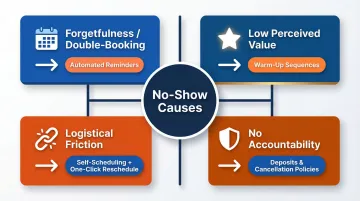
Each cause has a direct automation fix, which is why the strategies below are organized by intervention point.
Not All Bookings Carry Equal Risk
No-shows aren't evenly distributed. First-time visits carry significantly higher no-show risk than follow-ups, and longer lead times correlate with higher abandonment rates. Knowing this helps prioritize where to deploy automation first — free consultations, first-time clients, and appointments booked more than a week out are the highest-leverage starting points.
Strategies That Reduce No-Shows by Changing How You Set Up Appointments
Many no-shows are baked in at the moment of booking. Poor friction, no financial commitment, and long lead times create the conditions for ghost appointments before they even happen.
Way 1 — Enable Online Self-Scheduling With Real-Time Availability
Letting contacts book directly from a live availability link—rather than emailing back and forth—creates immediate confirmation and psychological ownership of the slot. An ophthalmology practice study found that online-booked appointments had a 1.8% no-show rate compared to 5.9% for manually booked appointments.
Why it works:
- Eliminates email lag and scheduling friction
- Gives the contact control over timing, increasing commitment
- Confirms the appointment instantly, reinforcing accountability
Implementation tip: Ensure your booking link syncs with your actual availability in real time—outdated slots erode trust and increase cancellations.
Way 2 — Require a Deposit or Upfront Commitment at Booking
A financial stake—even a small one—reliably improves show rates by shifting appointments from "intent" to "investment." Practice-reported survey data shows that deposit policies can decrease no-show rates by up to 50%.
For B2B contexts:
- Use a pre-filled intake form or paid seat reservation instead of a monetary deposit
- Even non-financial commitments (like completing a prep questionnaire) increase follow-through
Deposit structure:
- Percentage-based deposits (20–50% of service cost) work well for professional services
- Communicate the policy clearly at booking—no surprises
- Offer grace exceptions for genuine emergencies
Important caveat: Flat fines imposed after no-shows are ineffective. A Danish study of 6,746 patients found that a €34 no-show fine had zero effect on the baseline 5% no-show rate, and 79% of fines went unpaid. Upfront commitment structures outperform reactive penalties every time.
Way 3 — Shorten the Gap Between Booking and Appointment
Longer lead times correlate directly with higher no-show rates. A study of 71,178 neurology appointments found that appointments booked 60+ days in advance had a 19% no-show rate, compared to just 8% for appointments booked less than 7 days out. Each additional day of lead time increases no-show odds by a factor of 1.0019.
Why urgency fades:
- Competing priorities emerge over time
- Original motivation loses relevance
- Memory of the commitment weakens
What to do:
- Automate confirmation nudges for appointments booked more than a week out
- Proactively offer nearer slots when possible
- Use waitlist automation to fill last-minute openings
Way 4 — Automate Cancellation Policy Delivery at the Moment of Booking
Once the slot is secured, a clear cancellation policy sent automatically in the booking confirmation—not buried in fine print—sets behavioral expectations from the start.
What a practical policy should specify:
- Cancellation window (e.g., 24 hours' notice required)
- Fee structure (deposit forfeiture, percentage charge)
- Exception criteria (emergencies, illness)
- How to reschedule (direct link included)
Automation ensures every contact receives this information instantly and consistently, so there's no ambiguity about what happens if they need to cancel.
Strategies That Reduce No-Shows by Changing How You Manage Appointments
Even well-set-up appointments slip through the cracks without active, automated management. The four strategies below target the specific failure points where manual processes break down.
Way 5 — Set Up Automated Multi-Channel Reminders With Strategic Timing
A single reminder is rarely enough. A systematic review of 29 studies found that automated reminders produce an average 34% relative reduction in non-attendance, with SMS reminders delivering a 38% lower no-show rate than no reminder at all.
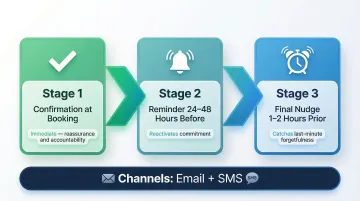
Optimal reminder sequence:
- Confirmation at booking — immediate reassurance
- Reminder 24–48 hours before — reactivates commitment
- Final nudge 1–2 hours prior — catches last-minute forgetfulness
A Kaiser Permanente trial of 158,669 visits found that sending two text reminders (3 days and 1 day prior) reduced no-shows by 7% in primary care and 11% in mental health compared to a single reminder.
Channel recommendations:
- Email + SMS as core channels
- Vary timing by appointment type and lead time (longer lead times benefit from a 3-day advance reminder)
Way 6 — Enable One-Click Rescheduling in Every Reminder
Clients who can't easily reschedule often default to silence — a no-show — rather than navigate friction to cancel. Research analyzing 749,880 appointments found that when patients initiate their own rescheduling, no-show probability decreases by 10.9 percentage points. On the flip side, clinic-initiated rescheduling increases no-show probability by 6.2 percentage points.
Why it works:
- Converts potential no-shows into rebooked appointments
- Gives the host advance notice to fill the slot
- Reduces guilt and friction, preserving the relationship
Implementation tip: Include a prominent "Reschedule" button in every reminder email and SMS — make it as easy as one click.
Way 7 — Use Waitlist Automation to Backfill Cancellations
A smart waitlist system automatically offers freed-up slots to queued prospects or clients, turning cancellations into recovered revenue. Automated waitlist management systems recover between 30% and 50% of canceled appointment slots.
Real-world impact:
- A UCSF study of the Epic Fast Pass automated waitlist system found that 11% of offers were accepted, moving patients up by a median of 14 days and recovering an estimated $3 million in professional fees over 9 months
- Mayo Clinic saw automated waitlists move appointments up by a mean of 22.6 days
Best for: High-demand services, sales teams with active pipelines, or any business where waitlists exist.
Way 8 — Track No-Show Patterns With Scheduling Analytics
Scheduling data shows exactly where your no-show risk concentrates — certain time slots, client segments, or booking lead times tend to underperform consistently. Once you know which patterns repeat, targeted interventions become straightforward: extra reminders for high-risk slots, deposits for repeat offenders, tighter booking windows for longer lead times.
Key metrics to monitor:
- Show rate (percentage of scheduled appointments attended)
- Reschedule rate
- Cancellation timing (how far in advance cancellations occur)
- Revenue lost to no-shows
- Time to third-next-available appointment (TNA) — measures access pressure
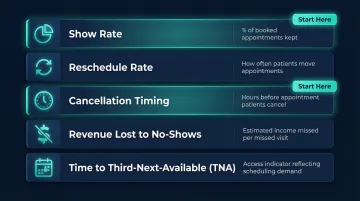
Start with show rate and cancellation timing — those two metrics surface the most actionable patterns fastest.
Strategies That Reduce No-Shows by Changing Your Communication Approach
Automation doesn't mean impersonal. The way a message is worded—and when it arrives—shapes whether the recipient treats the appointment as optional or essential. A well-timed, context-aware reminder outperforms a generic one every time.
Way 9 — Personalise Automated Reminders With Context and Warmth
Reminders including the recipient's name, appointment specifics, the value they'll receive in the session, and a human-sounding sign-off outperform template-only messages.
What to include:
- Recipient's name and appointment details (date, time, location/link)
- Context: what the meeting is about and why it matters
- Value proposition: what they'll gain from attending
- Human-sounding sign-off (not "Automated Reminder System")
How scheduling tools enable this:
- Use variable personalisation fields (name, appointment type, notes)
- Adjust tone to match your brand and audience
- Test different messaging to see what resonates
The tone of a reminder can reinforce perceived appointment value—treat it as part of your brand experience, not a compliance task.
Way 10 — Automate Immediate Follow-Up on No-Shows
A no-show follow-up sent within minutes—not days—dramatically increases rebooking rates and signals that the appointment was noticed.
The three elements that work:
- Brief, non-accusatory check-in ("Hope everything is okay")
- Direct rescheduling link
- Reference to the original meeting context
How to automate this:
AI email assistants like NewMail AI can automate follow-up drafts directly within Gmail or Outlook, so each follow-up sounds personal and relevant—not like a form letter—without requiring manual effort after every missed meeting. It learns your communication style and uses full thread context to draft replies that feel like you wrote them.
Why timing matters: Immediate follow-up shows you care, preserves the relationship, and makes rebooking feel natural rather than punitive.
Way 11 — Build Pre-Appointment Value With Warm-Up Sequences
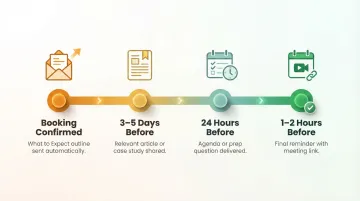
Sending a brief preparatory message—a useful resource, a reminder of the agenda, or a question to get the attendee thinking ahead—increases psychological investment and reduces the perceived ease of skipping.
What works:
- Share a relevant article or case study 2–3 days before
- Send a brief agenda or prep question 24 hours before
- Include a "What to expect" outline in the confirmation
How to automate this:
Build warm-up messages into your reminder sequence, particularly for first-time clients, sales discovery calls, or high-stakes consultations. Clients who receive a prep question or a relevant resource before a call are less likely to treat it as optional.
Conclusion
Reducing no-shows with scheduling automation depends on identifying where in the booking lifecycle the friction or commitment gap exists—upfront setup, active management, or communication—not on applying a single tactic in isolation.
The most effective approach combines automated consistency (reminders, rescheduling links, follow-ups) with personalized communication that reinforces the value of showing up. The 11 strategies in this post are designed to be layered, not isolated. Teams that work across all three phases—setup, management, and communication—see compounding improvements in show rates, calendar efficiency, and client retention.
Frequently Asked Questions
Can automated reminder systems help reduce the number of no-shows for appointments?
Yes—automated reminders are one of the most proven interventions. Multi-touchpoint sequences (confirmation, 24–48 hour reminder, 1–2 hour nudge) deliver a 34% average reduction in no-shows, with SMS reminders alone cutting no-show rates by 38% compared to no reminder.
What are the benefits of electronic scheduling of appointments?
Electronic scheduling eliminates the back-and-forth of manual coordination and keeps both sides accountable. Key benefits include:
- 24/7 booking access without inbox dependency
- Real-time availability sync that prevents double-booking
- Automatic confirmations and reminders sent without manual effort
- Easy rescheduling that reduces outright cancellations
- Lower administrative burden for staff
What is a good no-show rate for appointments?
Acceptable no-show rates vary by industry—healthcare often sees 5–30%, while B2B sales calls typically aim for under 10%. Teams with strong automation and reminder systems regularly achieve show rates of 90% or higher.
How do you follow up with a client who missed an appointment?
Send the follow-up within minutes of the missed appointment. Keep the tone neutral and caring, include a direct rescheduling link, and avoid shaming language. Focus on recovery: preserve the relationship and make it easy for them to rebook.
Should you charge a fee for missed appointments?
Fees work best when disclosed at booking, proportionate to session value, and paired with a grace exception for genuine emergencies. Partial deposits are often enough—they reduce no-shows without requiring a rigid penalty policy.
How far in advance should appointment reminders be sent?
Use a three-stage sequence: confirmation at booking, a reminder 24–48 hours before, and a final nudge 1–2 hours prior. For high-stakes or healthcare appointments, add a 3-day advance reminder. Optimal timing varies by appointment type and lead time.