Introduction
B2B sales reps waste about 14 out of 51 hours each week on administrative tasks—nearly two full days spent wrestling with paperwork instead of closing deals. Meeting scheduling sits at the heart of this productivity crisis. The typical coordination dance—sending availability requests, navigating time zone confusion, chasing confirmations, handling last-minute reschedules—drains selling time and costs you deals.
Research shows that odds of qualifying a lead drop 21 times when you wait 30 minutes instead of responding within 5 minutes. Every scheduling delay compounds that risk.
In B2B, where sales cycles stretch across months and buying committees average 6.8 stakeholders, friction adds up fast. A prospect who needs three email exchanges just to book a discovery call is a prospect losing interest.
This guide breaks down how to automate meeting scheduling so your team spends less time coordinating and more time closing.
Key Takeaways
- Use smart scheduling links so prospects self-book — no email back-and-forth needed
- Route qualified leads to the right rep automatically based on intent signals
- Automate confirmations, multi-touch reminders, and post-meeting follow-ups
- Sync your CRM bi-directionally to kill manual logging and protect data accuracy
- Measure show rate, speed-to-lead, and held-to-qualified meeting rate as your core KPIs
Why Manual Meeting Scheduling Stalls B2B Sales
The Scheduling Tax: Trading Selling Time for Administrative Work
Every manual meeting coordination steals time from revenue-generating activities. The pattern is painfully familiar: a prospect fills out a demo request form, triggering an email from the rep asking for availability. The prospect replies with three options. Two don't work for the rep, who counters with alternatives. The prospect takes a day to respond. By the time both parties land on a slot, 72 hours have elapsed and the buying temperature has dropped.
This friction erodes both rep productivity and prospect enthusiasm. Sales reps already spend 60% of their time on non-selling tasks. Each scheduling negotiation adds minutes that compound into lost hours—hours that could have been spent qualifying additional leads or advancing existing opportunities.
The Speed-to-Lead Problem: First Responder Wins
Response velocity determines conversion. 78% of customers buy from the company that responds first, yet 63% of B2B companies never respond to inbound leads and average response times exceed 29 hours. Manual scheduling introduces precisely the kind of delays that automation eliminates.
Waiting just 30 minutes instead of 5 reduces your odds of qualifying a lead by 2,100%. Yet manual coordination — checking calendars, crafting replies, waiting for responses — makes sub-5-minute engagement nearly impossible. By the time your rep sends the scheduling request, three competitors have already booked their meetings.
The Downstream Pipeline Effect: Stalled Scheduling = Revenue Leak
Scheduling friction doesn't just delay individual meetings—it inflates sales cycles and deflates win rates. B2B SaaS sales cycles have lengthened 22% since 2022, now averaging 84 days. Every day added to "contact to first meeting" extends that cycle further.
Delayed deals reduce win rates significantly. When deals take longer than expected, win rates drop 113%. Prospects who wait days for a confirmed meeting go cold, start comparing alternatives, and re-enter evaluation mode with a shorter memory of why they chose you first. Every hour of scheduling delay is a measurable dent in your pipeline.
Best Practices for Automating B2B Meeting Scheduling
Nail Your ICP Before Automating Anything
Automation amplifies whatever flows through your system. Route unqualified prospects to reps at scale, and you've automated waste. Before configuring scheduling tools, lock in your Ideal Customer Profile criteria: industry verticals, company size thresholds, job titles, buying triggers, and disqualifying characteristics.
How to define ICP for routing automation:
- Audit your last 20 closed-won deals—identify patterns in company size, industry, persona, deal size, and lead source
- Document common buying triggers (product launches, funding rounds, compliance deadlines)
- Translate these patterns into routing rules: "SaaS companies with 50-200 employees requesting enterprise demos route to Enterprise AEs"
- Set disqualification filters: students, competitors, companies below minimum deal threshold
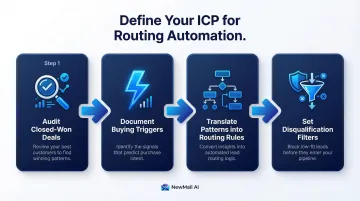
Only qualified leads should reach the booking stage. If your automation sends pricing page visitors and newsletter subscribers into the same queue, you're optimizing the wrong funnel.
Use Smart Scheduling Links to Eliminate Back-and-Forth
Smart scheduling links let prospects self-select meeting times from your reps' real-time availability, removing email ping-pong. Enterprise customers report saving more than 9,000 hours over three years by deploying these tools, with 66.7% of qualified form submissions converting to booked meetings—more than double the 30% industry average.
Best practices for deploying scheduling links:
- Embed links at high-intent moments: after a positive reply, on pricing pages, in email sequence CTAs — not cold outreach
- Pre-configure duration (30-min discovery, 60-min demo), meeting type, and required fields before sending
- Brand your booking page with your logo, colors, and personalized confirmation language
- Never send a raw calendar link. Write "Here's my calendar for a 30-minute discovery call to discuss [specific pain point]"
The goal is making it easy for willing prospects to say yes — not forcing meetings through automation.
Automate Lead Routing to Match the Right Prospect with the Right Rep
Getting the scheduling right is only half the job. Even a perfectly timed meeting creates problems if it lands with the wrong rep. Automated routing needs to account for territory, account size, product line, rep availability, and ownership history — and any prospect with an existing relationship must return to their known contact, not a random SDR.
Critical routing logic:
- Route by territory: geographic region, industry vertical, and company size bracket
- Route by intent: pricing page visitors should never land in the same queue as blog subscribers
- Always return existing accounts to the assigned rep, not the next available SDR
- Run round-robin only among reps who are available — exclude those on PTO or at capacity
Organizations using automated routing see a 28% improvement in lead-to-opportunity conversion compared to manual processes. The difference comes from speed and precision — qualified leads reach the right rep within minutes, while manual handoffs can take hours.
Automating the Email Communication Layer Around Scheduling
The Email Workflow That Surrounds Every Meeting
Most teams automate the calendar booking but leave the surrounding emails to manual effort: the initial outreach that earns the booking, the confirmation, the pre-meeting context message, and the post-meeting follow-up with action items. This gap creates inconsistency and missed opportunities.
The "email communication layer" determines whether prospects show up and whether meetings advance deals. A generic "you're booked" confirmation feels robotic. No pre-meeting context leaves prospects underprepared, while a delayed follow-up kills the momentum you just built.
AI-Powered Email Drafting That Maintains Your Voice
AI email tools can draft personalized meeting-related messages in each rep's authentic voice rather than sending templated notifications. This keeps interactions feeling human and consistent with your brand — directly influencing show rates and deal progression.
NewMail AI works directly inside Gmail, Outlook, and Apple Mail to draft scheduling-related emails — from the initial meeting request through confirmation messages to post-meeting follow-ups with action items. It learns your communication style in 60 seconds and generates drafts in your tone, so each message sounds like you wrote it. Its task extraction feature ensures agreed next steps don't fall through the cracks, and its zero data retention architecture means sensitive sales conversations are never stored.
Pre-Meeting Emails That Set Expectations and Reduce No-Shows
Automated pre-meeting emails deliver value before the call, setting expectations and making reps look prepared without manual effort. Send a brief agenda, a relevant case study, or a simple "what to expect" note 24 hours before the meeting.
Effective pre-meeting message components:
- A one-line agenda: "We'll review your workflow gaps, walk through how [product] addresses them, and assess fit"
- A prep note: "Please have your current tool open so we can work through your specific setup"
- Rep name, title, and LinkedIn profile so prospects know who's joining
- A reschedule link so moving the meeting stays frictionless
Post-Meeting Automation That Maintains Momentum
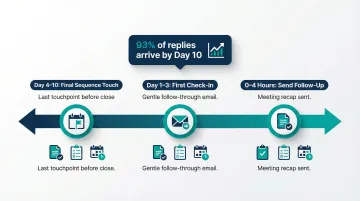
80% of B2B sales require 5-12 follow-ups after initial contact, yet 44% of salespeople give up after just one attempt. Automating post-meeting follow-ups eliminates the most skipped step in the sales process and keeps deals moving forward.
Configure your system to automatically send follow-up emails within 2-4 hours of meeting completion. Include meeting recap, agreed next steps, action item ownership, and proposed timeline. Research shows 93% of replies arrive by Day 10 in a properly structured follow-up sequence, making timely first follow-up critical to deal velocity.
Reducing No-Shows Through Smart Pre-Meeting Automation
The Multi-Touch Reminder Sequence
No-shows aren't just scheduling problems—they reflect weak qualification, unclear value communication, or lack of engagement before the meeting. Average B2B no-show rates hover around 31%, but implementing automated, multi-touch reminders (email plus SMS) improves show rates to 83%.
Optimal reminder cadence:
- Confirmation: Immediately after booking with meeting details, agenda, and value proposition
- 24-hour reminder: Include the agenda, a note on what the rep has prepared, and a reschedule link
- 1-hour nudge: Short "looking forward to speaking" message with meeting link
Each reminder should reinforce the meeting's value, not just announce "reminder: you have a meeting." Include specific context that makes skipping feel like a real loss:
"Tomorrow we'll walk through how [Company X] reduced processing time by 40% using our automation workflow."
No-Show Recovery: The Critical 30-Minute Window
Even the best reminder sequences won't prevent every no-show. When one happens, recovery speed determines whether you salvage the opportunity — send a follow-up within 15-30 minutes while the meeting is still fresh, with a frictionless reschedule link ready to go.
Effective no-show recovery message:
- Acknowledge the miss without guilt: "Noticed we missed our call this morning"
- Assume good intent: "I know schedules get hectic"
- Offer value: "I've set aside 20 minutes of research on your workflow"
- Make rescheduling effortless: Include direct booking link
- Keep tone warm, not pushy
Prospects who no-show once often convert on the second attempt — but only if the follow-up arrives before the moment passes.
Common Mistakes to Avoid When Automating Meeting Scheduling
Mistake 1: Over-Automating at the Expense of Personalization
Blasting scheduling links to cold prospects without prior context makes automation feel impersonal and damages conversion. Automation should trigger at the right moment in the relationship—after a positive reply, following a demo request, when a prospect hits a high-intent page—not as a blanket first-touch tactic.
The goal is removing friction for willing prospects, not forcing meetings. A cold prospect who receives "Book time on my calendar" as a first touch feels processed, not valued. Use automation to accelerate engaged conversations, not replace relationship-building.
Mistake 2: Failing to Sync Scheduling Tools with the CRM
When calendar bookings don't automatically update your CRM, reps manually log meetings (or don't), data gets dirty, and pipeline reporting becomes unreliable. Poor CRM data costs the average B2B company $12 million to $15 million annually, with sales reps wasting 27% of their time navigating bad records—roughly 550 hours per rep per year.
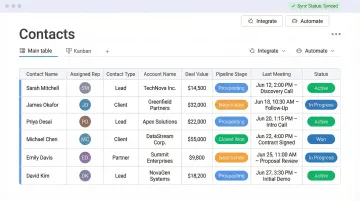
Always ensure your scheduling automation writes back to the CRM. At minimum, each booking should log:
- Contact record and rep assignment
- Meeting type, date, and time
- Meeting outcome or disposition
Bi-directional sync eliminates manual entry, preserves data integrity, and keeps pipeline forecasting reliable.
Mistake 3: Letting Time Zone Errors Slip Through
For B2B sales teams working across regions, scheduling automation must handle time zone detection automatically. Sending a calendar invite for 3 AM in a prospect's local time zone signals carelessness and erodes trust fast.
Ensure your scheduling tool displays availability in the prospect's local time zone without manual intervention. Modern platforms detect location from IP address or let prospects select their zone explicitly, preventing confusion and missed meetings.
Frequently Asked Questions
What are the best practices for automating meeting scheduling in B2B sales?
Use smart scheduling links for instant self-booking, automate intent-based lead routing to match prospects with the right rep, automate pre- and post-meeting email communications to maintain engagement, enforce bi-directional CRM sync to eliminate manual logging, and track show rate and speed-to-lead as core success metrics.
How can I shorten the B2B sales cycle?
Automating meeting scheduling shortens sales cycles by reducing time-to-first-meeting and ensuring qualified leads reach the right rep within minutes, not days. Automated follow-ups then sustain deal momentum between touchpoints, preventing prospects from going cold.
What tools do B2B teams use to automate meeting scheduling?
Teams typically deploy scheduling link tools (Calendly, Chili Piper), CRM-integrated schedulers (HubSpot Meetings), and lead routing platforms. AI email assistants like NewMail AI handle the surrounding communication layer — drafting outreach, sending confirmations, and automating follow-ups.
How do I reduce no-shows in B2B sales meetings?
Start by qualifying leads before booking to filter low-intent prospects. Then run a multi-touch reminder sequence: confirmation immediately after booking, a 24-hour reminder with agenda, and a 1-hour nudge with a reschedule link. Deploy automated no-show recovery follow-ups within 30 minutes of a missed meeting.
What should stay manual in the meeting scheduling process?
Key relationship moments benefit from human judgment: initial personalized outreach to enterprise accounts, live discovery calls, and complex rescheduling for strategic deals. Automation handles logistics and repetitive communication — humans handle relationship-building and strategic decisions.