Introduction
You send a meeting request. Three emails later, you're still negotiating a time slot. Then the meeting happens — and the follow-up slips through the cracks anyway. This cycle repeats dozens of times a week for most professionals, and it adds up fast.
According to McKinsey, knowledge workers spend 28% of their workweek managing email — over 580 hours annually. Separately, research from Doodle found that professionals waste up to 4 hours per week just coordinating meetings. Neither task moves a deal forward or delivers client value on its own.
This guide covers the exact setup process for automating scheduling and follow-ups, what separates automation that clients appreciate from automation that frustrates them, and the common mistakes that cause these systems to stall.
Key Takeaways
- Automation built around clear triggers—inquiry received, meeting completed, proposal sent—outperforms generic time-based blasts
- Three tools cover the foundation: a scheduling tool, action-triggered follow-up sequences, and templates written in your voice
- Three touchpoints—booking confirmation, post-meeting recap, proposal follow-up—cover the bulk of manual communication overhead
- Automation fails most often due to generic messaging, misconfigured triggers, or no reply handling—not because the tools are wrong
How to Set Up Automated Client Scheduling & Follow-Ups
Step 1: Map Your Client Communication Touchpoints
List every recurring moment in your client lifecycle where a message or scheduling action is needed before touching any tool:
- New inquiry response
- Discovery call confirmation
- Post-meeting recap
- Proposal follow-up
- Contract renewal reminder
- Payment confirmation
- Project milestone updates
Mapping this first prevents building automation around only obvious moments while missing high-value ones. Identify which touchpoints are currently inconsistent or frequently missed, then prioritize automating those first rather than trying to automate everything simultaneously.
Step 2: Choose Your Scheduling Automation Tool
The core requirement: a scheduling tool that removes back-and-forth by letting clients self-select from real-time availability. Options include Calendly, Cal.com, or native calendar booking links. This tool must integrate with wherever your client communication happens—email, CRM, or website.
Before deploying, confirm:
- Your calendar is accurately blocked with buffer times configured
- Confirmation and reminder messages are customized to reflect your brand rather than generic defaults
- Time zones are properly configured for multi-region clients
- Availability rules match your actual working preferences
Research shows that automated reminders reduce meeting no-shows by 28% to 75%, while self-scheduling tools save professionals 5–10 hours weekly on coordination tasks alone.
Step 3: Build Automated Follow-Up Sequences
Trigger-based sequencing sends follow-ups automatically when specific client actions occur:
- Meeting booked → send prep materials
- Meeting completed → send recap plus next steps
- Proposal sent → check in after 48 hours if no reply
- No response after 5 days → send final "break-up" email
This approach is more effective than time-based follow-ups sent to everyone on a schedule. Data shows 58% of replies come from the first email, but sequences of 4–7 emails achieve 27% reply rates compared to just 9% for shorter sequences.
The weakest follow-ups are the ones that read like templates. Tools like NewMail AI draft follow-up emails in your voice directly inside Gmail or Outlook, including meeting recaps with action items. It analyzes your sent emails to learn your communication style in 60 seconds—no separate platform needed.
Step 4: Connect Scheduling and Follow-Up Into One Workflow
Link the two systems so when a meeting is booked, a pre-meeting email is sent automatically, and when the meeting ends, a post-meeting follow-up is triggered. CRMs and scheduling tools typically support this via native integrations or workflow connectors like Zapier or Make.
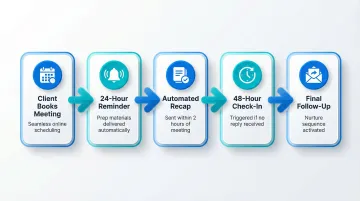
A connected workflow looks like this:
- Client books meeting via scheduling link → confirmation email sent immediately
- 24 hours before meeting → reminder email with prep materials
- Meeting occurs → automated recap sent within 2 hours with action items
- If no reply within 48 hours → polite check-in sent
- If still no reply after 5 days → final follow-up or move to nurture sequence
Compliance check: Before connecting client email data to any automation workflow, verify the tool meets GDPR or relevant data standards—particularly for regulated industries like legal, finance, and healthcare. For GDPR compliance, your platform should have documented legitimate interest justification, signed data processing agreements, and end-to-end encryption in place.
Step 5: Test, Review, and Refine Before Going Live
Run yourself through the full sequence as a mock client before going live. Check each of these:
- Verify all trigger conditions fire correctly
- Confirm messages arrive in the right order with personalized fields populated
- Check that reply handling is configured—automated sequences should pause or escalate when a client replies, not continue blindly
- Test edge cases: cancellations, reschedules, out-of-office responses
Plan a review checkpoint at the 2–4 week mark. Track open rates, reply rates, and conversion from follow-up to next step.
Warm client follow-ups should hit 20–40% reply rates. If you're consistently under 15%, the messaging is either too generic or too frequent—adjust cadence or rewrite the core copy.
When Automation Makes Sense (and When It Doesn't)
Automation is not universally better. It suits high-volume, repeatable communication patterns but damages relationships if applied to sensitive, nuanced, or high-stakes conversations requiring human judgment.
Automation delivers clear value for:
- Initial inquiry responses (responding within 5 minutes increases conversion by 391%)
- Appointment confirmations and reminders
- Post-meeting summaries with action items
- Recurring check-ins for ongoing clients
- Renewal or deadline reminders
Cadence matters as much as channel. Despite the myth that "80% of sales require 5 follow-ups"—a fabricated statistic traced to a non-existent 1957 source—modern data shows most conversions happen between the 2nd and 5th follow-up. A sequence of 3–5 messages spaced over 1–2 weeks captures roughly 42% of replies that occur after the initial outreach.
Automation becomes a liability for:
- Highly customized proposals requiring contextual judgment
- Situations where a client has expressed frustration or raised a complaint
- Any communication signaling a relationship is at risk
- Sensitive negotiations or conflict resolution
These require a human response. Design your automation to recognize these signals and route them out of the sequence immediately.
What You Need Before You Start Automating
Tools alone don't create a working automation system. The prerequisite is having clean, structured inputs:
- An updated contact list with accurate client details
- Clearly defined stages in your client lifecycle
- Draft versions of messages you want to automate before configuring any workflow
Equipment and Tool Requirements
- A scheduling link tool with calendar sync (Calendly, Cal.com, or native booking links)
- An email platform or CRM with sequence/automation capability
- A way to connect the two (native integration or workflow connector like Zapier)
For teams already working in Gmail or Outlook, inbox-native tools cut switching costs considerably. NewMail AI integrates directly inside both email clients, connecting in under 30 seconds with no separate dashboard to manage.
Message Templates and Communication Readiness
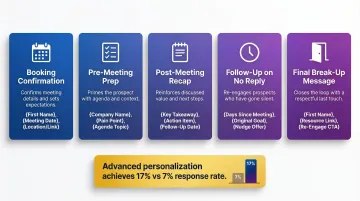
Write templates before building sequences—one for each trigger scenario:
- Booking confirmation
- Pre-meeting prep
- Post-meeting recap
- Follow-up on no reply
- Final "break-up" message
The quality of these templates determines whether automation feels professional or robotic. Templates should include personalization fields (name, meeting topic, next step) and a clear call-to-action. Research shows that emails with advanced personalization beyond {{first_name}} achieve 17% response rates compared to just 7% for generic templates.
Key Variables That Affect Your Automation Results
Two businesses can use identical tools and get very different results. The outcome depends on how well these four variables are configured and maintained.
Trigger Precision
Trigger logic is the most important configuration decision in any automation setup. A trigger that fires too broadly — say, targeting "all contacts" — sends irrelevant messages. One that fires too narrowly misses key moments entirely.
Poorly defined triggers are the primary cause of duplicate or out-of-context messages, which erodes trust faster than no automation at all. Configure triggers based on specific client actions — meeting booked, proposal opened, payment received — rather than time-based rules alone.
Message Timing and Frequency
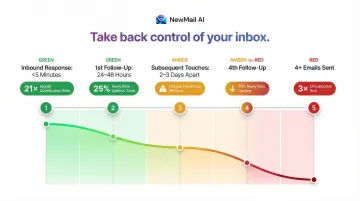
The interval between follow-ups affects perceived professionalism — too fast feels pushy, too slow loses momentum. Research-backed timing benchmarks to configure by default:
- Respond to inbound inquiries within 5 minutes (21× higher lead qualification rate)
- Send first follow-up 24–48 hours after initial outreach (yields ~25% reply rates)
- Space later touches 2–3 days apart to prevent fatigue
- Expect reply rates to drop 55% by the fourth follow-up
- Note that 4+ emails triples unsubscribe rates
Over-messaging is harder to recover from than under-messaging. Build in frequency caps and honor reply signals — if a client responds, the sequence should stop or branch accordingly.
Personalization Depth
Generic automated messages are identifiable as automated — they signal to clients that they're being processed rather than served. Dynamic fields, contextual references (the service discussed, the meeting outcome), and a consistent voice all make the message feel authentic.
The closer an automated message sounds to what you'd write manually, the higher the response rate. AI tools that learn your communication style outperform static templates. That said, raw AI-generated emails suffer a 43% lower reply rate (8.2% vs 11.7%) because recipients easily detect uniform tone and phrasing. The practical fix: use AI for delivery timing and sequencing, but keep a human hand in the actual copywriting.
Reply and Exception Handling
Most automation systems default to continuing a sequence even after a client has replied — producing awkward, contradictory messages that undermine the relationship. A sequence that doesn't account for replies is structurally incomplete.
Configure every sequence to pause or branch when a reply is received. Define explicit handling for each scenario: client books, client cancels, client asks a question mid-sequence. Gaps here don't just create confusion — they make your automation visible in the worst possible way.
Common Mistakes When Automating Client Scheduling and Follow-Ups
Most automation problems aren't tool problems — they're setup problems. These are the five mistakes that consistently derail otherwise well-intentioned systems:
- Skipping trigger mapping and jumping straight to tool configuration. This leaves gaps at mid-funnel moments — exactly where most deals are lost.
- Copying default message templates from the platform without adjusting tone, content, or personalization fields. Recipients recognize these instantly, and the signal is low effort.
- Building sequences with no exit condition. Clients who reply should exit the sequence immediately. Use a 4–5 touch maximum over 2–3 weeks, ending with a low-pressure close rather than silence.
- Not reviewing performance after launch. Check open rates, reply rates, and booking conversions monthly — then adjust timing, subject lines, or message content based on what the data shows. Warm client outreach should reach 20–40% reply rates; cold outbound, 3–5%.
- Ignoring compliance for regulated industries. Legal, finance, and healthcare professionals should verify that any automation platform handling client email is GDPR-compliant, processes data ephemerally, and doesn't train AI models on message content. Tools like NewMail AI — built in Switzerland with zero data retention by default — are designed specifically for this constraint.
When these gaps are closed, automation stops being a liability and starts running reliably in the background.
Frequently Asked Questions
What is the 80/20 rule for automation?
The 80/20 principle means roughly 20% of automation touchpoints—typically booking confirmation, post-meeting follow-up, and no-reply check-in—will handle 80% of repetitive client communication. Start with those three before building more complex sequences.
How do you professionally follow up with a client?
A professional follow-up references the specific prior interaction (meeting, proposal, inquiry), states a clear next step or question, and is sent within a defined window (24–48 hours post-meeting). Automation keeps this consistency intact across every client—no memory required.
How many follow-up messages should you send before stopping?
Most conversions happen between the 2nd and 5th follow-up. A sequence of 3–5 messages spaced over 1–2 weeks—with a brief closing message at the end—is reasonable for most service-based workflows. Beyond that, response rates fall sharply and continued outreach risks damaging the relationship.
Can I automate client scheduling without a CRM?
Yes, a standalone scheduling tool (like Calendly or Cal.com) with automated confirmation and reminder emails covers the core scheduling workflow. A CRM becomes valuable when you need to track client history, score leads, or trigger more complex multi-step sequences.
How do you make automated follow-ups sound personal?
Use dynamic fields for name, specific meeting topic, and next step. Write templates in your own voice rather than formal boilerplate. AI drafting tools can help here—NewMail AI analyzes your sent emails and generates follow-up drafts in your own voice, so each message reads like you wrote it, not a template.
Is it safe to automate follow-ups for sensitive client communications?
It depends on the platform. For regulated or privacy-sensitive work, verify that the tool is GDPR-compliant, does not retain client email content, and holds documented zero data retention agreements with any AI providers it uses. Certifications like Google Security Certified are a reliable signal of rigorous data handling practices.