Introduction
Inconsistent follow-up directly bleeds revenue. Between 40% and 60% of B2B deals end in "no decision"—not lost to competitors, but abandoned because prospects go cold. While 80% of sales require five or more touches, 48% of reps never make a second follow-up attempt. The problem isn't lack of intent; it's that manual follow-up doesn't scale when you're managing dozens or hundreds of active conversations.
AI assistants are changing this by automating trigger-based, personalized follow-ups directly from your inbox. The best systems detect when a prospect hasn't replied, when a meeting ends without a recap, or when a proposal sits unopened—then send context-aware messages that sound like you wrote them.
Getting this right, though, depends on more than picking a tool. Results vary based on how precisely you define triggers, how well the AI mirrors your voice, and whether it works natively inside your inbox or routes you through a separate platform.
This article walks through the exact steps to build a working AI follow-up workflow—when automation makes sense, what determines quality, and the most common setup mistakes to avoid.
Key Takeaways
- AI assistants automate customer follow-ups end-to-end—detecting trigger events, drafting personalized responses, and sending messages without manual input
- Results hinge on precise trigger logic, voice calibration, and native inbox integration that preserves full thread context
- Best for high-volume scenarios: post-meeting recaps, unanswered proposals, onboarding check-ins, and re-engagement sequences
- Most failures stem from vague triggers, over-automation without human review, and generic drafts that don't reference prior conversations
- Choose tools that process email ephemerally with zero data retention — customer communications demand it
How to Automate Customer Follow-Up Workflows With AI Assistants
Step 1: Map Your Follow-Up Scenarios and Define Trigger Logic
Before touching any tool, identify which follow-up situations currently drain your time. Common scenarios include post-demo emails, unanswered proposals, post-onboarding check-ins, renewal reminders, and re-engagement after extended silence. List every scenario where you're manually tracking whether someone responded.
For each scenario, define the specific trigger condition:
- Time delay: No reply within 3 days
- Behavioral signal: Proposal opened but no response received
- Event-based: Meeting completed without follow-up sent
- Date-driven: Renewal date approaching within 30 days
Vague triggers like "follow up when it feels right" produce inconsistent automation. Instead, use specific intervals based on industry benchmarks. Research shows the most effective first follow-up occurs exactly 3 days after the initial email, boosting reply rates by 49%.
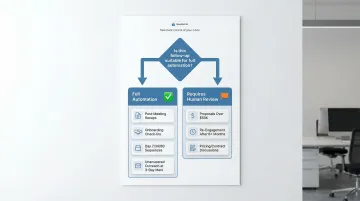
Determine which scenarios benefit from full automation versus AI-assisted drafts that a human reviews before sending. High-stakes communications (proposals over $50,000, re-engagement after 6+ months of silence, pricing negotiations) should require human approval before anything goes out.
Routine post-meeting recaps and onboarding check-ins can run autonomously. The distinction matters: getting this wrong means either bottlenecking your team or sending the wrong message at a critical moment.
Step 2: Choose an AI Assistant That Works Inside Your Existing Communication Channels
Evaluate whether the AI assistant integrates natively with your inbox (Gmail, Outlook, Apple Mail) or requires a separate platform. Native inbox tools eliminate tab-switching and allow the AI to read prior thread history for more accurate, context-aware drafts.
Key features to assess:
- Task extraction from emails: Automatically identifies action items and follow-up needs
- Follow-up scheduling: Allows you to set specific delays or queue messages for future sending
- Voice matching: Drafts replies that sound like you, not generic templates
- Thread context access: Analyzes full conversation history, not just the last message
Critical privacy consideration: AI assistants that process email content should operate with zero email storage and ephemeral data processing. NewMail AI, for example, processes email context without retaining message content and operates under Zero Data Retention agreements with Anthropic and Mistral. That makes it well-suited for sales teams in regulated industries where customer communications contain sensitive data.
Check the tool's data handling policy before granting inbox access. Avoid platforms that store email content for training purposes or lack clear Data Processing Agreements.
Step 3: Configure AI Drafting Templates and Personalization Rules
Set up follow-up draft templates for each scenario identified in Step 1. Each template should include:
- A reference to the prior interaction ("Following up on our demo last Tuesday where we discussed automating your sales workflows...")
- A clear next step or CTA ("Are you available for a 15-minute call Thursday to discuss implementation?")
- Relevant supporting links: calendar link, proposal document, or case study
Train the AI on your communication voice by providing sample emails or allowing it to learn from past sent messages. The goal is for drafted follow-ups to sound like you wrote them, not like a CRM-generated template. Tools like NewMail AI learn a user's voice and style within 60 seconds of setup by analyzing sent email patterns, tone, and phrasing preferences.
Define personalization variables the AI should pull automatically:
- Customer's name and company
- Specific product or service discussed
- Date of last interaction
- Open action items or commitments made
- Pain points mentioned in prior emails
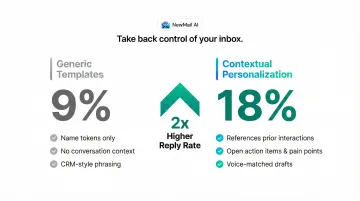
Generic follow-ups ("Just checking in!") consistently underperform. Campaigns with advanced contextual personalization achieve 18% reply rates — double the 9% rate of generic templates.
Step 4: Launch, Test, and Establish Human Review Checkpoints
Before going live, run the workflow end-to-end using a test scenario. Confirm that:
- Triggers fire at the right moment (not too early, not too late)
- AI drafts reflect accurate context from prior conversations
- Messages route to the correct recipient
- Timing aligns with your defined intervals
Establish human review checkpoints for high-stakes follow-ups. Require manual approval for:
- Proposals over a defined deal size (e.g., $25,000+)
- Re-engagement after 90+ days of silence
- Any communication involving pricing, contracts, or legal terms
- First-time outreach to executive stakeholders
The checkpoints above aren't friction — they're guardrails. A misfire on a $40,000 proposal costs more than the time saved across a dozen routine automations.
Set up a monitoring cadence to review AI draft quality weekly during the first month. Track reply rates, positive response rates, and cases where drafts needed significant editing. That feedback loop sharpens the system over time and clarifies which scenarios are ready for full automation versus which still need a human in the loop.
When Should You Automate Customer Follow-Up Workflows?
Not every follow-up should be automated. Automation works best when the message is largely predictable, the context is captured in prior emails or CRM data, and volume makes manual effort unsustainable.
High-ROI automation scenarios:
- Send post-meeting recaps within hours — attendees expect summaries with action items while the conversation is still fresh
- Follow up on unanswered outreach at the 3-day mark — that first nudge alone boosts reply rates by 49%
- Schedule onboarding check-ins at Day 7, Day 30, and Day 60 to keep new customers engaged without manual tracking
- Trigger renewal or upsell reminders automatically from contract dates or usage milestones in your CRM
When automation becomes a liability:
- Pricing discussions, multi-stakeholder deals, and custom terms — these need human judgment, not a template
- Dissatisfied customers expect empathy and real problem-solving; an automated response here actively damages trust
- Cold outreach to prospects you've never contacted — generic AI messages damage credibility before any relationship exists
That decision framework matters because the stakes are real. The average B2B lead response time sits at 42 hours, yet responding within 5 minutes multiplies conversion chances 21 times. For predictable, high-volume touchpoints, automation closes that gap — so your team's attention stays where it actually moves deals forward.
Key Variables That Affect AI Follow-Up Workflow Performance
Once the workflow is live, outcome quality is determined by a small set of controllable variables. Getting these right separates workflows that generate replies from workflows that generate unsubscribes.
Trigger Precision
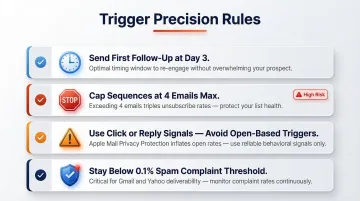
Imprecise triggers cause follow-ups to fire at the wrong moment: too early before a prospect has had time to act, too late after they've moved on, or based on a misleading signal entirely. Apple's Mail Privacy Protection pre-loads tracking pixels, inflating open rates across over 50% of the email client market, so open-based triggers regularly fire before anyone has read the email.
To avoid this, apply industry-tested timing rather than platform defaults:
- Send the first follow-up 3 days after the initial email
- Cap sequences at 4 emails total — exceeding this triples unsubscribe and spam complaint rates
- Avoid open-based triggers; use click or reply signals instead
- Gmail and Yahoo now enforce a 0.1% spam complaint threshold, making over-automation a direct domain reputation risk
AI Voice Calibration
A follow-up that reads like a CRM bot breaks trust immediately. Customers who have had real conversations with a rep expect the tone to match that relationship.
The more signal the AI has about the sender's writing style — prior emails, preferred phrasing, how they structure CTAs — the more accurately drafts will reflect that voice. NewMail AI, for instance, learns a user's voice and style within 60 seconds of setup by analyzing sent email patterns, producing drafts that sound human rather than template-generated.
Personalization Depth
Generic follow-ups consistently underperform compared to messages that reference specific prior exchanges, shared next steps, or pain points the customer raised.
Personalized emails increase response rates by 32% over generic ones. Advanced contextual personalization — referencing company news, role responsibilities, or conversation-specific details — achieves 18% reply rates versus 9% for generic templates. Move beyond {First_Name} tokens and incorporate conversation history, open action items, and customer-stated goals.
Data Privacy Compliance
AI assistants that process email content must handle customer data in compliance with GDPR, CCPA, and sector-specific regulations. Using a non-compliant tool exposes both the sender and the customer to data risk.
Workflows built on tools without zero data retention or proper Data Processing Agreements can violate privacy regulations and erode customer trust — particularly in legal, financial, healthcare, or enterprise contexts. In 2025, the UK ICO fined a software provider £3.07M for security failings, while France's CNIL fined a processor €1M for retaining data after contract termination. Regulators are now fining data processors directly for GDPR Article 28 violations, shifting liability from controllers to the tools themselves.
Common Mistakes When Automating Follow-Up Workflows With AI
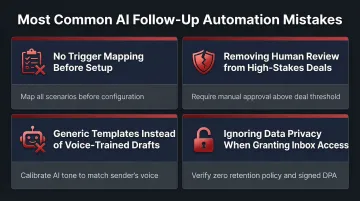
Most follow-up automation failures aren't tool problems — they're setup problems. These four mistakes account for the majority of broken workflows.
No trigger mapping before tool setup: Teams that skip defining clear trigger conditions end up with workflows that fire randomly, flood inboxes, or miss critical follow-up moments. Map your scenarios first, then select your tools.
Removing human review from high-stakes communications: Full autonomy across every scenario leads to tone-deaf messages at the worst possible moments. Require human approval for deals above a set threshold, pricing discussions, and re-engagement after extended silence.
Using generic templates instead of voice-trained drafts: Emails that don't match the rep's tone or reference prior conversation details get flagged as automated and receive lower response rates. Voice calibration during setup is what separates effective AI drafts from messages that get ignored.
Ignoring data privacy when granting inbox access: Giving an AI assistant access to customer threads without verifying its data retention policy creates compliance risk, particularly for regulated industries and teams working under NDAs. Confirm your tool has zero email storage and signed Data Processing Agreements with its AI providers.
Conclusion
Automating customer follow-up workflows with AI assistants delivers the most value when triggers are precisely defined, the AI is calibrated to the sender's voice, and human review checkpoints protect high-stakes communications. Vague trigger logic and generic AI output are the two root causes of follow-up workflows that erode rather than build relationships.
Both are avoidable with deliberate setup. Three steps make the difference:
- Define triggers using industry benchmarks (3 days for the first follow-up)
- Train the AI on your actual writing style, not a generic template
- Set clear thresholds for when automation hands off to human judgment
Done right, follow-up automation scales without sacrificing quality. Conversations stop falling through the cracks, and the personal relationships that close deals stay intact.
Frequently Asked Questions
How can I automate customer follow-up workflows with AI assistants?
AI assistants automate follow-ups by detecting trigger events (elapsed time since last email, meeting completions, no response received), drafting personalized responses based on prior thread context and your communication style, and either sending messages automatically or queuing them for review—depending on your approval settings.
Which AI assistants are best for automating customer follow-up workflows?
The best tools integrate natively with Gmail or Outlook—no separate platform required. They learn the user's voice for personalized drafts rather than generic templates, and they operate under clear data privacy standards: zero email storage and Data Processing Agreements with AI providers.
How do I personalize automated follow-up emails at scale without sounding robotic?
Personalization requires the AI to reference specific prior interactions, open action items, and the customer's stated goals—not just name tokens. Tools trained on the sender's writing style by analyzing past sent emails produce drafts that read like the sender wrote them, not a template.
What triggers should I set for automated customer follow-up sequences?
The most effective triggers are: no reply after 3 days (the optimal first follow-up interval), meeting completed with no follow-up sent within 2 hours, proposal opened but no response received within 5 days, and renewal date approaching within 30 days.
How do I ensure my AI follow-up workflows comply with GDPR and data privacy laws?
Verify three things: the tool has zero data retention (no email content stored beyond immediate processing), it operates under a Data Processing Agreement with clear processor obligations, and—if processing EU customer data—it complies with GDPR or holds adequacy agreements such as Switzerland's revFADP.
How long does it take to set up an automated follow-up workflow with AI?
Basic workflows (trigger + draft template + send rule) can be configured in under 30 minutes with inbox-native tools. Thorough setup—including voice calibration, multi-scenario trigger mapping, and end-to-end testing with review checkpoints—typically takes 1–2 hours for a team's first workflow.