Introduction
When a customer submits a support request and hears nothing back, frustration sets in fast. On the other side of that silence, support teams are drowning in open tickets, manually tracking dozens of cases across email threads, helpdesk queues, and Slack messages. Cases slip through the cracks, customers feel ignored, and CSAT scores drop.
Unresolved cases that go silent are one of the top drivers of customer dissatisfaction. According to TechSee's 2022 State of Customer Loyalty and Churn report, 1 in 3 customers will churn if their issue isn't resolved fast enough.
That churn risk extends to B2B too. McKinsey's 2024 B2B Pulse Survey found that 54% of B2B buyers will abandon a purchase or switch suppliers after a poor omnichannel customer experience.
This post covers why unresolved support cases demand automated follow-ups, how to set up triggers and timing sequences that match your SLA tiers, how to write follow-up messages that don't feel robotic, and when to escalate or close cases without damaging customer relationships.
Key Takeaways
- Unresolved cases without follow-ups drive repeat contacts, complaints, and churn
- Automation ensures consistent, timely communication without overwhelming agents
- Trigger sequences should differ based on who's waiting — customer or agent
- Human-sounding messages use first-person language and a single clear CTA
- After 2–3 unanswered follow-ups, send a pre-closure notice before closing
Why Unresolved Support Cases Need Automated Follow-Ups
Support inboxes operate in high-volume, real-time environments where cases can go quiet without anyone noticing. Unlike sales pipelines with visual dashboards tracking every lead, support teams often lack clear signals when a customer is still waiting for resolution. The problem isn't intentional neglect—it's the sheer impossibility of manually tracking every thread across dozens of simultaneous cases.
When Cases Go Silent, Customers Leave
When cases receive no follow-up, the consequences compound quickly:
- Repeat contacts: Customers submit duplicate tickets or escalate through other channels
- Social complaints: Frustrated customers take grievances public on Twitter, LinkedIn, or review sites
- Churn acceleration: According to the 2022 TechSee churn survey, 80% of customers churned due to dissatisfaction with service quality, and 21% churned after a single negative experience
The gap between customer expectations and reality is stark. Research shows that 73% of consumers will switch to a competitor after multiple bad experiences, and over 50% will switch after just one.
What Automation Does That Agents Can't
Support agents juggle cases across email threads, helpdesk tickets, chat sessions, and internal collaboration tools simultaneously. Remembering who needs a nudge, when to check in, and which cases have gone silent is humanly impossible at scale.
Automation solves this by:
- Monitoring case status continuously without manual oversight
- Triggering follow-ups at precisely defined intervals
- Maintaining consistent communication cadence across all cases
- Freeing agents to focus on resolution work instead of tracking tasks
Setting Up Triggers and Timing for Automated Follow-Ups
Understanding Support Triggers
A trigger is a specific condition that initiates an automated action. In support contexts, triggers fall into two categories:
Inactivity-based triggers: Fire when there's no customer response for a defined period (e.g., "pending customer response" status for 24 hours)
Status-based triggers: Fire when a case remains unresolved after a set timeframe (e.g., ticket sitting in "in progress" for 3+ days)
The distinction matters because each scenario requires different messaging, timing, and escalation paths.
Recommended Tiered Timing Sequence
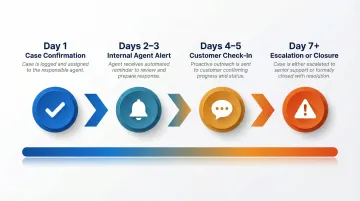
Effective follow-up sequences mirror the case lifecycle and account for both customer expectations and agent workload:
- Day 1 — Send automated confirmation the case was received and is under review. This sets expectations and reassures customers their request didn't disappear.
- Days 2–3 — Trigger an internal alert to the assigned agent to provide a status update. This is an accountability mechanism, not a customer-facing message.
- Days 4–5 — Send gentle automated outreach if the customer hasn't responded to a clarification request. Frame it as availability: "I wanted to check in and make sure you have everything you need."
- Day 7+ — Initiate an escalation trigger or send a case closure warning. This is a process decision point that requires human review.
Two Critical Follow-Up Scenarios
The tone, timing, and content of your follow-up must differ based on who is waiting:
When the customer hasn't responded:
- Use gentle, helpful language
- Remove friction: "Just reply to this email if you'd like to continue"
- Emphasise availability, not urgency
When the agent hasn't resolved the issue:
- Acknowledge the wait without making excuses
- Give a specific next update time: "I'll have an update for you by end of day tomorrow"
- Reaffirm active work: "Our engineering team is currently reviewing this"
Mixing these up—asking a frustrated waiting customer if they "still need help"—compounds damage instead of repairing trust.
Configuring Follow-Up Rules by SLA Tier
Once you've defined your scenarios, the next step is aligning follow-up cadences to your existing SLA structure. Most helpdesk platforms (Zendesk, Freshdesk, Intercom, Salesforce) allow admins to set SLA-based automation rules — map your sequences to ticket priority levels so high-value cases get faster follow-up.
According to industry SLA standards, B2B support teams typically segment by account value:
| Customer Tier | Email Response Target | Follow-Up Cadence |
|---|---|---|
| Strategic/Critical (S1) | 2-4 business hours | Every 2-3 days |
| Enterprise/High (S2) | 4-8 business hours | Every 3-5 days |
| Commercial/Medium (S3) | 12-24 business hours | Every 5-7 days |
Critical: Build in Exit Conditions
Automated follow-ups must stop the moment a case is resolved, escalated, or the customer responds. Failing to configure exit conditions creates the infuriating scenario where customers receive "Did you still need help?" emails after their issue was already fixed.
Platform-specific notes from Zendesk and Freshdesk documentation:
- Zendesk: Use "greater than" conditions (e.g., >48 hours) combined with a nullifying tag to prevent infinite messaging loops
- Freshdesk: Bound time triggers (e.g., >24 and <25 hours) to ensure rules fire only once
Writing Follow-Up Messages That Feel Human
The Core Tension
Automated messages risk feeling cold and impersonal, especially when customers are already frustrated. The goal is to write templates that read as if a real agent took two minutes to check in—not as if a system fired off a scheduled blast.
Framework for Each Follow-Up Message Type
For "waiting on customer response" follow-ups:
- Lead with a brief recap of the open question or request
- Express genuine availability without pressure
- Make the next step frictionless: "Just reply to this email" or "Click here to continue"
Example:
Hi [Name],

I wanted to follow up on your question about [specific issue]. I asked about [recap of request] to help narrow down the cause.

If you're still seeing this issue, just reply with that info and I'll jump right back in. If it's resolved, no need to do anything—I'll close this out in a few days.

Let me know how I can help.

[Agent Name]
For "case still in progress" follow-ups:
- Acknowledge the wait without making excuses
- Give a specific next update time if possible
- Reaffirm that the team is actively working on it
Example:
Hi [Name],

Quick update on [specific issue]: Our engineering team is still investigating the root cause. I know this is taking longer than expected, and I appreciate your patience.

I'll have another update for you by end of day tomorrow, even if it's just a progress check. You're not being ignored—this one's just taking more digging than usual.

Thanks for bearing with us.

[Agent Name]
Tone and Language Choices
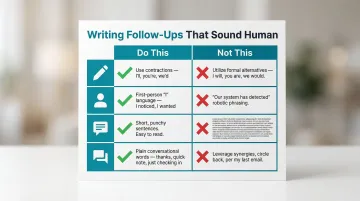
Use these techniques to sound human:
- Use contractions: "I'll" instead of "I will," "you're" instead of "you are"
- First-person language: Write as "I" checking in, not "our system has detected"
- Short sentences: Break up dense blocks of text
- Avoid corporate jargon: Skip phrases like "your ticket has been escalated" or "as per our previous communication"
Maintaining this voice across a full team is where things get inconsistent. Tools like NewMail AI address that by learning each agent's communication style and drafting follow-ups that match it—working directly inside Gmail and Outlook so agents never have to leave their inbox to stay on-message.
The "One Ask Per Email" Rule
Getting the tone right only goes so far if the email itself overwhelms the reader. Each follow-up should have a single clear call to action. Don't ask the customer to:
- Provide more information
- Rate their experience
- Confirm their account details
- AND reply if they still need help
Overloaded follow-ups increase friction and reduce response rates. Keep it simple: one email, one ask.
Building an Escalation and Case Closure Framework
When to Escalate vs. When to Close
If a customer hasn't responded to 2-3 follow-up attempts over a reasonable window (typically 7-14 days depending on case priority), decide whether to escalate internally or send a final notice before closure.
Decision criteria:
- Strategic accounts warrant internal escalation before any closure action
- Billing errors or data loss require escalation; minor UI questions can close
- First-time users deserve more patience than repeat non-responders
What a "Case Closure Warning" Email Should Include
Never close a case without giving the customer a final chance to respond. Your closure warning should include:
- Clear statement of closure timing: "This case will be closed in 3 business days if we don't hear back"
- Recap of original issue and steps taken: Summarize what was discussed and attempted
- Easy way to reopen: "Just reply to this email anytime to continue the conversation"
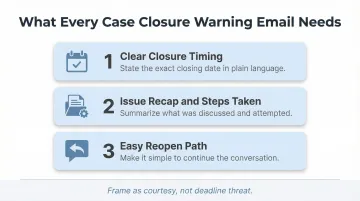
Frame this as courtesy, not deadline threat:
Hi [Name],

I haven't heard back since I asked about [recap]. I want to make sure you got what you needed, so I'm going to close this case in 3 business days.

If you're still running into issues or have questions, just reply to this email anytime—even after it's closed—and I'll reopen it right away.

Otherwise, glad I could help!

[Agent Name]
That tone keeps the door open without creating pressure — which matters, because how you close a case shapes whether a customer comes back.
Handling Cases That Reopen After Closure
Automated systems should allow customers to reopen cases by simply replying to a closed-case email within a defined window (typically 7-14 days). This prevents the frustrating experience of re-explaining an issue from scratch.
Why this matters: According to HappySignals' 2024 Global IT Experience Benchmark, reopened tickets cost 15-20% more in resources. Each reassignment drops user happiness by more than 7 points and costs nearly 2 hours in lost productivity — costs that compound fast at scale.
Internal Escalation Path
If a case has been unresolved beyond SLA thresholds, automated triggers should notify a team lead or manager — not just the customer. Internal accountability follow-ups are a critical part of automation planning, yet most teams configure alerts only for customer-facing touchpoints.
Configure alerts that fire when:
- Cases exceed SLA resolution time by 50%
- Cases receive 2+ customer follow-ups without resolution
- High-priority cases remain "in progress" beyond defined thresholds
Metrics to Track and Common Mistakes to Avoid
Metrics Worth Tracking
Monitor these KPIs to measure follow-up automation effectiveness:
- Average case resolution time — from case opening to final close
- First-response time after automated follow-up — whether the trigger successfully re-engaged the customer or agent
- Case reopening rate after closure — target below 5%, per Atlassian Community benchmarks
- CSAT/NPS scores — compare satisfaction across cases that received automated follow-ups vs. those that didn't
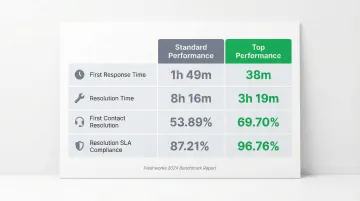
Industry benchmarks from the 2024 Freshworks Customer Service Benchmark Report:
| Metric | Standard Performance | Top Performance |
|---|---|---|
| First Response Time | 1 hour 49 minutes | 38 minutes |
| Resolution Time | 8 hours 16 minutes | 3 hours 19 minutes |
| First Contact Resolution | 53.89% | 69.70% |
| Resolution SLA Compliance | 87.21% | 96.76% |
Common Mistakes to Avoid
- Skipping priority segmentation: A billing error should not follow the same cadence as a minor UI question. Map follow-up sequences to SLA tiers.
- Forgetting exit conditions: Customers who receive "Did you still need help?" after their issue is already resolved get confused or annoyed. Always suppress follow-ups on closure.
- Sounding like a bot: Phrases like "your ticket has been escalated" or "our system has detected" signal automation immediately. Write as a person would.
- Over-sequencing unresolved cases: More than 3-4 customer-facing follow-ups without resolution is a process failure, not a cadence problem. Escalate internally instead.
Frequently Asked Questions
How to professionally follow up on an unanswered email?
Reference the original request briefly, keep the tone warm and non-accusatory, and include a clear next step. Wait 2-3 business days before your first follow-up in support contexts. Example: "I wanted to check in on [specific issue]. If you still need help with this, just reply and I'll pick this back up."
What is the 3 email rule?
The 3 email rule says you shouldn't follow up more than 3 times on an unanswered message before pausing outreach — in support contexts, that means 3 customer-facing attempts before initiating case closure.
What are examples of automatic responses?
Auto-responses fall into two categories: instant acknowledgments ("We received your request and will respond within 24 hours") and inactivity-triggered follow-ups ("I wanted to check in since I haven't heard back about [issue]. Let me know if you still need help.").
How often should you follow up on an unresolved support case?
Follow up every 2-3 days for high-priority cases and every 5-7 days for lower-priority cases. Cadence should map to SLA tier — not applied uniformly across all case types.
When should you automatically close a support case?
Close a case after 2-3 unanswered follow-ups within a defined window (typically 7-14 days), always with a courtesy pre-closure notice sent to the customer giving them a final chance to respond.
How do you write a follow-up email that doesn't sound automated?
Use plain text, write in first-person, and reference the customer's specific issue rather than a generic ticket number. Keep it short — 3 to 5 sentences maximum.