Introduction
Unpaid invoices are a critical financial drain for businesses. According to Atradius, overdue invoices affect 43% of credit-based B2B sales for US companies, while PYMNTS data shows that 86% of businesses report up to 30% of their monthly invoiced sales are overdue—creating serious cash flow pressure.
That pressure compounds when follow-ups depend on manual processes: spreadsheets, calendar reminders, individually drafted payment emails. These approaches don't just waste time — they create gaps in timing and tone that let overdue accounts slip further, and push clients toward avoidance rather than payment.
This guide covers how email automation solves the AR follow-up problem end to end: triggers, templates, personalization, and compliance. You'll learn how to build a follow-up sequence that recovers payments faster while keeping client relationships intact.
Key Takeaways
- Manual AR follow-ups increase Days Sales Outstanding (DSO) through delayed, inconsistent outreach
- Automation sends payment reminders via time-based and event-based triggers at the right intervals
- Effective AR sequences cover five stages, from pre-due reminder to final notice, with escalating tone
- Personalization and segmentation keep automated outreach from feeling robotic to reliable clients
- Track DSO reduction, email open rates, and payment conversion by stage to optimize your sequence
The Real Cost of Manual AR Follow-Ups
Manual AR processes typically operate like this: team members track invoices in Excel, set calendar reminders for follow-up dates, and write individual payment emails for each overdue account. Each step introduces delays. Reminders get missed during busy periods, emails sit in draft folders, and high-priority accounts get the same attention as low-risk ones.
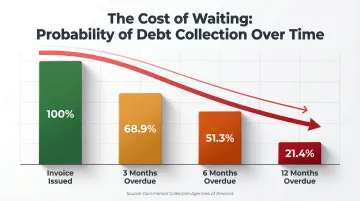
The collection probability data tells the story. According to the Commercial Collection Agencies of America, the likelihood of collecting a delinquent account drops to 68.9% after three months, 51.3% after six months, and just 21.4% after one year. Every day an invoice ages without follow-up, recovery odds fall further.
The Hidden Operational Costs
QuickBooks research found that 65% of businesses spend 14 hours per week on administrative tasks related to collecting payments: drafting emails, tracking responses, logging payment confirmations, and escalating disputes.
Industry-specific data from Chaser shows that 30%+ of respondents in Construction, Financial Services, and IT report spending seven or more hours weekly just managing accounts receivable tasks. For a five-person AR team, that's 35+ hours per week, roughly a full-time employee's worth of effort, dedicated solely to manual collection outreach.
The Relationship Damage You Don't See Coming
Inconsistent manual follow-up creates two problems at once:
- Over-chasing: Multiple reminders land within days because team members don't coordinate, frustrating otherwise reliable payers
- Under-following: Invoices disappear entirely when the AR specialist is out sick, on vacation, or stretched thin
The result is visible in customer reactions. A reliable payer hit with aggressive collection language feels disrespected. A client whose invoice was ignored for 60 days then receives a sudden final notice — that kind of inconsistency erodes trust quickly.
Human error compounds these risks. Invoices slip through due to capacity constraints, sick days, software glitches, or employee turnover. Each gap translates into bad debt write-offs: revenue earned but never collected because the follow-up process failed.
How AR Email Automation Works
AR email automation uses software or AI-assisted tools to send pre-scheduled or event-triggered payment reminder emails based on invoice aging, payment status, or customer behavior. Unlike manual processes, automation doesn't require drafting individual emails for each communication—systems pull invoice data automatically and send reminders according to predefined rules.
Triggers and Scheduling Rules
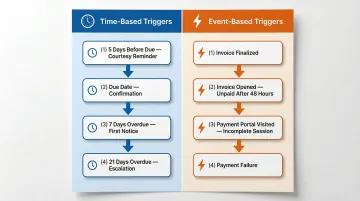
Two trigger types power effective AR automation:
Time-based triggers fire reminders according to calendar dates relative to the invoice due date:
- Five days before due date → send courtesy reminder
- Day of due date → send due date confirmation
- Seven days overdue → send first overdue notice
- 21 days overdue → send escalation notice
Example: A $12,000 invoice issued on March 1 with a March 31 due date triggers a pre-due reminder on March 26, a due date reminder on March 31, a first overdue notice on April 7, and an escalation notice on April 21.
Event-based triggers fire based on customer actions or system events:
- Invoice finalized in billing system → send initial invoice email with payment link
- Invoice opened but not paid within 48 hours → send follow-up nudge
- Payment portal visited but transaction not completed → send abandonment reminder
- Subscription payment fails first attempt → send immediate payment failure notice
Example: A customer opens an invoice email, clicks the payment link, visits the payment portal, but closes the browser without completing the transaction. An event-based trigger sends a targeted reminder within 24 hours: "We noticed you started the payment process for Invoice #4721—click here to complete your payment in under 60 seconds."
Integration with Your Accounting Stack
Modern AR email automation connects directly to accounting and billing platforms—QuickBooks Online, Xero, NetSuite, Stripe—to pull live invoice data. Reminders reflect real payment status, stop when payment is received, and never send duplicate outreach.
Each major platform handles this differently:
- QuickBooks Online: Native reminders a few days before or after due dates; integrates with Chaser, YayPay, and Invoiced for advanced sequencing
- Xero: Built-in automatic invoice reminders; integrates with Chaser and Invoiced
- NetSuite: Dunning Letters SuiteApp for automated collections; connects with Billtrust and YayPay
- Stripe: Automatic collection reminders for unpaid invoices, schedulable before, on, or after due dates
Inbox-native AI assistants offer a different path. Tools like NewMail AI work directly inside Gmail, Outlook, and Apple Mail to draft personalized payment follow-up emails in your voice—without requiring a separate platform login. For finance teams handling sensitive communications, NewMail AI's zero data retention and GDPR-compliant architecture means invoice details and client data are never stored, which matters for businesses in regulated industries.
When a client responds—whether with a payment confirmation, a dispute, or a request for revised terms—the system stops the reminder sequence immediately and routes the reply to a human team member. A customer who paid on Monday won't receive a dunning notice on Wednesday.
Designing Your AR Follow-Up Email Sequence
An effective AR follow-up sequence runs on a progressive cadence with escalating tone across multiple touchpoints. The number of touches, timing intervals, and messaging style should be calibrated to invoice size, customer relationship, and past payment behavior.
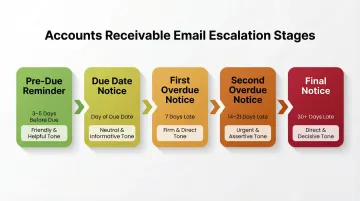
The 5-Stage AR Email Cadence
Stage 1 — Pre-Due Date Reminder (3–5 days before):
This email is proactive, relationship-positive, and low friction. It assumes payment will be made on time and positions the reminder as a helpful service rather than a demand.
Include:
- Invoice number and amount
- Original due date
- Direct payment link
- Contact information for questions
- Friendly, appreciative tone
Example tone: "Just a quick reminder that Invoice #8834 for $4,500 is due on April 15. Click here to pay securely. Thanks for your business—let us know if you have any questions."
Stage 2 — Due Date Reminder (day of):
This is a neutral, factual nudge confirming the invoice is due today. Keep tone professional and non-accusatory—many clients simply need a same-day reminder because the invoice arrived weeks ago and isn't top of mind.
Include:
- Confirmation that payment is due today
- Invoice details and amount
- Payment link
- Contact for questions
- Professional, matter-of-fact tone
Stage 3 — First Overdue Notice (7 days past due):
The tone shifts slightly more direct. Acknowledge the invoice is now overdue, reference the original due date, and provide a clear call to action. Introduce dispute resolution language here—clients who have a legitimate reason for non-payment should know how to raise it.
Include:
- Statement that invoice is overdue
- Original due date reference
- Current outstanding balance
- Payment link and instructions
- Contact information for disputes or payment plan requests
- Slightly firmer but still professional tone
Stage 4 — Second Overdue Notice (14–21 days past due):
This email escalates urgency and references prior outreach. Introduce late payment policy language if applicable (interest charges, service suspension terms). If initial emails have gone unanswered, consider CC'ing an additional stakeholder or contacting a different person at the company entirely.
Include:
- Clear statement of overdue status and days past due
- Summary of previous communication attempts
- Late payment policy details (if applicable)
- Firm call to action with deadline
- Alternative contact or escalation notice
Stage 5 — Final Notice (30+ days past due):
This is the last automated step before manual escalation or collections handoff. Be direct, summarize all prior communication, state consequences of non-payment clearly, and include a firm deadline.
Include:
- Summary of all previous outreach attempts
- Total overdue amount and number of days past due
- Explicit consequences (account suspension, collections referral, legal action)
- Final deadline for payment (e.g., "Payment must be received by May 15 to avoid collections referral")
- Direct contact information for resolution
Example tone contrast:
- Stage 1: "Hi Sarah, just a friendly reminder that your payment of $2,000 for March services is due on April 10. Here's your secure payment link. Thanks!"
- Stage 5: "This is our final notice regarding Invoice #4482 for $2,000, now 32 days overdue. We have sent four previous reminders without response. Unless payment is received by May 15, this account will be referred to our collections agency and may impact your credit standing. Contact us immediately to resolve."
Template Language Principles
Across all stages, apply these principles:
- Address clients by name with a specific invoice reference — "Hi Michael, regarding Invoice #7721" beats "Dear Customer, your invoice"
- Avoid generic phrasing — "We noticed your payment" sounds robotic; "Your March invoice" sounds human
- Keep emails short and action-oriented: three paragraphs maximum, one clear CTA
- One CTA per email — pay now, contact us to resolve, confirm receipt, or request a payment plan
- Match tone to stage — Friendly early, firm late, but never hostile
Personalization, Tone, and Privacy in AR Email Automation
Generic payment reminders get ignored. EmailToolTester data shows emails with non-personalized subject lines achieve just 19.57% open rates. Clients who receive robotic, bulk reminders feel disrespected — a follow-up that references the specific invoice, client name, and relationship history performs measurably better.
Segmenting clients before sending improves both response rates and client relationships. Start with payment history:
Segment by Payment History
- Reliable payers (always pay within terms) → lighter touch, shorter sequences, friendlier tone
- Occasional late payers (usually pay but sometimes need reminders) → standard sequence with moderate escalation
- Chronic late payers → more intensive sequence, earlier escalation, firmer tone
Invoice size determines how much human involvement the sequence needs:
Segment by Invoice Size
- Small invoices under $1,000 → automated sequence only
- Medium invoices $1,000–$10,000 → automated sequence with manual review at final notice stage
- Large invoices over $10,000 → hybrid approach with personal outreach earlier in sequence
Industry context shapes tone and timing more than most teams realize:
Segment by Industry
- Government/public sector (slow bureaucratic payment processes) → longer tolerance window, emphasis on documentation
- Startups (cash flow challenges common) → earlier offer of payment plans
- Enterprise clients (complex AP workflows) → CC multiple stakeholders earlier
Segmentation works across industries precisely because it replaces one-size-fits-all pressure with context-aware outreach. Experian's work with Sanford Health illustrates the scale of the effect: by segmenting and prioritizing collections based on ability to pay, Sanford realized a $40+ million collection lift — a reminder that the logic holds whether you're collecting patient balances or B2B invoices.
AR emails carry sensitive financial data — invoice amounts, contract terms, outstanding balances. Any AI tool processing that content must meet clear security standards. Look specifically for zero data retention agreements with AI providers (meaning your email content isn't stored or used for model training), GDPR compliance, and ideally a jurisdiction with strict data laws. For businesses in regulated industries, this is a compliance requirement, not a preference.
Key Metrics to Measure AR Email Automation Success
Days Sales Outstanding (DSO) is the primary financial metric for AR health. It measures the average number of days between issuing an invoice and receiving payment.
Formula: (Accounts Receivable / Total Credit Sales) × Number of Days
According to APQC benchmarks, top performers collect payment in 30 days or less, median performers take 38 days, and bottom performers require 46+ days. The Hackett Group reports the 2025 average DSO is 40.1 days. A well-optimised automated follow-up sequence should reduce your DSO measurably over time.
Email-level metrics indicate sequence performance:
- Open rates: Low open rates point to subject line problems or deliverability issues — check these first
- Response rates: Any engagement (even disputes) is preferable to silence; track reply volume by stage
- Payment conversion rate per stage: Paidnice data shows pre-due reminders reduce late payments by 25–40%, giving Stage 1 strong preventative value
Use this data to optimise timing and tone. If Stage 3 (first overdue notice) generates the highest payment conversion, consider moving its timing earlier. If Stage 5 open rates are low, test different subject lines or send times.
Once your sequence is dialled in, shift focus to what it means for the business. Operational metrics reveal the true ROI of automation:
- Hours saved per week: Quantify time recovered from eliminating manual outreach across your AR team
- Reduction in bad debt write-offs: Track what percentage of previously written-off revenue is now collected
- Improvement in on-time payment rate: Measure whether proactive reminders are shifting more invoices into terms
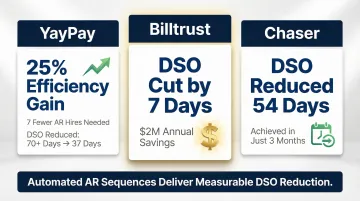
Published results from AR platforms illustrate what's achievable:
- YayPay (Forrester TEI study): 25% efficiency improvement, seven fewer AR hires needed, DSO dropped from 70+ days to 37
- Billtrust: A client cut DSO by seven days in 2024, generating roughly $2 million in annual savings
- Chaser: A client reduced DSO by 54 days within three months of implementation
Frequently Asked Questions
What is email automation for accounts receivable follow-ups?
AR email automation uses scheduled and triggered emails to send payment reminders, overdue notices, and escalation messages automatically based on invoice status—without requiring manual drafting for each communication. The system integrates with your billing platform and sends the right message at the right time based on predefined rules.
How many follow-up emails should you send before escalating an overdue invoice?
Most effective AR sequences involve four to five touchpoints across a 30-day window: pre-due reminder, due date notice, first overdue notice (7 days late), second overdue notice (14–21 days late), and final notice (30+ days late). After the final automated notice, escalate to manual outreach or third-party collections.
What triggers should I set for AR follow-up email sequences?
Use two core trigger types: time-based (days before/after due date, such as "send reminder 5 days before due date" or "send overdue notice 7 days after due date") and event-based (invoice viewed but unpaid, payment portal visited but not completed). Combining both produces the most responsive sequences and reaches customers when they're most likely to act.
How does AI improve AR email follow-up automation?
AI tools draft personalized follow-up emails in the sender's voice, predict which accounts need intensive outreach based on payment behavior patterns, and handle reply triage—automatically pausing sequences when customers respond and routing exceptions to human team members. AR teams shift from sending routine reminders to resolving disputes and managing exceptions.
How do I keep automated AR emails from damaging client relationships?
Personalize every message with client name, invoice specifics, and payment history, and calibrate tone by stage: friendly early, firm late, never hostile. Segment by payment history so reliable clients don't receive aggressive language. Always pause sequences the moment a client responds—continuing reminders after engagement damages trust.
What data privacy considerations apply to automated AR email communication?
AR emails contain sensitive financial data—invoice amounts, outstanding balances, contract terms—so any automation tool should comply with GDPR, use encrypted communication, and operate with zero data retention. This last requirement is especially critical when AI drafts email content, since financial data may pass through AI processing systems.