Introduction: Why Sending at the "Right Time" Isn't Enough Anymore
Generic "best time to send" advice—Tuesday at 10 AM, anyone?—costs senders 40–60% of potential engagement. That figure, drawn from controlled experiments across 4.2 million email sends (Seventh Sense, 2023), reveals a core flaw: assuming all buyers operate on identical schedules. When the average office worker receives 121 emails daily, mistimed outreach gets buried instantly.
The real problem? Most professionals schedule emails based on broad heuristics that ignore how each individual contact actually behaves—when they read, when they reply, and how engaged they've been historically. A prospect who opens emails at 6 AM and responds within an hour requires a completely different approach than one who checks email sporadically in the evening.
What follows covers how AI reads contact engagement signals, translates them into smarter scheduling decisions, and helps teams drive measurable reply rate improvements—without guesswork.
Key Takeaways
TLDR:
- Generic "best time" advice costs 40-60% of potential engagement—per-contact AI scheduling beats audience-wide averages
- AI analyzes open times, reply speed, click behavior, and engagement decay to predict each contact's optimal window
- Behavior-triggered follow-ups achieve 70.5% higher open rates and 152% higher click-through rates vs. fixed schedules
- Most teams see meaningful reply rate improvements within 3-6 weeks as AI accumulates per-contact data
- Privacy-first tools like NewMail AI process engagement signals ephemerally without permanent data storage
What Is AI Email Scheduling Based on Contact Engagement?
Engagement-based email scheduling analyzes how a specific contact has previously interacted with your emails—when they open, how fast they reply, whether they click links—and uses that data to schedule future emails when that contact is most likely to engage again. Unlike calendar-based tools that send at the same local time for everyone, or generic send-time optimization (STO) that relies on audience-wide averages, this approach is built around the individual.
Two Approaches: Aggregate vs. Per-Contact
Most tools offer two scheduling methods:
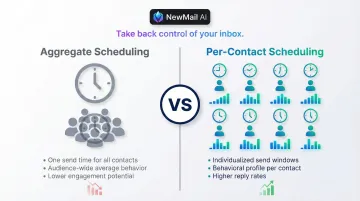
Aggregate scheduling recommends a single "best time" based on audience-wide data. If your average contact opens emails at 10 AM, every message goes out at 10 AM. This approach ignores individual behavior completely.
Per-contact scheduling generates a unique optimal send time for each individual based on their personal behavior history. If Contact A opens emails at 6 AM and replies within 30 minutes, while Contact B checks email around 8 PM and rarely responds same-day, the AI schedules accordingly.
Per-contact scheduling is more effective in practice because different buyer personas operate on different schedules. Sending at a universally "optimal" time means missing the actual window when a specific prospect is ready to engage.
What This Is NOT
Engagement-based scheduling is not:
- Calendar meeting booking tools
- Cold email blasting platforms
- Traditional autoresponder sequences with fixed delays
- Generic timezone sending that delivers the same local time to everyone
It's a predictive model that builds a behavioral profile per contact — refining send times as new engagement data comes in.
The Engagement Signals AI Reads to Time Your Emails
Open-Time Signals
AI logs the exact timestamp when a contact opens an email, including multiple opens if they revisit the message. Across multiple emails over time, the system identifies patterns—does this contact typically check email first thing in the morning, during lunch, or late evening?
Time-zone normalization happens automatically. A London-based contact receives messages at 9:30 AM GMT; a San Francisco prospect gets theirs at 10:15 AM PST.
Important caveat: Apple's Mail Privacy Protection (MPP) artificially inflates open rates by preloading tracking pixels via proxy servers, making open timestamps unreliable for MPP users. Modern AI systems compensate by weighting click-based and reply-based signals more heavily.
Reply Latency Signals
AI measures how long a contact typically takes to respond after opening an email:
- What time of day or day of week do their fastest replies cluster around?
- How does reply speed differ by context—quick replies to short questions vs. slower replies to longer asks?
- Are there patterns in when they go silent versus when they engage immediately?
Advanced systems use survival analysis models—such as Cox Proportional Hazards (CoxPH)—to predict time-to-reply. These models treat each contact's response history as a probability curve, not a flat average, which means two contacts with similar open rates can have very different predicted reply windows.
Click and Link Engagement Signals
Whether a contact clicks embedded links, how quickly they click after opening, and whether they revisit a link—all indicate active versus passive reading behavior:
- Immediate clicks suggest high interest and urgency
- Returning to the same link multiple times points to active evaluation, not casual browsing
- No clicks despite multiple opens suggest passive scanning rather than engaged reading
Click behavior directly shapes follow-up timing. A contact who hit a pricing link yesterday gets a tightly-timed follow-up; one who opened but never clicked gets a longer cadence with a different angle.
Thread History and Recency Signals
AI considers the full conversation thread:
- How long since the last interaction?
- Did previous emails go unanswered?
- Has the contact shown a pattern of re-engaging after a gap?
This context shapes both timing and tone. A contact who typically responds after 3-5 days shouldn't receive a follow-up at 48 hours. A contact who went quiet mid-conversation needs a re-engagement sequence—not a standard next-step nudge.
Engagement Decay Signals
When a previously responsive contact goes cold—declining open rates, increasing time-to-reply, or complete silence—AI detects this drift and adjusts the scheduling cadence accordingly. The system might space out sends to avoid appearing aggressive, or trigger a re-engagement sequence timed to the contact's historically peak activity window.
In customer success contexts, engagement decay typically precedes churn by weeks. Catching it early—before a renewal conversation or QBR—gives retention teams a window to intervene while the relationship is still recoverable.
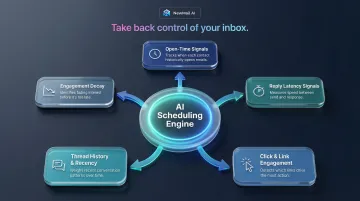
How AI Converts Engagement Data Into a Smarter Send Decision
The Prediction Model
AI aggregates the signals above into a per-contact behavioral profile, then applies a predictive model to estimate the probability of engagement within each upcoming time window. The output isn't a single "best time" but a ranked set of windows with associated confidence scores.
For example, a contact might show:
- 68% engagement probability Tuesday 9-10 AM
- 52% engagement probability Wednesday 2-3 PM
- 31% engagement probability Friday afternoon
The AI schedules for the highest-probability window unless other factors (content type, urgency, recent interactions) override that default.
Content Type Affects Timing
AI matches engagement timing to the type of message being sent:
- A follow-up after a demo may be scheduled within a tight window (same-day or next morning) to capitalize on fresh context
- A nurture email may be held until the contact's historically high-attention window later in the week
- Urgent requests get prioritized regardless of optimal timing
Behavioral-triggered emails—sent in direct response to actions like link clicks or document reopens—achieve 70.5% higher open rates and 152% higher CTR than generic scheduled sends. This performance gap demonstrates why content-timing alignment matters.
The Cadence Adjustment Loop
After each send, AI updates the contact's profile with the new engagement outcome:
- Did they open? When?
- Did they reply? How quickly?
- Did they ignore it completely?
This feedback continuously refines the next scheduling decision. The system gets more accurate with each interaction: stronger predictions drive higher engagement, which feeds sharper data back into the model.
How NewMail AI Approaches Engagement Context
NewMail's priority inbox and AI drafting features work with this engagement context natively inside Gmail, Outlook, and Apple Mail. The platform identifies which contacts are most active and shapes both the timing and content of outreach accordingly—no extra tools or external dashboards required.
NewMail operates on a zero data retention architecture. The system analyzes priority patterns, response speeds, and conversation stalls in real-time, then discards email content after processing. That design is backed by Zero Data Retention agreements with AI providers including Anthropic and Mistral, and Google Security Certified status—the highest data security certification available for Google Workspace applications.
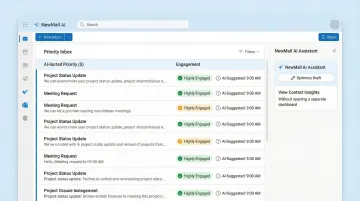
Handling Conflicting Signals
What happens when a contact's open history says "Tuesday at 10 AM" but recent engagement has dropped to near-zero? AI weighs recency more heavily than historical averages and adjusts recommendations dynamically.
A contact who was highly responsive three months ago but has gone dark since will be flagged for re-engagement sequencing rather than standard scheduling—preserving sender reputation while giving the relationship time to reset.