Introduction
AI has fundamentally changed what a phishing email looks like — and how often it works. In 2025, 16% of all data breaches involved AI-assisted attacks, and AI-automated phishing emails achieved a 54% click-through rate compared to just 12% for standard attempts. Email remains the most exploited attack vector in the enterprise — and the threat is accelerating.
Enterprise email security extends far beyond basic spam filters. It's a layered architecture: authentication protocols, AI-powered threat detection, data loss prevention, access controls, and continuous monitoring all working together against evolving threats.
This guide covers the critical threats targeting enterprises today, the features that form a robust security framework, and actionable best practices — including one often-overlooked risk: AI email productivity tools and what they access.
Key Takeaways
- Enterprise email security requires a multi-layered strategy; no single tool stops all threats
- Core features: email authentication (SPF, DKIM, DMARC), AI threat detection, encryption, MFA, and DLP
- Best practices: enforce DMARC at rejection level, require MFA universally, run phishing simulations, integrate with SIEM
- AI is now both weapon and defense: attackers use it to scale phishing, defenders use it to detect anomalies
- Vet AI email tools carefully — many store full email content, creating data retention and breach risks
Why Enterprise Email Is a Prime Attack Target
Large organizations face disproportionate email-based attacks due to three factors: high email volume (thousands of messages daily), diverse user bases with varying security awareness, and the sensitive nature of communications. Finance approvals, executive messaging, vendor contracts, and credential resets all live in the inbox, making email a high-value target.
The Three Major Threat Categories
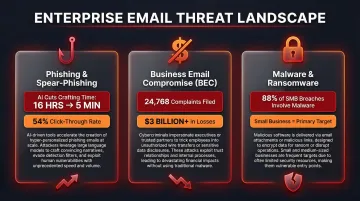
- Phishing and spear-phishing: AI-generated campaigns evade traditional filters using personalized messaging that mimics legitimate communication. Generative AI has reduced phishing email crafting time from 16 hours to just 5 minutes, letting attackers run campaigns at a volume that was previously impossible.
- Business Email Compromise (BEC): Attackers impersonate executives or vendors to authorize fraudulent payments. In 2025, the FBI's IC3 reported 24,768 BEC complaints resulting in over $3 billion in total losses — and small and medium businesses are targeted nearly four times more than large organizations.
- Malware and ransomware: Delivered via weaponized attachments or links, these attacks encrypt systems or steal credentials. Among SMBs, ransomware accounts for 88% of all breaches.
The Financial and Reputational Stakes
The average cost of a data breach reached $4.44 million globally in 2025, while US organizations faced a record $10.22 million average. These figures compound when compliance failures following a breach trigger regulatory penalties under GDPR, HIPAA, or PCI-DSS frameworks.
These figures compound when compliance failures following a breach trigger regulatory penalties under GDPR, HIPAA, or PCI-DSS frameworks.
Beyond the direct financial hit, breaches carry lasting reputational damage — lost client trust, leadership accountability, and increased regulatory scrutiny that can take years to recover from.
Core Features of Enterprise Email Security
Enterprise email security is a layered architecture where each feature addresses a different attack surface. A gap in any layer creates an exploitable vulnerability.
Email Authentication Protocols
Email authentication prevents domain spoofing before any content reaches detection layers.
The Foundational Trio:
- SPF (Sender Policy Framework): Verifies that the sending mail server is authorized to send on behalf of the domain
- DKIM (DomainKeys Identified Mail): Adds a cryptographic signature proving message integrity and sender authenticity
- DMARC (Domain-based Message Authentication, Reporting & Conformance): Aligns SPF/DKIM results with the visible "From" domain and enforces a policy—none, quarantine, or reject
The DMARC Enforcement Gap:
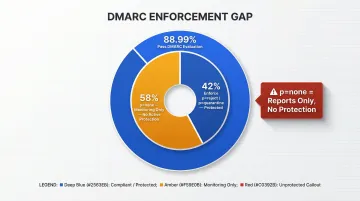
While 88.99% of global email volume passes DMARC evaluation, only 42% of DMARC-publishing domains enforce protective policies (p=reject or p=quarantine). The remaining 58% remain in p=none monitoring mode—generating reports but taking no enforcement action. This creates a false sense of security, as attackers can still spoof these domains externally.
Supporting Protocols:
- MTA-STS (Mail Transfer Agent Strict Transport Security): Forces TLS encryption between mail servers, preventing message interception during transit. Adoption remains low at just 0.7% across the top 1 million domains
- BIMI (Brand Indicators for Message Identification): Allows verified brand logos to appear in supported inboxes, reinforcing sender trust and reducing impersonation risk
AI-Powered Threat Detection
Signature-based filtering cannot detect phishing campaigns or BEC attempts that have no prior known signatures. Modern AI-driven threat detection analyses:
- Linguistic patterns and conversation context
- Sender behaviour deviations
- Email structure anomalies
- Domain reputation signals
Key Detection Capabilities:
- Attachment sandboxing executes suspicious files in isolated environments before delivery, catching zero-day malware that traditional antivirus engines miss
- Real-time URL rewriting re-evaluates links at click time — not just at receipt — catching delayed activation tactics where attackers weaponise URLs hours after delivery
Independent Testing Results:
| Security Platform | Threat Detection Rate | Legitimate Accuracy |
|---|---|---|
| Trend Vision One Email | 100% | 100% |
| Cisco Secure Email Threat Defense | 96% | 100% |
| Google Workspace Enterprise Plus | 63% | 80% |
Source: SE Labs 2024-2025 Email Security Testing
Native cloud email security provides baseline protection. Stopping targeted Business Email Compromise requires the 95%+ detection rates that specialised third-party platforms deliver — a gap encryption and access controls alone cannot close.
Encryption and Data Protection
Enterprises require two encryption layers to secure email communications:
TLS (Transport Layer Security): Encrypts messages in transit between mail servers, preventing interception during transmission. Without TLS enforcement via MTA-STS, messages can be downgraded to unencrypted transmission.
End-to-End Encryption (S/MIME or PGP): Required for highly sensitive communications demanding proof of authenticity and non-repudiation. End-to-end encryption ensures only the intended recipient can decrypt the message, even if the email server is compromised.
Compliance Alignment:
Encryption directly supports regulatory compliance frameworks. GDPR requires protection of personal data in transit and at rest. HIPAA mandates encryption for protected health information (PHI) transmitted via email. PCI-DSS explicitly states: "Never send unprotected PANs by end user messaging technologies"—a requirement only encryption satisfies.
Data Loss Prevention (DLP)
DLP monitors outbound emails for unauthorized transmission of sensitive data categories:
- Personally identifiable information (PII)
- Financial account numbers
- Protected health information (PHI)
- Intellectual property and trade secrets
Policy Enforcement Actions:
When DLP detects sensitive data in outbound messages, automated policies can:
- Encrypt the message automatically
- Quarantine for admin review
- Block transmission entirely
- Alert security teams immediately
Without DLP, a single misdirected email containing PHI or financial records can trigger a regulatory breach notification — and the fines that follow. DLP turns that exposure into an auditable, enforceable control.
Access Control and Identity Protection
Multi-Factor Authentication (MFA):
Even when credentials are stolen, MFA prevents account access without the second authentication factor. MFA blocks 99.9% of automated account attacks, and more than 99.9% of compromised accounts lack MFA enabled.
Role-Based Access Control (RBAC):
Limits mailbox access based on job function, ensuring employees can only access data necessary for their roles.
Conditional Access Policies:
Restrict login attempts based on:
- Device health and compliance status
- Geographic location
- Risk score calculated from behaviour analysis
Account takeover via compromised credentials is one of the most common entry points into enterprise networks. Once an attacker operates inside a legitimate account, behavioural baselines become the last reliable detection signal — making MFA and conditional access the critical first barrier, not a fallback.
Enterprise Email Security Best Practices
Most enterprises have some security tools in place but fail at enforcement, integration, or testing. These best practices move from knowing the features to operationalizing them effectively.
Best Practice 1: Enforce DMARC at Rejection, Not Just Monitoring
Many organizations deploy SPF and DKIM but leave DMARC at p=none, which generates reports but takes no enforcement action. The result is false security: attackers can still spoof the domain externally.
The Path to Full Protection:
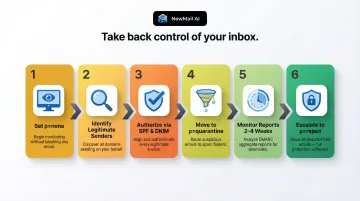
- Start at p=none to collect aggregate and forensic reports
- Identify all legitimate senders including third-party services (marketing platforms, CRMs, support systems)
- Authorize legitimate senders via SPF records or DKIM signing
- Move to p=quarantine to soft-fail unauthorized messages
- Monitor reports for false positives over 2-4 weeks
- Escalate to p=reject to hard-fail all unauthorized messages
Only p=reject provides full protection against domain spoofing attacks targeting customers, partners, and employees.
Best Practice 2: Require MFA for All Users Without Exception
MFA reduces the risk of account compromise by 99.22% across all user populations. However, effectiveness depends on universal enforcement and modern protocols.
Critical Implementation Requirements:
- Deploy MFA for 100% of users—no exceptions for executives, contractors, or service accounts
- Apply stricter controls on privileged accounts (admins, finance, executives)
- Disable legacy authentication protocols that bypass MFA entirely—Microsoft is permanently removing Basic Auth/SMTP AUTH support in March 2026
- Monitor for MFA bypass attempts including token theft, AiTM attacks, and prompt bombing
Attackers are actively bypassing basic MFA—token theft accounts for 31% of MFA bypass attacks. Use phishing-resistant MFA methods like hardware security keys or platform-integrated biometrics for high-risk accounts.
Best Practice 3: Run Regular Phishing Simulations and Targeted Security Training
Human error accounts for 26% of data breaches. Security awareness training measurably reduces this risk—but only when it runs continuously, not as an annual checkbox.
Continuous Simulation Impact:
Organizations conducting regular security awareness training see their baseline phishing failure rate drop by 86% over 12 months—from 33.1% to just 4.1%. After just 90 days, risk is reduced by over 40%.
Best Practice Simulation Strategy:
- Reflect current attack styles, including AI-generated, highly personalized emails
- Use role-based training—finance teams need wire transfer fraud awareness, executives need BEC awareness
- Avoid generic annual compliance checkboxes—training must be continuous and contextual
- Track metrics over time to identify high-risk departments and users
Phishing simulations should test the entire security stack, not just end users. They expose gaps in email filtering, authentication enforcement, and incident response that no amount of user training can compensate for.
Best Practice 4: Integrate Email Security with SIEM and Automate Response via SOAR
Those incident response gaps don't fix themselves. When email alerts are siloed from endpoint and network data, multi-stage attacks register as isolated events — and security teams respond too late.
Integration Requirements:
Forward these signals into your SIEM platform:
- DMARC authentication results (pass/fail events)
- DLP alerts (policy violations, quarantined messages)
- Threat detection signals (sandboxing results, URL rewriting triggers)
- Account takeover indicators (impossible travel, unusual login patterns)
SOAR Automation Benefits:
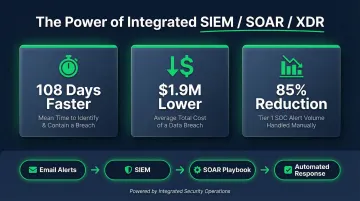
Organizations with extensive use of security AI and automation identify and contain breaches 108 days faster and lower average breach costs by $1.9 million. A Forrester study on Cortex XSIAM found that unifying SIEM, SOAR, and XDR reduced tier 1 SOC alert volume by 85%.
Automated Response Playbooks:
- Quarantine high-risk messages automatically
- Disable compromised accounts immediately
- Block malicious domains at the gateway
- Escalate high-severity incidents to human analysts
Best Practice 5: Vet Every AI Email Tool in Your Stack for Data Retention and Privacy Architecture
Enterprises are rapidly adopting AI-powered email assistants for productivity: summarizing threads, drafting replies, categorizing inboxes. Each new tool processing email content becomes a potential attack surface or compliance liability.
According to IBM's Cost of a Data Breach Report, shadow AI usage adds $670,000 to average breach costs, and 97% of organizations that reported an AI-related security incident lacked proper AI access controls.
Security Team Audit Criteria:
Before deploying any AI email tool, evaluate:
- Whether the tool stores email content or processes it ephemerally (some retain full message histories for training)
- Whether Zero Data Retention agreements are in place with the AI provider
- Which security certifications the vendor holds: Google Security Certified, GDPR compliance, SOC 2 Type II
- Where data is processed and under which jurisdiction (data sovereignty affects compliance obligations)
- Whether a Data Processing Agreement (DPA) is available — required for GDPR and many industry regulations
Example: Privacy-First AI Email Architecture
NewMail AI demonstrates a security-first approach to AI email assistance. The platform processes email content ephemerally with zero email storage by default, maintains Zero Data Retention agreements with AI providers including Anthropic and Mistral, holds Google Security Certified status, and operates under Swiss-based GDPR compliance with military-grade encryption.
Practical Recommendation:
Include AI email tools in the same security audit process as any third-party tool accessing organizational data. Require vendors to provide documented evidence of data handling policies, certifications, and incident response procedures before deployment. For enterprise deployments, insist on DPAs, SOC 2 reports, and evidence of encryption standards.
Compliance and Regulatory Alignment
Strong email security and regulatory compliance aren't separate goals — one enables the other. GDPR requires protection of personal data in transit and at rest, while HIPAA mandates encryption and audit logging for PHI. PCI-DSS, meanwhile, restricts how cardholder data flows through email entirely.
Each framework shares the same core demand: email cannot be an uncontrolled channel.
What Compliance-Ready Email Security Looks Like
- Retain audit logs for the full regulatory window — HIPAA mandates 6 years from creation or last effect, and other frameworks follow similar timelines
- Run DMARC reporting continuously — aggregate and forensic reports provide the domain authentication visibility that incident investigations and compliance audits require
- Log every DLP event — policy triggers, encrypted sends, and blocked transmissions all serve as evidence of control effectiveness during audits
- Document incident response procedures with email breach scenarios, notification timelines, and containment steps — GDPR Article 33 requires supervisory authority notification within 72 hours of becoming aware of a breach
Recent Regulatory Enforcement
Regulatory bodies actively penalize email security failures:
- HIPAA: PIH Health fined $600,000 following a phishing attack that compromised 45 employee email accounts, with violations including failure to report the breach within 60 days
- GDPR: The UK ICO fined Capita £14 million for failing to ensure security of personal data during a cyberattack
- PCI-DSS: Requirement 4.2 explicitly prohibits unencrypted transmission of cardholder data via email
Enterprises operating across multiple jurisdictions face layered obligations — and controls must be consistently applied across all domains. That includes inactive or marketing domains, which attackers frequently target for spoofing because they are less monitored.
The Hidden Risk: AI Email Tools Without Proper Security Architecture
As enterprises increasingly adopt AI email assistants for productivity, these tools often process the full content of employee email. If the AI provider stores that content, trains on it, or lacks Zero Data Retention agreements, every email handled becomes a data retention and breach liability.
Security Criteria for AI Email Tool Adoption
Evaluate these criteria before deploying any AI email assistant:
Data handling architecture:
- Does the tool store email content or process it ephemerally?
- Are emails written to disk or retained in memory only during processing?
- Does the provider have Zero Data Retention agreements with underlying AI models?
Security certifications:
- Is the tool certified under relevant frameworks (Google Security Certified, SOC 2, ISO 27001)?
- Does the vendor provide GDPR-compliant Data Processing Agreements?
- Where is data processed, and under which jurisdiction's data laws?
Breach notification and incident response:
- Does the vendor have documented incident response procedures?
- What notification timelines apply in the event of a security incident?
- Are forensic investigation capabilities available for enterprise customers?
Privacy-First Architecture Example
NewMail AI is one example of this approach in practice. Email content passes through servers only as necessary for AI analysis, then is deleted — with Zero Data Retention agreements in place with AI providers including Anthropic and Mistral to prevent content storage during model processing.
Structured context data (communication style, role, priorities) is stored with military-grade encryption under user control, while email content itself remains ephemeral. Headquartered in Switzerland, the platform holds Google Security Certified status and provides Data Processing Agreements for enterprise customers requiring GDPR compliance.
Practical Recommendation
These criteria apply to any AI tool touching organizational email — not just the tools built with privacy-first architecture. Include AI email assistants in the same security audit process as any other third-party vendor. Before deployment:
- Request documented evidence of data handling policies from vendors
- Verify security certifications through independent sources
- Obtain Data Processing Agreements specifying data retention limits
- Review incident response procedures and breach notification commitments
- Confirm encryption standards for data in transit and at rest
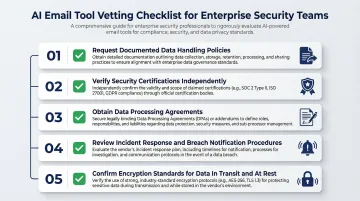
Security teams should require vendors to provide SOC 2 Type II reports, penetration testing results, and evidence of third-party security audits before granting access to organizational email.
Frequently Asked Questions
What are enterprise email security solutions?
Enterprise email security solutions are the combined set of tools, protocols, and policies used to protect organizational email at scale. This includes email gateways, authentication protocols like DMARC, AI-powered threat detection, DLP systems, and encryption—all working together to prevent phishing, BEC, malware, and data loss.
How to ensure email security?
Deploy and enforce authentication protocols (SPF, DKIM, DMARC at p=reject), require MFA for all users, use AI-powered threat detection to catch novel attacks, encrypt sensitive communications, implement DLP to prevent data exfiltration, and maintain visibility through audit logging and SIEM integration.
How to secure email and remote work?
Require MFA and restrict email access to secured, managed devices with up-to-date endpoint protection. Enforce VPN use on public networks and apply conditional access policies that verify device health and location before granting mailbox access.
How do you maintain GDPR and HIPAA compliance for email?
Encrypt email in transit (TLS/MTA-STS) and at rest (S/MIME, PGP), maintain centralized audit logs matching regulatory retention mandates (often 6+ years), and enforce DLP policies for sensitive data categories. Documented incident response procedures and DMARC reporting round out a defensible compliance posture.
What are automated workflows in incident response?
Automated incident response workflows, typically implemented through SOAR platforms, execute predefined playbooks when threats are detected. Actions include quarantining suspicious emails, disabling compromised accounts, blocking malicious domains, and notifying security teams—reducing mean time to respond and containing threats before they spread.
What is an email identity?
Email identity refers to the verified sender information attached to an email—including the domain, IP address, and cryptographic signatures established through SPF, DKIM, and DMARC. Together, these protocols confirm that an email genuinely originates from who it claims to be, preventing impersonation and spoofing attacks.