Introduction
Professionals in enterprise teams routinely manage hundreds of emails weekly — often exceeding 117 daily messages across knowledge work environments. That volume creates measurable friction: bottlenecks where response time determines deal velocity, inconsistent tone across customer-facing teams, and executives spending 28% of their workweek on email alone. Factor in context-switching costs (23 minutes to refocus after each interruption), and email overload consumes roughly 15.5 hours weekly, costing organizations an estimated $48,000 per knowledge worker annually.
Enterprise teams have responded by rapidly adopting generative AI for email generation. McKinsey's 2024 State of AI report found that 72% of organizations now use AI in at least one business function, with 65% regularly deploying generative AI — nearly double the 2023 rate.
Adoption alone doesn't guarantee results, though. The practical friction is real: data privacy concerns, maintaining brand voice across distributed teams, compliance with GDPR and sector-specific regulations, and knowing when AI output needs human judgment before sending.
This guide explains how to deploy and use enterprise generative AI for email generation correctly — covering prerequisites, step-by-step execution, and governance frameworks.
Key Takeaways
- Enterprise AI email tools only deliver value when data is clean, audiences are segmented, and governance is set up first.
- Strong prompts specify audience, goal, tone, and a clear call to action; vague inputs reliably produce generic output.
- Every customer-facing email needs human review before sending — no exceptions in regulated industries.
- Require native integration with Gmail, Outlook, or Apple Mail, plus Zero Data Retention and GDPR compliance as non-negotiables.
- Track performance at segment or campaign level, not in aggregate, to identify which prompts and outputs actually work.
When Should You Use Enterprise Generative AI for Email Generation?
When Volume and Consistency Justify AI
AI email generation is appropriate in specific operational contexts, not as a universal replacement for human authorship. The conditions that make it valuable include:
- Outreach sequences to segmented prospect lists
- Personalised follow-ups at scale based on CRM triggers
- Segment-specific campaign emails (industry, role, lifecycle stage)
- Internal announcements to large teams
- Customer service response drafting where response time is a service-level metric
Where AI Email Generation Creates Risk
Avoid deploying AI as a complete replacement in sensitive relationship contexts. Executive negotiations, customer complaints requiring empathy, and legal correspondence demand human judgment that AI cannot replicate. Sending unreviewed AI output exposes your organisation to factual errors, compliance violations, and tone mismatches — any of which can erode trust faster than efficiency gains can justify. Human review isn't optional; it's the control layer that makes AI output safe to send.
The Operational Threshold
Once you've identified where AI carries risk, the next question is whether your volume justifies the investment. Enterprise email AI delivers measurable ROI when teams send high volumes weekly, manage multiple distinct segments simultaneously, or operate under compliance requirements demanding response-time consistency. If your team sends fewer than 50 external emails weekly, the setup and governance overhead may exceed the productivity gain.
What You Need Before Getting Started
Clean, Segmented Contact Data
AI generates email content based on the audience context you provide. Without reliable segmentation fields—role, industry, lifecycle stage, behavioural signals—personalisation defaults to generic output indistinguishable from bulk mail. Before deploying AI at scale:
- Audit your CRM or contact database for data completeness
- Identify which segmentation fields are accurate and which need enrichment
- Establish who maintains data quality and how often it's refreshed
A Defined Governance Framework
Governance is a prerequisite, not an afterthought. Enterprise email AI requires clarity on:
- Who reviews drafts before sending (sender, compliance lead, team manager)
- Which email types require multi-level approval (customer-facing, executive, legal)
- How AI output is logged for audit purposes
- What data retention policies apply to prompts and generated content
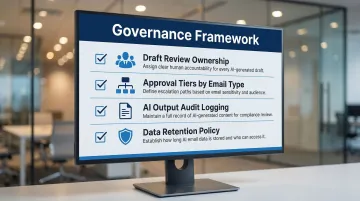
Without this framework, teams either abandon AI tools after early compliance scares or send unreviewed output that creates regulatory exposure.
An Enterprise-Grade AI Email Tool
Not all AI email tools meet enterprise security and integration standards. Evaluate tools on these criteria:
Native integration: Does it operate inside Gmail, Outlook, or Apple Mail, or does it require switching to a separate interface? Tools that disrupt existing workflows see poor adoption.
Data retention: Does the vendor store email content, and for how long? Tools like NewMail AI process email context ephemerally with zero email storage by default, and maintain Zero Data Retention agreements with AI providers — a hard requirement for GDPR compliance and regulated industries.
Security certifications: Look for Google Workspace Security Certification, SOC 2 Type II, and explicit GDPR compliance, not just marketing claims. Tools headquartered in Switzerland operate under some of the world's strictest data protection laws, which adds a meaningful layer of regulatory accountability.
Access controls: Can you mirror existing team permissions so junior team members can't send on behalf of executives without approval?
Role Assignments and Skill Readiness
Successful deployment requires clear human roles:
- Admin/IT: Configures the tool, manages permissions, ensures data security
- Team lead or ops: Creates and maintains prompt templates for common email types
- Sender or compliance lead: Reviews output before sending
- Baseline prompting knowledge: Teams need training on effective prompt construction — covering audience context, goal framing, and tone constraints — before going live
How to Use Enterprise Generative AI for Email Generation (Step-by-Step)
Enterprise email AI works best when you follow a defined sequence. Skipping steps (especially governance setup or human review) is the most common reason deployments fall short or create compliance risk.
Setup and Configuration
Connect to your existing email environment: Most enterprise-grade tools operate natively inside Gmail, Outlook, or Apple Mail rather than requiring a separate interface. Proper setup includes:
- Authentication via OAuth or Single Sign-On (SSO)
- Permission scoping — granting only the access the tool needs
- Verifying the tool cannot send emails without explicit user validation
Configure brand voice and tone guidelines: Tools that learn your writing style during initial setup produce significantly more usable first drafts. This configuration typically involves:
- Analysing a selection of sent emails to extract tone, style, and common phrasing
- Inputting team-specific context: FAQs, frequently linked resources, standard sign-offs
- Defining tone constraints (formal vs. conversational, sector-specific language)
Incomplete voice configuration is a common setup error that forces heavy editing later, eliminating the efficiency AI promises.
Generating Email Drafts
An effective enterprise email prompt includes four elements:
- Audience context — who the recipient is, their role, and their likely concern
- Email goal — book a meeting, provide an update, resolve an issue, or follow up on a proposal
- Tone and constraints — formal vs. direct, and any compliance language to include or avoid
- A specific call to action — what you want the recipient to do next
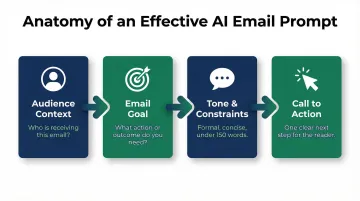
Generation modes: Enterprise teams typically use three modes depending on email type:
- Manual generation, initiated by the sender, works best for one-off or relationship-sensitive emails
- Templated prompts applied to defined segments suit campaign emails with consistent structure
- Automated generation, triggered by CRM events, handles follow-ups, renewals, and milestone outreach
Each mode requires different governance. Manual generation may need minimal review; automated generation requires stricter pre-approval of prompt templates.
What confirms correct generation: Output should reflect the audience context you provided, match the defined tone, include the correct CTA, and require only minor edits rather than a full rewrite. If output consistently requires heavy editing, the prompt needs refinement — not the email.
Reviewing and Approving Output
Human reviewers must check before any AI-generated email is sent:
- Verify product references, dates, and claims are factually correct
- Confirm the tone matches your brand voice and the relationship context
- Check that required legal language is present and prohibited claims are absent
- Test every hyperlink to confirm it works and leads to the right destination
- Assess whether the call to action fits the recipient's current stage
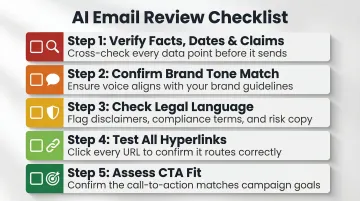
Graduated review levels: Internal team updates may need minimal review. Customer-facing sales emails or executive communications require more rigorous approval. High-volume, lower-risk email types benefit most from AI speed; high-stakes emails benefit from AI as a drafting assistant, not final author.
Monitoring and Refining Over Time
Once AI-generated emails go live, track:
- Open and reply rates at segment or campaign level, not in aggregate
- Editing time per draft, which signals whether your prompts are working
- Consistency of voice and relevance across outputs over time
When performance is weak, review the prompt first — not individual email outputs. The prompt carries more structural weight than any single draft. Adjust audience context, goal framing, or tone constraints before concluding an approach doesn't work.
Where Enterprise Email AI Is Commonly Used in Practice
Across most organisations, AI-assisted email generation slots into four key workflows:
- Sales outreach: Personalised sequences and follow-ups grounded in CRM data, keeping messaging consistent across account managers while shortening time-to-response
- Customer success: Renewal conversations, check-ins, and issue resolution drafts that let teams handle higher volumes without sacrificing relationship quality
- Marketing campaigns: Segment-specific emails that adapt core messaging to different industries, company sizes, or product interests
- Internal communications: Announcements, meeting recaps, and action item summaries across large organisations — reducing time spent on routine updates
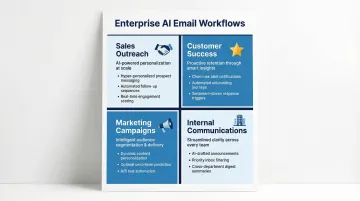
Regulated Industries
Financial services, healthcare, legal, and government sectors operate under stricter requirements — GDPR compliance and Zero Data Retention agreements are baseline expectations, not optional features. In practice, this shapes how teams deploy AI:
- Insurance brokerages have deployed AI via secure APIs with strict access controls, reclaiming over one month per year in administrative time while staying compliant
- Manufacturing firms use AI to draft multilingual responses for account managers, keeping all data within secure Microsoft 365 boundaries
- Government agencies have built virtual agents using middleware that strips personal data before it reaches AI back-end services
Best Practices for Using Enterprise Email AI Effectively
Best Practices for Using Enterprise Email AI Effectively
Always Review External Emails Before Sending
AI factual errors, tone drift, and compliance gaps are real risks. A 2025 Stanford study found that purpose-built legal AI research tools still hallucinated between 17% and 33% of the time, citing inapplicable authority and fabricating legal provisions. Human review protects the output quality that AI enables — skip it for external emails and you're absorbing that risk directly.
Build and Maintain a Shared Prompt Library
Experienced teams don't write prompts from scratch for every email type. They develop tested, reusable templates for common scenarios:
- Follow-up after no response
- Outreach to cold prospects
- Internal project update
- Escalation response
Update these templates based on performance data. Prompt quality determines output quality — a weak prompt library limits ROI regardless of the underlying model.
Treat Voice Configuration as Ongoing Input
Prompt templates handle structure, but voice configuration handles style — and style changes. As your team's communication evolves, update the AI with new examples, adjusted tone guidelines, and refined segment contexts. Tools that learn from sender feedback and actual email patterns produce increasingly accurate drafts over time. The editing load drops noticeably once the model has enough signal.
Conclusion
Successful enterprise email AI deployment is less about model sophistication and more about workflow discipline. Clean data, clear prompts, defined governance, and consistent human review separate teams that see measurable productivity gains from those that abandon the approach after early frustration.
Treat AI email generation as a structured operational capability. Teams that invest in proper setup, voice configuration, and review processes build something durable — reviewers get faster, tone stays consistent, and the system earns broader trust across the organization.
Frequently Asked Questions
Which AI is best for enterprise?
There is no single answer — the best enterprise AI email tool is the one that fits your existing stack and meets your compliance requirements. Prioritise inbox-native tools that connect directly to Gmail, Outlook, or Apple Mail and carry certifications like GDPR compliance and Zero Data Retention.
What is the AI tool for generating emails?
Options range from native AI features inside email clients to purpose-built enterprise platforms. For enterprise use, prioritise tools with voice personalisation, privacy controls, and inbox-native operation — general-purpose writing tools often require interface switching and introduce data retention risk.
What is the difference between generative AI and enterprise AI?
Generative AI refers to the underlying technology—models that create text, images, or code. Enterprise AI refers to how that technology is deployed in governed, integrated, scalable business environments with security controls, access management, and compliance requirements built in.
Is AI copywriting illegal?
AI-generated email content is not inherently illegal, but enterprises must ensure it complies with applicable regulations (CAN-SPAM, GDPR, sector-specific rules), avoids false claims, and has clear human accountability. The FTC states there is "no AI exemption" from existing consumer protection laws.
How to tell if an email is written by Generative AI?
Common signals include uniform sentence structure, generic phrasing, and absence of the sender's natural voice. Enterprise email AI with proper voice training and human review should produce output that's difficult to distinguish from skilled human writing.
What is the 60 40 rule in email?
The 60/40 rule suggests email content should be roughly 60% informational and 40% promotional. It's a rule of thumb among email marketers — not a legal standard — used to improve engagement. When prompting AI for enterprise emails, keeping this balance in mind helps avoid outputs that read as overly sales-driven.