Introduction
Automated emails are only as effective as when and how they're scheduled. A poorly timed, overly frequent, or generic automated email can damage engagement just as easily as no email at all. The difference between a campaign that lands in the spam folder and one that drives action often comes down to a single factor: the right message at the right moment to the right person.
Most professionals still default to "spray and pray" automation—batch sends at arbitrary times with no adjustment for recipient behaviour or context. This guide covers seven scheduling best practices that help you build strategic, well-timed campaigns that consistently drive opens and replies.
Key Takeaways
- Sending at peak engagement windows for your audience lifts open rates measurably.
- Segmenting recipients before scheduling ensures the right message reaches the right person.
- Behaviour-based triggers outperform fixed-time sends in both relevance and conversion rate.
- Frequency capping and list hygiene protect deliverability and sender reputation over time.
- AI-assisted personalisation keeps automated emails feeling human rather than templated.
Schedule Sends Around Peak Engagement Windows
Generic "best time" benchmarks—like Tuesday at 9–11 AM—serve as a starting point, not a rule. Audience type, industry, and geography all shift what "peak" means. According to HubSpot's 2026 research, machine learning-based send-time optimization delivers 15–25% lifts in open rates for established programmes.
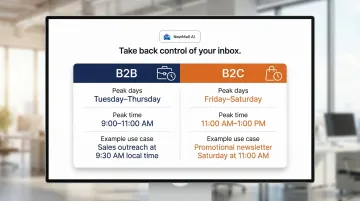
B2B and B2C audiences run on different schedules. B2B professionals engage most on weekdays—Tuesday through Thursday, between 9:00 AM and 11:00 AM—when open and click-through rates peak. B2C customers shift toward evenings and weekends, with Friday afternoons and Saturday mornings drawing the strongest attention as consumers browse deals and plan purchases.
Two examples that reflect this split:
- Sales outreach (B2B): Tuesday at 9:30 AM local time, catching decision-makers at the start of their workday
- Promotional newsletter (B2C): Saturday at 11:00 AM local time, when consumers actively browse and plan purchases
Time Zone Segmentation
If your list spans multiple regions, a single send time means half your audience receives the email at the wrong hour. Research analyzing 380,000 e-commerce emails shows that local time zone optimization delivers 36.8% open rates compared to 31.2% for a single national send—a 15.2% improvement.
How to segment by time zone:
- Divide your list into major time zones (Pacific, Mountain, Central, Eastern for US audiences; GMT, CET, AEST for international)
- Schedule the same email to send at the optimal local time for each segment (e.g., 10:00 AM Pacific, 10:00 AM Central, 10:00 AM Eastern)
- Use your email platform's time zone detection features or append time zone data from signup forms
Run Your Own Four-Week A/B Test
Industry benchmarks are a starting point. Your own audience data is the real answer. Run a controlled test over four weeks:
- Send identical content to equal list segments at different times each week
- Test four windows: early morning (7–9 AM), mid-morning (9–11 AM), early afternoon (1–3 PM), and late afternoon (4–6 PM)
- Track open rates and click-through rates for each variant
- After four weeks, you'll have statistically meaningful data pointing to your audience's actual peak window
Segment Your Audience Before You Schedule
Audience segmentation in automated email scheduling means dividing recipients into groups based on role, lifecycle stage, engagement level, or behavior—and then tailoring both the content and the scheduled timing to each group. A one-size-fits-all schedule fails because a new lead, a long-time customer, and an at-risk churning user all have different urgency levels and responsiveness patterns.
Research from Mailchimp shows that segmented campaigns generate a 100.95% higher click-through rate and 14.31% higher open rates compared to non-segmented sends. The performance gap is clear: targeted scheduling based on recipient characteristics significantly outperforms blanket sends.
Role-Based Segmentation
Different professional roles engage at different times during the workday. Decision-makers often review strategic content early in the morning before meetings fill their calendars, while individual contributors prefer detail-focused updates mid-afternoon when executing tasks.
- Decision-maker summary email: Schedule for 7:30–8:30 AM when executives review priorities before the day begins
- Detail-focused update for individual contributors: Schedule for 2:00–3:00 PM when they're executing tasks and need tactical information
Engagement-Based Segmentation
Recipients who actively open and click your emails respond differently than those who've gone dormant. Highly active contacts can handle more frequent, timely messages, while inactive users require re-engagement emails at different cadences.
- Highly active contacts: Send immediately when triggered, or at their demonstrated peak engagement window
- Inactive users (30+ days): Send re-engagement emails at off-peak times (e.g., Sunday morning) when inbox competition is lower and the message stands out
Segmentation only works if each send feels intentional, not filtered. Use merge tags and dynamic content fields to customize each email beyond just the recipient's name — reference specific actions the user took, their company name, their role, or their last interaction with your product.
Example: "Hi {{FirstName}}, we noticed your team at {{CompanyName}} recently downloaded our {{ResourceName}} guide. Here are three ways {{Role}} leaders like you are applying these insights..."
This approach ensures each segmented send feels direct and relevant, not like a filtered blast.
Use Behaviour-Based Triggers Over Fixed-Time Schedules
Fixed-time automated emails go out at a set time regardless of recipient action (e.g., every Tuesday at 9 AM). Behaviour-triggered emails, by contrast, send immediately or at a delay based on what a recipient does—signed up, clicked a link, abandoned a cart, or reached a subscription milestone.
According to Klaviyo's 2026 benchmark data, automated flows generate 41% of total email revenue from just 5.3% of send volume. Behaviour-triggered emails deliver over 3× higher click rates (5.58% vs. 1.69%) and 13× higher placed order rates (2.11% vs. 0.16%) than batch campaigns.
Three High-Value Trigger Scenarios:
Welcome sequence triggered at signup: The moment a user signs up is their highest attention point. Experian data shows welcome emails generate four times the total open rates and five times the click rates compared to other bulk promotions. Send the first email immediately — introduce your brand, set expectations, and guide the user to their first value moment (complete profile, explore a key feature, access onboarding resources).
Re-engagement after 30+ days of inactivity: When a recipient hasn't opened any email in 30+ days, their attention has drifted. Trigger a re-engagement email acknowledging the gap and offering a compelling reason to return — exclusive content, a special offer, or a product update — with a clear next step.
Follow-up after a link click without conversion: A recipient who clicks a pricing page, product demo, or case study link but doesn't convert is a warm lead. Send a follow-up within 24 hours addressing common objections, providing additional proof (testimonials, an ROI calculator), or offering direct assistance.
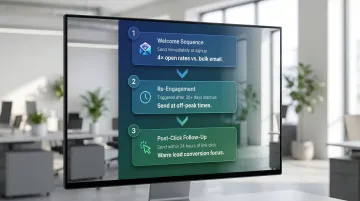
What makes each of these triggers effective comes down to one principle: timing.
The Intent Window
The intent window is the short period after a trigger event when the recipient's attention is at its peak. Delayed responses — once this window closes — convert at a fraction of the rate. A cart abandonment email sent 72 hours later, for instance, is far less effective than one sent within 1–2 hours.
Set Exit Conditions
If a recipient completes the desired action — makes a purchase, books a demo — remove them from the trigger sequence immediately. Redundant or contradictory messages confuse recipients and erode trust in your send cadence.
Cap Send Frequency to Prevent Inbox Fatigue
Frequency capping means setting a maximum number of automated emails a single recipient can receive in a given time window. This is especially important when multiple trigger sequences overlap — a user might simultaneously be in a welcome series, a cart abandonment flow, and a promotional campaign.
Research from MarketingSherpa and Return Path shows that customer complaints increase rapidly when email frequency exceeds five messages per week. Beyond seven weekly messages, one in ten recipients is likely to report the sender as spam.
Read rates tell the same story: going from 1× per week (32% read rate) to 5× per week drops that figure to 21% — a 34% decline in engagement.
Establish a Prioritised Frequency Hierarchy:
Transactional and time-sensitive emails should always send. Promotional and nurture emails, by contrast, can be suppressed once the recipient has hit the capping window limit.
Example hierarchy:
- Transactional emails (order confirmations, password resets, account alerts): Always send immediately
- Behaviour-triggered emails (welcome series, cart abandonment): High priority, send unless cap exceeded
- Promotional emails (newsletters, sales campaigns): Suppress if recipient has already received 3 marketing emails this week
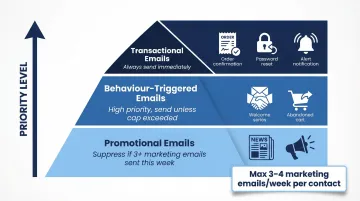
Set a practical cap: No more than 3–4 marketing emails per week per contact. Track this across all campaigns and triggers.
Monitor Unsubscribe Rate Spikes:
Unsubscribe rates are your earliest signal that send frequency has gone too far. According to the DMA's 2023 Consumer Email Tracker, 57% of consumers who unsubscribe cite receiving "too many" emails as the primary reason.
What to do: If your unsubscribe rate spikes above your baseline by 20% or more in a given week, immediately audit your send frequency and reduce cadence for the affected segments.
Personalise at Scale Without Losing the Human Voice
Automation enables scale but risks making emails feel robotic—especially when copy relies on generic templates or placeholder-heavy messages that don't adapt to context. Research shows that emails with personalised subject lines are 26% more likely to be opened, and personalised emails deliver 6× better transaction rates than generic emails.
AI-Powered Email Assistants Close the Gap
AI-powered email tools can draft messages in the sender's own voice and style, adapting tone to recipient context at scale. Platforms like NewMail AI learn a sender's communication style in approximately 60 seconds by analysing a selection of sent emails. The AI extracts patterns in voice, tone, professional role, and business priorities, then generates draft responses and follow-ups that sound genuinely personal rather than templated.
That capability matters at volume. McKinsey research shows that AI-powered personalisation achieves open rate lifts of up to 34.6%, and scaling it from 20% to 95% of campaigns lifted click-through rates by 25%.

Write with Collaborative Language
- Use "we" and "our" to create partnership tone
- Avoid phrases like "This is an automated message" or "You are receiving this email because..."
- Open with acknowledgement or context that reflects the recipient's specific situation, not a generic greeting
Example: Instead of: "You are receiving this email because you downloaded our whitepaper." Write: "Thanks for downloading our ROI guide last week—here are three ways teams like yours at {{CompanyName}} are applying these insights to reduce costs."
A/B Test Subject Lines and Preview Text Consistently
Subject lines and preview text are the first (and often only) elements recipients see before deciding whether to open. Testing these elements systematically means even small gains in open rates add up quickly across high-volume automated sends.
What to A/B Test:
- Question vs. statement: "How do you reduce churn?" vs. "3 ways to reduce churn by 20%"
- Personalisation: "Sarah, your invoice is ready" vs. "Your invoice is ready"
- Length: 6-word subject vs. 12-word subject
- Urgency: "48 hours left" vs. "Here's what you need to know"
Preview text functions as a second subject line in most mobile inboxes — and it's often ignored. Litmus research shows that adding and optimising preview text can increase open rates by 8% and boost click-through rates by up to 30%. Given that mobile devices account for 55% of all email opens globally, it's worth treating preview text with the same attention as the subject line itself.
Establish a Structured Testing Cadence:
- Test one variable at a time to isolate what drives performance
- Run each test for enough sends to reach statistical significance (minimum 1,000 recipients per variant for reliable results)
- Document winning formulas in a shared reference so the entire team benefits from accumulated learning
Example: If you discover that question-based subject lines outperform statements by 12% for your re-engagement emails, apply that insight to all future re-engagement campaigns and test a new variable (e.g., personalisation).
The compounding effect is real: brands that test weekly consistently outperform those that don't. Start with your highest-volume automated sequence — that's where consistent testing delivers the fastest, most measurable payoff.
Monitor Deliverability and Keep Your List Clean
Even perfectly scheduled, well-written automated emails fail if they land in spam. Sender reputation is built (or damaged) by recipient behaviour patterns over time. Inbox providers like Gmail and Outlook evaluate senders based on specific thresholds.
Official Deliverability Thresholds:
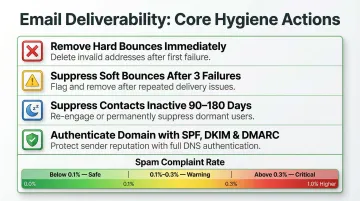
Google's 2024 sender guidelines mandate that spam complaint rates remain below 0.1% (1 in 1,000 emails) and never exceed 0.3%. Senders exceeding 0.3% are ineligible for mitigation and risk permanent reputation damage.
Microsoft's Bulk Complaint Level (BCL) assigns a score from 0–9. A BCL of 7 is the default threshold for routing to the Junk folder, whilst Strict policies route BCL 5+ to quarantine.
HubSpot's deliverability protection suspends accounts that hit a hard bounce rate of 5%.
Core Hygiene Actions:
- Remove hard bounces immediately: Hard bounces indicate invalid or closed email addresses and damage sender reputation
- Suppress soft bounces after three consecutive failures: Soft bounces (full inbox, temporary server issue) should be suppressed after three consecutive misses
- Proactively suppress contacts who haven't opened any email in 90–180 days: Dormant subscribers drag down engagement metrics and push up spam complaint rates. Validity research confirms that mailbox providers aggressively close inactive accounts, turning unengaged contacts into hard bounces and spam traps
Authenticate Your Domain:
Before launching any automated sequence, confirm SPF and DKIM are properly configured. Google requires senders of 5,000+ messages per day to set up SPF, DKIM, and DMARC — with the From: domain aligned to either SPF or DKIM — and mandates one-click unsubscribe (RFC 8058).
Microsoft's 2025 requirements follow the same standard: domains sending over 5,000 emails per day must pass SPF and DKIM, with a DMARC policy of at least p=none aligned to SPF or DKIM.
Frequently Asked Questions
What is the best time to send automated emails?
There is no universal "best time"—B2B audiences tend to engage mid-week during business hours, whilst B2C audiences often respond better on evenings or weekends. Running audience-specific A/B tests over four weeks is the most reliable way to find the right window for your recipients.
How do scheduled emails differ from triggered automated emails?
Scheduled emails go out at a fixed pre-set time (e.g., every Tuesday at 9 AM), whilst triggered emails are sent automatically in response to a specific recipient action or event. Triggered emails are generally more timely and contextually relevant.
How often should automated emails be sent?
Frequency depends on email type: transactional emails can send as needed, whilst marketing or nurture sequences should be capped to avoid fatigue, typically no more than 3–4 per week. Unsubscribe rates serve as the clearest signal that frequency has exceeded the audience's tolerance.
How do you stop automated emails from going to spam?
Four steps cover the essentials:
- Authenticate your domain with SPF and DKIM
- Remove hard bounces and inactive contacts promptly
- Keep spam complaint rates below 0.1% (the threshold set by major inbox providers)
- Include a clear, functional unsubscribe link in every email
Can AI help with scheduling and personalising automated emails?
Yes. AI tools can analyse engagement patterns to suggest optimal send times and generate personalised content at scale. NewMail AI, for instance, learns your communication style in around 60 seconds and drafts emails in your voice across high-volume sequences — keeping messaging relevant without manual effort for each recipient.