Email sequences fix the follow-up problem. They replace guesswork with automation, eliminate manual tasks, and ensure no opportunity falls through the cracks. When built correctly, they guide recipients toward a specific action—whether that's booking a meeting, completing a trial, or re-engaging after months of silence.
This guide covers what email sequences are, which types drive results, how to build one step-by-step, and the best practices that separate high-converting sequences from forgettable ones.
Key Takeaways
- Email sequences are automated, behavior-triggered email series designed to guide recipients toward specific actions
- They outperform time-based drip campaigns by responding to what recipients actually do
- The highest-performing types include welcome, lead nurturing, re-engagement, cold outreach, and onboarding sequences
- Effective sequences depend on clear goals, precise triggers, segmented audiences, and ongoing testing
- AI tools keep tone consistent and messaging tailored — even across thousands of contacts
What Is an Email Sequence?
An email sequence is a pre-written series of emails sent automatically based on a trigger or time interval. Each sequence is designed to move a specific recipient toward a defined goal—signup, purchase, meeting booked, or trial conversion.
The critical distinction between email sequences and drip campaigns comes down to logic. Drip campaigns are time-based and send the same message to everyone on a fixed schedule. Email sequences are behavior-triggered — they branch based on how the recipient actually responds. If someone clicks a link in email two, they might receive a different email three than someone who didn't click.
That behavioral logic is what makes sequences so versatile across the customer journey. A single well-built sequence can handle:
- Onboarding — guiding new signups through first-use steps
- Nurture — warming up leads who aren't ready to buy yet
- Re-engagement — pulling back contacts who've gone quiet
- Post-purchase — driving reviews, upsells, or renewal reminders
Once written and activated, sequences run without manual intervention — freeing teams to focus on conversations that actually need a human touch.
The Core Benefits of Using Email Sequences
Efficiency Gain: Written Once, Works Continuously
Sales representatives spend 60% of their time on non-selling tasks, with 67% spending at least 11 hours weekly on research and follow-up. Email sequences eliminate this time drain. Once built, they run automatically—following up with prospects, nurturing leads, and re-engaging inactive subscribers without manual intervention.
Personalization and Conversion Advantage
That freed-up time only matters if your outreach actually converts. Because sequences respond to recipient actions, they feel relevant rather than generic—and relevance is what drives results. Behavior-triggered automated flows deliver 3x higher click rates and 13x higher placed order rates compared to batch-and-blast campaigns.
The returns are measurable: email marketing delivers $36 to $42 for every $1 spent, making it one of the highest-ROI channels in B2B marketing.
Analytics Advantage
Automated sequences generate trackable behavioral data that manual outreach simply can't match. That visibility lets teams make targeted improvements rather than guessing. Key metrics to track include:
- Open and click rates by sequence step to pinpoint where engagement drops
- Bounce and unsubscribe rates to flag messaging or timing issues
- Conversion rates per variant when A/B testing subject lines or CTAs
The Most Important Types of Email Sequences
Welcome Sequence
The welcome sequence is the first automated impression a subscriber or new user receives, triggered immediately after signup. It should set expectations, introduce your brand voice, and deliver on any promised resource.
Welcome emails average 51% to 83.63% open rates, far outpacing standard marketing emails. That window is short — use it to confirm value, set expectations, and point subscribers toward a clear next step.
Lead Nurturing Sequence
Lead nurturing sequences educate, build trust, and move prospects further down the funnel—not to sell directly. Typical pacing runs 3–7 days between emails.
A well-structured nurture sequence moves through two phases:
- Educational phase — Answer questions, share guides, and demonstrate expertise without pushing for a sale
- Conversion phase — Introduce case studies and testimonials, highlight key product benefits, and present a clear path to action
The tone should shift gradually from advisory to persuasive as the sequence progresses.
Re-Engagement Sequence
The win-back or re-engagement sequence triggers when a subscriber or customer has gone inactive for a defined period. B2B contact data decays at an annualized rate of 22.5%, making regular list cleaning essential.
Typical structure (3-4 emails):
- Reconnect - Acknowledge the gap, ask what's changed
- Offer value - Share a helpful resource or update
- Present an incentive - Discount, exclusive content, or special access
- Final breakup email - "Should we part ways?" prompt that cleans your list
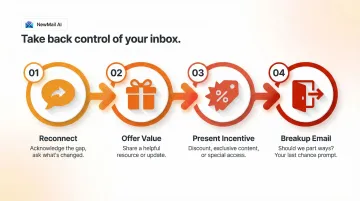
Contacts who don't respond to any of these four emails should be removed — keeping unengaged addresses on your list actively harms deliverability.
Cold Outreach Sequence
Cold outreach sequences start without any prior relationship — which means every element, from subject line to sign-off, has to earn the reader's attention from scratch.
Best practices for cold sequences:
- Research-backed personalization - Advanced personalization yields a 17% reply rate compared to 7% for basic personalization
- Lead with value - Focus on what they gain, not what you offer
- Keep the initial email short - 50-125 words maximum
- Use follow-ups to build credibility - Don't repeat the ask; add new information
- Stop immediately upon reply - Continuing to send after a response damages credibility
Senders who consistently use 2–3 follow-ups see 27% reply rates, proving that disciplined follow-up delivers results.
Onboarding / Trial-to-Paid Sequence
Onboarding sequences trigger after free trial signup or new account creation, designed to reduce churn and demonstrate product value before a trial expires.
Typical structure:
- Quick-win setup email - Help users achieve immediate value
- Feature spotlights - Highlight capabilities that solve their specific problems
- Success story or social proof - Show how others achieved results
- Conversion nudge near trial end - Clear call-to-action to upgrade before expiration
The sequences that work best don't just explain features — they walk users through the exact actions that correlate with long-term retention.
How to Build an Effective Email Sequence: A Step-by-Step Framework
Step 1 — Define Your Goal
Every sequence must begin with a single clear objective. Is the goal to book a demo, convert a trial user, re-engage a lapsed customer, or confirm a purchase? Without this clarity, sequence emails lose focus.
Your goal determines sequence length and tone. A cart abandonment sequence might be 3 emails over 5 days. A lead nurturing sequence might be 8 emails over 6 weeks.
Step 2 — Identify Your Trigger and Audience Segment
Pair each sequence with a specific trigger event: form submission, purchase, inactivity threshold, content download, trial signup. Then define your audience segment.
One-size-fits-all sequences underperform because relevance drives engagement. A trial user for a marketing automation tool needs different messaging than a trial user for accounting software, even if both signed up on the same day.
Step 3 — Map the Sequence Flow Before Writing
Plan before you write:
- How many emails will the sequence include?
- What is each email trying to achieve?
- What behavioral branches might exist?
For example: if someone clicks the demo link in email two, send a scheduling-focused email three. If they don't click, send a case study addressing common objections instead.
This planning stage prevents sequences from feeling random or redundant.
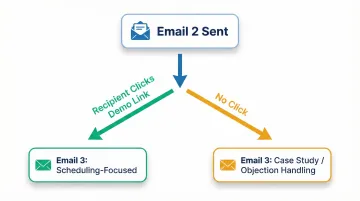
Step 4 — Write the Emails
Each email should have a clear purpose, one call to action, and a consistent voice. Maintaining that tone across 5–8 emails is harder than it sounds, especially for teams running multiple sequences at once.
Tools like NewMail AI help by learning your voice in 60 seconds and drafting each email to match it — so sequences stay consistent without sounding templated, even across different audience segments.
Step 5 — Set Up Automation with the Right Timing
Timing between emails directly affects performance — send too fast and you feel pushy, wait too long and you lose momentum.
General timing guidance:
- Initial follow-up: 24-48 hours after trigger
- Subsequent touches: Every 2-5 days depending on sequence type
- Abandoned cart: Shorter intervals (1-2 days)
- Lead nurturing: Longer intervals (4-7 days)
Behavior-based triggers outperform fixed schedules. If someone downloads a resource, send the next email immediately. If they haven't engaged, wait longer before the next touch.
Step 6 — Test, Monitor, and Optimize
The first version of a sequence is rarely the best version. Run A/B tests on:
- Subject lines
- Send times
- CTA placement and wording
- Email length
- Offer presentation
Watch these metrics:
- Open rates - Subject line and timing performance
- Click-through rates - Content relevance and CTA strength
- Reply rates - Personalization effectiveness
- Conversion rates - Whether the sequence achieves its goal
Treat optimization as a recurring practice. Teams that review sequence metrics monthly catch underperforming steps early — before they erode results across an entire funnel.
Best Practices for High-Converting Email Sequences
Keep Each Email Focused on One Idea and One Action
Multi-topic emails dilute response rates. Recipients don't know what to do when presented with multiple options or messages.
Every email in a sequence should do one job and end with one clear CTA. If you want them to book a demo, don't also ask them to download a guide and follow you on LinkedIn.
Personalize Beyond First Name
True personalization references:
- The action that triggered the sequence
- The recipient's industry or role
- Their previous behavior or engagement history
- Specific pain points relevant to their segment
Generic example: "Hi Sarah, I wanted to follow up on our previous conversation. Our platform helps companies like yours improve efficiency. Would you like to schedule a demo?"
Personalized example: "Hi Sarah, I noticed you downloaded our guide on reducing cart abandonment last week. Based on your interest in e-commerce optimization, I thought you'd find value in seeing how our automation cut checkout friction by 34% for a similar DTC brand. Would a 15-minute walkthrough next Tuesday work?"
Respect Frequency and Spacing
Over-emailing damages sender reputation and kills trust. Smart spacing guidelines:
- Abandoned cart: 1-2 days between emails (3-5 emails total)
- Lead nurturing: 4-7 days between emails (5-8 emails total)
- Re-engagement: 5-7 days between emails (3-4 emails total)
- Onboarding: 2-3 days between emails (6-10 emails total)
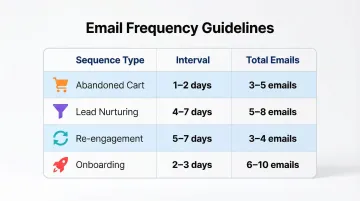
Sequences should automatically stop when a reply is received. Continuing to send after someone responds is one of the fastest ways to destroy trust.
Ensure Mobile Optimization and Deliverability
42% of all emails are opened on mobile devices, making mobile optimization non-negotiable.
Mobile best practices:
- Short subject lines (40 characters or fewer)
- Clean, simple formatting
- Easily tappable CTAs (buttons, not tiny text links)
- Front-loaded key information (first 2-3 lines)
Deliverability requires good list hygiene and avoiding spam-triggering language. Remove bounces promptly, avoid ALL CAPS and excessive exclamation marks, and maintain a healthy sender reputation.
Use AI to Maintain Voice and Scale Without Losing the Human Feel
As email volume scales, keeping every message sounding like you wrote it personally gets difficult. Tools like NewMail AI address this by drafting and refining replies in your own voice, learning your style and tone rather than defaulting to generic templates.
For sales teams and executives handling high-volume inboxes, this matters in practice. NewMail AI works inside Gmail, Outlook, and Apple Mail, so there's no context-switching between tools. Each reply stays on-brand and on-voice, even when you're moving through dozens of sequences at once.
How to Measure and Optimize Email Sequence Performance
Primary KPIs
Open Rate: Measures subject line and timing performance. Industry averages range from 31% to 42%, but these vary significantly by industry and sequence type. Welcome emails consistently outperform with 50%+ open rates.
Click-Through Rate (CTR): Measures content relevance and CTA strength. Average CTR across industries sits around 1.69% to 2.62%. Higher CTRs indicate your content resonates and your CTA is compelling.
Conversion Rate: Measures whether the sequence achieves its actual goal. This is your most important metric. A sequence with low open rates but high conversion rates is more valuable than one with high opens and no conversions.
Drop-Off Analysis
Identify at which email in the sequence most people disengage. If 60% of recipients open email one but only 15% open email four, something between emails three and four is causing friction.
This drop-off point reveals whether:
- The sequence is too long
- The content loses relevance
- The pacing is off
- The ask is too aggressive too soon
Each of these has a different fix — and knowing which one you're dealing with is exactly where the optimization loop begins.
The Optimization Loop
Use performance data to run incremental tests. Change one variable at a time and measure impact:
- Test subject lines against each other
- Vary send timing by 2-3 hours
- Try different CTAs or offer presentations
- Experiment with email length
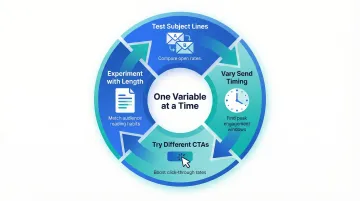
Teams that review sequence performance monthly — rather than treating campaigns as permanent — consistently see higher conversion rates over time.
Frequently Asked Questions
What is the rule of 7 follow-ups?
The "rule of 7" is a sales concept suggesting that prospects need to encounter your message at least 7 times before taking action. Modern B2B research shows buyers engage in an average of 27 interactions before making a purchase decision — a strong case for multi-touch follow-up sequences.
What is the difference between an email sequence and a drip campaign?
Drip campaigns send the same pre-scheduled emails to everyone at fixed intervals. Email sequences are behavior-triggered and branch based on individual actions—making sequences more personalized and typically more effective at conversion. Sequences respond to what recipients do; drips follow a calendar regardless of engagement.
How many emails should be in a sequence?
Most effective sequences contain 3-10 emails. Shorter sequences (3-4 emails) suit time-sensitive scenarios like abandoned carts; longer ones (6-10 emails) fit lead nurturing or onboarding where the decision cycle is extended.
How long should an email sequence last?
Sequence length depends on the goal and buyer journey stage. Abandoned cart sequences may run 3-7 days, while lead nurturing sequences can span 4-8 weeks — spacing should match the natural pace of the decision being made.
What triggers should I use to start an email sequence?
Most common triggers: form submissions, free trial signups, purchases, inactivity thresholds, content downloads, and cart abandonment. Behavioral triggers (based on what someone did) generally outperform purely time-based triggers because they're contextually relevant to the recipient's actions.
How do I keep email sequences from feeling robotic or impersonal?
Sequences feel human when they reference the specific action that triggered them, match the recipient's context, use conversational language, and stop automatically when a real reply comes in. Avoid continuing to send regardless of engagement—that's the fastest way to feel robotic.