Introduction
Picture this: three agents reply to the same customer. A VIP request sits unopened for six hours. Yesterday's urgent billing issue is now buried under 40 new messages. This isn't a crisis—it's Tuesday.
This is what happens when support teams treat their inbox like personal email: no routing, no triage, no system. Support teams aren't immune to that drain—knowledge workers spend 28% of their workweek managing email, roughly 11 hours a week. Without structure, that cost multiplies across every missed SLA and duplicate reply.
This guide covers how to build a managed inbound email system that actually holds up under volume—from initial setup and daily triage habits to the overlooked errors that quietly erode response quality.
Key Takeaways
- Structured triage beats raw inboxes—route emails by category and priority, not gut feel
- SLA targets and canned response libraries cut resolution time without sacrificing quality
- "Touch it once" discipline prevents the costly habit of re-reading emails without acting
- NewMail AI automates categorization, drafts responses, and flags urgent emails before agents touch their inbox
- Most support email failures trace back to skipping triage, ignoring metrics, or treating it like personal correspondence
When Your Inbound Support Email Setup Is Working Against You
Most teams don't realize their system is broken until customers start complaining. Watch for these early warning signs:
- Agents regularly miss emails or send duplicate replies to the same customer
- No clear ownership—everyone assumes someone else will handle it
- Response times vary wildly between agents, with no consistency or predictability
- No way to track open vs. resolved requests at a glance
Operational triggers that demand a real system
Informal email handling breaks down when team size crosses a threshold—typically around 3-5 agents. Beyond that, the old "we'll figure it out" approach creates bottlenecks.
As volume grows, watch for these compounding signals:
- Increasing volume of follow-up emails from customers asking "Did you get my last message?"
- Agents spending more time searching for emails than responding to them
- No visibility into what's been handled and what's still pending
These red flags have a measurable cost. Knowledge workers spend 28% of their workweek—roughly 11.2 hours—managing email. For support teams running unstructured inboxes, that means missed SLAs, frustrated customers, and burned-out agents.
The average worker receives 117 emails daily. Without a triage system, a VIP escalation and a routine FAQ compete for the same attention—and the wrong one often wins.
How to Manage Inbound Support Emails: A Step-by-Step Workflow
Step 1: Set Up a Centralized Inbox with a Category System
Route all inbound support emails to one central address—support@yourcompany.com—rather than individual agent addresses. This creates accountability and prevents emails from disappearing into personal inboxes when agents are out sick or on vacation.
Next, create a consistent category structure that every email can fit into:
- Billing - Payment issues, invoice requests, subscription changes
- Technical Issues - Bugs, login problems, feature malfunctions
- Account Requests - Password resets, access changes, user provisioning
- General Inquiries - Product questions, feature requests, feedback
Configure labels, folders, or tags within Gmail, Outlook, or your help desk tool to reflect these categories. The structure must be agreed upon by the whole team before launch—inconsistent tagging kills the system faster than no system at all.
Step 2: Define Triage Rules and Routing Logic
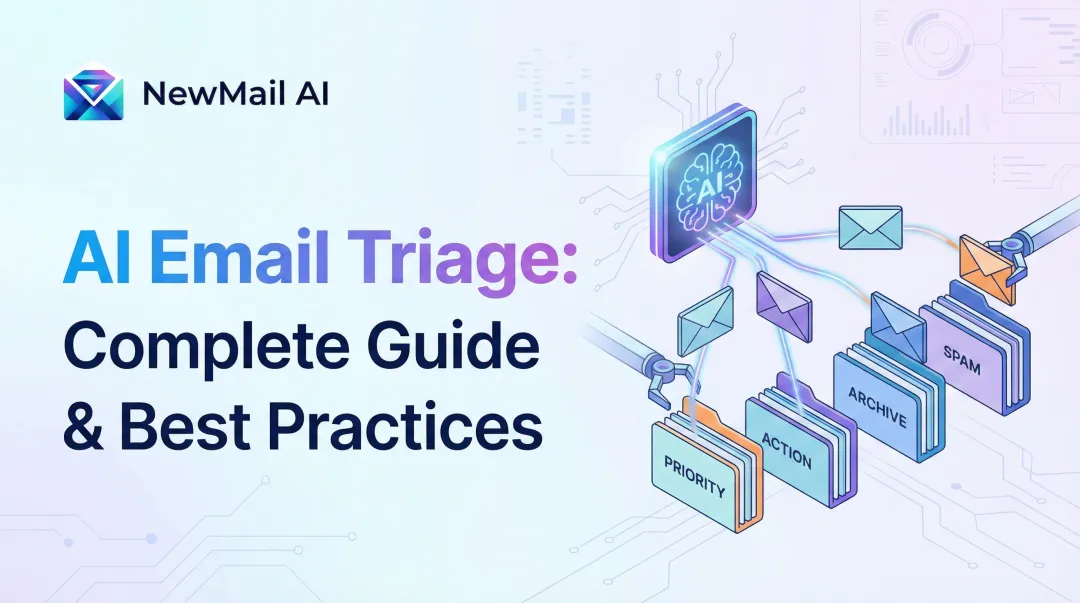
With your categories in place, the next step is deciding what happens to each email the moment it lands. Evaluate every new message on two axes: urgency and topic type. That combination determines priority level (high, medium, low) and which agent or team handles it.
Triage framework example:
- High priority: Business-critical functions down, VIP customers, legal/compliance issues
- Medium priority: Standard technical issues, billing questions, feature requests
- Low priority: General inquiries, feedback, marketing opt-outs
Set up automated routing rules based on:
- Subject line keywords (e.g., "urgent," "invoice," "can't login")
- Sender domain (e.g., enterprise customers get routed to senior agents)
- Email tags applied by AI or manual review
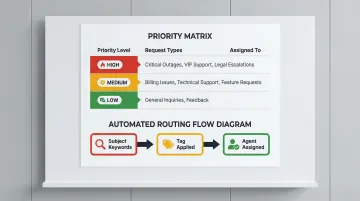
Misrouted emails cost more than just time — they erode customer trust when a billing question bounces through three agents before finding the right one.
Step 3: Set Response SLAs and Build a Template Library
SLAs (Service Level Agreements) for email response time create accountability and set customer expectations. Industry benchmarks matter: 89% of customers expect an email reply within 1 hour, yet the cross-industry average is 12 hours and 10 minutes.
Recommended starting SLAs:
- First response within 4 hours during business hours
- Resolution or substantive update within 24 hours
- High-priority issues: first response within 1 hour
Build a library of approved response templates for the most common inbound request types:
- Password reset instructions
- Billing cycle explanations
- Shipping delay updates
- Feature availability questions
Each template should include placeholders for the customer name and account details, and lead with empathy before moving to next steps.
Step 4: Establish a Daily Review and Processing Routine
Two dedicated 30-45 minute processing blocks per day outperform reactive monitoring throughout the day. Structured sessions reduce context-switching and cut the compulsive inbox-checking that kills deep work.
Daily review routine:
- Start from oldest unresolved emails to prevent backlog accumulation
- Re-label or re-route anything misclassified during initial triage
- Escalate anything breaching SLA thresholds
- Archive or close anything fully resolved
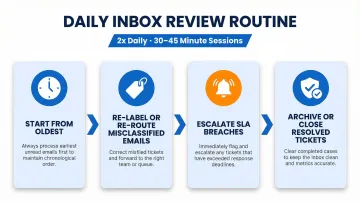
This approach ensures no request ages beyond your SLA window. Teams with structured processing blocks consistently respond faster than those monitoring email all day — constant interruptions create the feeling of urgency without actually improving response times.
Key Best Practices That Determine Inbound Support Email Performance
Setting up the system is step one. Consistent execution depends on daily practices that prevent the system from breaking down under real-world volume. Without them, even a well-structured inbox becomes a backlog waiting to happen.
Apply the "Touch It Once" Rule
When an agent opens an email, they must take one of four actions:
- Reply - Draft and send a response immediately
- Delegate - Forward to the right team member with context
- Schedule for follow-up - Set a reminder and close it
- Archive/close - Mark resolved and remove from active queue
Re-reading an email multiple times without acting is the single biggest time drain in support inboxes — every deferred decision adds cognitive load and increases the chance the email slips through entirely.
Use Priority Inbox Categories and Labels Consistently
The category system from Step 1 only works if every team member applies it correctly. Enforce this through:
- Shared tagging conventions documented in a team wiki
- Brief onboarding for new agents covering the category structure
- Weekly audit of mislabeled emails to catch patterns
AI-powered tools like NewMail AI can automate this entirely. Its Priority Detection feature applies categories without manual tagging and surfaces urgent emails first — natively inside Gmail and Outlook, with no external dashboards needed.
Build and Maintain a Shared Canned Response Library
Canned responses cut response time for common questions from minutes to seconds. Agents personalize a pre-written template and send it immediately.
What makes a good canned response:
- Clear resolution path or next steps
- Personal greeting placeholder ([Customer Name])
- Empathetic tone that acknowledges the issue
- Links to help documentation or related resources
Organize the library by request category for fast retrieval. Store templates in a shared document or directly within your email client using built-in templates or snippets.
Set and Monitor Response Time Metrics
Track these core email support metrics weekly:
- First response time - Minutes or hours from receipt to first agent reply
- Average resolution time - Total time from first contact to issue closed
- Email volume by category - Which request types are driving the highest load
- Reply-to-close rate - How many conversations require more than one exchange
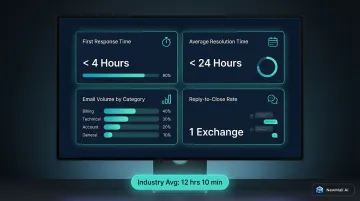
Without baseline metrics, teams cannot identify bottlenecks or prove whether changes to the system are working. The cross-industry average email response time is 12 hours and 10 minutes, but the best retail and e-commerce teams average under 6 hours.
Apply Collision Detection and Clear Ownership Rules
Collision happens when two agents reply to the same customer without knowing it. Prevent this by:
- Assigning every open email to a named agent
- Using a shared inbox tool with collision detection (visual indicators when someone else is drafting)
- Maintaining a status system (open, in progress, resolved) visible to the whole team
Common Mistakes Teams Make When Managing Inbound Support Emails
Most support teams don't fail because of bad intentions — they fail because of avoidable structural habits. These four patterns show up repeatedly, and each one compounds over time.
Treating the support inbox like a personal inbox
Without categories, routing, or clear ownership, every agent sees everything and assumes someone else will handle it. Emails fall through the cracks, and customers send follow-ups asking "Did anyone see this?"
Skipping triage during busy periods
Triage discipline matters most when volume spikes — not least. Teams that abandon their prioritization rules under pressure generate the most complaints about slow or missing replies. The instinct to "just start replying" means easy tickets get answered while urgent issues sit ignored.
Setting no SLA targets
Without a response time commitment, agents have no urgency benchmark — and customers have no expectation to calibrate against. Even a simple internal SLA (first reply within 4 hours) measurably improves consistency and prevents the "I'll get to it when I get to it" mindset.
Ignoring performance data
Running a support inbox by feel ("it seems like things are getting faster") rather than by metrics is a trap. Without tracking resolution time and volume trends, teams cannot identify which request types consume the most time or which agents need support. Tracking response time by category, for instance, often surfaces one or two ticket types quietly consuming 40% of team bandwidth.
How AI Transforms Inbound Support Email Management
AI email assistants eliminate the triage bottleneck that slows most support teams down. Instead of reading each email to categorize and prioritize, AI scans incoming messages, applies priority labels, flags urgent requests, and surfaces what needs immediate attention — all before an agent opens their inbox.
Tools like NewMail AI work directly inside Gmail, Outlook, and Apple Mail, automatically building a priority inbox with custom categories that adapt to the support team's workflow. The Priority Detection feature and intent-based categorization organize emails based on what needs to happen next — not just who sent them. It reads the underlying request, not just the sender.
Support email tasks AI handles well:
- Drafting first-response emails in the agent's voice for common request types
- Extracting action items or follow-up tasks from email threads
- Summarizing long conversation histories so agents can respond to escalated tickets without reading every prior message
NewMail AI learns an individual agent's voice and writing style in approximately 60 seconds by analyzing a selection of sent emails. The system captures tone, word choice, and communication patterns, then uses this context to draft responses that sound like the agent wrote them.
The Thread Summary + What To Reply feature is especially useful for escalations: it shows what the customer wants, what's already been tried, and what to address next — so agents can respond confidently without reading every prior message in a chain.
Critical caveat for regulated or sensitive industries:
AI email tools must meet strict data handling standards when customer data passes through AI systems. Look for:
- Ephemeral processing — emails analyzed in-memory and discarded, never stored persistently
- GDPR compliance covering lawful basis, data minimization, and storage limitation
- End-to-end encryption (AES-256 for stored data, TLS 1.2/1.3 for transmissions)
NewMail AI is headquartered in Switzerland — one of the strictest data privacy jurisdictions globally — and holds Zero Data Retention agreements with AI providers including Anthropic and Mistral. It has also achieved Google Security Certified status, the highest tier of data security certification available for Google Workspace applications.
Frequently Asked Questions
What are the 5 D's of email management?
The 5 D's are Delete, Do, Delegate, Defer, and Document: a triage framework for acting on every email the moment it's opened. Widely attributed to Microsoft Outlook best practices and David Allen's Getting Things Done methodology, this system keeps emails from sitting in the inbox unactioned.
What is the 3-21-0 email rule?
The 3-21-0 rule, coined by productivity author Kevin Kruse, recommends checking email only 3 times per day, allowing up to 21 minutes per session, and ending each session with 0 unprocessed emails. This structured approach prevents inbox overwhelm through disciplined time-boxing and reduces constant context-switching.
How do you prioritize inbound support emails effectively?
Use urgency and topic-based triage: categorize by request type (billing, technical, account), flag anything affecting business-critical functions or multiple users as high priority, and use SLA thresholds to auto-escalate emails approaching the response deadline. AI tools can automate this classification based on email content rather than manual review.
What is the ideal first response time for inbound support emails?
Industry standards vary by sector, but 89% of customers expect an email reply within 1 hour. The cross-industry average is 12 hours, but top-performing teams respond within 4-6 hours. Set SLAs based on customer expectations, not just what feels achievable—gaps between expectation and delivery drive churn.
Should support emails be managed with a shared inbox or a ticketing system?
Shared inboxes work best for smaller teams (under 10 agents) handling moderate volume where a human feel matters. Ticketing systems are better for high-volume environments needing structured SLA tracking, automation, and reporting. The right choice depends on team size, request volume, and complexity of routing and escalation workflows.
How can a small team handle high inbound support email volume without burning out?
Three levers reduce cognitive load without adding headcount: canned responses for common requests, scheduled processing sessions to cut context-switching, and AI-assisted triage that pre-sorts and drafts replies before agents open their inbox. Tools like NewMail AI combine priority detection, task extraction, and AI drafting in the agent's voice—giving small teams the throughput of a much larger operation.