Introduction
If your team is spending more time sorting email than acting on it, the numbers explain why. Business professionals receive an average of 121 emails daily, consuming 28% of the workweek—over 580 hours per year—on inbox management alone. With global email traffic projected to hit 424.2 billion messages per day by 2028, the manual triage burden is only growing.
AI-powered email routing produces measurable results. Organizations report 50-hour monthly time savings, response times cut from hours to minutes, and misrouting rates dropping from 30% to under 5%. Despite this, many teams still rely on manual sorting—creating bottlenecks that hurt customer satisfaction, inflate operational costs, and slow response times against faster competitors.
This article explains the measurable advantages of AI email routing, when each matters most, and what's at stake when organizations stick with manual processes.
Key Takeaways
- AI routing uses machine learning to classify and direct emails automatically—eliminating manual triage
- Cuts response times by up to 60% while saving 50+ hours monthly in labor costs
- Reduces misrouted messages from 30% to under 5% through content-aware classification
- Scales across teams of any size without adding headcount or complexity
- Teams that skip it deal with growing backlogs, rising costs, and missed time-sensitive messages
What Is AI-Powered Email Routing?
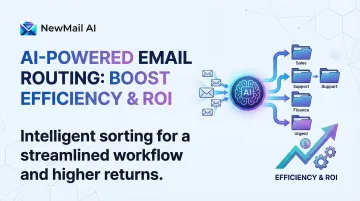
AI-powered email routing automatically reads incoming email content, determines intent and urgency, then directs each message to the right person, department, or workflow—no human intervention required. Unlike traditional rule-based filters that rely on subject lines or sender addresses, AI systems analyze full message context to understand what action each email requires.
Organizations deploy this technology across several environments where manual sorting creates bottlenecks:
- Shared customer service inboxes handling high ticket volumes
- Sales pipelines where lead response time directly affects conversion
- Executive assistants managing C-suite communications
- Multi-department teams where misrouted emails stall decisions
The system works natively inside Gmail, Outlook, and Apple Mail—no separate dashboards or workflow changes required.
The practical results speak clearly. When a Fortune 50 company processed 13,000 emails monthly, AI routing cut manual handling from 90 to 40 hours per month, freeing the same team to handle double the volume without adding staff.
Key Advantages of AI-Powered Email Routing
The advantages below reflect operational outcomes organizations actually track: time, cost, accuracy, and scalability. They apply whether you're an individual executive managing 200 daily emails or a support team handling thousands of customer requests.
Advantage 1: Faster Response Times at Scale
AI routing eliminates the delay between an email arriving and reaching the right person. Instead of a human reading, categorizing, and forwarding, the system completes classification in seconds.
How the process changes: Incoming emails are classified by intent—urgent escalations, billing inquiries, product complaints, routine requests—and routed instantly to the appropriate recipient or queue. Urgent items get flagged for immediate attention, while routine messages flow to standard queues without manual intervention.
Why this matters:
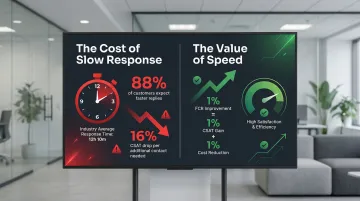
Every minute an urgent email sits unread creates risk—missed client deadlines, unresolved complaints, delayed decisions. The average email response time across industries is 12 hours and 10 minutes, yet 88% of customers expect faster responses than they did a year ago. In sales and customer success contexts, first-response speed directly affects conversion rates and retention.
For every 1% improvement in first-call resolution, organizations see a 1% improvement in customer satisfaction and 1% reduction in operating costs. Delayed responses carry a steep price: CSAT scores drop 16% for each additional call required to resolve an issue.
KPIs impacted:
- Average first response time
- SLA compliance rate
- Urgent email escalation rate
- Customer satisfaction score (CSAT)
When this advantage matters most:
Impact is highest in high-volume environments (50+ emails daily), shared inboxes, or roles where email drives time-sensitive decisions—sales teams, support functions, or executive communications. Tools like NewMail AI apply this logic directly inside Gmail, Outlook, and Apple Mail using custom priority inbox categories, keeping routing native to existing workflows with setup complete in under three minutes.
Advantage 2: Measurable Reduction in Manual Workload and Cost
Email triage—reading, categorizing, and forwarding messages that could be handled automatically—quietly consumes hours that compound across a team.
How the process changes: Instead of an office manager or coordinator spending hours daily on inbox sorting, AI handles classification and routing continuously. That time shifts to higher-value tasks like customer relationship building, strategic planning, or client-facing work.
Why this matters:
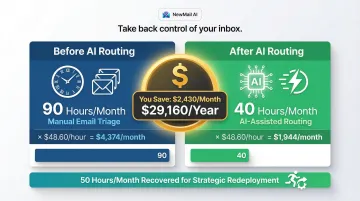
Manual triage carries hidden costs. A Fortune 50 client reduced routing time from approximately 90 hours to 40 hours monthly for 13,000 emails—saving 50 hours per month with the same team size.
At the median $20.59 hourly wage for customer service representatives, that's $1,029.50 monthly in direct labor savings, or $12,354 annually, per team member freed from triage duty. When total compensation costs average $48.60 per hour, those same 50 hours represent $2,430 monthly ($29,160 annually) in recovered capacity—either cost reduction or redeployment toward revenue-generating work.
KPIs impacted:
- Hours spent on email triage per month
- Overhead cost per email processed
- Team capacity utilisation
- Emails handled per FTE
When this advantage matters most:
This advantage compounds with volume. The higher the daily email count, the more dramatic the savings. Especially relevant for teams managing shared inboxes, helpdesks, or multi-department routing where one person manually assigns every email.
Advantage 3: Higher Accuracy and Fewer Misrouted Messages
Manual classification introduces errors that compound quietly: wrong department assignments, overlooked urgent emails, duplicated responses. AI routing addresses all three simultaneously.
How the process changes: AI reads full email content (not just subject lines or sender addresses) to determine intent, then routes based on learned categories and priority rules—applying the same logic consistently across every message. In one documented case, misrouting rates dropped from 30% to under 5% after AI implementation, with escalation rates decreasing 40% as tickets were resolved correctly the first time.
Another study showed misrouting falling from 26% to 3.4% in a multi-department SaaS environment. Traditional manual systems suffer from 30% reassignment rates, adding 15 minutes of delay per transfer—AI-powered workflows cut these delays by 30-50%.
Why this matters:
Misrouted emails don't just waste time—they erode trust, delay resolution, and create internal friction. A billing query that lands in the wrong department, or a complaint that goes to a junior team member instead of a manager, has downstream consequences. Only 20% of companies answer questions fully on the first reply, and 62% don't respond to customer service emails at all.
KPIs impacted:
- Email misrouting rate
- Re-routing frequency
- Customer complaint resolution time
- First-contact resolution rate
When this advantage matters most:
Critical in organisations with multiple departments, role-based queues, or compliance requirements where routing accuracy is an accountability issue—financial services, legal, or healthcare environments. Systems that process full email content and learn from routing patterns deliver consistent accuracy that manual triage cannot match.
What Happens When AI Email Routing Is Missing or Ignored
Running high-volume email operations on manual triage creates real, escalating costs. With professionals spending 28% of the workweek managing email, organizations face operational failure modes that grow worse with volume:
- Inconsistent handling — one coordinator routes billing questions to finance; another sends them to customer service. Response quality becomes a lottery.
- Buried urgencies — when 62% of companies fail to respond to customer service emails and only 20% answer questions fully on first reply, critical escalations disappear into routine volume.
- Headcount creep — teams that managed 8,000 monthly emails with two coordinators now face 13,000 emails and need a third hire just to maintain triage, not improve it.
- A hard scaling ceiling — the Launch Consulting case study showed the same team doubled email handling capacity without adding staff, something manual routing simply can't replicate.
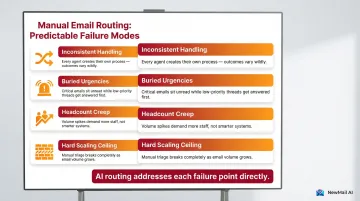
For any organization managing email at scale without automated routing, these aren't worst-case scenarios — they're the predictable result. AI routing addresses each failure point directly.
How to Get the Most Value from AI Email Routing
AI email routing works best when it's configured around your actual workflows and reviewed regularly — not just switched on and forgotten.
Four practices separate teams that see real gains from those that don't:
- Define categories around your real email types — inquiries, complaints, orders, escalations — not generic defaults. Systems that analyze full email content (not just subject lines) deliver meaningfully higher routing accuracy.
- Tune routing logic as your business changes. If billing queries spike after a pricing model update, the system needs to recognize and route those messages correctly. Review misrouting rates monthly, not annually.
- Use a tool that works inside your existing email client. Migration friction kills adoption. NewMail AI runs natively inside Gmail, Outlook, and Apple Mail — setup takes under three minutes, and emails are processed ephemerally with zero data storage by default, a requirement for teams with compliance obligations.
- Track three core metrics: average response time, misrouting rate, and hours saved per month. These numbers justify the investment and pinpoint where further tuning will have the most impact.
Conclusion
AI-powered email routing removes the operational drag of manual triage, replacing it with consistent, fast, and accurate handling at any volume. The gains in speed, cost reduction, and accuracy compound over time — but only when the system is tuned to real workflows and applied consistently.
A team that routes intelligently today builds a scalable foundation, not just a short-term patch. With email volumes growing 3-4% annually and response time expectations rising, the gap between manual and automated routing will only widen.
Organizations that act now gain ground through:
- Faster first responses and fewer missed messages
- Lower overhead from reduced manual triage
- Higher accuracy that holds up at scale
Those that delay don't just fall behind — they spend more effort just to hold their current position.
Frequently Asked Questions
What is the intelligent routing process?
Intelligent routing is an automated system that reads incoming email content, classifies it by intent or category using machine learning, and directs it to the right person or workflow. No human intervention is required at the triage stage.
What is an example of email routing?
A shared customer service inbox receives 150 emails daily. AI routing automatically sends billing questions to the finance team, product complaints to the support manager, and urgent client escalations to a senior account representative—with each email arriving at the right destination within seconds.
How does AI email routing differ from traditional rule-based routing?
Traditional rule-based routing relies on fixed conditions like keywords in subject lines or sender addresses. AI routing reads full email content and intent, adapts to new patterns over time, and handles ambiguous or complex messages that rigid rules would misclassify.
What ROI can businesses expect from AI email routing?
ROI varies by volume. The Launch Consulting case study shows 50 hours saved monthly, with the same team doubling email handling capacity—translating to £2,430 monthly (£29,160 annually) in recovered capacity at £48.60 hourly. Payback periods are typically short given the cost of manual triage.
Is AI email routing secure for sensitive business communications?
Security depends on the solution's architecture. Look for tools that process email ephemerally (no content stored), use encrypted handling, and meet relevant data regulations. NewMail AI is built on zero data retention, with Zero Data Retention agreements with Anthropic and Mistral, GDPR compliance, and Google Security Certified status.