Introduction
Sales managers spend 28% of their day managing email — triaging inbound leads, chasing follow-ups, and extracting deal context from scattered threads — while their reps burn 5.9 hours weekly manually logging CRM data. Meanwhile, leads contacted within 5 minutes are 21x more likely to qualify, yet the average B2B response time lags at 42–47 hours. Gmail AI addresses this directly by removing the administrative load that keeps reps out of actual selling.
Results vary dramatically between teams using identical tools. Configuration quality, workflow alignment, and rep adoption consistency all determine whether a team saves 3 hours per week or abandons the tool within a month. How deliberately you set it up is what separates those outcomes.
This guide covers:
- The exact setup steps for managing a sales team with Gmail AI
- What conditions need to be in place before you start
- Key variables that affect outcomes
- Common mistakes that derail adoption
Key Takeaways
- Gmail AI cuts admin time and speeds up follow-ups — but only when configured for sales workflows
- Biggest gains come from automating drafting, categorizing, and summarizing — not replacing judgment
- Effective adoption means configuring AI to match each rep's voice and aligning inbox categories to the funnel
- Privacy is non-negotiable — prioritize Zero Data Retention and Google Security Certified tools
- Teams with solid setup report faster response times and significantly less post-call admin
How to Manage Sales Teams Effectively with Gmail AI
Step 1: Configure Gmail AI at the Team Level Before Individual Reps Touch It
The biggest setup mistake is deploying AI one rep at a time without centralized configuration. Managers should first establish workspace-level permissions, inbox rules, and shared templates that reflect the team's sales process. Without this foundation, reps end up with inconsistent AI behavior, fragmented data, and no visibility for managers.
Before rollout, verify:
- Admin access to Google Workspace — Required for workspace-level configuration and permissions management
- OAuth scope review — Confirm what inbox data the AI tool can access and ensure it aligns with your security requirements
- Role-based permissions — Enable managers to monitor usage metrics and adoption patterns without accessing individual rep email content
Tools with enterprise-grade security pass Google's OAuth App verification and undergo Cloud Application Security Assessment (CASA) audits every 12 months. This third-party validation ensures the tool meets Google's security standards before connecting to your team's inboxes.
Step 2: Set Up AI-Assisted Outreach and Reply Workflows
Train the AI to generate draft replies in each rep's individual voice — not a generic corporate tone. Feed it examples of high-performing past emails and define your ICP and key value propositions.
The best tools learn passively — analyzing sent emails during setup and extracting communication patterns automatically, learning your communication style in 60 seconds rather than requiring manual training.
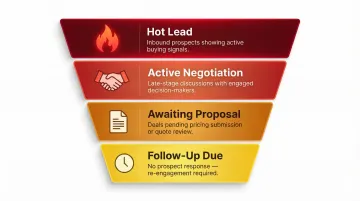
Configure priority inbox categories using AI-generated classifications aligned to your sales funnel:
- "Hot Lead" — Inbound prospects showing buying signals
- "Awaiting Proposal" — Deals pending pricing or contract review
- "Follow-Up Due" — Threads where prospects haven't responded within your defined window
- "Active Negotiation" — Late-stage discussions requiring immediate attention
This lets reps work through their inbox in deal-priority order rather than chronological order, ensuring high-value conversations get attention first.
NewMail AI is built for exactly this workflow. It runs natively inside Gmail with no extra tools, drafts in each rep's voice including FAQs and relevant links, and takes under 2 minutes to set up — with a free 14-day trial that makes team-wide deployment straightforward.
Step 3: Leverage AI Email Intelligence for Pipeline Visibility
Managers can use AI-generated thread summaries and task extraction features to get a clear picture of where deals stand without requiring reps to manually update the CRM after every email exchange. This addresses a critical pain point: 91% of CRM data is incomplete, and manual forecasting hits only 70-79% accuracy with a 15% error rate.
AI-extracted action items work like this:
- "Send pricing by Friday" → Automatically added to the rep's task list with a due date
- "Schedule demo with VP" → Flagged as pending action and surfaced in manager dashboards
- "Waiting on legal review" → Tagged as stalled, prompting manager coaching intervention
This visibility helps managers spot stuck deals early, identify coaching opportunities, and maintain forecast accuracy without micromanaging inboxes. Companies that improve CRM data hygiene through AI automation increase forecast accuracy by up to 30%.
Step 4: Automate Follow-Ups and Meeting Recaps
Set up automated follow-up nudges for threads where prospects haven't responded within a defined window. AI drafts the follow-up in context based on the previous conversation, so it doesn't feel templated or generic. The stakes here are real: 80% of B2B sales require 5+ follow-ups, yet 44% of reps abandon prospects after a single attempt.
AI meeting recaps with extracted action items serve as the link between calls and email follow-through. When a rep finishes a discovery call, the recap immediately surfaces:
- What happened during the meeting
- What decisions were made
- What happens next, with ownership and due dates
Reps can send these recaps as follow-up emails directly from Gmail, assign them as tasks, or log them in the pipeline — cutting the 5.9 hours per week typically lost to manual CRM updates.
When Does Gmail AI Work Best for Sales Team Management?
Gmail AI delivers the clearest ROI for sales teams where the majority of prospect and customer communication flows through email. Outbound SDR teams, account management teams handling renewal pipelines, and customer success teams managing onboarding over email all benefit more than purely phone-based sales organizations.
When Gmail AI Becomes Essential
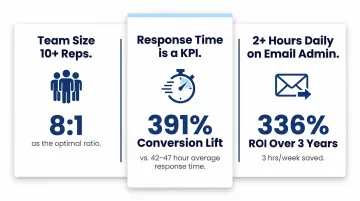
Team size exceeds 10–15 reps: The optimal sales manager-to-rep ratio is 8:1. When managers oversee more than 10 direct reports, pipeline accuracy and coaching quality both suffer. AI-generated summaries and action items help managers maintain visibility as teams grow.
Response time to inbound leads is a tracked KPI: Leads contacted within 1 minute see a 391% improvement in conversion compared to a 2+ minute delay. Yet the average B2B response time sits at 42–47 hours. AI drafting tools help teams hit sub-5-minute SLAs — and leads reached within the hour are 21x more likely to qualify.
Reps spend 2+ hours daily on email admin instead of selling: Sales professionals dedicate 70% of their time to non-selling tasks. Teams using Gmail AI with consistent daily adoption save an average of 3 hours per week per user — 150 hours annually — delivering a 336% ROI over three years.
When Gmail AI Adds Friction
Not every sales environment benefits equally. Three conditions tend to limit the return:
No defined ICP or sales playbook: Without documented value propositions, ideal customer profiles, or standard messaging, AI-generated drafts will be generic at best — the tool needs clear inputs to calibrate against.
Deals happen primarily on calls: If email only handles calendar invites, the ROI won't justify the setup effort.
Your industry has strict data sensitivity requirements: Standard AI tools often store or log email content, which creates compliance risk in regulated sectors. Look for Zero Data Retention certification and GDPR compliance — both of which NewMail AI holds — before deploying any AI email tool.
What Your Sales Team Needs Before Getting Started
Preparation directly determines results. Teams that deploy Gmail AI without first documenting their sales workflow, tone guidelines, and inbox structure typically see poor draft quality, low rep adoption, and no measurable impact on pipeline metrics. Two areas need attention before you flip the switch: technical access and data compliance.
Equipment and Access Requirements
At minimum, the team needs:
- Google Workspace accounts with admin-level configuration access
- A Gmail-native AI tool (browser extension or Workspace add-on)
- Agreed inbox labels or categories that map to stages in the sales funnel (e.g., "New Inbound Lead," "Active Negotiation," "Churned Account")
Data Security and Compliance Readiness
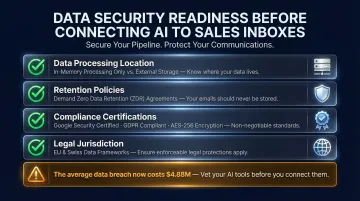
Sales inboxes contain sensitive information: prospect company data, deal terms, pricing, competitive intelligence. Before connecting any AI tool, managers must verify each of the following:
- Data processing location — Does the tool store content on external servers, or is data processed in memory only and never written to disk?
- Retention policies — Look for Zero Data Retention agreements with AI providers. Anthropic and Mistral discard all inputs immediately after processing; OpenAI and Google Gemini temporarily store data under strict agreements preventing training use or reselling.
- Compliance certifications — Google Security Certified status, GDPR compliance, and AES-standard encryption are baseline requirements. Unsanctioned "shadow AI" tools are a documented risk factor: IBM's 2024 Cost of a Data Breach Report puts the global average breach cost at $4.88M.
- Legal jurisdiction — Where your AI vendor is incorporated affects your legal recourse. EU and Swiss-domiciled providers fall under GDPR and Swiss Federal Data Protection Act (nFADP) — two of the strongest privacy frameworks globally.
Key Variables That Determine How Well It Works
Two sales teams with the same Gmail AI tool can get dramatically different outcomes based on how well they control the following variables. Getting these right is what separates teams that save hours weekly from teams that abandon the tool after a month.
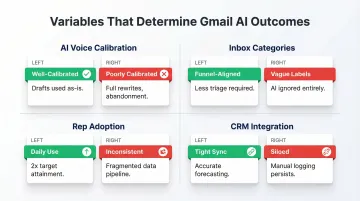
AI Voice Calibration
If AI drafts sound generic or off-brand, reps will override them constantly — eliminating the time savings the tool was supposed to deliver. The quality of context fed into the AI during setup determines how closely drafts match each rep's actual style.
Well-calibrated drafts get used as-is or with minor edits. Poorly calibrated ones require full rewrites and erode rep trust, leading to abandonment. The best tools — like NewMail AI — analyze sent emails passively during setup, extracting tone, vocabulary, and structure in about 60 seconds without manual training.
Inbox Category and Filter Configuration
AI can only prioritize emails as intelligently as the categories it's given. Vague or overlapping inbox labels create confusion — precise, funnel-aligned ones create clarity. Well-structured inboxes typically include categories like:
- New Inbound Lead — flags first-touch prospects for same-day response
- Active Negotiation — surfaces threads requiring decision-maker follow-up
- Churned Account — routes win-back opportunities to the right rep
Teams with well-designed inbox structures report reps spending less time triaging and more time on high-value conversations. Teams with poorly defined categories find reps ignoring AI suggestions entirely.
Rep Adoption Consistency
Gmail AI tools only generate value when reps actually use the drafts, act on AI-extracted tasks, and apply follow-up nudges. Inconsistent usage creates fragmented data and makes it impossible for managers to rely on AI-generated pipeline signals.
The adoption data is hard to ignore: sales professionals who use AI daily are 2x more likely to exceed their targets, and heavy users are 3.5x more likely to book 5+ meetings per month than occasional ones. When AI lives inside Gmail, reps don't need to context-switch — daily use becomes the default, not the exception.
CRM and Task Integration Quality
If AI-extracted action items and email summaries stay siloed inside Gmail and never flow into the CRM, managers lose pipeline visibility — and reps still have to manually log activity, defeating one of the core benefits.
Teams with tight CRM integration see faster pipeline updates and more accurate forecasting. Teams without it face the same data hygiene problems they had before adopting AI. According to Gartner, 30% of generative AI projects are abandoned after proof of concept due to poor integration and unclear business value.
Common Mistakes Sales Managers Make with Gmail AI
Sending AI Drafts on High-Stakes Threads Without Review
Automating routine follow-ups and first-touch outreach makes sense. Letting AI send responses to active negotiations, contract discussions, or escalated customer issues — without a rep reading them first — does not.
Buyers in late-stage deals pick up on generic or slightly off-tone responses fast. Establish a clear policy for which email types always require rep review before sending.
Using One Generic AI Voice for Every Rep
Configure a single brand voice for every rep, and buyers will notice — because every email sounds like it came from the same robot. Calibrate AI drafts per rep, or at minimum per role (SDR, AE, CSM), to preserve authenticity.
The difference between a trusted seller and a forgettable one often comes down to voice. Don't let identical AI outputs erase that distinction across your team.
Skipping Security Vetting Before Connecting AI to Sales Inboxes
This is the highest-risk mistake sales managers make. A poorly vetted AI tool with broad OAuth access to sales inboxes can expose prospect data, deal terms, and competitive intelligence — often without anyone noticing until damage is done.
Before granting inbox access to any tool, confirm:
- Data retention policies — does the vendor store your emails, and for how long?
- Encryption standards — is stored data protected at rest and in transit?
- Compliance certifications — GDPR, SOC 2, or equivalent depending on your industry
Most AI-related data incidents trace back to access controls that were never properly scoped in the first place. Vet before you connect.
Frequently Asked Questions
Is there an AI assistant for Gmail?
Yes, several AI assistants integrate directly into Gmail — from Google's built-in Gemini features to third-party tools like NewMail AI that work natively inside the Gmail interface with no extra tools required. The best choice depends on whether you need individual writing assistance or team-level workflow automation with manager visibility.
What are the best AI tools for sales teams?
The best AI tools for sales teams depend on the bottleneck being solved. Meeting intelligence tools address post-call admin, outbound automation tools address prospecting at scale, and Gmail-native AI assistants like NewMail AI address day-to-day inbox management, follow-ups, and draft generation for reps who live in email.
How do sales teams use AI?
Sales teams use AI for drafting outbound emails, prioritizing inbound leads, automating follow-ups, extracting action items, and surfacing deal signals for managers. The most effective teams pair AI assistance with human judgment — keeping control over high-stakes conversations.
How do I set up Gmail AI for my sales team?
Start by selecting a Gmail-native tool, configuring Google Workspace admin permissions, and calibrating AI voice settings using examples of high-performing past emails. NewMail AI is built for fast team deployment — 2-minute setup and a 14-day free trial with full feature access.
Is Gmail AI safe for sensitive sales data?
Safety varies by tool — some store email content on external servers, while privacy-first options like NewMail AI process data ephemerally with no retention by default. For sensitive deal data, prioritize Zero Data Retention certification, military-grade encryption, and credentials like GDPR compliance and Google Security Certified status.
Can Gmail AI help with sales follow-ups and pipeline tracking?
Yes. AI can draft context-aware follow-ups based on thread history, send nudges when prospects go silent, and surface deal summaries that help managers spot stalled opportunities — without reps manually updating the CRM after every touchpoint.