Introduction
A high-intent prospect replies to an outreach email Friday afternoon expressing interest in your solution. By Monday morning, after three rounds of calendar back-and-forth across time zones and multiple stakeholders, they've booked a demo with your competitor. This scenario plays out daily in enterprise sales. Not because reps lack urgency, but because manual scheduling creates friction at the exact moment momentum matters most.
According to Harvard Business Review research, firms that contact potential customers within an hour of receiving a query are nearly seven times more likely to qualify the lead than those who wait even an hour longer.
The problem is that speed is hard when the average enterprise deal involves 13 internal stakeholders. What should be a 5-minute scheduling task turns into a multi-day email chain.
In enterprise sales, automating meeting scheduling is about keeping deals moving forward, protecting rep capacity, and delivering a professional buyer experience from the very first touchpoint. This guide covers the best practices that high-performing sales teams use to make that happen.
Key Takeaways
- Trigger scheduling links only after positive signals—cold outreach with embedded links hurts deliverability and personalization scores
- Use round-robin routing and booking limits to prevent rep burnout as meeting volume scales
- Bi-directional CRM sync updates deal records automatically on every booking, reschedule, or no-show
- Collective availability features eliminate multi-week coordination chains for deals with 5+ stakeholders
- Vet tools against SOC 2 or ISO 27001, GDPR with a signed DPA, SSO support, and data residency requirements
Why Manual Scheduling Stalls Enterprise Deals
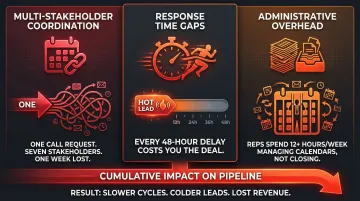
The cost of manual scheduling compounds dramatically in enterprise sales. Unlike SMB deals where one decision-maker schedules and attends, enterprise purchases involve 8-13 stakeholders depending on company size and deal complexity. A single scheduling thread for one discovery call can generate dozens of emails and multiple days of delay as the rep coordinates across procurement leads, champions, technical evaluators, and internal team members.
That coordination delay has a direct cost. When prospects wait 48+ hours for confirmed meeting times, interest cools, competing vendors fill the gap, and reps lose the psychological advantage of a warm conversation. InsideSales research found that conversion rates drop 8X when response time increases from 5 minutes to just 6+ minutes — making speed-to-meeting one of the clearest predictors of whether a deal advances.
The productivity damage runs deeper than lost deals. Salesforce's State of Sales report found that sales reps spend only 28% of their week actually selling, with more than half their time absorbed by data entry and administrative coordination.
Calendar management forces constant context-switching between selling activities and logistics. The more complex the deal, the worse the problem gets — and in enterprise sales, that complexity is the baseline.
The compounding effect across these three failure points — coordination overhead, momentum loss, and rep distraction — is why scheduling friction shows up in forecasts long before anyone names it as a cause.
- Multi-stakeholder coordination turns a single discovery call into a week-long email chain
- Response time gaps let competing vendors establish relationships while your team idles
- Administrative overhead keeps reps out of selling conversations and inside their calendars
Best Practices for Automating Enterprise Meeting Scheduling
Set Availability Rules That Protect Both Rep Capacity and Buyer Experience
Configure daily meeting limits, buffer times between calls, and minimum notice periods in your scheduling tool from day one. Enterprise reps typically need 15-30 minutes of prep before high-stakes calls to review account history, competitive positioning, and tailored messaging. They also need post-call time to update CRM records, send follow-ups, and extract action items.
Gartner research projects that by 2026, teams using GenAI for meeting prep will reduce preparation time by over 50%. Even so, reps need structured buffer periods — enforced automatically, not left to manual discipline.
Create differentiated event types for different deal stages. A 20-minute discovery call requires different availability rules and prep needs than a 60-minute multi-stakeholder demo or a 90-minute contract review. Configure distinct booking links for each stage with appropriate time allocations, minimum lead times, and post-meeting buffer periods. This prevents over-scheduling and ensures the right time investment for each conversation type.
Integrate Scheduling Directly with Your CRM and Sales Stack
A scheduling tool operating in isolation creates a data gap: meetings get booked but not logged, follow-ups don't trigger automatically, and pipeline records fall out of sync. Bi-directional CRM integration ensures every booking, reschedule, or no-show updates the relevant contact or deal record automatically, eliminating manual entry and preventing leads from slipping through the cracks.
Implement intelligent lead routing for inbound enterprise leads. When a prospect submits a demo request form, the scheduler should use firmographic data — company size, industry, region — to route the meeting to the correct rep without manual assignment. Enterprise AEs handle different complexity levels than SMB teams, and routing must reflect this.
Round-robin routing keeps workloads balanced as meeting volume grows, preventing individual reps from becoming bottlenecks while others sit underutilized.
Automate Pre- and Post-Meeting Communication Without Adding Inbox Chaos
Every meeting generates its own email thread: confirmations, pre-meeting prep notes, post-call follow-ups, action item summaries. For enterprise reps managing dozens of active opportunities, that overhead compounds fast — easily 20-30 minutes of inbox work per meeting.
AI email assistants like NewMail AI work natively inside Gmail and Outlook to extract scheduling tasks from email threads, draft follow-up messages in the rep's voice, and surface meeting recaps with action items—handling the communication layer that scheduling tools don't touch. NewMail's GDPR-compliant, Swiss-based platform processes data ephemerally with zero data retention agreements with AI providers including Anthropic and Mistral, meeting the security standards enterprise teams require.
Configure automated reminder sequences to reduce no-shows. A well-designed reminder flow cuts missed meetings without requiring rep involvement:
- Confirmation at booking — sets expectations and includes the agenda
- 24-hour reminder — surfaces prep materials and confirms attendance
- 1-hour reminder — delivers the call link and any last-minute context
Standard no-show rates in sales hover around 20%, but best-in-class teams achieve 8-12%. In enterprise sales, no-shows carry disproportionate cost given the stakeholder coordination required to arrange each meeting. One missed call can delay deals by weeks.
Managing Multi-Stakeholder and Cross-Region Scheduling Complexity
Collective availability scheduling solves the enterprise-specific challenge of coordinating meetings across multiple stakeholders. When a deal requires the prospect's procurement lead, champion, and technical evaluator alongside your AE and sales engineer, manual scheduling can consume two weeks of calendar ping-pong.
Research shows that deals involving 5+ engaged stakeholders close at 30% versus 5% for single-threaded opportunities. Collective scheduling features surface only times when all required participants are free, cutting that coordination overhead dramatically.
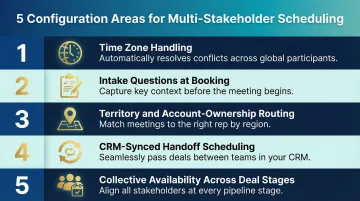
Five configuration areas determine how well your scheduling setup handles this complexity:
Time zone handling — 72% of companies work across time zones, so automatic detection is non-negotiable. A prospect who books what looks like 9 AM their time but lands at 3 AM for the rep creates immediate friction. Your tool should handle daylight saving transitions automatically and display each participant's local time without guesswork.
Intake questions at booking — Enterprise reps entering calls with zero context waste the first 10 minutes on discovery that could have been collected upfront. Custom fields covering company size, use case, current tools, or primary challenge let reps arrive with targeted agendas and skip the generic opener.
Territory and account-ownership routing — When a named account already has an assigned AE, any inbound meeting request from that company should route back to that rep, not a generic queue. This protects relationship continuity and keeps enterprise prospects from being handed to someone new mid-deal.
CRM-synced handoff scheduling — When an SDR qualifies a lead and ownership shifts to an AE, the next meeting should be scheduled and logged automatically under the correct deal record. Manual handoffs carry the highest drop-off risk in enterprise sales, where 86% of B2B purchases stall during the buying process.
Collective availability across deal stages — As deals progress, the stakeholder mix changes. Scheduling tools that pull live calendar availability for the current required participants (not a static link) prevent delays when the buying committee shifts.
Avoiding Common Enterprise Scheduling Automation Mistakes
Three mistakes consistently derail enterprise scheduling automation—and all three are avoidable with the right guardrails in place.
Don't neglect booking caps. Caps aren't just a feature—they're a pipeline quality control mechanism. Having 30 poorly-prepared calls is worse than 10 well-researched conversations. Outreach data shows that opportunities with live meetings close 32 days faster with higher win rates, but only when those meetings are strategic. Automated scheduling should include guardrails that prevent reps from overcommitting.
Don't embed scheduling links in cold outreach. A calendar link in a first-touch email signals low personalization, may trigger spam filters, and asks for a level of trust the prospect hasn't extended yet. Wait for a positive reply before sharing a booking link. Many teams send proposed time slots as plain text instead—it keeps the exchange feeling personal rather than transactional.
The same logic applies to your underlying processes. Don't automate on top of broken workflows. If CRM routing rules are outdated or territory assignments are wrong, automation amplifies those errors at scale rather than correcting them.
Before going live, audit existing scheduling workflows and identify edge cases: accounts with multiple contacts, partner-involved deals, renewals vs. new business. Build routing logic that handles each correctly from the start.
Security and Compliance Requirements for Enterprise Scheduling Tools
Enterprise scheduling tools must meet the same security bar as the rest of the sales stack. These tools connect to CRMs, calendars, and contact data, meaning they handle sensitive prospect and customer information. For teams selling into regulated industries—finance, healthcare, legal—the scheduler becomes part of the compliance review. Buyers will ask about it, and teams need answers ready. 61% of enterprises now require InfoSec sign-off pre-purchase, making security validation a deal requirement.
Non-negotiable technical requirements for enterprise scheduling tools include:
- SSO and SCIM provisioning to control access and automate user management
- Role-based permissions separating what reps vs. admins can modify
- Audit logs for diagnosing routing errors or unauthorized changes
- Data processing agreements (DPAs) defining how prospect data is handled
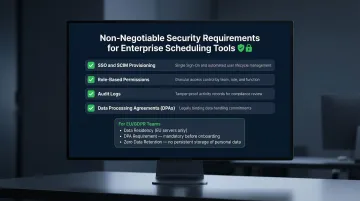
Tools without these capabilities cannot pass enterprise procurement reviews. For teams operating across the EU, data residency requirements add another layer of scrutiny.
GDPR compliance requires that scheduling tools offer a DPA, process data within compliant regions, and avoid retaining meeting or contact data beyond necessity. Vendors headquartered in jurisdictions with strict data-privacy laws — Switzerland, for example — provide structural assurance beyond policy statements. The certification baseline enterprise security teams now expect from AI-powered tools includes GDPR compliance, Google Security Certification, and Zero Data Retention agreements with AI providers. NewMail AI holds all three.
Admin controls needed for enterprise governance include:
- Ability to enforce mandatory SSO
- Restrictions on which reps can share meeting links externally
- Limits on integrations to IT-approved tools only
- Data retention policy configuration
These controls protect organizations from misuse while giving sales teams the flexibility to move fast.
Frequently Asked Questions
What is the difference between a standard scheduling tool and one built for enterprise sales?
Enterprise scheduling tools add intelligent lead routing based on firmographic data, multi-stakeholder collective availability management, bi-directional CRM sync, role-based permissions, and compliance features like SOC 2, GDPR DPAs, and SSO. Standard tools like basic Calendly lack the complexity handling required for multi-rep, multi-region, regulated-industry sales workflows.
How do you prevent automated scheduling from feeling impersonal in high-value enterprise deals?
Send personalized context alongside the booking link, use intake questions that show you've researched the prospect's situation, and follow up with a human-written note after booking. The tool handles logistics; the rep maintains the relationship. Automation works best when the prospect never notices it.
When in a sales sequence should you share a scheduling link with a prospect?
Only after a positive reply or expressed interest—never in cold outreach. Early links hurt email deliverability by triggering spam filters, signal low personalization, and require trust that hasn't been established. Wait for engagement, then offer the link as a convenience that respects the prospect's time.
How should enterprise teams handle scheduling for multi-stakeholder deals with 5+ participants?
Use collective availability features that surface only times when all required participants—across both buyer and seller sides—are free simultaneously. This eliminates multi-week scheduling chains and can cut time-to-first-meeting by days, sometimes weeks, on complex deals.
How do you measure the ROI of automating meeting scheduling in enterprise sales?
Track speed-to-meeting, show rates, meeting-to-opportunity conversion rate, and hours saved from coordination—then compare against pre-automation baselines. Successful implementations typically reduce speed-to-meeting by 50%+ and improve show rates by 10-15 percentage points.
What security certifications should an enterprise scheduling tool have?
Baseline requirements include SOC 2 Type II or ISO 27001, GDPR compliance with a signed DPA, SSO with SCIM provisioning, and data residency options. For tools using third-party AI providers, verify Zero Data Retention agreements to confirm prospect data isn't stored or used for model training.