Introduction
Scheduling a single meeting can spiral into a cascade of back-and-forth emails—"Does Tuesday work?", "I'm free Wednesday after 2pm," "Let's try Thursday morning." For sales teams, recruiters, and executives, this coordination dance wastes hours that could be spent on revenue-generating work or strategic decisions. Organizing a traditional group meeting requires an average of 30 emails, according to Doodle, and Calendly reports that 36% of professionals spend at least three hours a week just scheduling meetings.
Meeting scheduler software cuts this process down to a single step. You set your availability once, connect your calendar and video conferencing tool, and share a booking link. Contacts choose a slot, both parties receive automatic confirmations and video links, and you reclaim hours each week.
Below, we break down 8 of the top meeting scheduler tools in 2026—what each does well, where it falls short, and which types of teams will get the most out of it.
Key Takeaways
- Meeting scheduler software lets you share a booking link so clients or teammates can self-schedule—cutting the back-and-forth entirely
- Top 8 picks: Calendly, Clockwise, Reclaim AI, Doodle, SimplyMeet.me, Cal.com, Microsoft Bookings, and Google Calendar Appointment Scheduler
- Choose based on calendar integrations, video conferencing support, AI capabilities, customization depth, pricing, and data privacy
- Most tools offer free plans or trials; AI-powered options like Reclaim AI and Clockwise optimize complex calendars
What Is Meeting Scheduler Software?
Meeting scheduler software lets you set your availability, connect your calendar and video conferencing app, and share a booking page where others can reserve time—without back-and-forth emails.
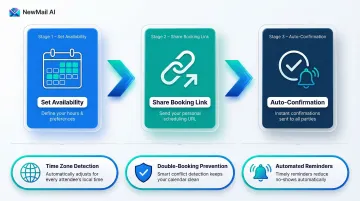
Configure your availability and meeting types once, share a link, and invitees pick a slot. Both parties receive automatic confirmations, calendar invites, and video conferencing links.
Most tools also handle:
- Time zone detection — converts availability to each invitee's local time automatically
- Double-booking prevention — syncs with your existing calendar in real time
- Automated reminders — reduces no-shows without manual follow-up
The 8 tools below cover the full range, from basic free schedulers to AI-powered options built for high-volume teams.
8 Best Meeting Scheduler Software in 2026
Each tool below was evaluated on feature depth, integration breadth, pricing value, ease of use, and user trust. The list covers options suited for individuals, sales teams, and enterprise organizations.
Calendly
Calendly is the category standard, widely adopted by professionals and sales teams for its polished interface, reliable calendar syncing (Google, Outlook, and iCloud), and trusted brand recognition that reassures invitees. Major video conferencing platforms—Zoom, Meet, Teams, Webex—integrate seamlessly.
Standout features:
- Multiple event types: one-on-one, group, and round-robin
- Routing forms that direct leads to the right team member
- Salesforce and HubSpot integrations for sales workflows
- Automated email and SMS reminders
The free plan is limited to one booking link; paid plans unlock advanced routing and analytics.
With over 20 million users globally and adoption across 86% of the Fortune 500, Calendly has become the default choice for revenue teams.
| Best For | Professionals, sales teams, and recruiters wanting simple, trusted scheduling |
|---|---|
| Key Features | Event types, routing forms, CRM integrations, automated reminders, time zone detection |
| Pricing | Free plan available; paid plans from $10/seat/month (billed annually) |
Clockwise
Update: Clockwise will be discontinued on March 27, 2026, with all user data deleted shortly after. Clockwise is directing existing users to migrate to Reclaim AI.
Clockwise was an AI-powered calendar tool that actively analyzed your calendar to protect focus time, resolve conflicts, and find optimal meeting slots across team members. It was particularly well suited for knowledge workers managing dense schedules.
Key features included:
- AI Calendar that created events from natural language prompts
- "Ideal Day" setup that defined focus blocks and lunch breaks
- "Prism" interface for dynamic event management
- Scheduling Links that surfaced only slots that wouldn't fragment deep work
| Best For | Companies that wanted to protect team focus time while simplifying client booking |
|---|---|
| Key Features | AI Calendar, Scheduling Links, Ideal Day, flexible meeting rescheduling |
| Pricing | No longer available as of March 27, 2026 |
Reclaim AI
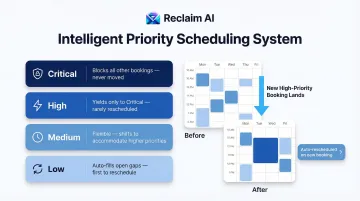
Reclaim AI treats your calendar as a priority engine: it assigns priority tiers to tasks and meetings and dynamically reshuffles lower-priority items when high-priority bookings land. Especially useful for teams that use their calendar as their primary productivity system.
What sets it apart:
- Priority-based scheduling links (critical, high, medium, low) that auto-rearrange your day when a booking confirms
- Smart Meetings that find the best cross-team time slots
- Detailed time analytics tracking hours per person and per meeting type
- Calendar sync across multiple platforms
Reclaim AI is the officially recommended alternative for migrating Clockwise customers, with a 100% price match guarantee for 12 months.
Reclaim maintains SOC 2 Type II certification and GDPR compliance, making it suitable for enterprise deployment.
| Best For | Businesses managing complex team schedules and wanting data-driven calendar insights |
|---|---|
| Key Features | Priority scheduling links, Smart Meetings, calendar sync, advanced time analytics |
| Pricing | Free plan available; paid plans from $10/seat/month (billed annually) |
Doodle
Doodle is a veteran in the scheduling space, best known for its group polling feature that lets large groups vote on the meeting time that works best for everyone. Suitable for individuals and businesses coordinating events, interviews, or team-wide meetings.
Core capabilities:
- Group Poll: propose time slots, collect votes, lock in the winner
- One-on-one booking links for standard appointments
- Sign-Up Sheets for webinars or open events
- Deadline reminders to drive poll responses
- Integrations with Zoom, Google Meet, and Teams
Doodle holds SOC 2 Type II certification with annual audits and is GDPR compliant.
| Best For | Individuals and teams needing consensus-based scheduling or event sign-ups |
|---|---|
| Key Features | Group polls, one-on-one booking, sign-up sheets, automated reminders, video platform integrations |
| Pricing | Free plan available; paid plans from $6.95/user/month (billed annually) |
SimplyMeet.me
SimplyMeet.me is a clean, straightforward scheduling platform with a standout Poll Meetings feature that automates the process of finding the best meeting time for groups. Well suited for large teams coordinating schedules across many participants.
Notable features:
- Poll Meetings: participants vote on proposed slots; organizer confirms the final time
- Multiple Meeting Types with language settings and group size controls
- Unified Scheduled Meetings dashboard with filtering by day, week, or month
- Payment integration via SBPay for consultations or paid classes
The free plan supports 500 meetings per month for individual users.
| Best For | Large teams choosing consensus meeting times; service providers accepting paid bookings |
|---|---|
| Key Features | Poll Meetings, meeting types, scheduled meetings dashboard, SBPay integration, calendar sync |
| Pricing | Free individual plan; paid plans from $9.99/user/month (billed annually) |
Cal.com
Cal.com is an open-source scheduling tool offering maximum flexibility for individuals and technical teams: unlimited event types on the free plan, a public API for custom integrations, and support for 20+ video conferencing tools. Ideal for those who want full control without vendor lock-in.
What makes it stand out:
- Open-source architecture with self-hosting and deep customization options
- Supports 8+ calendars and 20+ conferencing tools
- Recurring booking options and Zapier integration for post-booking workflows
- Team scheduling with round-robin and collective event types
One trade-off: the booking page aesthetic is minimal compared to more design-forward alternatives.
Cal.com maintains SOC 2 Type II certification and provides a Data Processing Addendum for enterprise customers.
| Best For | Individuals and technical teams wanting maximum integration flexibility and open-source control |
|---|---|
| Key Features | Open-source, unlimited event types, 20+ video integrations, public API, round-robin scheduling |
| Pricing | Free for individuals; team plans from $15/user/month (billed annually) |
Microsoft Bookings
Microsoft Bookings is the native scheduling solution for Microsoft 365 users, integrating directly with Outlook, Teams, and the broader M365 ecosystem—making it a low-friction choice for organizations already running on Microsoft infrastructure.
Everything it offers comes included in an existing M365 subscription:
- Automatic bi-directional Outlook sync to prevent double-booking
- Customizable booking pages with staff calendars and service definitions
- Teams integration for virtual meetings
- Automated confirmation and reminder emails
- Customer data collection at time of booking
All customer data is stored within Microsoft 365 using Exchange shared mailboxes, ensuring compliance with your organization's existing data governance policies.
| Best For | Organizations already using Microsoft 365 who want a native scheduling solution |
|---|---|
| Key Features | Outlook/Teams sync, multi-staff calendars, branded booking pages, automated reminders, customer data collection |
| Pricing | Included with Microsoft 365 Business plans from $6/user/month (billed annually) |
Google Calendar Appointment Scheduler
Google Calendar's built-in Appointment Schedule feature is the simplest zero-setup option: it's built directly into Google Calendar, requires no new account, and lets users create shareable booking pages in minutes. Best for individuals who need a basic, free solution without customization requirements.
What it includes:
- Native Google Calendar and Meet integration with no third-party setup
- Configurable availability windows and buffer times
- Embeddable booking page link
- Scheduling window limits to control how far out bookings can be made
Worth noting: there's no branding customization, no lead qualification forms, and limited polish for professional or sales contexts where presentation matters.
| Best For | Google Workspace users wanting a free, no-setup scheduling page |
|---|---|
| Key Features | Native Google Calendar integration, availability windows, buffer times, shareable/embeddable link, Google Meet auto-link |
| Pricing | Free with Google account; Google Workspace plans from $6/user/month (billed annually) |
How We Chose the Best Meeting Scheduler Software
Tools were assessed on core scheduling functionality (booking pages, calendar sync, video conferencing integration), AI or automation capabilities, customization depth, pricing value across plan tiers, and ease of use for both host and invitee.
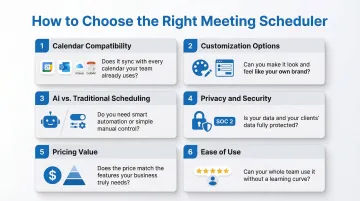
Key factors that should drive your decision:
Calendar and video conferencing compatibility: Verify your exact platforms are supported, not just "major apps." For example, if you use CalDAV or iCloud calendars, Cal.com and SimplyMeet.me explicitly support these, while other tools may not.
Customization options: Consider branding, booking forms, and multiple meeting types. Calendly and Cal.com offer extensive customization; Google Calendar Appointment Scheduler offers almost none.
AI vs. traditional scheduling: AI tools like Reclaim AI optimize your calendar proactively and protect focus time; traditional tools like Calendly and Google Calendar are simpler but require manual configuration.
Privacy and security: Meeting scheduler tools access calendar data containing sensitive business intelligence—client names, deal stages, internal project details. Before committing to a tool, verify:
- Whether it stores full calendar event content or only availability metadata
- That it offers role-based permissions and data encryption
- Its data retention policies, especially for regulated industries
Tools like Calendly, Reclaim AI, Cal.com, and Doodle maintain SOC 2 Type II certification, while Microsoft Bookings and Google Calendar inherit their parent platform's compliance framework.
Conclusion
The best meeting scheduler software depends on your use case. AI-powered tools like Reclaim AI suit teams managing complex, dense calendars; poll-based tools like Doodle and SimplyMeet.me work best for group consensus; Calendly and Cal.com are strong all-rounders; and Microsoft Bookings and Google Calendar Appointment Scheduler are ideal when staying within an existing ecosystem.
Scheduling a meeting is only the start. Once the meeting happens, there are follow-up emails, action items, and recap threads to manage. For professionals who want to handle that side of the workflow just as efficiently, NewMail AI covers post-meeting follow-up directly inside Gmail, Outlook, or Apple Mail.
NewMail automatically pulls action items from meetings, generates structured summaries with assigned owners and due dates, and drafts context-aware follow-up emails in your voice—all without leaving your inbox.
Try your top pick from the list above, and if managing high email volumes around those meetings is a challenge, explore NewMail AI free for 14 days—no credit card required.
Frequently Asked Questions
What is meeting scheduler software?
Meeting scheduler software lets users create shareable booking pages linked to their calendar, so clients or colleagues can self-select available time slots—eliminating back-and-forth scheduling emails and automatically generating calendar invites and video meeting links.
What is the best free meeting scheduler software?
Calendly, Doodle, Reclaim AI, and Cal.com all offer usable free plans. Cal.com (unlimited event types, open-source) and Doodle (group polls + basic booking) have the broadest free-tier features, while Google Calendar Appointment Scheduler is the simplest option for Google Workspace users.
How does AI improve meeting scheduling?
AI scheduling tools like Reclaim AI go beyond displaying availability—they analyze calendar patterns, protect focus time, assign meeting priorities, and dynamically reschedule lower-priority events when new bookings arrive, cutting manual calendar management time considerably.
What features should I look for in meeting scheduling software?
Top criteria include calendar sync with your existing platforms, automatic video conferencing link generation, customizable booking pages, automated reminders to reduce no-shows, and—for sales or enterprise teams—CRM integration and lead routing capabilities.
How does meeting scheduler software connect to the rest of my workflow?
Most tools integrate with CRMs (Salesforce, HubSpot), payment platforms (Stripe, PayPal), and automation tools like Zapier. A new booking can automatically log in your CRM, trigger a confirmation email, and create a post-meeting follow-up task—without manual input.
Is meeting scheduling software secure for business use?
Security varies by provider. Most encrypt data in transit and at rest, but calendar data can expose sensitive business context. Verify data retention policies, GDPR/SOC 2 compliance, and whether the tool stores calendar event content or only availability metadata before deploying to enterprise or regulated teams.