Introduction
Professionals attend 11.3 hours of meetings weekly—nearly a third of the average workweek. Yet most walk away with scattered notes, unclear action items, and decisions that fade before the next morning.
The cost is real: Fortune 500 companies lose 25 billion hours annually to ineffective collaboration, with ineffective meetings draining $37 billion from US businesses each year.
AI meeting assistants address this directly. They record, transcribe, and summarize conversations automatically, replacing manual note-taking with searchable meeting libraries teams can query weeks or months later.
This guide evaluates the 10 best AI meeting assistants for 2026, focusing on transcription quality, integration depth, security certifications, and post-meeting workflow support. Whether you're weighing native platform tools like Zoom AI Companion and Microsoft 365 Copilot against standalone cross-platform options, the criteria here will help you match the right tool to your team's needs.
Key Takeaways
- AI meeting assistants save hours weekly by automating recording, transcription, and summarization, freeing teams from manual note-taking
- Top tools extract action items, integrate with CRMs like Salesforce and HubSpot, and support follow-up workflows beyond basic transcription
- Evaluate tools on platform compatibility (Zoom, Meet, Teams), transcription accuracy, security certifications (SOC 2, GDPR, HIPAA), and integration depth
- Top picks span every use case: Fireflies.ai for collaboration, Fathom for free fast summaries, Krisp for bot-free audio, and Read AI for enterprise analytics
- For regulated industries, confirm SOC 2, GDPR, and HIPAA certifications directly with vendors before deployment
What Is an AI Meeting Assistant?
AI meeting assistants are software tools that join video calls or run in the background to automatically record, transcribe, summarize conversations, and extract action items. They eliminate the distraction of manual note-taking so participants can focus on the discussion itself.
Modern tools go well beyond transcription. Depending on the platform, they can:
- Analyze conversation sentiment and speaker talk-time
- Sync action items directly to CRM systems
- Draft follow-up emails based on meeting content
- Build searchable meeting libraries across your entire history
That last point matters more than it sounds. Tools like Fireflies.ai let users ask "What decisions were made about the Q2 budget?" and pull instant answers from past meetings — something no notebook ever could.
The right tool depends on how your team works, not just what features look impressive on a pricing page.
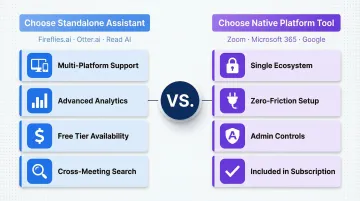
When You Need a Standalone Assistant vs. Built-in Platform Tool
Choose standalone assistants (Fireflies.ai, Otter.ai, Read AI) when:
- Your team uses multiple video platforms—61% of hybrid-work companies use two or more conferencing tools
- You need advanced analytics like sentiment tracking, conversation intelligence, or CRM sync
- Budget constraints favor tools with generous free tiers
- You require cross-meeting search across all platforms
Choose native platform tools (Zoom AI Companion, Microsoft 365 Copilot, Google Gemini) when:
- Your organization is fully committed to one ecosystem
- You want zero-friction adoption without third-party setup
- Admin controls and policy enforcement are priorities
- You prefer tools already included in your subscription
The 10 Best AI Meeting Assistants for 2026
Tools were evaluated on transcription quality, AI feature depth, platform compatibility, integration ecosystem, security posture, and pricing accessibility. Below is a master comparison table covering all 10 tools.
| Tool Name | Best For | Supported Platforms | Free Plan | Starting Paid Price | Key Security Certifications |
|---|---|---|---|---|---|
| Fireflies.ai | Collaboration & searchable library | Zoom, Meet, Teams, Webex | Yes (unlimited transcription) | $10/month | SOC 2, GDPR, HIPAA (Enterprise) |
| Fathom | Fast summaries & free tier | Zoom, Meet, Teams | Yes (unlimited) | $16/month | SOC 2, GDPR, HIPAA |
| Otter.ai | Q&A search & team collaboration | Zoom, Meet, Teams | Yes (unlimited meetings) | $19.99/month | SOC 2, GDPR, HIPAA |
| Krisp | Bot-free audio + notes | Any platform | Yes | $8/month | SOC 2, GDPR, HIPAA |
| Fellow | Full meeting lifecycle & privacy | Zoom, Meet, Teams | Yes (5 AI notes) | $7/month | SOC 2, GDPR, HIPAA |
| Avoma | Sales coaching & analytics | Zoom, Meet, Teams, Webex | No | $19/month | SOC 2, GDPR, HIPAA |
| tl;dv | Cross-meeting search & reports | Zoom, Meet, Teams | Yes (unlimited recordings) | $18/month | SOC 2, GDPR |
| Granola | Human+AI hybrid notes | Mac, iOS (all platforms) | Yes | $14/month | SOC 2, GDPR |
| Zoom AI Companion | Native Zoom integration | Zoom only | Yes (with paid Zoom account) | Included | SOC 2, GDPR |
| Read AI | Enterprise search & AI copilot | Zoom, Meet, Teams | Yes | $19.75/month | SOC 2, GDPR, HIPAA (Enterprise+) |
Here's a closer look at what sets each tool apart.
Fireflies.ai
Fireflies.ai is a widely adopted AI meeting assistant known for its searchable meeting library and collaboration features. It works across Zoom, Google Meet, Teams, Webex, and more, with a generous free tier covering unlimited transcription (800 minutes of storage per seat).
Key differentiators:
- AskFred generative AI — query meetings conversationally (e.g., "What pricing objections came up last week?")
- Automatically identifies and tags discussion themes across meetings
- Detects emotional tone and participant engagement via sentiment analysis
- Tracks talk time, monologue patterns, and participation balance
- Clips and shares key moments as shareable soundbites
- Native CRM sync with Salesforce and HubSpot
The free tier's unlimited transcription makes it a strong starting point for teams managing high meeting volumes on a tight budget.
Fathom
Fathom is a lightweight, fast AI meeting assistant best known for its completely free individual plan and real-time meeting summaries. It's popular among professionals who want quick recaps without heavy setup or learning curves.
Key differentiators:
- Unlimited free plan with no meeting limits or storage caps
- Mark key moments during meetings with one click (real-time highlight capture)
- Send summaries instantly to participants or stakeholders with one click
- Automatic CRM logging to Salesforce, HubSpot, and others
- Keyword alerts (paid plans) — get notified when specific topics are mentioned
- Minimal UI keeps adoption friction low
If you want meeting summaries that are ready before the call ends, Fathom is the lowest-friction option on this list.
Otter.ai
Otter.ai is one of the best-known AI transcription tools, with strong collaborative features that let team members comment, highlight, and assign action items directly within the transcript.
Key differentiators:
- Otter AI Chat — query meetings ChatGPT-style (e.g., "Summarize the marketing discussion")
- OtterPilot auto-joins scheduled meetings without manual setup
- Workspace Channels organize team meetings by project or department
- Search across all meetings in your workspace at once
- Team members add notes and assign tasks inline within transcripts
Transcripts become living documents — teams continue discussions, assign tasks, and search past meetings without leaving Otter.
Krisp
Krisp is the only AI meeting assistant on this list built around audio quality first. It cancels background noise, enhances voice clarity, and generates meeting notes—all without sending a bot into your call.
Key differentiators:
- Runs locally on your device — no visible bot in the participant list
- Noise and echo cancellation across any platform (Zoom, Meet, Teams, Slack, Discord)
- Automatic transcription and action item extraction post-call
- Minimal CPU and memory impact during calls
- Audio processed locally for noise cancellation — not sent to the cloud
Krisp is ideal for professionals who work in noisy environments or want meeting etiquette preserved without a bot on the call.
Fellow
Fellow is a meeting management tool that covers the full meeting lifecycle—from collaborative agenda building before the call to AI-generated notes and action items after—with granular privacy controls backed by Vanta-managed compliance.
Key differentiators:
- 500+ pre-built agenda templates for 1:1s, standups, retrospectives, and more
- Vanta-managed compliance with full audit trails
- Explicit prohibition on using your meetings to train OpenAI models
- End-to-end workflow: brief creation, in-meeting notes, action items, and follow-ups
- Transcription and summarization in 93 languages
For executives who want structured meeting processes and explicit control over how their data is used, Fellow is the standout choice.
Avoma
Avoma is a conversation analytics and meeting intelligence platform designed for customer-facing teams—sales, customer success, and support—who need meeting outcomes to flow directly into CRM systems.
Key differentiators:
- Identifies and counts filler words ("um," "uh") for targeted coaching
- Alerts when one speaker dominates — monologue detection for rep feedback
- Measures talk-to-listen ratios to coach active listening habits
- Flags competitor mentions automatically during calls
- AI scoring rates call quality and surfaces improvement recommendations
- Native sync with Salesforce, HubSpot, and Pipedrive
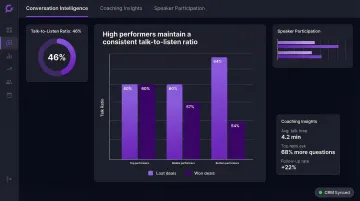
Revenue teams who need coaching data tied directly to CRM records will get more from Avoma than from any general-purpose meeting tool.
tl;dv
tl;dv is an AI meeting assistant focused on structured minutes and AI-powered search. It produces clean, shareable meeting minutes and allows users to query content across all past meetings using natural language.
Key differentiators:
- Cross-meeting AI search — ask questions across your entire library (e.g., "What were our pricing decisions this quarter?")
- Scheduled weekly digests deliver action item summaries automatically to Slack
- Search meetings filtered by CRM account, deal stage, or opportunity
- Unlimited recordings and transcripts on the free plan (10 AI notes/month)
tl;dv works best when your team treats past meetings as a searchable record — not just recordings collecting dust.
Granola
Granola is a hybrid note-taking assistant that combines the human feel of manual notes with AI enrichment. Users jot lightweight notes during the meeting, and Granola fills in the gaps using the transcript.
Key differentiators:
- Records from device audio — no bot appears in the participant list
- Mac/iOS app works with any meeting platform or audio source
- Clean, distraction-free interface keeps focus on the conversation
- Your manual notes are enriched with transcript detail, not overwritten
- Output reads as curated notes, not raw transcript dumps
Granola suits professionals who want to stay present in conversations while knowing the details are captured accurately.
Zoom AI Companion
Zoom AI Companion is the native AI assistant built directly into Zoom. For existing Zoom users, it requires no extra setup—it detects action items, generates meeting summaries, and helps draft follow-up emails from within the Zoom interface.
Key differentiators:
- No third-party tools to install or configure — zero-friction adoption
- Works across Zoom Meetings, Docs, Phone, and Team Chat
- Recognizes decisions, deadlines, and commitments in context
- IT admins can enable or disable features at the account level for compliance
- Included at no additional cost with paid Zoom plans
For organizations already standardized on Zoom, this is the obvious first option to activate — no new vendor, no new contract.
Read AI
Read AI is an enterprise-grade AI meeting assistant that transcribes across Zoom, Google Meet, and Teams, then goes further — connecting meeting content to emails, docs, and workplace data for organization-wide search.
Key differentiators:
- AI suggests next steps proactively based on connected workplace data
- Tracks participant attention and emotional tone throughout calls
- Ada (Digital Twin) — a personal AI assistant that extends beyond meeting tasks
- Query across meetings, emails, and documents with a single search
- Deep integrations with Salesforce, HubSpot, and productivity tools
Read AI is built for enterprise teams who need meeting intelligence connected to the broader context of how their organization works.
How We Chose the Best AI Meeting Assistants
A meeting assistant with perfect transcription is useless if action items sit trapped in a PDF instead of flowing into your task manager. That's why this guide evaluates tools across five criteria — not just accuracy, but whether each one fits into how your team actually works.
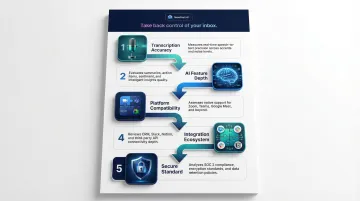
Five evaluation criteria used in this guide:
- Transcription accuracy — Correctly attributes dialogue across speakers, handles accents, jargon, and crosstalk without manual cleanup
- AI feature depth — Goes beyond a transcript to generate summaries, extract action items, track topics, and surface conversation intelligence
- Platform compatibility — Connects reliably with Zoom, Google Meet, Microsoft Teams, and other tools your team already uses
- Integration ecosystem — Pushes data natively to CRMs (Salesforce, HubSpot), project tools (Asana, Notion), and communication platforms (Slack)
- Data security posture - SOC 2 Type II, GDPR, HIPAA compliance, and zero data retention options
Privacy Architecture Matters as Much as Features
For teams in sensitive industries—legal, finance, healthcare—privacy architecture is a hard requirement. Look for tools offering:
- Zero data retention options - Data processed in-memory and immediately discarded
- Explicit opt-in for AI training - Vendors must not train models on your conversations without consent
- Certifications - SOC 2 Type II, GDPR, and HIPAA Business Associate Agreements
Tools like Fellow explicitly prohibit using customer data to train OpenAI models, while Krisp and Granola offer bot-free capture to maintain meeting etiquette and keep data within your region.
From Meeting to Action: Why Workflow Completion Matters
Capturing a meeting is only half the job. The tools ranked highest in this guide close the loop — they turn summaries and action items into tangible next steps, whether that's a task in Asana, a deal update in Salesforce, or a follow-up drafted in your inbox. Post-meeting workflow automation is what separates a useful recorder from a genuine productivity multiplier.
NewMail AI complements any meeting assistant on this list by handling the follow-up side of that cycle — drafting post-meeting emails in your voice, with action items and next steps ready to send from your inbox.
Conclusion
The best AI meeting assistant for 2026 is the one that fits your existing workflow—your meeting platforms, your tools, your team size, and your security requirements—rather than the most feature-rich option in isolation.
Start by identifying your biggest pain point:
- Transcription only? Choose Fathom or Otter.ai for free unlimited transcription
- Post-meeting follow-up? Pair any assistant with workflow tools that draft emails and sync tasks
- CRM sync and revenue intelligence? Avoma or Fireflies.ai for deep CRM integrations
- Calendar coordination and meeting lifecycle? Fellow or Read AI for end-to-end meeting management
Then evaluate integration depth and scalability. A tool with basic transcription that connects to your existing stack will deliver more value than an advanced tool that operates in isolation. That's where follow-up becomes the missing link—capturing decisions means nothing if action items don't reach the right inboxes.
NewMail AI handles that gap. It drafts post-meeting emails in your voice, with action items and next steps pulled directly from the conversation, so follow-through happens without the manual effort.
Frequently Asked Questions
What is the best AI assistant for meetings?
The best overall picks are Fireflies.ai for collaboration and searchable meeting libraries, Read AI for enterprise-wide search and recommendations, and Fathom for individuals seeking fast, free summaries. The right choice depends on team size, platform preference, and whether you need basic transcription or advanced features like CRM sync and conversation analytics.
What is the best AI transcription for Zoom meetings?
Otter.ai, Fireflies.ai, and Fathom are strong standalone transcription tools for Zoom, offering cross-platform support and generous free tiers. Zoom AI Companion is the best built-in option for users who prefer native integration without adding third-party tools.
What is the best AI assistant for Teams?
Microsoft 365 Copilot is the native option for Teams, offering seamless integration across Outlook and Teams. Strong third-party alternatives include Fireflies.ai, Otter.ai, and Read AI, all of which support Teams alongside Zoom and Google Meet for multi-platform organizations.
What is the best AI assistant for executives?
Three tools stand out for executive use:
- Fellow — full meeting lifecycle management with agendas, notes, and follow-ups
- Read AI — enterprise search and proactive recommendations
- Avoma — conversation analytics and coaching for revenue leaders
All three support strategic decision-making, not just note capture.
Which AI is best for conversation and tracking?
Avoma is the strongest for conversation analytics, offering filler word tracking, monologue detection, talk-to-listen ratio analysis, and competitive mention tracking. Fireflies.ai is a close second, with robust keyword and topic tracking across a searchable meeting library.
Which AI appointment scheduler is the best?
These are different categories. Meeting assistants handle post-meeting workflows (transcription, summaries, action items), while appointment schedulers manage pre-meeting coordination. For scheduling, consider Calendly or Reclaim.ai — the tools on this list focus on meeting capture, not calendar logistics.