Introduction
Modern business teams face a crushing administrative burden. Knowledge workers spend 28% of their workweek—over 580 hours annually—managing email alone, while 89% report losing up to 4 hours per week just scheduling meetings. Add fragmented task lists scattered across multiple tools, and it's no wonder teams struggle to focus on high-value work.
That burden has a solution. Unlike traditional automation tools that follow rigid, rule-based logic, modern AI assistants understand context, learn preferences, and take autonomous action—automating scheduling, extracting tasks, managing calendars, and handling multi-step workflows without adding more tools to your stack.
Key Takeaways
- AI assistants automate scheduling, task extraction, inbox management, and multi-step workflows—saving teams several hours weekly
- The best tools understand context, learn preferences, and take action across connected systems
- Top picks include NewMail AI for email, Motion and Reclaim.ai for calendar intelligence, and Microsoft Power Automate for enterprise workflows
- Prioritize fit with your email client, calendar tools, security requirements, and how quickly teams can get up and running
What Are AI Assistants for Business Workflow and Scheduling?
AI business assistants use large language models (LLMs), natural language processing (NLP), and machine learning to understand context and act on it. Unlike traditional automation tools with rigid, predefined rules, these assistants adapt to changing situations and make decisions within defined parameters — without waiting to be told what to do.
Two categories drive most of the value:
AI scheduling assistants optimize calendars, protect focus time, and coordinate meetings—resolving conflicts, minimizing schedule fragmentation, and preserving deep work blocks across teams.
AI workflow automation assistants connect business systems, route tasks, and reduce manual handoffs—automating multi-step processes across departments without requiring technical expertise or custom development.
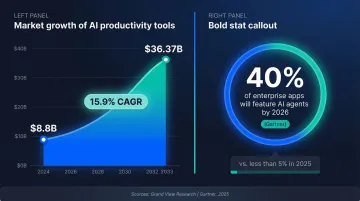
Both categories are scaling fast. The global AI productivity tools market was valued at $8.8 billion in 2024 and is projected to reach $36.37 billion by 2033, growing at 15.9% annually. By 2026, Gartner predicts 40% of enterprise applications will feature integrated AI agents — up from less than 5% in 2025.
Best AI Assistants for Business Workflow Optimization and Scheduling
These tools were selected based on depth of AI capability, integration breadth, ease of deployment, privacy standards, and demonstrated value for business teams.
NewMail AI
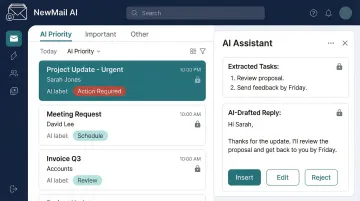
NewMail AI is a privacy-first, email-native AI assistant built by founders from AI and cybersecurity backgrounds. Designed for professionals and teams (20–200+) managing high email volumes, it works directly inside Gmail, Outlook, and Apple Mail with zero email storage by default.
Core capabilities include:
- Processes emails ephemerally with no stored email content by default
- Extracts tasks and scheduling actions directly from email context
- Generates AI-drafted replies in your voice, including FAQ responses
- Delivers priority inbox categorization and instant meeting recaps with action items
The platform maintains Zero Data Retention agreements with AI providers including Anthropic and Mistral, operates under Swiss-based GDPR compliance, and holds Google Security Certification (the highest level of data security certification for Google Workspace applications). Setup takes under 2 minutes.
| Key Features | Priority inbox with custom categories, task extraction and scheduling, AI-drafted replies in your voice, instant meeting recaps with action items, FAQ auto-responses |
|---|---|
| Best For | Executives, sales teams, and enterprise teams handling high email volumes who need inbox-to-workflow automation without compromising data privacy |
| Pricing | Professional: $12/month; Enterprise: Custom pricing for teams 20-200+; Free 14-day trial with full access, no credit card required |
Motion
Motion is an AI-powered workspace combining calendar management with project and task management. Widely used by entrepreneurs, small teams, and productivity-focused professionals, it consolidates workday planning into one tool.
Motion's AI automatically builds and rebuilds your daily schedule based on task priority and deadlines. When new meetings appear, it reschedules affected tasks in real time. The platform also includes AI meeting notes, document drafting, and standard operating procedure (SOP) documentation.
| Key Features | Automatic daily schedule building, AI task prioritization, project management, AI meeting notes, natural language meeting booking |
|---|---|
| Best For | Individuals and small teams wanting a single AI-managed workspace for tasks, projects, and calendar |
| Pricing | Pro AI: $19/month; Business AI: $29/month (billed annually) |
Reclaim.ai
Reclaim.ai (now owned by Dropbox) is a smart calendar assistant that protects recurring habits, focus blocks, and personal commitments from being overwritten by meetings. It integrates with both Google Calendar and Microsoft Outlook.
The AI Time Defense feature auto-reschedules 1:1s and recurring meetings when conflicts arise, syncs tasks from project management apps, and offers flexible habit defense settings (most flexible to most defensive) that adapt to each user's working style.
| Key Features | Habit protection, AI Time Defense, task scheduling with deadline awareness, 1:1 rescheduling, calendar-task app sync |
|---|---|
| Best For | Professionals who want to protect focus time and personal habits while keeping meetings coordinated automatically |
| Pricing | Free plan available; Starter: $10/user/month; Business: $15/user/month; Enterprise: $22/user/month (billed annually) |
Clockwise
Note: Clockwise is joining Salesforce and will no longer be available after March 27, 2026. Consider alternatives for long-term planning.
Clockwise is a team-oriented AI calendar tool that orchestrates schedules across entire teams simultaneously—resolving conflicts, protecting focus time, and minimizing schedule fragmentation. It integrates with Slack and Google Workspace.
Clockwise calculates the "Focus Time cost" for every meeting attendee and recommends times that minimize disruption across the full team. An analytics dashboard shows organization-level metrics like focus time created and conflicts resolved. The platform has created over 8 million hours of focus time and rescheduled 23 million meetings.
| Key Features | Team-wide calendar optimization, Focus Time cost analysis, Slack status sync, no-meeting day enforcement, analytics dashboard |
|---|---|
| Best For | Teams and managers who need collaborative calendar intelligence to protect deep work time across departments |
| Pricing | Free plan available; Teams: $6.75/user/month; Business: $11.50/user/month (billed annually) |
Microsoft Power Automate
Microsoft Power Automate is a cloud-based workflow automation platform within the Microsoft 365 ecosystem. It enables users at any technical level to build automated workflows—from simple email triggers to complex, multi-department processes—across 1,400+ app connectors.
Relevance for enterprise workflow optimization: deep integration with Teams, Outlook, SharePoint, and Dynamics 365; AI Builder capabilities for document processing and natural language-triggered workflows; and cost-effectiveness for organizations already in the Microsoft ecosystem. A 2024 Forrester study found Power Automate delivered a 248% ROI and $39.85 million NPV over three years.
| Key Features | Cloud and desktop automation, AI Builder (natural language and document intelligence), 1,400+ connectors, Microsoft 365 native integration, no-code/low-code workflow builder |
|---|---|
| Best For | Enterprises and mid-sized businesses already using Microsoft 365 that need scalable, cross-department workflow automation |
| Pricing | Power Automate Premium: $15/user/month; Process: $150/bot/month; Hosted Process: $215/bot/month (billed annually) |
How to Choose the Right AI Business Assistant for Your Team
Most teams pick AI tools based on feature lists rather than fit. According to Glean's analysis of enterprise AI adoption, 95% of generative AI pilots fail due to poor integration planning and missing change management—not the tools themselves.
Core evaluation factors:
- Confirm compatibility with your email client, calendar, CRM, and project management systems before committing
- Verify GDPR compliance, zero data retention policies, encryption at rest and in transit, and certifications like SOC 2 or ISO 27001
- Evaluate contextual understanding, natural language task creation, and adaptive learning—not just surface-level automation
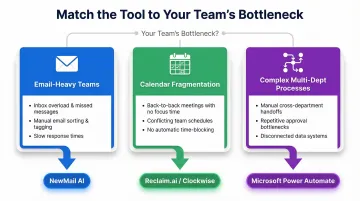
Once you've validated the basics, match the tool type to your team's actual bottleneck:
- Email-heavy teams benefit most from inbox-native AI like NewMail AI, which handles drafting, categorization, and task extraction without leaving your inbox
- Teams losing hours to calendar fragmentation need scheduling-focused tools like Reclaim.ai (habit protection) or Clockwise (team-level coordination)
- Organizations running complex multi-department processes benefit from workflow platforms like Microsoft Power Automate
The global average cost of a data breach is $4.44 million in 2025, with shadow AI incidents adding $670,000 to that figure. When evaluating any AI assistant, treat security certifications and transparent data handling as non-negotiable—not differentiators.
Conclusion
The right AI assistant is the one your team actually uses. The best tools reduce friction, connect with the software you already rely on, and save real hours each week without creating new security risks.
Before committing, evaluate scalability, ongoing data security practices, and ROI in time saved. Prioritize tools with free trials so your team can test real-world fit before rolling out company-wide.
If your team's biggest time sink is email, that's the logical place to start. NewMail AI takes two minutes to set up, retains zero email data, and drafts responses in your voice. Start your free trial and see how inbox-to-workflow automation works when privacy is built into the architecture, not bolted on after.
Frequently Asked Questions
Which AI is best for scheduling and planning?
Motion excels for all-in-one task and calendar management with automatic daily schedule building. Reclaim.ai is ideal for habit protection and focus time defense. Clockwise (sunsetting March 2026) specializes in team-level coordination. The best choice depends on whether you need personal, team, or cross-system scheduling optimization.
How can I use AI to improve workflows?
AI improves workflows by automating repetitive tasks like email triage, meeting scheduling, and document routing. It extracts action items from communications, connects disparate tools, and reduces manual handoffs—freeing teams to focus on client-facing and strategic work.
Which AI is best for creating workflows?
Microsoft Power Automate and Zapier are strong for multi-step automated workflows across 1,000+ app connectors. Moveworks and Workato serve larger enterprise needs with complex, multi-system automation. Your best fit depends on technical complexity and whether you're already in the Microsoft 365 ecosystem.
What is the difference between an AI scheduling tool and an AI workflow automation tool?
AI scheduling tools focus specifically on calendar optimization, meeting booking, and time management. Workflow automation tools connect multiple business systems to automate multi-step processes across departments. Some tools like NewMail AI bridge both by automating email-driven scheduling and task workflows in one platform.
Are AI business assistants safe to use with sensitive company data?
Safety depends on the provider's architecture. Look for zero data retention policies, end-to-end encryption, GDPR compliance, and certifications from recognized security bodies like SOC 2 or ISO 27001. Tools like NewMail AI are built privacy-first with ephemeral data processing and zero email storage by default, minimizing exposure risk.