Introduction
The average professional spends 28% of their workweek—approximately 11.2 hours—managing email. For Executive Assistants, this burden multiplies fast: you're not just managing your own inbox, but coordinating an executive's schedule, fielding requests on their behalf, and ensuring nothing critical slips through while processing over 300 messages daily.
EAs face distinct challenges that go beyond volume. You're rewriting the same meeting request for the fifth time this week. You're navigating the balance of sounding authoritative while communicating on someone else's behalf.
Maintaining your executive's tone across dozens of daily interactions is its own skill—especially when you're working without clear guidance on what that tone should be.
That's what this guide addresses. You'll find ready-to-use templates for the most common EA scenarios, the best practices behind them, and a framework for writing emails that carry executive authority without sounding robotic.
Key Takeaways
- Every effective EA email includes a purpose-first subject line, a clear ask in the body, and an explicit next step
- Templates save time on recurring messages—but always customize for recipient, context, and your executive's voice
- Emails with 50–125 words get the highest response rates—keep it short
- Professional follow-ups tie to real deadlines and deliverables, not vague "just checking in" language
- A 15-second pre-send checklist catches the most common mistakes: buried asks, tone mismatches, and missing attachments
What Makes an Effective Executive Assistant Email
The Seven Elements Every EA Email Should Include
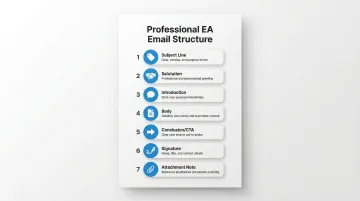
Every professional EA email should contain these seven structural components:
1. Subject Line (Purpose-First, Specific) Your subject should signal the email's purpose immediately. Use formats like "Meeting Request: [Executive Name] + [Topic]" or "Rescheduling [Date] Call." Vague subjects like "Following Up" or "Quick Question" get ignored or deprioritized.
2. Salutation (Tailored to Relationship) Match formality to the recipient's relationship with your executive. External clients warrant "Dear Mr. Smith," while internal colleagues may accept "Hi Alex." When in doubt, err formal.
3. Introduction (State Purpose in First Sentence) Busy recipients scan emails in seconds. Lead with your purpose: "I'm reaching out to schedule a call between [Executive Name] and your team to discuss the Q2 partnership proposal."
4. Body (One Topic Per Email, Bullets for Multiple Items) Keep the body focused on a single topic. If you need to communicate multiple details—dates, logistics, action items—use bullet points for scannability. Research shows emails with 1–3 clear questions are 50% more likely to get responses than those asking no questions or burying requests in paragraphs.
5. Conclusion (Clear CTA or Next Step) End with an explicit call to action: "Please confirm your availability by Friday, March 15" or "Let me know which option works best by end of day Thursday."
6. Signature (Name, Title, and Contact) Include your full name, title ("Executive Assistant to [Executive Name]"), and contact information. This builds credibility and makes it easy for recipients to reach you.
7. Attachment Note (Explicitly Flagged) If you've attached a document, reference it in the body: "I've attached the meeting agenda for your review." This prevents recipients from missing critical files.
The 5 C's of Email Etiquette for EAs
The 5 C's—Clear, Concise, Complete, Correct, and Courteous—form the foundation of professional business communication. Derived from the "7 C's of Communication" introduced in 1952 by professors Scott M. Cutlip and Allen H. Center, these principles translate directly into email etiquette for executive assistants.
- Clear: State your purpose in the first sentence and avoid ambiguity about what you're asking.
- Concise: Keep it tight. Emails between 50–125 words achieve response rates above 50%, while longer messages see engagement drop sharply.
- Complete: Include all necessary details upfront—dates, times, locations, context—so recipients don't need to follow up for clarification.
- Correct: Verify every name, title, and time before sending. A misspelled name or wrong meeting time undermines your executive's credibility and yours.
- Courteous: Maintain professionalism even under pressure. A respectful tone preserves relationships and reflects well on your executive.
How Tone Should Shift Based on Your Audience
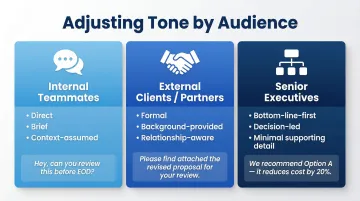
Not all recipients warrant the same communication style. Adjust your tone to match the relationship and organizational hierarchy:
Internal teammates get direct, brief messages — they already know the context. For example: "Can you send the Q1 report by Thursday? [Executive Name] needs it for Friday's board meeting."
External clients or partners need more formality and background. They may not know your executive's schedule constraints or internal shorthand. For example: "Thank you for your continued partnership. I'm reaching out on behalf of [Executive Name] to coordinate a follow-up discussion on the proposal you submitted last week."
Senior executives above your executive require a bottom-line-first approach. Lead with the decision or key fact, then add supporting detail only if necessary. For example: "The board meeting has been moved to March 20 at 10 AM EST due to a scheduling conflict. All materials and dial-in details remain the same."
Essential Email Templates for Executive Assistants
Scheduling, Confirmation, and Calendar Management
Meeting Scheduling Template
Subject: Scheduling a Call with [Executive Name] re: [Specific Topic]
Body:
Hi [Recipient Name],
I'm [Your Name], Executive Assistant to [Executive Name], and I'm reaching out to schedule a call to discuss [specific topic or purpose].
Would any of the following times work for your calendar?
- [Day, Date] at [Time] [Time Zone]
- [Day, Date] at [Time] [Time Zone]
- [Day, Date] at [Time] [Time Zone]
Please let me know which option works best, or feel free to suggest an alternative if none of these fit your schedule.
Looking forward to hearing from you.
Best regards,
[Your Name]
Executive Assistant to [Executive Name]
[Contact Information]
Why This Works: The three-option format follows professional EA best practices that minimise back-and-forth emails. Offering specific date/time slots removes the cognitive load of an open-ended ask. Research shows that suggesting specific times more than doubles meeting conversions compared to vague "let me know what works" requests.
Meeting Confirmation Template
Subject: Confirmed: [Meeting Title] on [Date] at [Time]
Body:
Hi [Recipient Name],
This confirms your meeting with [Executive Name] on [Day, Date] at [Time] [Time Zone].
Details:
- Topic: [Meeting Purpose]
- Location/Link: [Physical address or video conference link]
- Duration: [Expected length]
If you need to reschedule, please let me know as soon as possible.
Best regards,
[Your Name]
Why This Works: Brevity is essential in confirmations—recipients should be able to scan this in under 10 seconds. The bolded details ensure critical information stands out, and the reschedule offer maintains flexibility while setting the expectation that changes require advance notice.
Rescheduling and Cancellation Templates
Rescheduling (with new options):
Subject: Rescheduling [Meeting Title] – New Time Options
Body:
Hi [Recipient Name],
Unfortunately, we need to reschedule your [Date] meeting with [Executive Name] due to [brief, professional reason].
Would any of these alternative times work for you?
- [Option 1]
- [Option 2]
- [Option 3]
I apologize for the inconvenience and appreciate your flexibility.
Best regards,
[Your Name]
Cancellation (no reschedule):
Subject: Cancellation: [Meeting Title] on [Date]
Body:
Hi [Recipient Name],
I'm reaching out to inform you that the [Date] meeting with [Executive Name] has been cancelled due to [brief reason].
We appreciate your understanding and will reach out to reschedule once [Executive Name]'s calendar opens up.
Thank you,
[Your Name]
Why These Work: Both templates acknowledge the inconvenience while maintaining professionalism. The rescheduling version proactively offers alternatives to keep momentum, while the cancellation version signals intent to reconnect without committing to a timeline that may not hold.
Follow-Up, Delegation, and Internal Communication
Follow-Up After No Response Template
Subject: Re: [Original Subject Line]
Body:
Hi [Recipient Name],
I'm following up on my [Date] email regarding [specific topic or request].
[Executive Name] needs [specific deliverable or decision] by [deadline] to [reason tied to business outcome].
Could you confirm by [specific date] so we can move forward?
Thank you,
[Your Name]
What Makes This Effective: The body is respectful but firm—no apologetic language like "just checking in" or "sorry to bother you." Tying the request to a real deadline and business outcome drives significantly higher response rates than open-ended follow-ups.
Internal Team Update Template (On Behalf of Executive)
Subject: Update from [Executive Name]: [Specific Topic]
Body:
Hi Team,
[Executive Name] asked me to share the following updates regarding [context or project name]:
Key Updates:
- [Update 1]
- [Update 2]
- [Update 3]
Next Steps:
- [Action item 1] – Owner: [Name], Due: [Date]
- [Action item 2] – Owner: [Name], Due: [Date]
If you have questions, please reply to this thread or reach out to [Executive Name] directly.
Best,
[Your Name]
On behalf of [Executive Name]
The Logic Here: Attributing the message to the executive in the subject line establishes authority immediately. Assigning owners with due dates in the Next Steps block converts a status update into a clear record of accountability—no follow-up needed to clarify who owns what.
Out-of-Office Coverage and Document Request Templates
Out-of-Office Coverage:
Subject: [Executive Name] Out of Office: [Date Range]
Body:
[Executive Name] will be out of the office from [Start Date] to [End Date] with limited email access.
For urgent matters during this time, please contact [Point of Contact Name] at [Contact Information].
Thank you,
[Your Name]
Document Request:
Subject: Document Request: [Specific Document Name]
Body:
Hi [Recipient Name],
I need [specific document or information] in [format] by [deadline] for [reason or meeting].
Please send it to [email address] by [specific date and time].
Thank you,
[Your Name]
Why These Work: Both templates stay under five sentences and provide all necessary information upfront. The OOO template sets clear boundaries with a named alternative contact, while the document request removes any ambiguity about format, destination, and deadline—the three details most likely to cause delays.
How to Write an Email on Behalf of an Executive
When to Write on Behalf vs. When the Executive Should Send Directly
Not every email should come from you. Knowing when to step in and when to defer to your executive is critical:
Appropriate EA Territory:
- Routine coordination and logistics
- Scheduling requests and confirmations
- Information gathering and document requests
- Follow-up reminders on pending items
- Internal team updates on non-strategic matters
Requires Executive's Direct Involvement:
- Strategic decisions or commitments
- Sensitive feedback or performance conversations
- Personal relationship messages (congratulations, condolences)
- High-stakes negotiations or partnership discussions
- Messages requiring the executive's unique authority or judgment
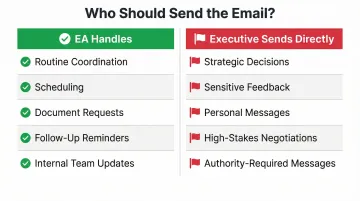
When in doubt, confirm with your executive before sending anything that involves a commitment, conflict, or strategically important relationship.
How to Open an On-Behalf-Of Email Effectively
The opening sentence sets the tone and establishes your authority. Introduce yourself and your purpose immediately:
Effective Opening: "I'm [Your Name], Executive Assistant to [Executive Name], and I'm reaching out to coordinate [specific topic or request]."
Recipients know immediately who you are, why you're writing, and what they need to do — all before the second sentence.
Matching the Executive's Voice and Authority
Writing on behalf of an executive requires more than adding their name to your signature. Your email should carry their directness, formality level, and decision-making tone—not your personal communication style.
How to Calibrate Voice: Review a sample of your executive's recent sent emails before drafting. Note:
- Sentence length and structure (short and punchy vs. detailed and explanatory)
- Formality level (conversational vs. strictly professional)
- Common phrases or sign-offs they use
- How they make requests (direct commands vs. collaborative suggestions)
For executives with heavy inboxes, NewMail AI can learn a specific writing style and draft replies in that voice within 60 seconds — useful when you're managing dozens of on-behalf responses daily.
Example Contrast:
Executive's Direct Style: "Move the board meeting to March 20. Send updated invites today."
EA's Natural Style (Too Soft): "Would it be possible to reschedule the board meeting to March 20? If that works, I can send updated calendar invites when you have a chance."
Correct On-Behalf Style (Matches Executive): "The board meeting has been moved to March 20. Updated invites will be sent today."
On-Behalf-Of Template Structure
Subject: [Specific, Purpose-Driven Subject Line]
Body:
Hi [Recipient Name],
I'm [Your Name], Executive Assistant to [Executive Name], reaching out regarding [specific purpose].
[Brief context or background if needed—1-2 sentences maximum]
Key Details:
- [Detail 1]
- [Detail 2]
- [Detail 3]
Next Step:
[Clear action required] by [specific date].
Please let me know if you have questions.
Best regards,
[Your Name]
Executive Assistant to [Executive Name]
[Contact Information]
Handling High-Stakes or Sensitive On-Behalf Communications
The template above works well for routine communication. For anything sensitive or consequential, the structure is the same — but the approval step comes first. Always confirm with your executive before sending if the message involves:
- A commitment of their time, resources, or authority
- A conflict, disagreement, or corrective feedback
- An external relationship of strategic importance (major client, board member, partner)
Keep a record of approval—a quick Slack message, forwarded email, or verbal confirmation—for accountability. This protects both you and your executive if questions arise later about who authorized the communication.
Professional Follow-Up Email Best Practices for Executive Assistants
The 3-Email Follow-Up Rule
The "3-email rule" is a professional convention popularized by technology author Phil Simon in his 2015 book Message Not Received. The principle: after three email attempts without resolution, it's time to pick up the phone or schedule a meeting.
How to Apply It:
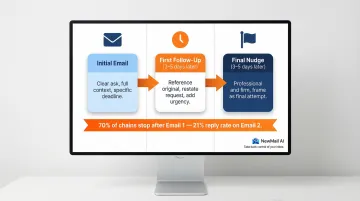
Email 1 (Initial Message): Make the ask clearly with all necessary context and a specific deadline.
Email 2 (First Follow-Up, 3–5 Business Days Later): Reference the original message, restate the request briefly, and add urgency tied to a business need. Tone: respectful but direct.
Email 3 (Final Nudge, 3–5 Business Days After Email 2): Frame as a final opportunity to respond before moving to an alternative channel or escalating. Tone: professional and firm, not apologetic.
Research shows 70% of email chains stop after the first attempt, yet there's a 21% chance of reply on the second email. If the third email goes unanswered, a phone call or meeting request is your most efficient next move.
Alternatives to "Just Checking In" That Drive Action
The phrase "just checking in" signals no urgency—and recipients know it. Replace it with language tied to real deadlines and outcomes:
Strong Alternatives:
- "I wanted to follow up on [specific item] ahead of the [date] deadline."
- "Could you confirm by [date] so we can proceed with [next step]?"
- "I'm circling back on [topic] to ensure we stay on track for [goal or meeting]."
- "Following up on my [date] email—[Executive Name] needs [deliverable] by [deadline] to [business reason]."
Data shows that specific, concrete language improves recipient satisfaction by 9% and meaningfully increases response rates.
Subject Line and Timing Best Practices for Follow-Ups
Subject Lines: Re-use the original subject line with "Re:" to keep the thread connected and provide context. This helps recipients locate prior correspondence and understand the follow-up's purpose immediately.
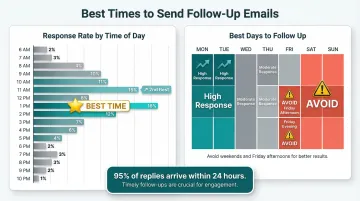
Timing matters just as much as wording. Analysis of email reply data reveals specific windows that yield the highest response rates:
Optimal Timing:
- Best time of day: 1 PM, followed closely by 11 AM
- Best days of week: Monday and Tuesday see the most active reply volume
- The 24-hour rule: 95% of emails that get replies are answered within the first day, so follow-ups should occur sooner rather than later if you haven't heard back
Avoid sending follow-ups on Friday afternoons or outside business hours (8 PM–7 AM), when reply rates drop significantly.
Common EA Email Mistakes That Undermine Professionalism
The Buried Ask Problem
Busy recipients scan emails in seconds. When your purpose and request appear in the third or fourth paragraph, they're likely to be missed entirely.
Before (Buried Ask):
"I hope this email finds you well. I wanted to reach out regarding the upcoming partnership discussion we've been planning. [Executive Name] has been reviewing the proposal and has some thoughts to share. We've been coordinating calendars on our end and wanted to see if we could find a time that works for everyone involved.
Would you be available for a call next week?"
After (Purpose-First):
"I'm reaching out to schedule a call between [Executive Name] and your team to discuss the partnership proposal.
Would any of these times work?
- Tuesday, March 12 at 2 PM GMT
- Wednesday, March 13 at 10 AM GMT
- Thursday, March 14 at 3 PM GMT"
The rewritten version states the purpose in the first sentence and presents the ask in an immediately scannable format. Ineffective communication costs businesses an estimated $12,506 per employee annually, driven by time lost resolving confusion and following up on unclear requests.
Tone Inconsistency Weakens the Executive's Brand
If Monday's scheduling email reads formally ("Dear Mr. Thompson, I am writing to confirm...") and Wednesday's similar message is casual ("Hi John, just wanted to lock in..."), recipients become confused about your executive's communication style and authority.
Templates solve this by establishing a consistent voice, but only when customised for each situation. Before sending, verify the template matches:
- The recipient's relationship level with your executive
- The formality appropriate to the situation
- Your executive's typical communication patterns
Even small tone mismatches — a "Dear" where a "Hi" would fit, or vice versa — can undercut the authority you're trying to project.
Pre-Send Review Checklist: A 15-Second Habit That Prevents Costly Corrections
Before clicking send, verify these five items:
- Recipient names and titles are correct – Double-check spelling, especially for external contacts
- All dates and times are accurate – Verify time zones for virtual meetings
- Links and attachments are included – If you referenced a document or URL, confirm it's attached or embedded
- Subject line matches the email's purpose – Does it accurately reflect the content?
- The ask is clear and realistic – Can the recipient understand exactly what you need and by when?
This 15-second review catches the majority of errors that lead to follow-up emails, embarrassing corrections, and wasted time.
Frequently Asked Questions
What are the key C's (principles) of effective email etiquette?
The 5 C's—Clear, Concise, Complete, Correct, and Courteous—form the foundation of professional email communication. Each principle addresses a distinct failure point: unclear asks, wasted words, missing details, factual errors, and poor tone. EAs writing on behalf of senior leaders should apply all five to every message before hitting send.
How do I say 'checking in' professionally in an email?
Replace "just checking in" with specific, action-oriented language tied to real deadlines. Examples: "Following up on [topic] ahead of the [date] deadline," "Could you confirm by [date] so we can proceed?" or "Circling back on [item] to ensure we stay on track for [goal]."
What are common follow-up email rules (e.g., the 3-email and 4-email rules)?
The 3-email rule states that after three messages without resolution, it's time to switch to a phone call or meeting. The sequence: initial message with clear ask, first follow-up after 3–5 business days, and final nudge 3–5 days later. Going beyond three follow-ups without a response typically signals that a different channel or escalation is needed.
How do I introduce myself as an executive assistant in an email?
Use this format in your opening sentence: "I'm [Your Name], Executive Assistant to [Executive Name], and I'm reaching out to [specific purpose]." This immediately establishes who you are, your connection to the executive, and why you're writing — giving recipients the context to act.
What are the top skills of an executive assistant?
The core skills most relevant to email communication include:
- Professional discretion — knowing what to share and with whom
- Strong written communication — clarity, grammar, and tone
- Attention to detail — verifying names, dates, and facts before sending
- Task prioritization — managing competing deadlines without dropping the ball
- Voice accuracy — representing the executive's tone and authority consistently
How do I write an email on behalf of an executive?
Four steps cover most situations:
- Identify yourself and your executive in the opening sentence
- Match the executive's tone by reviewing their past emails before drafting
- State the purpose in the first or second sentence — no preamble
- Get explicit approval before sending anything involving strategic commitments or sensitive relationships