Introduction
Executive assistants spend nearly 30% of their day managing calendars—more than any other single activity. Yet poorly organised meetings cost U.S. companies an estimated $399 billion in 2019, while CEOs spend 72% of their work time in meetings averaging 37 per week. A poorly managed schedule creates a ripple effect: missed priorities, back-to-back fatigue, and eroded focus time.
Effective calendar management means acting as the gatekeeper of an executive's time. When you own the calendar, you shape their capacity to focus, decide, and lead.
TLDR:
- Take full ownership of the calendar—shared editing creates conflicts and lost priorities
- Block deep work time before meetings fill the gaps using an ideal week framework
- Attach a clear purpose, agenda, and prep materials to every calendar entry
- Map recurring cycles months ahead and review the schedule daily to stay ahead
- AI tools reduce scheduling friction without sacrificing security or control
What Is Executive Calendar Management?
Executive calendar management is the process of organising, protecting, and optimising a leader's schedule to ensure their time is spent on the highest-value activities—not just filling calendar slots with meetings.
Basic schedulers find available time and book meetings. Executive calendar management goes further — it requires understanding the executive's goals, working style, and priorities, then translating those into a structured, dynamic schedule. You become a strategic advisor who evaluates every request against business value before it ever touches the calendar.
A well-managed executive calendar covers far more than appointments:
- Project deadlines and deliverables
- Travel time with buffers for delays
- Preparation blocks before high-stakes meetings
- Protected focus time for strategic thinking
- Personal commitments that require energy reserves
This holistic view matters because executives don't just need open calendar slots—they need the right mental state, preparation, and energy level for each commitment. In practice, that means managing cognitive load alongside availability — not treating every hour as interchangeable.
Taking Full Control of Your Executive's Calendar
Why Sole Ownership Matters
When multiple people can add or modify calendar entries without going through the EA, scheduling conflicts, double-bookings, and priority misalignments are inevitable. You must be the single point of control — not to hoard authority, but to maintain strategic consistency.
Document Preferences First
Start with a structured onboarding conversation to capture your executive's meeting preferences:
- Preferred times of day for meetings (morning vs. afternoon, high-energy vs. low-stakes)
- Ideal meeting lengths by type (15-minute check-ins, 30-minute decisions, 60-minute strategy sessions)
- Buffer time requirements between meetings
- Out-of-office communication preferences (who gets notified, auto-reply messages)
- Restricted "deep work" blocks (when meetings are never scheduled)
With those preferences documented, you can build a calendar system that reflects them from day one.
Build a Consistent Calendar System
Set up a structure that makes every week scannable at a glance:
- Colour coding: Categorise by type — internal meetings, external meetings, travel, admin time, focus work, personal appointments
- Full entry details: Include attendees, location, meeting purpose, supporting documents, and links in every entry
- Naming conventions: Apply a uniform format so the executive instantly understands priorities when scanning the week
The Gatekeeper Role in Practice
All meeting requests go through you — including verbally agreed ones. Evaluate every request against the executive's priorities before confirming. Never accept a request without a clear stated purpose. If someone can't articulate why the executive needs to be in the room, the meeting probably shouldn't happen.
Consistent Calendar Reviews
Two review cadences keep the calendar reliable:
- Daily (end-of-day): Check the next day's schedule for conflicts, missing prep materials, or gaps
- Weekly: Scan the full upcoming week for back-to-back external meetings, travel logistics, or missing agenda items before they become last-minute problems
Prioritising Time: Building an Ideal Weekly Structure
The Ideal Week Concept
Rather than filling the calendar reactively as meeting requests arrive, an ideal week is a pre-built scheduling framework that designates specific time blocks for specific types of work — meetings, focused project work, email, strategic thinking, and downtime.
Identify Peak Productivity Periods
Determine your executive's energy patterns — morning vs. afternoon, creative vs. analytical preferences. Place high-cognition tasks and important meetings at optimal times, while scheduling administrative or lower-stakes commitments during energy troughs.
The "Do vs. Build" Time-Blocking Method
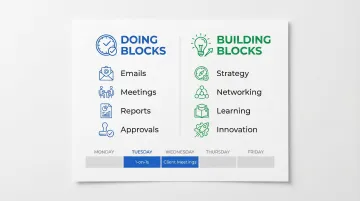
Every week contains two distinct types of work. Doing blocks cover emails, meetings, reports, and approvals — tasks that execute existing plans. Building blocks cover strategy, networking, learning, and innovation — tasks that create future value.
Within your doing blocks, batch similar meeting types together. Schedule all one-on-ones on Tuesdays, all client meetings on Wednesdays. This cuts context-switching and keeps the executive mentally in one mode for longer stretches.
Meeting-Free Blocks Are Non-Negotiable
The average knowledge worker attends 62 meetings per month, and 71% of senior managers find those meetings unproductive. Protecting focused work time is a competitive advantage. Block recurring "no meeting" windows — ideally 2–4 hour chunks — for deep strategic work.
The Buffer Time Rule
Always schedule transition time between back-to-back meetings — 5 to 15 minutes minimum. Longer buffers (30–60 minutes) should follow high-intensity sessions like board presentations or difficult conversations.
Without buffers, executives run late, arrive unprepared, and lose the mental space to think clearly. Microsoft research found that back-to-back meetings cause cumulative stress buildup, while short breaks allow the brain to reset.
Managing Meeting Types, Cadence, and Preparation
Recurring Meetings Framework by Cadence
- Daily: 15-minute EA check-in to review priorities and flag urgent items
- Weekly: Project check-ins, team stand-ups (30–45 minutes)
- Monthly: One-on-ones with direct reports, stakeholder meetings, team meetings
- Quarterly: Strategic planning sessions, performance reviews
- Annual: Goal-setting, board prep, major planning cycles
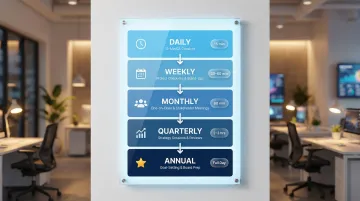
Schedule these in advance—not ad hoc—to create predictability and ensure nothing critical is dropped.
Evaluating Meeting Requests Before Accepting
Not every meeting deserves a spot on the calendar. Before accepting, run each request through a quick filter:
- Ask for an agenda before confirming
- Check who is attending and why
- Determine whether the executive's presence is needed or if a delegate could attend
- Assess whether the goal could be achieved through email or a brief call
Decline or redirect any meeting that doesn't clear this bar.
Pre-Meeting Preparation
For every confirmed meeting, gather and attach relevant materials directly inside the calendar entry:
- Previous meeting notes
- Attendee bios and context
- Reports or data the executive needs to review
- Agendas with clear objectives
The executive should be able to prepare with one click—no hunting through email or file systems.
Post-Meeting Follow-Up
After key meetings, close the loop quickly:
- Capture action items and assign owners
- Schedule follow-up tasks directly in the calendar
- Handle any new meeting requests that surfaced during the discussion
Tools like NewMail AI can automatically extract action items and meeting recaps from email threads, so nothing slips between the cracks—without adding another tool to the workflow.
One-on-Ones with Direct Reports
Schedule one-on-ones at least six months out to lock in consistent time. Cap each session at one hour, and before each meeting, brief the executive with a status update on each direct report's current objectives and project progress.
Tools and Technology for Smarter Scheduling
Core categories of scheduling tools:
- Calendar platforms: Google Calendar, Microsoft Outlook
- Scheduling automation: Calendly, Doodle (reduce back-and-forth for finding available times)
- Time zone management: World Time Buddy for international scheduling
- Time-tracking tools: Toggl, RescueTime for periodic time audits
How AI tools fit into EA scheduling workflows:
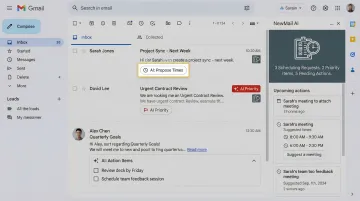
NewMail AI works directly inside Gmail, Outlook, and Apple Mail — no platform-switching required. It extracts scheduling tasks from incoming emails, flags priority messages, and keeps EAs on top of meeting-related communication without touching stored data. Key features relevant to EAs:
- Pulls scheduling requests and action items from emails automatically
- Operates with zero data retention agreements with AI providers
- Learns your executive's communication style in 60 seconds
- Sets up in under 2 minutes, with no sensitive data stored by default
Tool selection criteria:
The best tools fit into existing workflows without adding complexity, protect sensitive schedule information, and get you up and running fast — because the goal is better scheduling, not a steeper learning curve.
Advanced Strategies: From Reactive to Proactive
Proactive vs. Reactive Calendar Management
Most EAs start reactive — fielding requests as they land. The shift to proactive management is what separates good scheduling from genuinely strategic support. A proactive EA:
- Anticipates conflicts before they surface
- Reviews the calendar weeks ahead for gaps or overloaded stretches
- Prepares the executive before they ask
- Revisits the scheduling structure as business priorities change
The Time Audit as a Strategic Tool
Periodically track how your executive's time is actually spent — meetings, email, deep work, travel. Compare it against their stated priorities. Use that data to recommend schedule changes. This positions you as a strategic advisor rather than a scheduler. Research shows that having an EA can save up to 20% of a CEO's time when that time flows toward high-value activities.
Working Ahead
At the start of each quarter, map the cyclical events you know are coming: board meetings, planning cycles, performance reviews. Work backward from each to place all the preparatory meetings and deadlines. This eliminates last-minute scrambles and ensures your executive is never caught unprepared before a high-stakes commitment.
Frequently Asked Questions
What does executive calendar management mean?
Executive calendar management is the ongoing process of organising, prioritising, and protecting an executive's time—covering meetings, focus blocks, preparation, and follow-up—to ensure their schedule reflects their highest-value priorities, not just availability.
How do you prioritise tasks when managing a busy executive's calendar?
Use frameworks like the Eisenhower Matrix to distinguish urgent vs. important tasks. Align scheduling decisions with the executive's stated goals. Default to declining or delegating anything that doesn't meet a clear business purpose or strategic objective.
How do you manage a busy executive's calendar including scheduling appointments and meetings?
Take sole ownership of the calendar and require a stated purpose for every meeting request. Use an ideal week framework to place meetings in pre-defined blocks, then conduct daily and weekly reviews to catch conflicts before they happen and keep preparation materials ready.
What are calendar management skills?
Core skills include prioritisation, clear communication with stakeholders, and proficiency with scheduling tools. Equally important: the attention to detail that catches conflicts early and the judgement to decline low-value requests before they reach the executive.
What is an example of being proactive as an executive assistant?
Mapping all quarterly board meetings, planning committee deadlines, and performance review cycles at the start of the year, then working backward to schedule all preparation meetings—so the executive is always prepared without being asked.
How to structure executive meetings?
Every executive meeting needs a defined agenda sent in advance, a clear objective, a set time limit, and a process for capturing action items. The EA's role is to confirm all four are in place before the meeting starts.