Introduction
Professionals receive between 117 and 121 emails daily, spending roughly 28% of their workweek managing them. The pressure to reply quickly without sounding dismissive is real. Most people assume "short" means "rude," so they over-explain, hedge, and pad replies until the actual answer is buried three paragraphs deep.
Short doesn't mean unprofessional. Brevity signals confidence and respect when done right. This post delivers 15 ready-to-use short email reply samples covering everyday situations, so you can copy, adapt, and send in seconds.
Key Takeaways
- Effective short replies acknowledge the sender, address the core point, and state a clear next step — in 3-5 lines.
- The 15 samples below cover acknowledgment replies, professional updates, declining or deferring, and workplace interpersonal situations.
- Brevity isn't laziness — it respects the recipient's time and signals confidence in your message.
- AI tools can draft short, on-brand replies at scale without losing your personal voice.
What Makes a Short Email Reply Effective?
The Three Non-Negotiables
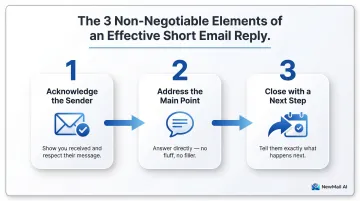
Every short reply should include three elements:
- Acknowledge the sender - Show you read their email
- Address the main point - One sentence is often enough
- Close with a next step - Or signal the conversation is complete
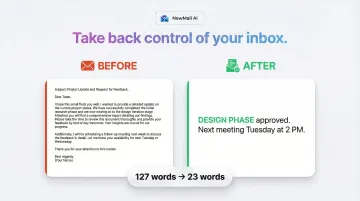
Before:
"Got it."
After:
"Thanks for sending this over. I've received the report and will review it by Thursday. I'll follow up with any questions."
Adding these three elements turns a dismissive one-liner into a complete, professional reply.
That framework applies broadly — but knowing when to keep it short matters just as much.
When Short Replies Work (and When They Don't)
Use short replies for:
- Acknowledgments and confirmations
- Simple yes/no answers
- Deferrals or redirects
- Follow-ups
Use longer replies for:
- Complex problem-solving
- Sensitive topics requiring empathy
- Detailed instructions or multi-step processes
Won't a Short Reply Seem Rude?
A warm, complete reply reads as confident — not curt. The data backs this up: emails between 50-125 words achieve a 50-51% response rate, compared to 44% for emails over 500 words. A Harvard Kennedy School study found a concise 49-word email nearly doubled the response rate of a 127-word version (4.8% vs. 2.7%).
The samples below put these principles into practice across the most common reply scenarios.
15 Short Email Reply Samples for Any Situation
Quick replies that sound rushed or robotic can undermine credibility. These 15 templates cover the most common situations professionals face — each with a brief use-case note and a copy-paste sample you can adapt in seconds.
Acknowledgment and Receipt Replies
Use these when someone needs confirmation that their message landed — no lengthy response required.
Sample 1 — Acknowledging Receipt of a Document or Email
When to use: Confirming you've received a file, proposal, or important email
Sample:
"Thanks for sending this over. I've received the contract and will review it by Friday. I'll follow up with any questions."
This shows you've read the email carefully and sets a clear expectation for next steps.
Sample 2 — Confirming Attendance at a Meeting or Event
When to use: Replying to calendar invites or meeting requests
Sample:
"Confirmed—I'll be there on Tuesday at 2 PM. Looking forward to it."
Adding the date and time shows you've read the invite carefully, not just clicked accept.
Sample 3 — Confirming You've Received a Request and Will Action It
When to use: When someone asks you to do something and you want to reassure them it's in progress
Sample:
"Got it—I'll take care of the vendor approval and have it ready by end of day Wednesday. Let me know if anything changes in the meantime."
Professional Request and Update Replies
These replies handle the situations where you can't respond in full immediately — but still need to keep things moving.
Sample 4 — Replying When You Need More Time to Give a Full Response
When to use: You can't answer immediately but don't want to leave them hanging
Sample:
"Thanks for reaching out. I need to gather some information before I can give you a complete answer—I'll have a response for you by Thursday afternoon. If this is urgent, let me know and I'll prioritize it."
Naming a specific day (not "soon") keeps the other person from following up unnecessarily.
Sample 5 — Providing a Brief Status Update on a Pending Task
When to use: Someone asks "Where are we on X?" and you need to update quickly
Sample:
"Quick update: the design review is in progress and on track for delivery next Monday. Will let you know if anything shifts."
Hit current status and the next milestone — that's all they need.
Sample 6 — Responding to a Thank-You Email
When to use: Someone thanks you and you want to close warmly without reopening the conversation
Sample:
"Really glad it was helpful! Let me know if there's anything else I can do."
Sample 7 — Answering a Simple Yes or No Question
When to use: Someone asks a straightforward question and you can answer directly
Sample:
"Yes—the budget has been approved. Finance will release the funds by Friday. Let me know if you need the approval email forwarded."
Answer first, add context second. Put the answer in the first word.
Declining, Deferring, and Redirecting Replies
Saying no or stepping aside doesn't have to be awkward. These replies keep the tone warm while setting a clear boundary.
Sample 8 — Politely Declining a Request
When to use: You can't take on a project, attend an event, or fulfill a request
Sample:
"Thanks for thinking of me—unfortunately I'm not able to take this on right now. You may want to reach out to Sarah instead. I hope it goes well!"
Brief reason (or none at all), optional alternative, and graceful close.
Sample 9 — Professionally Saying "I'll Get Back to You Shortly"
When to use: You can't answer now but want to commit to a realistic timeframe
Sample:
"Thanks for reaching out—I'll have a response for you by tomorrow at 3 PM. Wanted to make sure I give this the attention it deserves."
A specific time ("tomorrow at 3 PM") builds more trust than any vague promise of "shortly."
Sample 10 — Redirecting to the Right Person
When to use: You're not the right contact and want to redirect gracefully
Sample:
"Great question—Tom is better placed to help with this. I've cc'd him here so you're connected. He'll take it from here!"
Name the right contact, make the intro, and exit cleanly.
Sample 11 — Declining a Meeting or Rescheduling
When to use: You can't attend but want to stay engaged
Sample:
"I won't be able to make Wednesday at 10, but I'd love to connect—are you available Thursday afternoon? Or happy to handle this over email if quicker."
Decline clearly, suggest an alternative, and keep the tone warm.
Workplace and Interpersonal Replies
These templates handle the emotionally charged or socially delicate situations that trip most people up.
Sample 12 — Replying to an Upset, Rude, or Passive-Aggressive Email Professionally
When to use: The sender's tone is hostile or accusatory and you need to de-escalate
Sample:
"I understand this has been frustrating—I want to make sure we get this sorted. Can you clarify what specific outcome you're looking for so I can address it directly?"
Stay calm and neutral. Don't mirror the sender's tone. Focus on resolution, not winning the exchange.
Sample 13 — Apologizing Briefly for a Late Reply
When to use: You've delayed responding and want to acknowledge it without over-explaining
Sample:
"Sorry for the slow response—appreciate your patience. Here's where things stand: the report is finalized and I'll send it over by end of day."
One sentence of apology is enough. Over-apologizing draws attention to the delay.
Sample 14 — Following Up on an Unanswered Email
When to use: Your original email got buried and you need a gentle nudge
Sample:
"Just circling back on my email from last Tuesday in case it got buried. Happy to clarify anything—let me know if the Q3 budget proposal is still on your radar."
Re-surface the ask without sounding accusatory. Give them an easy out if priorities have shifted.
Sample 15 — Closing or Wrapping Up a Long Email Thread
When to use: The conversation is complete and you want to signal closure
Sample:
"Great—sounds like we're all set. Thanks for working through this with me. Don't hesitate to reach out if anything else comes up."
Close the loop and open the door for future contact.
Tips for Writing Short Email Replies Without Sounding Curt
Lead with the Answer, Not the Preamble
Most emails bury the response after long context-setting. The fix is simple: answer first, then add context if needed.
Before:
"I wanted to get back to you about the proposal you sent last week. After reviewing the options with the team and considering our budget constraints, we've decided to move forward with Option B."
After:
"We're moving forward with Option B. After reviewing with the team, it best fits our budget and timeline."
Cut Filler Phrases That Add Length Without Value
Avoid these common padding phrases:
"I hope this email finds you well""As per my previous email""Just wanted to quickly""I apologize for any inconvenience this may have caused"
Replace with direct statements or delete entirely. If you want to open warmly, lead with the relevant context — not a formality.
Match Your Reply Length to the Email You Received
A 3-line email rarely warrants a 10-paragraph reply, and vice versa. When someone sends a quick question, a quick answer respects their time. Avoid the instinct to over-explain.
A useful rule of thumb:
- Short question → 1-3 sentence answer, no preamble
- Detailed request → structured reply with context, but still trimmed to essentials
Reply Faster to Every Email with AI
Even with great templates, replying quickly to dozens of emails per day pulls focus—especially when each reply needs to sound natural and on-brand, not like a copied form response.
NewMail AI drafts short email replies in your voice, learning your tone and style in just 60 seconds. It works directly inside Gmail, Outlook, and Apple Mail—no separate tool to open—and takes under 2 minutes to set up.
Key features built for professionals handling sensitive communications:
- Ephemeral processing: No email content stored by default—only encrypted context
- Zero Data Retention agreements with AI providers including Anthropic and Mistral
- Google Security Certified: the highest level of data security certification for Google Workspace
- Swiss-made and GDPR compliant: built under some of the world's strictest data laws
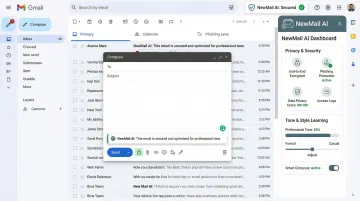
That means you get AI-speed drafting without handing over your inbox data to be stored or used for training.
Conclusion
Short email replies are not a shortcut—they're a skill. When done right, they save time, project confidence, and keep communication moving. The 15 samples above give you a starting point for any situation you encounter.
Save a few of these templates and adapt them to your voice. If you want to go further, NewMail AI drafts replies in your tone, prioritizes your inbox, and processes everything with zero data retention—so you stay responsive without sacrificing control over your information.
Frequently Asked Questions
What are some short email reply examples?
Common examples include acknowledging receipt ("Thanks—received. I'll review and follow up by Friday"), confirming a meeting ("Confirmed—I'll be there Tuesday at 2 PM"), and briefly deferring a response ("I'll have a response for you by Thursday afternoon"). The full list of 15 samples above covers most situations you'll encounter.
How do I write a short email reply?
Follow this three-step formula: answer first, add one line of context if needed, and close with a next step or open door. Keep the entire reply to 3-5 lines. Research shows that 50-125 words achieve the highest response rates.
How do I reply to an email to acknowledge receipt?
Confirm receipt, note what you'll do with the item, and give a timeframe. For instance: "Thanks—received. I'll review the contract and follow up by Wednesday with any questions."
How do I professionally say "I will get back to you shortly"?
Replace "shortly" with a specific timeframe. "Shortly" is vague and can erode trust. Instead, say "I'll have a response for you by Friday at 3 PM."
What is a good instant reply message?
A good auto-reply confirms receipt, gives a realistic response timeframe, and lists an urgent contact. Something like: "Thanks for reaching out. I'm away and will respond by Monday—for urgent matters, contact sarah@company.com."
How do you respond to a petty email?
Don't match the tone. Respond briefly and professionally—acknowledge the concern, address only the factual point, and avoid emotional language. Short, neutral replies give petty emails no fuel to escalate. "I understand this has been frustrating—let me clarify the timeline so we can move forward."