Gmail Integration
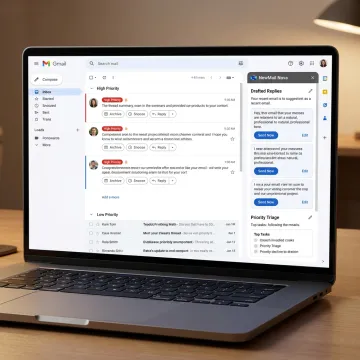
Nova works directly inside your existing Gmail and Google Workspace inbox, adding AI drafting, sorting, tagging, and productivity features without a new app, separate dashboard, or workflow change.
Learn how NewMail AI connects directly inside Gmail with secure OAuth, no downloads, and no separate dashboard. This guide explains how Nova learns your voice, prioritizes your inbox, drafts replies, extracts tasks, schedules meetings, and protects email data with Zero Data Retention, Google Security Certified safeguards, and GDPR-compliant privacy architecture.
Everything Gmail users need to turn inbox overload into prioritized, secure, approval-first email productivity.
Nova works directly inside your existing Gmail and Google Workspace inbox, adding AI drafting, sorting, tagging, and productivity features without a new app, separate dashboard, or workflow change.
Generate context-aware Gmail replies in your own voice using the full thread history, your role, priorities, FAQs, links, and approved knowledge while keeping final approval with you.
Surface urgent, high-value, and action-required Gmail conversations first while lower-priority CCs, cold outreach, and routine noise move into personalized categories and smart folders.
Nova identifies action items, commitments, deadlines, and next steps inside Gmail threads, then turns them into trackable tasks so important follow-through never disappears in the inbox.
Automatically detect stalled Gmail conversations and prepare polite, context-aware follow-up messages that help sales, customer success, recruiting, and executive threads keep moving.
Coordinate meetings from Gmail by checking calendar availability, proposing times across time zones, sending in-thread responses, and adding schedule context to daily briefings.

Start by connecting your Gmail or Google Workspace account through secure OAuth. NewMail AI does not require a separate inbox, browser dashboard, or download, and the connection process typically takes about 30 seconds.
Built for professionals who need faster email without compromising trust, privacy, or control.
Works inside Gmail, Outlook, and Apple Mail without forcing a new interface.
No email storage by default, with Zero Data Retention and GDPR-compliant processing.
Connect Gmail, personalize Nova, and receive sorted drafts in about two minutes.
Nova learns your style, FAQs, priorities, and role to draft personalized replies.
Built by AI and cyber security specialists.
NewMail AI was created by founders from AI and cyber security backgrounds who saw a gap in the email productivity market: professionals wanted AI help, but not at the cost of privacy or control. From the start, the product was built around ephemeral processing, no email retention by default, encrypted settings, and strict data-processing agreements with AI providers. Founder and leadership figure Yohann Abittan has been featured on The CTO Show discussing AI-powered executive assistants and productivity. Today, NewMail AI has evolved from a privacy-focused email tool into a comprehensive inbox-native assistant for Gmail, Outlook, and Apple Mail users worldwide.
NewMail AI connects to Gmail and Google Workspace through secure OAuth, so there is no separate inbox migration, browser dashboard, or software download. Nova works inside your existing Gmail workflow to prioritize messages, prepare replies, extract tasks, schedule meetings, and surface follow-ups. Setup typically takes about two minutes from connection to initial inbox sorting and draft generation.
Talk with NewMail AI about setup, security, or team deployment.

Highest-tier security certification for Google Workspace apps.
Privacy controls designed for regulated data obligations.
AI providers do not retain customer email data.
Connect your Gmail inbox, personalize Nova, and experience secure AI drafts, prioritization, task extraction, and follow-ups during a two-week free trial.
You can also send us a quick email at dpo@newmail.ai.
You can also send us a quick email at dpo@newmail.ai.