Smart Gmail Drafts
Nova drafts context-aware Gmail replies in your own voice, using full thread history, your role, priorities, FAQs, links, and knowledge base while keeping every outbound message approval-first.
Turn Gmail into a faster, clearer, privacy-first workspace with NewMail AI. Nova learns your voice, prioritizes the messages that matter, drafts contextual replies, extracts tasks, schedules meetings, and keeps follow-ups moving—all inside Gmail with no new dashboard, no download, and Zero Data Retention built for professionals who depend on inbox velocity.
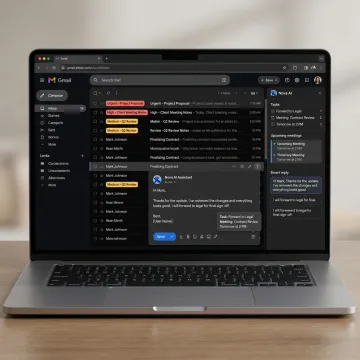
Gmail-native AI tools that help professionals prioritize, respond, organize, follow up, and protect sensitive email workflows.
Nova drafts context-aware Gmail replies in your own voice, using full thread history, your role, priorities, FAQs, links, and knowledge base while keeping every outbound message approval-first.
Surface urgent, revenue-impacting, and relationship-critical Gmail conversations first. NewMail AI learns your priorities and organizes messages into custom categories without forcing static labels or manual rules.
Automatically identify commitments, deadlines, action items, and next steps buried inside Gmail threads, then connect them to a navigable task list so important work does not disappear.
Keep stalled conversations moving with polite, context-aware follow-up drafts based on the original Gmail thread, relationship type, timing, and recipient response history, always with user approval.
Coordinate meetings directly from Gmail as Nova checks availability, handles time zones, proposes meeting times, and keeps scheduling inside the natural email conversation instead of a separate booking tool.
Use AI in Gmail with privacy-first architecture: no email storage, Zero Data Retention agreements, Google Security Certified status, military-grade encryption, and GDPR-compliant data processing.

Start by connecting Gmail through secure OAuth. There is no separate dashboard to learn, no email client migration, and no download required, so NewMail AI begins working inside your existing Gmail workflow.
Built for professionals who need faster email without sacrificing privacy, control, or personal voice.
Works directly inside Gmail, Outlook, and Apple Mail with no separate interface to manage.
No email storage, Zero Data Retention, and encrypted settings protect sensitive professional conversations.
Connect Gmail, teach Nova your context, and see sorted emails in about two minutes.
Nova learns your tone, priorities, FAQs, and links to draft replies that sound authentic.
Built by AI and cybersecurity-focused product leaders.
NewMail AI was built by founders from AI and cyber security labs who believed a useful email assistant must earn trust through architecture, not promises. Based in Switzerland and shaped by privacy-first principles, the company designed NewMail to process email ephemerally with zero email storage by default. Founder and leadership voice Yohann Abittan has discussed AI-powered executive assistants on The CTO Show, reflecting the team’s focus on practical productivity for busy professionals. NewMail AI has grown from a secure inbox tool into a broader AI assistant platform for individuals and enterprise teams, while preserving its core commitments: minimal data use, transparency, user control, GDPR compliance, and inbox-native assistance that never forces a new workflow.
The best AI email assistant for Gmail should work inside Gmail, draft in your voice, prioritize messages by real relevance, extract tasks, support follow-ups, and protect sensitive data. NewMail AI is built around those criteria: Nova runs inbox-native, learns your context quickly, uses approval-first drafting, and provides privacy safeguards including no email storage and Zero Data Retention.
Talk to NewMail AI about setup, security, and team rollout.

Supports strict European data protection obligations.
Highest-tier security review for Google Workspace applications.
AI providers process data without retaining email content.
Sign up for a free trial or contact the team to discuss Gmail setup, privacy requirements, Enterprise plans, or a guided demo.
You can also send us a quick email at dpo@newmail.ai.
You can also send us a quick email at dpo@newmail.ai.