Introduction
Opening Gmail to 15,000 unread messages is paralyzing. Every morning, professionals face the same anxiety: buried priorities, missed client emails, and the sinking realization that important threads are drowning in newsletters they never read. According to 2025 global email data, the average office worker receives 121 emails daily, spending up to 28% of their workweek—roughly 11 hours—just managing their inbox. Despite this volume, 42% of professionals describe their inbox as "out of control."
Most people are putting in the effort. The tools just aren't keeping up. Gmail's native search operators and category tabs help with manual cleanup, but they require constant attention and offer no learning capability for the hundreds of emails flooding in daily. The Gmail inbox cleanup tool market has grown significantly as professionals seek automated solutions beyond bulk-delete workarounds.
This guide compares the top five Gmail inbox cleanup tools across cleanup depth, AI capabilities, privacy standards, and pricing to help you choose the right fit.
Key Takeaways
- Gmail has no native bulk cleanup tool; third-party apps handle mass deletion, unsubscribing, and AI-driven management
- Match the tool to your goal: one-time purge (Inbox Zapper, Clean Email), ongoing AI prioritization (SaneBox, NewMail AI), or free newsletter cleanup (Unroll.Me)
- Privacy varies widely: Unroll.Me monetizes your data, while NewMail AI and Inbox Zapper use zero-retention architectures
- AI tools do more than declutter: they draft replies, extract tasks, and prioritize your inbox continuously
- All tools integrate natively with Gmail; setup ranges from 2 to 30 minutes
Overview of Gmail Inbox Cleanup Tools
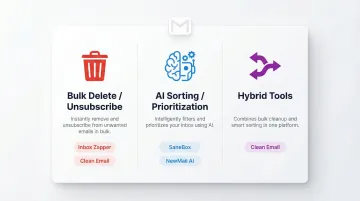
A Gmail inbox cleanup tool does more than delete emails—it automates the work of organizing, filtering, and managing high-volume inboxes. These tools fall into three categories:
- Bulk delete/unsubscribe tools — One-time cleanup focused on mass deletion and newsletter removal (Inbox Zapper, Clean Email)
- AI sorting/prioritization tools — Continuous management that learns patterns and surfaces important emails (SaneBox, NewMail AI)
- Hybrid tools — Combine cleanup with ongoing automation (Clean Email)
Gmail's native features—search operators, labels, and category tabs—are useful starting points. You can filter by sender, date, or attachment size, and Gmail's July 2025 "Manage subscriptions" hub centralizes mailing lists for one-click unsubscribing.
For professionals handling hundreds of emails daily, native Gmail hits a ceiling fast:
- Requires manual filtering every session — nothing carries forward automatically
- No bulk deletion across multiple senders at once
- Can't learn which emails matter to you or flag them accordingly
- No ability to draft responses or extract action items
For high-volume users, third-party tools fill the gap between basic filtering and intelligent inbox management.
Best Gmail Inbox Cleanup Tools: Complete Comparison
Tools were selected based on cleanup depth, AI capability, privacy posture, ease of setup, and suitability for professional and enterprise use.
NewMail AI
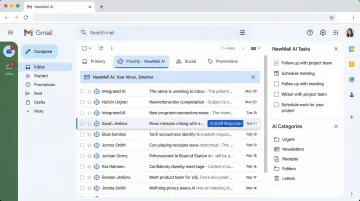
NewMail AI is a privacy-first AI email assistant built for Gmail, Outlook, and Apple Mail by a Swiss team with backgrounds in AI and cybersecurity. It goes beyond one-time cleanup to deliver continuous, intelligent inbox management—including AI drafting, priority inbox creation, task extraction, and meeting recaps.
What sets NewMail apart is its zero data retention architecture: email content is processed ephemerally and never stored. It holds Google Security Certified status—the highest level for Google Workspace apps—and is GDPR-compliant under Swiss law. This makes it the only tool in this list designed for sensitive industries and enterprise teams that cannot compromise on data security.
| Key Features | Pricing | Best For / Privacy |
|---|---|---|
| AI drafting in your voice, priority inbox with custom categories, task extraction and scheduling, meeting recaps with action items, works natively inside Gmail with 2-minute setup | Free trial available; Professional plan $12/month; Enterprise plans for teams 20–200+ users (contact sales for volume pricing) | Professionals and teams needing ongoing AI inbox management, not just cleanup; zero email storage by default; military-grade encryption; GDPR + Google Security Certified |
Clean Email
Clean Email is a dedicated inbox management tool that works across all major email providers including Gmail. It organizes cluttered inboxes into reviewable bundles and enables bulk actions like deletion, unsubscribing, archiving, and auto-clean rules.
It stands out for its breadth of automation features: the "Keep Newest" rule auto-deletes older emails from a sender while preserving the latest, "Read Later" diverts non-urgent emails into a digest folder, and its AI categorization identifies bills, receipts, and human-sent emails—all within a privacy-first framework that does not sell user data.
| Key Features | Pricing | Best For / Privacy |
|---|---|---|
| Bulk delete, unsubscribe, Read Later digest, Keep Newest automation, custom sender rules, Smart Views for grouped email types, Screener for new sender approval | Free tier (1,000 emails); annual plans: $29.99/year (1 account), $49.99/year (5 accounts), $99.99/year (10 accounts) | Users wanting comprehensive automation rules for ongoing cleanup; privacy-first; no data selling; works with Gmail and all major providers |
SaneBox
SaneBox is an AI-powered email prioritization service that works on top of any email client including Gmail. It automatically files low-priority emails into folders like SaneLater, SaneBlackHole, and SaneNews so only important messages reach your inbox.
Its learning engine works by analyzing your email interaction history to improve sorting accuracy over time, and SaneReminders let users snooze emails for later follow-up.
That said, SaneBox focuses on sorting and prioritization rather than bulk deletion or unsubscribing. PCMag awarded it 5 stars, validating its sorting accuracy and ease of training via drag-and-drop.
| Key Features | Pricing | Best For / Privacy |
|---|---|---|
| AI-powered inbox sorting, SaneLater/SaneBlackHole folders, SaneReminders for follow-up snoozing, one-click training, works with any email client | 14-day trial; Snack/Lunch/Dinner tiers approximately $4.13–$36/month depending on billing cadence | Users wanting AI to triage and prioritize emails automatically; privacy policy positive (headers/metadata only); no bulk delete focus |
Inbox Zapper
Inbox Zapper is a Gmail-specific cleanup tool that enables users to mass-unsubscribe from newsletters and bulk-delete unwanted emails in a single click. It offers a strong privacy commitment: all processing happens on-device and no email data is sent to or stored on Inbox Zapper's servers.
It's the simplest and most privacy-conscious option for users whose primary need is one-time inbox decluttering—over 61,000 users have used it to clean up millions of emails. It does not offer AI drafting, ongoing prioritization, or task management features.
| Key Features | Pricing | Best For / Privacy |
|---|---|---|
| One-click mass unsubscribe, bulk email deletion, on-device processing, Gmail-only (additional providers planned), privacy-first with no data leaving the device | Basic plan $20/month (limited); Unlimited plan $3.33/month (annual billing) | Users needing fast, one-time Gmail cleanup with maximum privacy; no AI management features; ideal for decluttering before adopting a long-term inbox tool |
Unroll.Me
Unroll.Me is a free newsletter and subscription management tool that consolidates email subscriptions into a single daily digest (called the "Rollup") and allows one-click unsubscribing. It supports multiple email platforms including Gmail.
The trade-off is privacy. The service is free because it monetizes anonymized user data for market research. Unroll.Me explicitly states "We use your data to fuel our market research business, NielsenIQ," sharing commercial email data and demographic details with e-commerce businesses and data brokers. In 2017, The New York Times reported that Unroll.Me's parent company sold anonymized Lyft receipt data to Uber. Due to this data monetization model, Unroll.Me is not recommended for privacy-conscious professionals or enterprise use.
| Key Features | Pricing | Best For / Privacy |
|---|---|---|
| Daily Rollup digest for newsletters, one-click unsubscribe, supports multiple email providers, simple and fast setup | Free (revenue model based on anonymized data monetization) | Users needing a free, simple newsletter management tool and not handling sensitive data; not recommended for privacy-conscious professionals or enterprise use |
How We Chose the Best Gmail Inbox Cleanup Tools
The most common mistake users make when choosing an inbox cleanup tool is optimizing for the wrong outcome—selecting a tool based on price or popularity without considering whether they need one-time cleanup, ongoing management, or AI-powered productivity assistance.
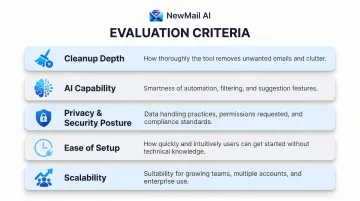
We evaluated tools based on:
Cleanup depth — How effectively the tool handles bulk deletion, unsubscribes, and backlog clearing
AI capability — Whether smart sorting, reply drafting, and task extraction are genuinely useful or cosmetic
Privacy and security posture — Data retention policies, third-party certifications, and whether processing is ephemeral
Ease of setup — Time to first value and native compatibility with Gmail
Scalability — Whether the tool works for solo users, growing teams, or enterprise deployments
Of these criteria, privacy deserves closer attention than most comparison guides give it. Privacy certifications—such as Google Security Certified status, GDPR compliance, and Zero Data Retention agreements with AI providers—matter most for professionals in legal, financial, healthcare, or executive roles where email content is sensitive.
According to Google's Workspace documentation, apps requesting restricted scopes must pass annual security assessments and display an independent security verification badge.
Zero Data Retention (ZDR) must be explicitly contracted. Anthropic offers ZDR for eligible APIs, ensuring customer data is not stored at rest after the response is returned. Mistral keeps API inputs and outputs for 30 days to monitor abuse by default—ZDR must be manually requested and approved at Mistral's discretion.
Conclusion
The right Gmail cleanup tool depends entirely on what your inbox actually demands. A one-time bulk delete solves a different problem than continuous AI triage for someone managing hundreds of emails per week.
Before committing to a tool, weigh these factors:
- Email volume: One-time cleanup vs. ongoing daily management
- Data sensitivity: Whether your industry requires zero data retention or GDPR compliance
- Productivity scope: Cleanup-only vs. drafting, task extraction, and meeting recaps
- Long-term cost: Per-seat pricing adds up fast for teams
For professionals and teams that need continuous inbox management, AI drafting in their own voice, and strict data privacy, NewMail AI is worth a look. Setup takes about 2 minutes, and a free trial is available at newmail.ai.
Frequently Asked Questions
What is the best clean up tool for Gmail?
There is no single best tool for everyone. For one-time bulk cleanup, consider Clean Email or Inbox Zapper. For ongoing AI-powered management, SaneBox or NewMail AI are stronger choices. Privacy requirements should also factor into your decision—tools like Unroll.Me monetize user data, while privacy-first options like Inbox Zapper and NewMail AI use zero-retention architectures.
What is the best way to manage a cluttered Gmail inbox?
Use a two-step approach: first, deploy a bulk cleanup tool like Inbox Zapper or Clean Email to delete and unsubscribe at scale. Then adopt an ongoing AI inbox management tool to prevent re-cluttering and keep priority emails visible. This combination delivers immediate relief and long-term control.
Does Gmail have an inbox cleanup tool?
No. Gmail offers search operators, category tabs, and a "Manage subscriptions" hub (added July 2025) for manual cleanup, but has no native bulk deletion or AI-based prioritization. Third-party tools are required for bulk deletion, auto-unsubscribing, and intelligent inbox management.
What is the difference between normal Gmail and business Gmail?
Standard Gmail (free) gives you 15GB of shared storage with basic controls. Google Workspace starts at 30GB per user and adds enterprise security features—Google Vault, DLP, S/MIME encryption, and custom domain email. Most inbox cleanup tools work with both versions.
Are Gmail inbox cleanup tools safe to use?
It depends on the tool. Some, like Unroll.Me, monetize anonymized data for market research, while privacy-first options like Inbox Zapper and NewMail AI use zero email retention and military-grade encryption. Always review a tool's privacy policy before granting inbox access.