Introduction
Modern professionals face an unrelenting flood of messages. In 2024, global email volume exceeded 361.6 billion messages daily, and by 2026 that number will reach 392.5 billion. Professionals spend roughly 28% of their workweek—approximately 11.2 hours—reading and answering email. The pressure to respond quickly without sacrificing quality has made automated response tools a standard feature across Gmail, Outlook, and Apple Mail.
Research shows that approximately 25% of email replies contain 20 tokens or fewer—short, routine acknowledgements that eat time without adding complexity. Smart reply exists to automate exactly this slice of communication.
Yet most people click suggested responses without understanding how the technology works. That gap makes it harder to judge whether smart reply fits your inbox—or why it occasionally misses the mark.
This guide breaks down what smart reply is, how it works step by step, what types exist, and where it genuinely helps versus where more capable AI is needed.
Key Takeaways
- Smart reply analyzes incoming email content and suggests 2–3 short, contextually relevant responses you can send with one click—no typing required
- It runs a machine learning pipeline that classifies reply-worthiness and generates candidate responses word by word
- Works best for simple exchanges like acknowledgements, confirmations, and yes/no questions—struggles with complex or knowledge-dependent messages
- NewMail AI goes further—learning your voice in 60 seconds and drafting full replies directly inside Gmail, Outlook, and Apple Mail
What Is Smart Reply for Email?
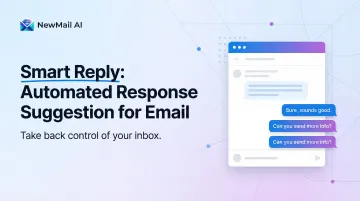
Smart reply is an AI-powered inbox feature that reads an incoming email and surfaces 2–3 short, pre-generated response options you can send with a single click, without composing a reply from scratch.
The technology exists to solve a specific operational problem: as email volume increased, a significant portion of professional communication became repetitive and formulaic—meeting confirmations, acknowledgements, quick approvals. Manually typing these routine messages wastes time; smart reply targets this exact slice of correspondence.
Smart reply is NOT:
- An auto-responder that sends messages automatically
- A full email drafting tool
- An out-of-office reply
- Capable of taking action like tagging, routing, or looking up information
That narrow scope is precisely the point. Smart reply handles one job well: eliminating the effort behind routine replies. That's why it remains embedded across major email clients — no configuration required, and it works passively on every incoming message.
How Does Smart Reply Work?
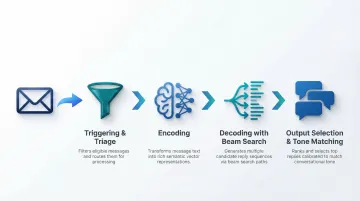
Smart reply runs your incoming email through a multi-stage NLP pipeline—triage, encoding, decoding, and output selection—before surfacing the three suggestions you see.
Triggering and Triage
The system first decides whether a message is even worth generating a reply for. Using a classifier model similar to spam detection, it distinguishes personal, reply-worthy emails from newsletters, automated notifications, CC'd threads, and promotional blasts. This triage step prevents suggestion fatigue and keeps the feature useful rather than noisy.
Understanding the Message: Encoding
The incoming email is tokenized and processed by a neural network (encoder) that converts the text into a vector representation—often called a "context vector" or "thought vector"—capturing meaning without being tied to exact wording.
This is why smart reply can recognize "Does tomorrow work for you?" and "Are you free tomorrow?" as semantically equivalent and surface the same type of responses for both.
Generating Candidate Replies: Decoding
Starting from the context vector, the model generates candidate reply text word by word, predicting the most likely next word at each step based on both the encoded message meaning and what has already been generated.
Two techniques sharpen the output quality:
- Attention mechanisms — instead of relying on a single fixed context vector, the model focuses on the most relevant parts of the original email at each generation step, which improves accuracy for longer or more complex messages.
- Beam search — explores multiple candidate sequences in parallel, producing better overall replies than greedy decoding, which simply picks the single most probable word at each step.
Output Selection and Tone Matching
The final 3 suggestions are selected to be meaningfully different from each other—not just rephrasing the same answer—so you have genuinely distinct choices. Modern smart reply systems also attempt to mirror the tone of the incoming message: formal messages tend to generate formal suggestions, and casual messages generate casual ones. However, this tone matching is population-level, not personalized to your individual writing style.
Types of Smart Reply Technology
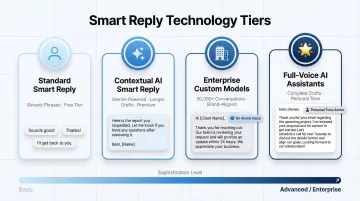
Standard smart reply (Gmail free tier): Generates short, generic phrases like "Thanks!" or "Sounds good!"—fast and frictionless, but impersonal with no adaptation to your voice or writing style.
Contextual AI-powered smart reply (Gmail with Gemini, premium plans): Uses larger language models to generate longer, more context-specific draft responses beyond a single phrase—available on paid tiers and noticeably more capable for professional correspondence.
Enterprise custom models (Google Agent Assist Smart Reply): Trained on an organization's own historical conversation data, typically requiring 30,000+ past conversations to generate brand-aligned, domain-specific suggestions. The results are accurate and brand-consistent, but the setup requires substantial technical resources to implement and maintain.
Full-voice AI email assistants: These tools go beyond suggestion to generate complete email drafts in your personal tone and style. NewMail AI, for example, learns your voice in 60 seconds and works directly inside Gmail, Outlook, and Apple Mail — with no email data stored by default, which matters for professionals in privacy-sensitive industries.
Where Smart Reply Works Best — and Where It Falls Short
Best-Fit Use Cases
Smart reply excels for:
- Quick acknowledgements
- Meeting confirmations
- Yes/no responses
- Scheduling coordination
- Brief follow-ups where speed matters more than nuance
These are the email types smart reply was designed for and where it consistently saves time.
Where It Struggles
Smart reply falters on:
- Open-ended questions
- Emotionally complex messages
- Multi-part requests
- Any reply requiring knowledge of your company's products, policies, customer history, or recent context
Smart reply cannot reference anything outside the current email thread.
The Personalization Gap
Standard smart reply does not learn your individual voice or style. It generates statistically likely responses based on patterns across millions of users, which is why two different people receive identical suggestions for the same incoming email—and why the replies can feel generic or off-brand.
The Knowledge Gap
Smart reply has no access to external information—your company's FAQs, internal policies, product details, or a sender's previous interactions. It can only work with what is explicitly written in the thread itself, making it unsuitable for any response that requires organisational context.
NewMail AI addresses both gaps directly: it learns your voice in 60 seconds and generates complete draft responses with access to your context — working inside Gmail, Outlook, and Apple Mail with zero email data retention by default.
Conclusion
Smart reply does its job well: it reduces friction on routine, short-form responses using a straightforward NLP pipeline. But by design, it stops at suggestions—it doesn't learn, adapt, or draft anything worth sending on its own.
Knowing where smart reply works and where it falls short helps you decide whether suggestion-based shortcuts are enough. Or whether you need something more capable—an AI that learns your voice, understands context, and drafts replies that are actually ready to send. Tools like NewMail AI are built for exactly that use case.
Frequently Asked Questions
What is a smart reply in email?
Smart reply is an AI feature built into email clients that reads incoming messages and surfaces 2-3 short, one-click response suggestions. It's designed to reduce the time spent typing routine replies without requiring any manual setup.
Can I use smart replies with my email?
Smart reply is available natively in Gmail (free and Workspace plans), Outlook (Microsoft 365), and Apple Mail. The level of sophistication varies by plan: basic suggestions on free tiers, more contextual AI drafts on premium plans.
What is a good automatic reply for email?
A good automatic reply states your availability clearly, sets expectations for response time, and offers an alternative contact if urgent. Keep it brief — one or two sentences for internal messages, slightly more formal for external ones.
How does smart reply learn your writing style?
Standard smart reply does not learn individual writing style. It generates population-level responses based on patterns across millions of users. More advanced AI email tools can learn a user's specific tone and vocabulary over time to produce personalized drafts.
Does smart reply work with Gmail and Outlook?
The two platforms take different approaches. Gmail's implementation ranges from simple one-tap replies to Gemini-powered drafts that pull context from the thread. Outlook's suggested replies are more uniform across the Microsoft 365 suite, with less variation between tiers.
What are the limitations of smart reply?
Smart reply has several hard limits:
- Responses are short and generic by design
- No access to external knowledge or company-specific context
- Doesn't adapt to individual voice or writing style
- Cannot perform workflow actions like tagging, routing, or escalating messages