Daily Briefings
Get a personalized morning digest summarizing important emails, overnight activity, schedule updates, links, and action items so you can catch up fast inside your existing inbox.
Start every day with a clear, prioritized inbox summary. NewMail AI’s AI Email Briefing Assistant delivers morning email recaps, schedule updates, important links, and action items directly inside Gmail, Outlook, and Apple Mail. Nova learns your role, priorities, and active conversations, so you can catch up quickly without opening another dashboard or sacrificing privacy.
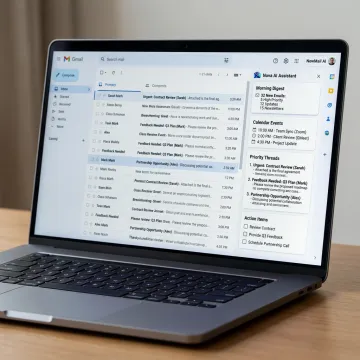
Daily email briefings supported by prioritization, scheduling, task extraction, smart drafts, and privacy-first inbox automation.
Get a personalized morning digest summarizing important emails, overnight activity, schedule updates, links, and action items so you can catch up fast inside your existing inbox.
Nova ranks incoming email by your role, priorities, contacts, and active projects, surfacing important conversations while lowering the distraction of cold outreach and low-value CCs.
Automatically identify commitments, deadlines, next steps, and to-dos hidden in email threads, then track them so important actions do not disappear as conversations move on.
Coordinate meetings directly from email with calendar-aware suggestions, time-zone handling, polite follow-ups, and daily schedule visibility inside the inbox briefing experience.
Create context-aware replies in your own voice from full thread history, FAQs, links, and approved knowledge, while keeping every outbound message approval-first.
Surface stalled threads and generate polite, context-aware follow-ups so prospects, customers, investors, and internal stakeholders do not fall through the cracks.
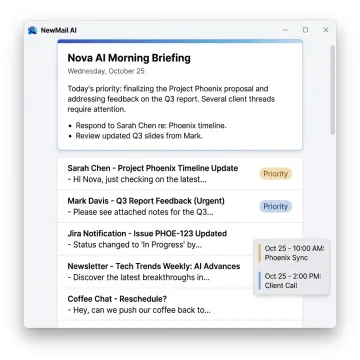
Connect Gmail, Outlook, or Apple Mail through secure OAuth in about 30 seconds. NewMail AI runs inside your existing inbox, so there is no new interface, dashboard, browser tab, or email client to adopt.
NewMail AI combines practical inbox productivity with privacy architecture built for trust.
Emails are processed ephemerally with no NewMail email storage by default.
Daily briefings and drafts appear inside Gmail, Outlook, and Apple Mail.
Nova learns your voice, priorities, FAQs, and role in about 60 seconds.
Enterprise teams get SSO, DPA, KPI dashboards, onboarding, and dedicated account management.
Built by AI and cyber security experts.
NewMail AI was built by founders from AI and cyber security labs who believed email AI could only work if trust was engineered from the start. Based in Switzerland, the company designed its platform around strict privacy expectations, ephemeral processing, and zero email storage by default. Founder and leadership voice Yohann Abittan has been featured on The CTO Show discussing AI-powered executive assistants and the future of productivity. Today, NewMail AI has grown from a privacy-focused email tool into a comprehensive inbox-native AI assistant for individuals and Enterprise teams, while staying committed to transparency, minimal data use, user control, and secure productivity inside the email clients professionals already use.
An AI email briefing assistant summarizes your most important inbox activity into a focused daily digest. NewMail AI’s Nova highlights important overnight emails, schedule updates, relevant links, and action items inside your existing email client. Instead of scanning every thread manually, you get a personalized catch-up based on your role, priorities, contacts, and active conversations.
Get clear answers about setup, security, pricing, or Enterprise rollout.

Highest-tier Google Workspace app security validation.
Designed to support strict European privacy standards.
AI providers process data without retaining it.
Tell us whether you are evaluating NewMail AI for yourself or a team, and we will help you choose the right trial, Professional plan, or Enterprise rollout path.
You can also send us a quick email at dpo@newmail.ai.
You can also send us a quick email at dpo@newmail.ai.