Daily Briefings
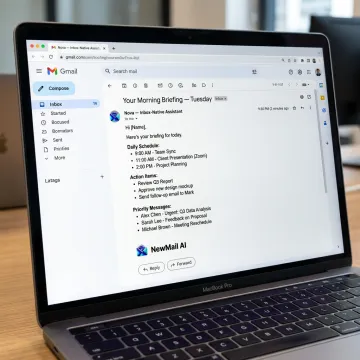
Nova delivers a concise morning digest with overnight email summaries, schedule updates, important links, meeting context, and the actions each user needs to take next.
Start every workday with a clear, personalized inbox digest for your team. NewMail AI’s Nova summarizes important overnight emails, schedule updates, key links, and action items directly inside Gmail, Outlook, and Apple Mail. Busy leaders, sales teams, and customer-success professionals can catch up quickly, respond faster, and stay focused without switching tools or compromising privacy.
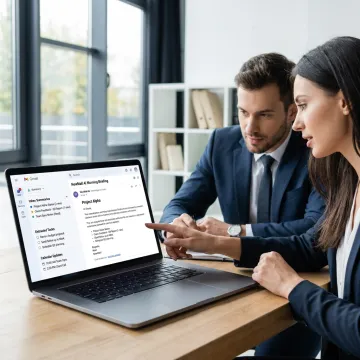
Everything busy teams need to turn email overload into a clear daily operating rhythm.
Nova delivers a concise morning digest with overnight email summaries, schedule updates, important links, meeting context, and the actions each user needs to take next.
Rank incoming email by personalized relevance, active projects, key contacts, and urgency so busy teams see the conversations that matter before inbox noise.
Automatically identify commitments, deadlines, next steps, and follow-ups from email threads, then turn them into a navigable task list tied to the original conversation.
Generate contextual replies in each user’s own voice using full thread history, role context, FAQs, approved links, and customer-specific details for faster responses.
Coordinate meetings from email by checking calendars, handling time zones, suggesting availability, and keeping the day’s schedule visible inside the morning briefing.
Surface stalled conversations and draft polite, context-aware reminders so deals, client requests, renewals, and operational threads keep moving without manual tracking.
Connect Gmail, Outlook, or Apple Mail through secure OAuth. Nova begins working inside the inbox your team already uses, so there is no dashboard rollout, new email client, or workflow migration to manage.
NewMail AI combines daily inbox clarity with enterprise-grade security and user control.
Built from day one around ephemeral processing, no email storage, and minimal data use.
Certified at the highest tier for Google Workspace application data security standards.
Runs inside Gmail, Outlook, and Apple Mail with no new dashboard or migration.
Nova learns each user’s voice, priorities, and context in about 60 seconds.
Built by AI and cyber security specialists.
NewMail AI was built by founders from AI and cyber security backgrounds who believed productivity software should earn trust through architecture, not promises. Based in Switzerland, the company designed Nova with strict privacy standards from day one: ephemeral processing, no email storage by default, Zero Data Retention agreements with leading AI providers, and military-grade encryption for stored preferences. What began as a privacy-focused AI email tool has grown into a comprehensive assistant platform for professionals and teams who need clarity without losing control. NewMail AI’s vision is simple: help busy teams move from inbox chaos to clarity in minutes while keeping user data protected, transparent, and under human control.
An AI daily email briefing is a personalized inbox digest that summarizes important emails, schedule updates, links, and action items before the workday begins. NewMail AI delivers this briefing directly inside your existing email client, so busy teams can understand what matters, what needs action, and which conversations require follow-up without scanning every thread manually.
Get clear answers on setup, security, pricing, and team rollout.

Confirms strong privacy standards for EU data protection.
Highest security certification for Google Workspace applications.
AI provider agreements prevent email data retention.
Request a demo, start a free trial, or ask about Enterprise rollout for teams of 20-200+.
You can also send us a quick email at dpo@newmail.ai.
You can also send us a quick email at dpo@newmail.ai.