: Complete Guide](https://file-host.link/website/newmail-uzhwp3/assets/blog-images/54ba44a0-036b-49f1-87a5-15f0afe8bcde/1782830680977722_2db24750e59844b2b06f8958206fd73d/360.webp)
AI email agents have emerged as a direct response to this. They read incoming emails, draft contextually relevant replies in your voice, and surface what actually needs your attention. The problem isn't the technology — it's that most people set these tools up poorly, hand them the wrong emails to handle, and then wonder why the drafts sound generic or, worse, commit them to something they didn't intend.
This guide walks through exactly how to use an AI agent for automated email responses: when to deploy one, how to configure it properly, how to review its output without creating new bottlenecks, and how to keep it calibrated over time.
Key Takeaways
- AI email agents work best on high-volume, routine email — scheduling, FAQs, status updates — not nuanced or high-stakes conversations
- Setup quality drives output quality: the more context you provide upfront, the fewer edits you'll make later
- Start in draft-only mode and validate accuracy for at least two weeks before expanding the agent's scope
- Human review is non-negotiable for new contacts, financial commitments, and sensitive relationships
- Choose a tool with zero data retention, clear permission scopes, and verifiable compliance — your email data is too sensitive to cut corners
When Should You Use an AI Agent for Email Responses?
Not every inbox needs an AI agent. The clearest signal that one would help is volume combined with repetition.
Microsoft WorkLab reports that the average worker now receives 117 emails per day. At that volume, manual triage alone consumes hours. The top 25% of email users in Microsoft 365 spend 8.8 hours per week just on email — before doing any of the actual work those emails are about.
Where AI Agents Genuinely Add Value
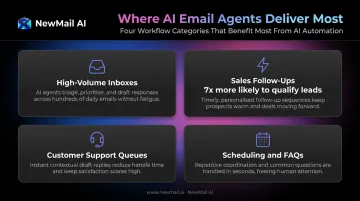
These are the workflows where an AI email agent pays off quickly:
- High-volume inboxes where a significant share of emails are logistical, repetitive, or follow a predictable pattern
- Sales follow-ups — Harvard Business Review research found companies that respond to leads within an hour are nearly 7x more likely to qualify them than those who wait longer
- Customer support queues where delayed or inconsistent replies have a direct cost
- Scheduling coordination, FAQ responses, and status update requests — categories where the draft content is relatively predictable
Where AI Agents Are Often Misapplied
Low-volume inboxes with mostly relationship-heavy or high-stakes communication are a poor fit. In those cases, if most of your email requires careful reading, judgment calls, or relationship context the agent doesn't have, you'll spend more time editing drafts than you would have writing them yourself.
A practical way to assess fit: AI agents deliver the most value when the cost of a delayed reply is high and the cost of a slightly imperfect draft is low. When both costs are high — new client outreach, legal matters, anything involving a commitment — human handling is the right call regardless of volume.
What You Need Before Setting Up an AI Email Agent
Rushing into setup without these three things is the primary reason agents underperform.
Essential Prerequisites
Before connecting any AI email agent, confirm you have these three things in place:
Email platform access with correct permissions: The agent needs read/write access to your inbox (Gmail, Outlook, or Apple Mail). Check exactly what permissions it requests and whether they match what it actually needs. Hold off on granting send-without-approval access until you've validated the tool's accuracy.
A voice and context document: This has the biggest effect on draft quality. Write down your communication style, how you handle common request types, phrases you use or avoid, and any nuances with key correspondents. Tools like NewMail AI learn your voice from sent email history in about 60 seconds — a written context document accelerates this further.
A defined scope and rule set: Decide upfront which email categories the agent can draft, which always need your review, and which it should never touch. Without this boundary, the agent treats every email as an identical task — and your inbox isn't.
Why Scope Matters More Than Most People Expect
An agent without scope boundaries drafts replies to emails it has no business touching. The time you spend correcting those mistakes erases the time savings you were expecting. Define scope before day one — not after the first awkward draft lands in someone's inbox.
How to Use an AI Agent for Automated Email Responses (Step-by-Step)
Effective use follows a defined sequence across five phases: setup, training, activation, review, and refinement. Skipping the context-building or review phases is the primary reason agents underperform — not the technology itself.
Setup and Configuration
Connect the agent to your email client via OAuth and review the permissions being granted. Confirm they're limited to what the tool actually requires — read access, draft creation, and labeling are typical. Avoid granting send-without-approval access until you've validated accuracy over one to two weeks.
Configure inbox categories the agent will act on. Common starting categories:
- Scheduling requests
- FAQ and common question types
- Status update requests
- Follow-up acknowledgments
Explicitly exclude higher-risk categories from the agent's scope, including billing disputes, new client outreach, sensitive interpersonal threads, and anything involving financial commitments.
NewMail AI's setup completes in under two minutes: connect your inbox via OAuth, Nova learns your context from sent email history, and inbox sorting with draft generation activates — all inside your existing Gmail, Outlook, or Apple Mail interface.
Training the Agent on Your Voice and Context
Provide a structured context document covering:
- Your tone preferences (formal, conversational, direct)
- Common reply patterns for frequent request types
- How you handle requests you want to decline
- Specific language you use with key correspondents
If the tool accepts past sent emails as training input, use that feature. Behavioral data from your actual email history is more accurate than manual descriptions because it captures how you actually write, not how you think you write. NewMail's Nova analyzes a selection of your sent emails during onboarding to generate this context automatically.
Activating the Agent and Running the First Week
Start in draft-only mode. The agent reads, categorizes, and drafts replies — but nothing sends without your explicit approval. This phase is for calibrating accuracy before you delegate any outcomes.
During the first week, review drafts carefully and note:
- Tone mismatches (drafts that sound plausible but not like you)
- Implied commitments you didn't authorize
- Emails the agent miscategorized
Use these observations to refine your context document and tighten category rules before expanding scope.
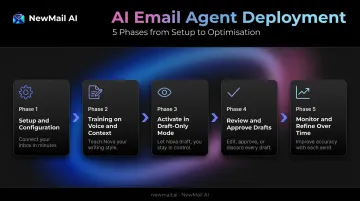
Reviewing and Approving AI-Drafted Replies
Read each draft as a recipient would, not as its author. This surfaces assumptions the agent made that feel internally plausible but aren't accurate. Plausible-but-wrong is the primary failure mode of AI-drafted replies.
Apply a mandatory slow-review rule to:
- New contacts (anyone not already in your sent history)
- Anything involving scheduling commitments, pricing, or deliverables
- Threads with complex relationship history
Even if the agent has been reliable for months, these categories should never get a quick skim. The agent's confidence in its output does not reliably reflect its understanding of relational context.
Monitoring and Refining Over Time
Track your edit rate on drafted replies over time. A declining edit rate signals improving accuracy; a stubbornly high rate suggests a training gap or a scope problem.
Use miscategorized or poorly drafted emails as structured feedback:
- Update the context document when you notice recurring tone mismatches
- Tighten category definitions if the agent keeps pulling in the wrong emails
- Note whether error patterns reflect missing context or emails that simply shouldn't be in scope
NewMail AI refines its output as you use it. Each correction you make — whether adjusting tone in a draft or updating a category rule — sharpens Nova's understanding of how you communicate.
What AI Email Agents Handle Well — and Where They Fall Short
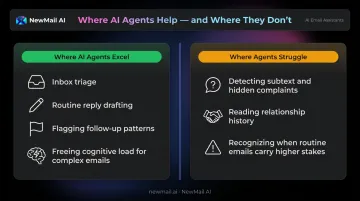
Where Agents Excel
- Sorting and triaging high-volume inboxes by urgency and required action
- Drafting replies to routine requests: FAQs, scheduling, status updates, resource requests
- Flagging patterns across multiple threads (follow-up needed, unresolved asks)
- Freeing up cognitive energy for complex emails that need genuine judgment
Tools like NewMail AI read the full email thread rather than just the most recent message, which keeps drafts accurate when a conversation has evolved across several exchanges. That full-thread awareness is one reason AI agents perform well on the tasks above — but it doesn't solve everything.
Where Agents Consistently Struggle
- Catching subtext in professionally worded emails — a politely phrased message can be a complaint or escalation in disguise
- Reading relationship history — the agent sees the words on screen, not the 18 months of context behind them
- Knowing when "routine" isn't — a scheduling request from a frustrated long-term client carries different weight than one from a new prospect
A 2024 NLP research review identifies persistent limitations in AI sentiment analysis, including sarcasm, irony, context dependence, and domain mismatch — all of which appear regularly in professional email.
The boundary rule: If the cost of sending a plausibly correct but actually wrong reply is high, that email should not be in the agent's scope.
Best Practices for Using AI Email Agents Effectively
Maintain a living context document. Update it whenever you notice a recurring tone mismatch or a missed relationship nuance. Treat it as the agent's operating manual, not a one-time setup task.
Define and revisit scope boundaries every four to six weeks. Your email patterns change, and the categories where the agent adds value will shift accordingly.
Avoid scope creep toward full autonomy too quickly. Expand auto-send permissions only after validating accuracy across a category over at least 30 days, and never for anything involving financial, legal, or relationship risk.
Prioritize privacy-first tools. Email contains sensitive professional and personal data. More than 1 in 4 organizations have banned generative AI use over privacy and data security risks, according to Cisco's 2024 research. Look for zero data retention by default, end-to-end encryption, and transparent data processing agreements. NewMail AI, for instance, processes email ephemerally: no content stored on its servers, and Zero Data Retention agreements with Anthropic and Mistral ensure those providers discard data immediately after processing — a concrete privacy baseline for professionals in regulated industries.
Watch for automation complacency. A 2024 University of Montana law review identified a pattern where familiarity with AI tools leads to passive approval rather than deliberate review. Set a minimum review practice for high-stakes email categories and hold to it.
Frequently Asked Questions
How long does it take for an AI agent to learn my email style?
Most tools begin generating useful drafts immediately after connecting your sent email history, but accuracy improves noticeably over one to two weeks of active use and feedback. NewMail AI claims an initial context acquisition of 60 seconds, with quality continuing to improve as the system learns your patterns over time. Providing a written context document at setup accelerates this process.
Is it safe to give an AI agent access to my email inbox?
It depends on the tool. Prioritize zero data retention policies, end-to-end encryption, and permission scopes limited to what the tool actually needs. NewMail AI, for example, holds the highest-tier Google Workspace security certification and processes all email ephemerally with no content storage.
Can an AI email agent send replies automatically without my approval?
Yes, but it shouldn't — at least not initially. Most tools offer both draft-only and auto-send configurations. Start in draft-only mode and validate accuracy across your email categories before enabling auto-send, which is only appropriate for a narrow set of well-defined, low-risk reply types.
What types of emails should never be handled by an AI agent?
Keep these in human hands: billing disputes, legal questions, sensitive relationship conversations, new client outreach, pricing or contractual commitments, escalations, and emotionally charged messages. Google explicitly warns against relying on Gemini for medical, legal, or financial advice, and the same caution applies to any AI email tool.
How is an AI email agent different from a basic autoresponder?
A basic autoresponder sends a pre-written reply based on a trigger: keywords, sender address, or out-of-office rules. An AI email agent reads the full thread, understands intent and context, and drafts a personalized reply based on your communication history — categorizing by meaning, not just subject-line keywords.
Can AI email agents work across Gmail, Outlook, and Apple Mail?
Compatibility varies by tool. Some agents are platform-specific; others work natively across multiple clients. NewMail AI integrates directly into Gmail, Outlook, and Apple Mail without requiring a separate app or dashboard — the AI assistant lives inside your existing inbox, which reduces friction and tends to improve adoption.