Introduction
According to Microsoft's 2025 Work Trend Index, the average worker now receives 117 emails and 153 Teams messages daily, with interruptions hitting roughly every two minutes. 40% of employees check email before 6 a.m. The inbox has become a full-time job layered on top of the actual job.
Most AI email tools still stop at autocomplete and spam filtering. But there's a distinction most buyers miss: an AI email assistant helps you write faster — you still read every message and decide what to do. An AI email agent reads, prioritizes, drafts, and acts on your behalf, without requiring your input at every step.
That distinction determines whether you reclaim 20 minutes or two hours daily. This guide breaks down the top AI email agents available now, what each actually does, and how to choose the right one for your workflow, email client, and privacy requirements.
Key Takeaways
- AI email agents go beyond drafting — they triage, prioritize, and automate so you focus on high-value work
- Privacy architecture matters: look for zero data retention, encryption, and compliance certifications
- Platform compatibility varies significantly — confirm Gmail, Outlook, or Apple Mail support before committing
- Top picks: NewMail AI for privacy-first teams, Superhuman for speed, Microsoft Copilot for Outlook enterprises
- Match your choice to your email client, team size, and how much control you want to keep over AI actions
What Is an AI Agent for Email Management?
Not all AI email tools work the same way — and choosing the wrong category means paying for features that don't solve your actual problem.
Three Distinct Tool Types
- AI email client — Replaces your inbox app entirely (Superhuman, Shortwave)
- AI email assistant — Lives inside your inbox to suggest and draft replies (SaneBox, basic Copilot features)
- AI email agent — Reads, interprets, and acts on email with minimal per-action input: sorting threads, extracting tasks, scheduling meetings, drafting context-aware replies, and triggering follow-ups automatically
Gartner defines the distinction clearly: AI assistants depend on human input and don't operate independently, while AI agents can perform complex, end-to-end tasks. Gartner also predicts 40% of enterprise applications will include task-specific AI agents by end of 2026, up from less than 5% in 2025.
What Powers Modern AI Email Agents
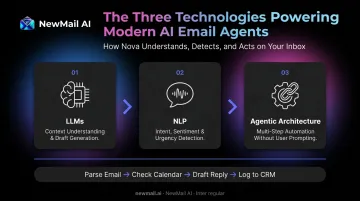
Three core technologies work together in 2026's best tools:
- LLMs — Understand email context and generate voice-matched draft replies
- NLP — Detect intent, sentiment, and urgency across incoming messages
- Agentic architectures — Chain multi-step actions (parse email → check calendar → draft reply → log to CRM) without user initiation at each step
The strongest tools also use privacy-preserving techniques: ephemeral processing (data handled in memory only) and zero data retention policies that ensure email content is never written to disk.
Each tool reviewed below is evaluated on how much genuine email work it handles end-to-end — from triage and drafting to follow-ups and calendar coordination.
Top AI Agents for Email Management in 2026
Selection criteria: depth of AI capability (true agentic behavior vs. drafting only), platform compatibility (Gmail, Outlook, Apple Mail), data privacy architecture, setup friction, and scalability from solo users to enterprise teams.
NewMail AI
NewMail AI is a Swiss-built, privacy-first AI email assistant designed for executives, sales professionals, and teams handling high email volume. It works natively inside Gmail, Outlook, and Apple Mail — no new interface to learn, no tab-switching.
What makes it different is the architecture. NewMail processes email ephemerally: content is analyzed in memory and never retained. The company holds Zero Data Retention agreements with its AI providers, military-grade encryption covers all stored context and metadata, and the platform holds Google Workspace's highest-tier security certification. For professionals in legal, finance, or healthcare, that's not a nice-to-have — it's the baseline.
Setup takes under three minutes. During the first 60 seconds, NewMail's AI (Nova) analyses a selection of your sent emails to build a structured profile of your voice, tone, role, and business context. That profile powers personalised drafts from the very first session, and the model continues refining with every use.
Important note on autonomy: NewMail operates on an approval-first model. The AI generates context-aware drafts you approve, edit, or send — it does not dispatch emails without your sign-off. Automated actions like follow-up reminders operate within timing rules you control.
Key capabilities:
- Priority inbox with custom categories
- AI drafts written in your voice (including FAQs and relevant links)
- Task extraction surfaced within an inbox-native to-do list
- Daily briefings and thread summaries with action items
- Approval-first workflows — human oversight on every outbound message
| Attribute | Details |
|---|---|
| Pricing | Free 14-day trial (no credit card); Professional $12/month ($9.60/month billed annually); Enterprise: custom pricing for teams 20–200+ |
| Best For | Executives, sales and customer success teams, professionals in sensitive industries, enterprise teams needing DPA/SSO/ZDR |
| Platforms | Gmail, Outlook, Apple Mail |
Superhuman
Acquired by Grammarly in July 2025, Superhuman remains the go-to choice for raw email speed. It's a standalone client — not an add-on — built around the 100ms performance rule (sub-50ms targeted, sub-32ms achieved for email rendering by Superhuman's own benchmarks).
Core capabilities include:
- Voice-matched drafts trained on your writing style over time
- Auto Drafts that handle follow-ups proactively
- Split inbox auto-triage to keep priorities visible without manual sorting
- Read receipts and follow-up reminders
Superhuman supports Gmail and Outlook accounts; Apple Mail is not supported.
The tradeoff: it's a premium standalone client, which means account migration friction upfront. It's best suited for solo executives and founders who process extreme email volume and want every millisecond optimised.
| Attribute | Details |
|---|---|
| Pricing | Free tier available; Pro from $12/user/month (billed annually); Business $33/user/month |
| Best For | Solo executives, founders, high-volume individual email users |
| Platforms | Gmail, Outlook |
Shortwave
Built by ex-Google/Firebase engineers, Shortwave reimagines Gmail with a chat-style interface, AI-powered semantic search across full email history, and smart email bundling. Its "Ghostwriter" feature analyses your sent folder to replicate greetings, sign-offs, tone, and common phrases — using embedding-based RAG to retrieve 5–10 relevant past emails for each draft.
The semantic search stands out for information retrieval: ask a natural language question and surface relevant threads instantly, not just keyword matches. stands out for information retrieval: ask a natural language question and surface relevant threads instantly, not just keyword matches.
Two limitations to know: AI usage is capped on lower plans (Business tier allows roughly 150–300 standard AI requests/day), and Shortwave is Gmail-only. Outlook and other providers require forwarding into Gmail, with sending limitations.
| Attribute | Details |
|---|---|
| Pricing | Business $24/seat/month; Premier $36/seat/month; Max $100/seat/month (billed annually) |
| Best For | Gmail power users who need fast information retrieval and style-matched drafting |
| Platforms | Gmail only (other providers via forwarding only) |
Microsoft Copilot for Outlook
Copilot is the native AI layer built into Outlook, and its strongest differentiator has nothing to do with email drafting. It pulls cross-app context — referencing Teams files, PowerPoint decks, Excel data — to inform summaries and action items in ways no standalone tool can replicate inside a Microsoft 365 environment.
Core email capabilities include:
- Thread summarization with numbered citations
- Tone-adjustable drafting with writing coaching on clarity and sentiment
- Meeting preparation summaries drawn from related communications
It works across Outlook for Windows, Web, Mac, iOS, and Android — but only on primary mailboxes. Shared mailboxes and encrypted S/MIME emails are not supported.
Requires an eligible Microsoft 365 subscription plus the Copilot add-on. For organisations already embedded in the Microsoft ecosystem, it's the natural choice. For everyone else, it's overkill.
| Attribute | Details |
|---|---|
| Pricing | $30/user/month add-on (requires Microsoft 365 subscription) |
| Best For | Enterprise organisations fully embedded in Microsoft 365/Outlook |
| Platforms | Outlook only |
SaneBox
SaneBox is a passive inbox organiser, not an agent. It analyses your email behaviour patterns — sender, subject, date, your past interactions — and automatically routes low-priority messages into a SaneLater folder, keeping your main inbox focused on what actually needs attention. SaneBlackHole one-click blocks unwanted senders permanently. A daily digest summarises everything that was filtered.
It does not draft emails, respond autonomously, or take agentic actions. Think of it as a reliable pre-filter: works with any IMAP client (Gmail, Outlook, Apple Mail, iCloud, Yahoo), requires zero interface changes, and runs in the background. Best paired with a drafting or agentic tool for a complete solution.
| Attribute | Details |
|---|---|
| Pricing | Snack $4.99/month; Lunch $7.99/month; Dinner $24.99/month |
| Best For | Professionals drowning in inbox noise who want passive filtering without switching email clients |
| Platforms | Gmail, Outlook, Apple Mail, iCloud, Yahoo, any IMAP |
How We Chose the Best AI Email Agents
The most common mistake buyers make is selecting a tool based on feature lists rather than testing whether it actually changes their daily workflow. Many tools market themselves as "AI agents" but function only as smarter autocomplete.
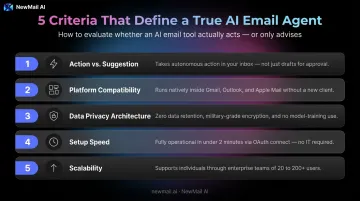
To cut through the noise, we evaluated every tool against five criteria that distinguish real AI agents from glorified autocomplete.
Five Criteria That Drove This List
Does it act, or just suggest? True agents handle triage, drafting, and follow-ups without per-action prompting. Tools that wait for you to initiate every step aren't agents — they're assistants.
Which platforms does it support? Gmail and Outlook cover the broadest ecosystem. Apple Mail support is rarer — NewMail AI and SaneBox are notable exceptions. Tools requiring full inbox migration were scored down for adoption friction.
How does it handle your data? Cisco's 2024 Privacy Benchmark Study found 92% of organisations view GenAI as a novel data risk, and 68% worry that AI tools could expose information to competitors. For legal, financial, or healthcare professionals, zero data retention, end-to-end encryption, and GDPR/DPA certification aren't optional.
How long does setup take? OAuth-based tools like NewMail AI deploy in minutes inside your existing inbox. Standalone clients require account migration — real adoption barriers for teams already stretched thin.
Does it scale beyond one user? The strongest tools serve individuals and grow to enterprise teams with SSO, DPA, KPI dashboards, and shared context libraries. Tools limited to individual use were ranked lower.
Conclusion
The most important email management decision in 2026 is not which tool has the most features. It's whether your AI tool is an assistant — where you still do the work, just faster — or a true agent that handles the work without pulling your attention back to every message.
For professionals and teams who need genuine agentic capability without compromising on data privacy, NewMail AI delivers that combination: zero data retention, Swiss-based GDPR compliance, approval-first human oversight, and native inbox integration across Gmail, Outlook, and Apple Mail. The free 14-day trial (no credit card required) gives full platform access — see for yourself whether it changes how you work.
Frequently Asked Questions
What is the best AI agent for email management?
The best choice depends on your use case. NewMail AI leads for privacy-conscious professionals and teams needing agentic capability within their existing inbox. Superhuman leads for raw individual speed. Microsoft Copilot is the natural fit for enterprise Outlook users. For any business email, tools with zero data retention policies offer the strongest protection.
Which email service works best with AI agents?
Gmail and Outlook have the broadest AI agent support. NewMail AI and SaneBox work across both, plus Apple Mail. Shortwave is Gmail-only; Microsoft Copilot is Outlook-only. Always verify compatibility with your current email provider before committing to a paid plan.
What is the difference between an AI email assistant and an AI email agent?
An AI email assistant helps you write and organise faster, but you still read, decide, and act on every message. An AI email agent reads incoming messages, determines the required action, and executes it — drafting replies, extracting tasks, triggering follow-ups — without you initiating each step.
Are AI email agents safe to use with sensitive business data?
Safety varies significantly by provider. Look for zero data retention policies, military-grade encryption, GDPR compliance, and formal certifications. Tools using ephemeral processing architectures — where data is processed in memory and never written to disk — offer the strongest protection for confidential communications.
How long does it take to set up an AI email agent?
It depends on the tool type. NewMail AI completes OAuth connection, AI context learning, and initial inbox sorting in under two minutes inside your existing inbox. Standalone clients like Superhuman require full account migration, which takes longer and carries more adoption friction.
Do AI email agents replace the need for a human assistant?
For most inbox tasks — triaging, drafting replies, extracting action items, scheduling follow-ups — yes. AI agents handle the repetitive volume that consumes hours of an executive assistant's day. However, for high-stakes relationship management or complex judgment calls, human oversight remains valuable. The strongest setups combine AI automation with human approval on outbound messages.