Introduction
The average knowledge worker now receives 117 emails daily, according to Microsoft WorkLab — and most are skimmed in under 60 seconds. That volume doesn't just slow you down; it buries the emails that actually matter.
AI email assistants have evolved well past basic drafting. The best tools in 2026 triage your inbox before you open it and draft replies in your actual voice. They extract commitments from threads, flag follow-ups you'd otherwise drop, and do it all before you've touched your keyboard. The wrong tool creates a different problem entirely — one where a poorly architected AI gets unrestricted access to your most sensitive professional communications.
This guide covers the five tools worth considering in 2026 — what each does well, where each falls short, and how to choose based on your actual bottleneck rather than a feature checklist.
Key Takeaways
- The best AI email assistants in 2026 do far more than draft — they triage, prioritize, and prevent dropped commitments.
- Your choice should start with your primary pain point: inbox volume, reply quality, missed follow-ups, or data privacy.
- Most tools support Gmail and Outlook; only a handful work natively across all three — Gmail, Outlook, and Apple Mail.
- Data security is the most skipped criterion in most reviews — and the highest-stakes one for sensitive industries.
- Use this guide's evaluation criteria — triage capability, draft quality, privacy architecture, and platform fit — to find your best match.
What Is an AI Email Assistant and Why Does It Matter in 2026?
An AI email assistant is software that manages your inbox using AI — automatically categorizing messages, drafting replies in your voice, extracting action items, and tracking follow-ups. Unlike a standard email client, it doesn't just speed up manual work — it handles much of that work for you.
Three capabilities separate genuinely useful tools from gimmicks:
- Smart triage — surfaces what needs your attention now, not just what arrived most recently
- Context-aware drafting — generates replies that sound like you wrote them, not like a template
- Follow-up and task management — prevents commitments made over email from falling through
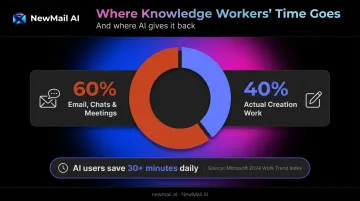
Microsoft's 2024 Work Trend Index found that knowledge workers spend 60% of their time in productivity apps on emails, chats, and meetings — leaving only 40% for actual creation work. AI users in that study reported saving more than 30 minutes daily. For client-facing professionals, that recovered time shifts the workday from inbox firefighting to actual output.
Best AI Email Assistant Tools in 2026
These five tools were selected based on inbox management depth, AI drafting quality, platform compatibility, pricing transparency, and data security practices. Each represents a distinct use case.
NewMail AI
NewMail AI is a privacy-first AI email assistant built by founders from AI and cybersecurity backgrounds, headquartered in Switzerland. It works natively inside Gmail, Outlook, and Apple Mail and sets up in approximately 2 minutes.
What sets it apart: NewMail is the only assistant on this list with Zero Data Retention agreements with AI providers Anthropic and Mistral, meaning email content is processed in-memory and immediately discarded after analysis — never written to storage. It holds Google Security Certified status (the highest tier of the Cloud Application Security Assessment for Google Workspace apps) and is GDPR compliant under Swiss data law.
Nova, NewMail's AI agent, performs a one-time analysis of a selection of your sent emails during onboarding to learn your voice, style, role, and business context in approximately 60 seconds.
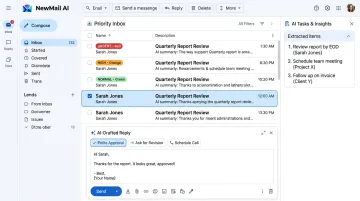
From there, it drafts replies in your tone, sorts your inbox by urgency and intent, extracts tasks, and generates meeting recaps with action items — all inside your existing email client, with no email ever sent without your explicit approval.
The Professional plan pricing starts around $20–25/month — verify current rates at app.newmail.ai. A 14-day free trial includes full feature access with no credit card required.
| Feature | Details |
|---|---|
| Key Features | Priority inbox with custom categories, AI drafts in your voice (including FAQs and links), task extraction, meeting recaps, FAQ auto-replies, works in Gmail/Outlook/Apple Mail |
| Pricing | Free 14-day trial; Professional from ~$20–25/month; Enterprise with volume pricing for teams of 20–200+ |
| Best For | Executives, sales and customer success teams, and organizations in legal, finance, or healthcare requiring zero data retention and verified security certification |
Superhuman
Superhuman — now part of the broader Grammarly suite following Grammarly's acquisition announced June 30, 2025 — is built for professionals who process high email volumes and need to move through their inbox as fast as possible. It layers on top of Gmail and Outlook with sub-100ms interface performance.
Where it excels: AI-powered triage automatically sorts your inbox by priority, keyboard-driven controls minimize time-per-email, and AI drafting is available on paid tiers. Note that core AI email features — including Ask AI, Write with AI with voice match, and Auto Summarize — are gated to the Business tier ($33/seat/month billed annually). The Free tier includes basic Grammarly suggestions and limited AI prompts. Verify current tier structure at superhuman.com/plans.
| Feature | Details |
|---|---|
| Key Features | AI auto-triage, on-demand AI drafts, Split Inbox, follow-up reminders, keyboard shortcuts, Grammarly writing assistance on paid tiers |
| Pricing | Free tier available; Business at $33/seat/month (billed annually) for full AI features |
| Best For | Executives and salespeople who spend 2+ hours daily in email and prioritize raw inbox speed |
SaneBox
SaneBox is a server-level inbox filtering tool that works on top of whichever email client you already use — no app to install, no interface to switch to. It analyzes email headers and metadata (not content) to sort messages into smart folders like SaneLater and SaneBlackHole.
The key differentiator: SaneBox is the only tool here that works passively without touching your email client, making it the lowest-friction adoption on this list. SaneReminders bounces emails you sent that haven't received a reply back into your inbox at the right time. That said, it doesn't draft replies or extract tasks — it's a filtering and follow-up tracking tool only. Expect 4–6 weeks for it to fully calibrate to your patterns. Verify current pricing at sanebox.com/pricing.
| Feature | Details |
|---|---|
| Key Features | Server-level inbox sorting, SaneBlackHole one-click unsubscribe, SaneNoReplies follow-up tracking, Do Not Disturb mode, works with any email client |
| Pricing | Plans start at approximately $7/month — verify at sanebox.com |
| Best For | Professionals who want a quieter inbox without switching email clients or learning anything new |
Shortwave
Shortwave is an AI-native email client built on Gmail by ex-Google engineers. It replaces your Gmail interface and automatically bundles threads by topic, collapses low-priority email, and surfaces what needs attention. Gmail is its primary and most capable platform — Microsoft 365 and Exchange accounts are not supported.
Why it stands out: Ghostwriter learns your writing voice from your sent folder and generates replies that match your style rather than producing generic outputs. Natural language search lets you query your email history conversationally. Tasklet connects your inbox to 3,000+ apps including Slack, Notion, and Google Drive. Business plans start at $24/seat/month — verify current pricing at shortwave.com/pricing.
| Feature | Details |
|---|---|
| Key Features | AI thread summaries, Ghostwriter voice-matched drafts, natural language email search, Tasklet automations, smart email bundling |
| Pricing | Business at $24/seat/month; Premier at $36/seat/month (billed annually) |
| Best For | Gmail-first teams who want a fully AI-native inbox experience with deep writing customization |
Google Gemini in Gmail
Gemini is the AI assistant built directly into Gmail and Google Workspace — no additional installation required. It surfaces inside the Gmail interface you already use.
Where it has the edge: Gemini draws context from Google Drive, Calendar, and Docs when composing follow-ups, giving it an advantage over standalone tools that only see the inbox. The most capable features — advanced thread summarization and contextual drafting — require a paid Workspace plan or Google AI add-on. For personal accounts, Google AI Pro starts at $19.99/month. Gemini does not connect to non-Google tools. Verify what your organization has licensed at workspace.google.com.
| Feature | Details |
|---|---|
| Key Features | AI email drafting, thread summarization, context from Drive and Calendar, smart reply suggestions, built-in scheduling |
| Pricing | Included with Google Workspace; Google AI Pro at $19.99/month for personal accounts |
| Best For | Teams fully embedded in Google Workspace who want AI features without adding any new software |
Privacy and Security: The Selection Criterion Most Reviews Miss
Your inbox holds deal negotiations, client relationships, and financial decisions — all in one place. Connecting it to an AI tool means granting that tool read access to everything in it.
Most reviews focus on features and pricing. Few ask the three questions that actually matter for sensitive deployments:
- Does the tool store email content on its servers?
- Does it use your data to train its AI models?
- Where is the company headquartered, and what data law governs it?
These questions aren't academic. The European Data Protection Board's 2024 opinion on AI models makes clear that GDPR principles apply to any AI system processing personal data — which includes the contents of a professional inbox.
What "Zero Data Retention" Actually Means
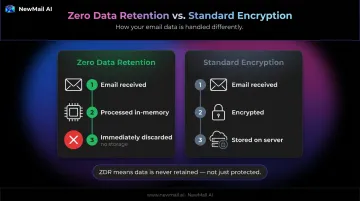
Zero Data Retention is an industry term (not a formal regulatory standard) describing a specific technical architecture:
- Email content is processed entirely in-memory
- Nothing is written to disk or persisted to any storage layer
- Content is discarded immediately after analysis completes
This is distinct from encryption, which protects data at rest but still stores it. ZDR means the data is never retained in the first place.
How NewMail AI Approaches This
Most tools that claim privacy still retain processed data under a different label. NewMail AI was purpose-built around these answers from day one. Its architecture:
- Holds formal ZDR agreements with Anthropic and Mistral: email content processed via those providers is never retained
- Uses strict Data Processing Agreements with OpenAI and Google Gemini that prohibit model training on user data
- Stores only encrypted user preferences and context metadata — never email content, tasks, or calendar events
- Is headquartered in Switzerland, operating under GDPR and Swiss data law — outside the reach of US CLOUD Act requests that can compel US-based companies to disclose data
For teams in legal, finance, healthcare, and executive roles, a single exposed email thread can carry serious professional or regulatory consequences. That makes this architecture a baseline requirement, not a differentiator.
How to Choose the Right AI Email Assistant for Your Needs
Start with the problem you're actually trying to solve, not the feature list.
| Primary Pain Point | Best Tool Category |
|---|---|
| Inbox overwhelm and volume | SaneBox (passive filtering) or Shortwave (AI-native client) |
| Reply speed and drafting quality | Superhuman or Gemini |
| Missed follow-ups and dropped commitments | NewMail AI (task extraction + follow-up tracking + drafts) |
| Data privacy and regulatory compliance | NewMail AI (ZDR, Swiss HQ, Google Security Certified) |
The Ecosystem Question
Your existing email platform will often narrow the field before you evaluate a single feature:
- Full Google Workspace shop → Gemini requires zero new adoption; it's already there
- Microsoft 365 shop → Microsoft Copilot for M365 is the path of least resistance (not covered here, but worth evaluating)
- Mixed environments or Apple Mail users → you need cross-client support, which is rare; NewMail AI is the only tool on this list that works natively across Gmail, Outlook, and Apple Mail
Gartner research from August 2025 puts Microsoft 365 at 77% market share in SaaS enterprise productivity. If your organization runs on M365, ecosystem fit alone may drive the decision.
Adoption Friction Is Real
Ecosystem fit determines which tools are viable — adoption friction determines which ones actually get used.
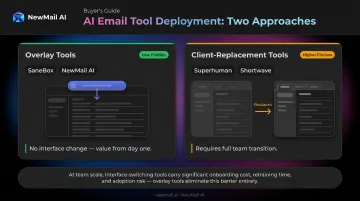
Tools that replace your email client — Superhuman, Shortwave — require your team to actually switch interfaces. That's a real transition cost, especially at team scale. Tools that layer on top of your existing client (SaneBox, NewMail AI) deliver value from day one without disrupting how your team works.
Conclusion
The right AI email assistant in 2026 is the one that solves your specific bottleneck. Each tool covered here has a clear strength: Superhuman on speed, SaneBox on passive filtering, Shortwave on Gmail-native AI, Gemini on Workspace integration. NewMail AI stands apart where data sensitivity is non-negotiable — privacy-first inbox management across Gmail, Outlook, and Apple Mail with zero email retention by default.
Security is a baseline requirement, not a differentiator. Before connecting any AI tool to your inbox, run three checks:
- Confirm the tool's data retention policy (ephemeral processing vs. stored email content)
- Look for independent security certifications, not just self-reported claims
- Check which jurisdiction governs the product and its data agreements
For professionals and teams who need AI that drafts in their voice and handles inbox priority without storing your email data, NewMail AI is worth a direct look. The 14-day free trial includes full feature access, no credit card, and setup in under three minutes — start at app.newmail.ai.
Frequently Asked Questions
What are the best AI email assistant tools in 2026?
The top tools by use case: NewMail AI for privacy-first inbox management, Superhuman for raw speed, SaneBox for passive filtering, Shortwave for Gmail-native AI, and Gemini for Google Workspace teams. The "best" depends entirely on whether your priority is triage, drafting quality, or data security.
Can AI email assistants work inside Gmail and Outlook?
Most support both, though integration depth varies. Shortwave and Superhuman replace your client entirely; SaneBox works at the server level with any client; NewMail AI layers natively inside your existing interface and is the only tool here that also supports Apple Mail.
Are AI email assistants safe for sensitive business emails?
Safety depends on the tool's architecture. Check whether it stores email content, trains AI models on your data, and holds independent certifications. Tools with Zero Data Retention and verified security credentials — like NewMail AI's Google Security Certified status — offer a stronger baseline for sensitive industries.
What is zero data retention in AI email tools?
Zero Data Retention means email content is processed in-memory only — analyzed to generate drafts or summaries, then immediately discarded. Nothing is written to a server or stored. This is distinct from encryption, which protects data at rest but still retains it.
How do AI email assistants learn your writing voice?
Most analyze your sent email history — tone, structure, vocabulary, response length — then apply those patterns when drafting replies. NewMail AI's Nova does a one-time analysis of your sent emails during setup and continues refining with ongoing use.
What should I look for in an AI email assistant for a sales or customer success team?
Prioritize AI drafts in your team's brand voice, follow-up tracking to prevent dropped leads, task extraction from threads, and strong data security if customer data is involved. NewMail AI's Enterprise plan adds shared team context, KPI dashboards, and formal ZDR agreements — built for teams handling sensitive client relationships at scale.