AI email assistants do all of that — without requiring you to leave your inbox.
This guide covers the five best AI email assistants for Gmail users in 2026, how they were evaluated, and which one fits your workflow.
Key Takeaways
- NewMail AI — best for Gmail users who want full inbox automation with zero data retention
- Shortwave — leads on natural-language search across your full inbox history
- Gemini works best when you're already deep in Google Workspace
- Superhuman — built for high-volume users who treat inbox speed as a performance metric
- SaneBox — best for passive inbox filtering without switching tools or workflows
What Is an AI Email Assistant for Gmail?
AI email assistants go beyond autocomplete. The best ones read context, learn how you write, sort by urgency, draft replies, extract action items, and — in some cases — act without being prompted.
There are three distinct deployment types for Gmail:
| Type | How It Works | Examples |
|---|---|---|
| Native integrations | Built directly into Gmail | Gemini for Gmail |
| Replacement clients | Replace the Gmail interface entirely | Shortwave, Superhuman |
| Add-on tools | Sit on top of Gmail without replacing it | NewMail AI, SaneBox |
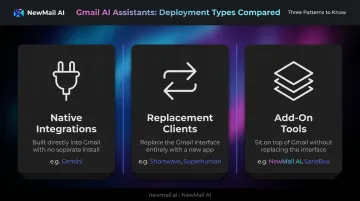
That distinction matters. If you don't want to migrate your workflow or learn a new interface, add-on tools are the practical choice. Tools like NewMail AI sit inside your existing Gmail inbox and handle the full email loop — drafting, sending, following up, and organizing — without asking you to change how you work.
Best AI Email Assistants for Gmail Users in 2026
These tools were evaluated on Gmail compatibility, AI depth, privacy standards, setup simplicity, and daily utility — not feature checklists.
NewMail AI
NewMail AI is a privacy-first AI email assistant that works natively inside Gmail, Outlook, and Apple Mail. Founded by Yohann Abittan, a Geneva-based AI specialist, it was built from day one with zero email storage — all data is processed in real time and never retained.
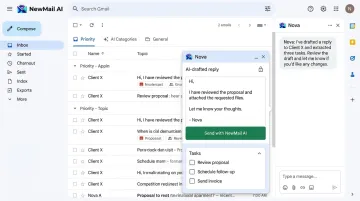
What sets it apart for Gmail users: it holds Google Security Certification (the highest tier for Google Workspace applications), has formal Zero Data Retention agreements with AI providers including Anthropic and Mistral, and sets up inside Gmail in under two minutes. The AI assistant, Nova, learns your writing voice in 60 seconds by analyzing a selection of sent emails — extracting structured context, then discarding the underlying content.
From that point, Nova handles your inbox end to end:
- Drafts replies in your tone, including FAQ responses and relevant links
- Auto-categorizes your priority inbox using AI-generated and custom categories
- Extracts tasks and schedules them directly from email threads
- Delivers instant meeting recaps with action items
Swiss-based and GDPR compliant, it's built for professionals where data confidentiality isn't optional.
| Feature | NewMail AI |
|---|---|
| Key Features | Priority inbox, AI drafting in your voice, task extraction, meeting recaps, FAQ-aware replies |
| Privacy & Security | Google Security Certified, Zero Data Retention with AI providers, GDPR compliant, Swiss-made, military-grade encryption |
| Pricing & Setup | 14-day free trial (no credit card, no download); Professional at $12/month; Enterprise for teams of 20–200+ |
Shortwave
Shortwave is a Gmail-native email client built by ex-Google/Firebase engineers, redesigned from the ground up to fix what standard Gmail gets wrong about managing high-volume inboxes. It works exclusively with Gmail and Google Workspace accounts, replacing the standard Gmail interface with a cleaner layout and AI-powered tools.
Its standout feature is natural-language inbox search — you can query your entire email history the way you'd ask a colleague ("find the contract from the Acme thread in October"). It uses Claude (Anthropic) to generate draft replies that read more naturally than template-based alternatives.
Best for Gmail users who spend significant time hunting old threads or managing high-volume inboxes. Note that key AI features are locked behind paid tiers, and it requires replacing the standard Gmail interface entirely.
| Feature | Shortwave |
|---|---|
| Key Features | Natural language email search, Claude-powered AI draft replies, thread bundling, smart labels, snooze, shared team comments |
| Gmail Compatibility | Gmail and Google Workspace only; replaces the Gmail interface entirely |
| Pricing | Free trial available; Business from $24/seat/month (annual billing) |
Gemini for Gmail
Gemini is Google's native AI assistant built directly into Gmail, available through paid Google plans. It requires no third-party setup and operates via a sidebar panel inside your existing Gmail interface.
Its core advantage is cross-app awareness — it can pull in relevant Drive documents while you're composing an email, summarize entire inbox threads in seconds, and surface context from Docs, Calendar, and Meet. For users already embedded in Google Workspace, that integration is genuinely useful.
That said, WIRED's review found it can miss points or hallucinate on complex threads — users should verify AI-generated summaries before acting on them. Users who need stronger privacy controls or a more dedicated voice-learning system may find it falls short.
| Feature | Gemini for Gmail |
|---|---|
| Key Features | Thread summarization, AI draft replies, cross-app context (Drive, Docs, Meet), natural language search across Gmail |
| Gmail Compatibility | Native Gmail integration; included in Google Workspace and Google AI paid plans |
| Pricing | Google AI Plus from $4.99/month; Google AI Pro at $19.99/month |
Superhuman
Superhuman is a speed-optimized email client for Gmail and Outlook designed for professionals who treat inbox speed as a competitive edge. It layers AI drafting, keyboard shortcuts, and intelligent triage over your existing inbox.
Keyboard-first navigation is the defining feature — experienced users triage dozens of emails in minutes. The Superhuman Go feature surfaces relevant files, support tickets, and calendar context mid-draft, cutting the context-switching that slows high-volume email work.
The shortcut-heavy interface has a real learning curve, and there's no free plan. It suits executives, founders, and sales professionals sending 50+ emails a day — people who will actually commit to the keyboard shortcuts.
| Feature | Superhuman |
|---|---|
| Key Features | Keyboard-first triage, AI reply drafts, read status tracking, AI-powered custom labels, Superhuman Go for contextual surfacing |
| Gmail Compatibility | Works with Gmail and Outlook; replaces the Gmail interface |
| Pricing | Free tier available; Pro from $12/member/month (annual); Business at $33/member/month (annual) |
SaneBox
SaneBox is an AI inbox organization tool that has been filtering inboxes since 2010. It connects on top of any existing email client — including Gmail — without replacing the interface, and improves its sorting accuracy automatically as it learns your behavior.
For Gmail users who don't want to change their workflow, SaneBox quietly routes emails into three dedicated folders: @SaneLater (low-priority), @SaneNews (newsletters), and @SaneBlackHole (permanent sender silencing) — all without manual rules. It also includes SaneDrafts, which generates AI-assisted replies in your tone.
Where it's limited: SaneBox doesn't match the triage depth, task extraction, or voice learning of dedicated AI assistants. It works best as a complement to another tool rather than a standalone solution.
| Feature | SaneBox |
|---|---|
| Key Features | AI inbox sorting (SaneLater, SaneNews, SaneBlackHole), behavior-based training, SaneDrafts for AI-assisted replies, works inside Gmail without interface changes |
| Gmail Compatibility | Works with Gmail, Outlook, Apple Mail, Yahoo, and any IMAP-based provider |
| Pricing | 14-day free trial; Snack plan from $7/month |
How We Chose the Best AI Email Assistants for Gmail
Tools were assessed on real-world Gmail utility, not feature lists. The most common mistake users make is picking based on a single standout feature — usually AI drafting — while ignoring whether the tool works natively in Gmail, how it handles their data, or whether it closes the full email loop.
Four criteria guided every evaluation:
- Gmail compatibility and setup simplicity — does it work inside Gmail, or require a full client switch?
- AI depth — does it triage, draft, and follow up, or only suggest text?
- Privacy and data security — does the tool store email content? What certifications back its claims?
- Voice and context learning — does it adapt to how you write over time?
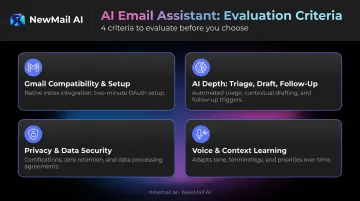
That fourth criterion — privacy — deserves special weight for professionals in legal, finance, healthcare, and executive leadership. Data retention policies and formal agreements with AI providers should be a hard filter, not a footnote. Tools built on zero data retention architecture carry far lower compliance risk than those without documented, audited controls.
That gap is wider than most assume. According to Cisco's 2026 Data and Privacy Benchmark, 90% of organizations report their privacy programs expanded because of AI — yet only 12% describe their AI governance as mature. The tool you connect to your inbox is part of that governance picture.
Conclusion
The right AI email assistant for Gmail fits how you already work, stays inside your inbox, and handles the full email lifecycle without adding new overhead. Feature count matters less than fit.
Before committing to any tool, run it through three practical filters:
- Does it work inside Gmail natively, or does it require replacing the interface?
- Does it handle your most time-consuming email task — drafting, triaging, or organizing?
- Does it meet the privacy and data security standards your role requires?
For Gmail users who need AI that drafts in their voice and never stores their email data, NewMail AI offers a 14-day free trial — no credit card required, setup in under two minutes. Start at app.newmail.ai.
Frequently Asked Questions
What is the best AI email assistant for Gmail in 2026?
NewMail AI is the top pick for privacy-conscious Gmail users, combining zero data retention with full inbox automation. For search-heavy use cases, Shortwave is the stronger choice; for users already in Google Workspace, Gemini integrates most seamlessly. The right pick comes down to your top priority: privacy, inbox speed, or staying inside Google's ecosystem.
Do AI email assistants work inside Gmail or do they require a separate app?
It depends on the tool. NewMail AI and SaneBox work as add-ons inside Gmail without replacing it, while Shortwave and Superhuman use their own standalone clients. Gemini is built natively into Gmail and requires no separate setup.
Are AI email assistants safe to use with Gmail?
Safety varies significantly by tool. Check whether the assistant stores email content, whether it holds formal data retention agreements with its AI providers, and whether it carries independent certifications like GDPR compliance or Google Security Certification. Marketing claims alone aren't enough — look for audited, documented proof.
What is the difference between Gemini for Gmail and a third-party AI email assistant?
Gemini is built natively into Gmail and benefits from cross-Google-app context across Drive, Docs, and Calendar. Third-party tools like NewMail AI or Shortwave offer specialized capabilities — zero data retention, stronger privacy architecture, or deeper voice learning — that Gemini doesn't offer.
Can AI email assistants write emails in my own voice and style?
The best ones do. NewMail AI learns your voice in 60 seconds by analyzing sent emails, then adapts every draft to match your tone. Shortwave uses Claude-powered models that produce more natural-sounding replies than template-based tools. Voice learning isn't universal — confirm it before committing to a tool.
How do I know if an AI email assistant is storing my email data?
Read the privacy policy and look for explicit statements about email content storage. Prioritize tools with Zero Data Retention certifications or formal agreements with their AI providers — and check whether those agreements are documented rather than just claimed. Third-party security certifications carry more weight than self-reported compliance.