Introduction
Workers now spend 60% of their time on emails, chats, and meetings, and Microsoft's telemetry shows the average professional receives 117 emails per day — with interruptions hitting every 2 minutes. The real problem isn't just volume. It's the context-switching, the missed follow-ups, the 40 routine replies that don't require any deep thinking but still eat 90 minutes out of your morning.
AI email assistants exist specifically to solve this. They handle the mechanical work — inbox triage, draft generation, follow-up tracking, thread summaries — so your attention stays on decisions that actually require it.
This guide covers the five best AI email assistants in 2026: what each one does well, where it falls short, how it's priced, and who it's built for. It also includes a framework for choosing the right tool based on your workflow and use case, not marketing feature lists.
Key Takeaways
- The best AI email assistants in 2026 go beyond drafting replies: they triage, prioritize, and track follow-ups automatically.
- Privacy and data security vary dramatically between tools; this matters especially in finance, legal, and enterprise settings.
- NewMail AI is the top pick for privacy-first inbox management: Zero Data Retention, Google Security Certified, setup in under 2 minutes.
- Ecosystem-locked tools (Gemini, Copilot) work best for teams already fully committed to one platform.
- The right tool depends on your email client, team size, and whether speed, drafting quality, or data protection matters most.
What Is an AI Email Assistant?
An AI email assistant is software that uses natural language processing and machine learning to help manage your inbox — covering drafting, triage, summarization, prioritization, and follow-up automation.
Two distinct categories exist:
- Inbox-native assistants layer on top of your existing Gmail, Outlook, or Apple Mail — no migration, no new interface
- Standalone email clients replace your current setup entirely (Superhuman falls here)
How the Category Has Evolved
Early tools focused narrowly on grammar correction and basic templates. Today's tools do far more: they understand full thread context, learn your writing voice from sent email history, extract action items, coordinate with calendars, and connect to CRMs and knowledge bases.
Market Research Future valued the AI email assistant market at $810M in 2024, with adoption accelerating as generative AI becomes the norm in modern workplaces.
Where AI Email Assistants Deliver the Most Value
- Executives drowning in 100+ daily emails who need smart triage, not more hours
- Sales and customer success teams who need personalized responses fast, at volume
- Professionals in regulated industries where speed and data security must coexist
- Knowledge workers losing hours each week to email that shouldn't require their attention
Best AI Email Assistants in 2026
Tools were selected based on inbox management depth, AI drafting quality, integration breadth, privacy posture, and real-world usability across Gmail, Outlook, and Apple Mail.
NewMail AI
NewMail AI is a Swiss-made, privacy-first AI email assistant built by founders from AI and cybersecurity backgrounds. It works natively inside Gmail, Outlook, and Apple Mail — no new interface, no migration. Setup takes under 2 minutes.
The platform's AI assistant, Nova, learns your voice, role, and business context during a 60-second onboarding analysis of your sent emails. From that point, it drafts replies that sound like you, surfaces priority emails automatically, extracts tasks, and generates meeting recaps with action items.
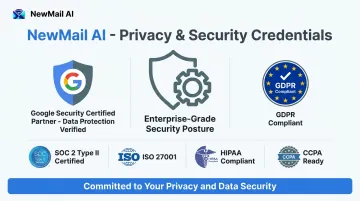
The privacy architecture is what separates NewMail from every other tool here. Three credentials back that up:
- Google Security Certified — the highest certification tier for Google Workspace apps
- Zero Data Retention agreements with Anthropic and Mistral — email content is processed ephemerally and never stored
- GDPR compliant and Swiss-headquartered — Switzerland's nFADP is one of the strictest data protection frameworks globally, and user email data is never used to train AI models
| Details | |
|---|---|
| Key Features | Priority inbox with custom categories, AI drafts in your voice, task extraction, meeting recaps with action items, approval-first drafting (no email sent without your review) |
| Pricing | Free Trial: 14 days, no credit card required. Professional: $12/month (or ~$9.60/month billed annually). Enterprise: volume pricing for teams of 20–200+, contact sales@newmail.ai |
| Best For | Executives, sales and customer success teams, and organizations in sensitive industries requiring Zero Data Retention and enterprise-grade security |
Superhuman
Superhuman is a premium AI email client designed for speed. Following Grammarly's acquisition and rebrand to Superhuman in October 2025, the suite now bundles AI email features with writing assistance across Gmail and Outlook.
The core differentiator is its keyboard-driven workflow — sub-100ms response times, Split Inbox for AI-powered triage, Auto Drafts, Voice and Tone Match, thread summaries, and follow-up reminders. G2 rates Superhuman Mail at 4.7/5 across 1,100+ reviews, with consistent praise for inbox speed and search quality.
The trade-off: Superhuman replaces your email client entirely. There's no free tier, and it's the most expensive option on this list.
| Details | |
|---|---|
| Key Features | Split Inbox AI triage, Auto Drafts, Voice and Tone Match, keyboard shortcuts, thread summaries, Auto Reminders, Ask AI |
| Pricing | Starter: $25/user/month. Business: $33/user/month. Enterprise: custom pricing |
| Best For | High-volume emailers — executives, founders, and sales teams — who want the fastest possible inbox triage and are willing to switch clients |
SaneBox
SaneBox is a passive, server-level inbox filtering tool that works alongside any email client — Gmail, Outlook, Apple Mail, or any IMAP provider — without requiring a client switch or a new interface.
It analyzes email headers (not content) to automatically sort messages into folders: SaneLater for low-priority items, SaneBlackHole for permanently blocking senders, and SaneNoReplies for tracking unanswered outbound emails. It's privacy-friendly by design — SaneBox never downloads or reads your email body.
The core limitation: SaneBox is a filtering layer, not a full AI assistant. It doesn't draft emails, summarize threads, or extract tasks. Initial calibration also takes 4–6 weeks to reach full accuracy.
| Details | |
|---|---|
| Key Features | Passive inbox filtering, SaneBlackHole for sender blocking, SaneNoReplies for follow-up tracking, daily digest, works with any email client |
| Pricing | Snack: ~$4.99/month (billed biyearly, 1 account). Lunch: ~$7.99/month (billed biyearly, 2 accounts). Dinner: ~$24.99/month (4 accounts). 14-day free trial available |
| Best For | Professionals who want a cleaner inbox without switching clients and don't need AI drafting or thread summarization |
Google Gemini in Gmail
Built directly into Gmail for Google Workspace users, Gemini drafts emails from prompts, summarizes threads, and answers natural language inbox queries. Gemini summary cards — which synthesize key thread points and update as replies arrive — became generally available in May 2025.
The standout advantage is zero adoption friction for existing Gmail users, plus cross-product context: Gemini can draw on Google Drive and Calendar, giving it broader awareness than inbox-only tools.
The hard constraint: it's ecosystem-locked. Teams whose work also spans Outlook, Slack, or Zoom will hit gaps.
| Details | |
|---|---|
| Key Features | AI email drafting, thread summarization, natural language inbox search, Calendar and Drive context integration, Smart Reply, Smart Compose |
| Pricing | Included with eligible Google Workspace plans: Business Starter ($6/user/month), Business Standard ($12/user/month), Business Plus ($18/user/month), and Enterprise editions. Feature depth varies by plan |
| Best For | Teams fully embedded in Google Workspace who want AI email features with zero setup friction and no additional tooling |
Microsoft Copilot in Outlook
Microsoft's answer to inbox AI, Copilot integrates directly into Outlook for Microsoft 365 users. It drafts emails from prompts, rewrites and adjusts tone, summarizes long threads with numbered citations linking back to specific emails, and pulls context from Word, Excel, SharePoint, and Teams.
Microsoft's own research across 6,317 employees found Copilot users read six fewer emails per week on average — with one consumer goods company seeing 31% less time spent reading email, saving 50 minutes per week.
Like Gemini, it's ecosystem-locked. Teams using Gmail, Zoom, or Slack won't get full context coverage.
| Details | |
|---|---|
| Key Features | AI email drafting and tone coaching, thread summarization with citations, task and calendar integration, cross-app context from Word/Excel/SharePoint/Teams |
| Pricing | Microsoft 365 Copilot: $30/user/month (paid yearly). Microsoft 365 Copilot Business: $21/user/month (paid yearly, max 300 users). Requires an eligible Microsoft 365 base plan |
| Best For | Organizations fully standardized on Microsoft 365 and Outlook who want AI email capabilities without adopting new tools |
How We Chose the Best AI Email Assistants
The most common mistake buyers make: choosing based on feature lists or brand recognition rather than the specific workflow problem costing them the most time.
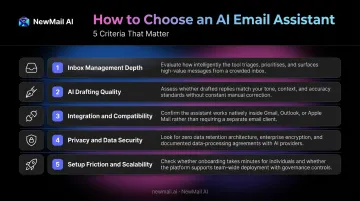
The Five Evaluation Criteria
Inbox management depth — Does the tool triage and prioritize, or only draft? Drafting alone solves a fraction of the problem.
AI drafting quality — Does it learn your voice over time, or produce generic output? Voice matching matters for professionals where tone and relationship context are critical.
Integration and compatibility — Does it work with your existing email clients without forcing a migration? A tool that requires switching clients adds adoption friction that undermines ROI.
Privacy and data security — What certifications does it hold? Where is data processed? Does it retain your email content? Are ZDR agreements in place with underlying AI providers?
Setup friction and scalability — How quickly does it deliver value, and can it grow with a team?
Why Privacy Deserves More Weight Than It Usually Gets
Most comparison guides treat security as a footnote — but your inbox is one of the most sensitive data surfaces in your organization.
Your inbox contains client communications, financial discussions, and legal correspondence. Any tool with access to it should be evaluated on:
- GDPR compliance and data storage policies
- Whether your data is used for model training
- Third-party security certifications (not vendor self-declarations)
- The jurisdiction of the company's headquarters
Cisco's 2026 Data and Privacy Benchmark Study found that 90% of organizations say privacy programs expanded because of AI, and 93% plan to allocate more resources to data governance in the next two years. That shift matters when evaluating tools: a company headquartered in Switzerland or another strong data-protection jurisdiction offers structural legal protections that go beyond standard compliance checkboxes — regardless of which AI providers it works with.
Which AI Email Assistant Is Right for You?
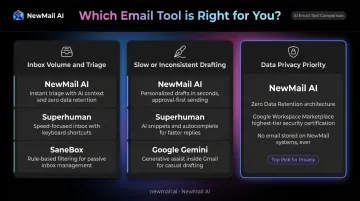
Your best tool depends on the specific problem you're trying to solve. Match your situation to one of the three scenarios below.
If your primary problem is inbox volume and triage
You need a tool that surfaces the most important emails without manually scanning everything.
- NewMail AI — Intent-based priority inbox with custom categories; inbox-native, no client switch required
- Superhuman — Solves this through speed and keyboard shortcuts, but requires switching to their client entirely
- SaneBox — Filters passively at the server level with no client change, but has no drafting capability
If your primary problem is slow or inconsistent drafting
You need a tool that learns your voice — not one that produces generic AI output.
- NewMail AI: Nova learns from your sent email history in 60 seconds and refines with each draft
- Superhuman: Voice and Tone Match builds your style profile over time
- Google Gemini: Smart Compose tailors suggestions to your writing patterns (Gmail users only)
If data privacy is your primary concern
For teams in finance, legal, healthcare, or any regulated industry:
- NewMail AI is the strongest choice: Swiss-based infrastructure, Google Security Certified, Zero Data Retention agreements with Anthropic and Mistral, GDPR compliant, and a formal DPA available for enterprise customers. Email data is never stored and never used for model training — enforced at the contract level with each AI provider.
- Avoid tools without explicit ZDR policies or documented security certifications.
Conclusion
The AI email assistant market in 2026 has matured past simple drafting tools. The best options now combine inbox intelligence, personalized voice matching, task extraction, and enterprise-grade security — all inside the email clients you already use.
The right tool is the one that removes the friction costing you the most time. That looks different depending on where the bottleneck is:
- Volume and triage: You need intelligent prioritization, not another folder rule
- Slow drafting: You need a tool that actually learns your voice, not generic templates
- Sensitive data: You need verifiable Zero Data Retention and documented security architecture, not a privacy policy buried in the footer
For professionals and teams who need all three without compromising on data security, NewMail AI is a strong fit. It's Swiss-built with Google Security Certification, integrates directly into Gmail, Outlook, or Apple Mail, and takes under 2 minutes to set up. The 14-day free trial requires no credit card.
Frequently Asked Questions
What is an AI email assistant and how does it work?
AI email assistants use natural language processing and machine learning to automate inbox tasks : triage, drafting, summarization, and follow-up tracking. Inbox-native tools layer onto your existing Gmail or Outlook without requiring a client switch, while standalone clients like Superhuman replace your current setup entirely.
Are AI email assistants safe to use for business emails?
Safety depends on the tool's architecture. Key things to check: OAuth authentication (no password sharing), GDPR compliance, whether the tool stores your email content, and whether it trains AI models on your data. Certifications like Google Security Certified and formal Zero Data Retention agreements confirm these protections are in place at the infrastructure level.
What is the best AI email assistant for both Gmail and Outlook?
Inbox-native tools that work across both Gmail and Outlook , like NewMail AI, are the most versatile. Ecosystem-locked tools like Google Gemini (Gmail only) and Microsoft Copilot (Outlook/M365 only) limit your options if your team uses both platforms or a mixed environment.
Can an AI email assistant learn my writing style and tone?
The best tools analyze your sent email history to learn your tone, vocabulary, and response patterns, then generate drafts that sound like you rather than generic AI output. NewMail AI's Nova calibrates in 60 seconds and improves with continued use; Superhuman's Voice and Tone Match and Google's Smart Compose work similarly.
What should I look for in an AI email assistant for a team?
Prioritize compatibility across multiple email clients, enterprise security documentation (ZDR, DPA, SSO), scalability to your team size, and KPI dashboards for tracking adoption and ROI. Shared context features , like NewMail AI's Enterprise team context, ensure AI-generated drafts stay consistent with your brand voice across all team members.
What does "Zero Data Retention" mean in an AI email assistant?
Zero Data Retention means the tool processes your email content in the moment, then discards it immediately without storing anything on its servers. For regulated industries, the strongest implementations back this up with formal ZDR agreements with the underlying AI providers directly — as NewMail AI has done with Anthropic and Mistral — guaranteeing it at the infrastructure level, not just in policy.