Introduction
Knowledge workers now receive an average of 117 emails daily, and Microsoft's 2025 research found that employees are interrupted every two minutes — 275 times per day — by emails, meetings, and chat notifications. Nearly 30% are back in their inbox by 10 p.m.
AI email assistants promise to solve this. Most do. But there's a tension most buyers miss: granting an AI access to your inbox means handing it your most sensitive professional communications. Not every tool treats that data with the same care.
This guide compares the 7 best AI email assistants in 2026 — evaluated on AI capability, platform compatibility, pricing, and data privacy posture (an area most comparisons skip entirely). Whether you're in a regulated industry or just drowning in threads, this breakdown will help you find the right fit.
TL;DR: Best AI Email Assistant for Each Use Case
| Tool | Best For |
|---|---|
| NewMail AI | Teams and professionals who can't compromise on data privacy |
| Superhuman | Power users who want maximum inbox speed above all else |
| SaneBox | Anyone who wants inbox filtering without AI reading their messages |
| MailMaestro | Outlook teams in regulated industries needing PII-safe drafting |
| Shortwave | Gmail users who want AI summaries without switching email clients |
| Microsoft Copilot for Outlook | Enterprise teams already standardized on Microsoft 365 |
| Google Gemini in Gmail | Google Workspace users who want built-in AI drafting at no added cost |
What Is an AI Email Assistant in 2026?
Today's AI email assistants go well beyond "write this email for me." The market has split into four distinct functional categories:
- AI email writers — compose-window plugins that draft or improve emails on demand, nothing more
- Inbox organizers — background filters that sort and deprioritize mail based on sender behavior and metadata
- Email clients — standalone apps that replace your native inbox UI entirely (Gmail/Outlook are swapped out)
- Inbox-native agents — the most capable category; they draft in your voice, triage incoming mail, extract tasks, and surface follow-ups — all from within your existing client
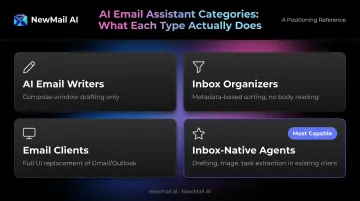
Picking the wrong category is the most common buyer mistake — someone who needs drafting help ends up with an organizer, while someone who wants filtering buys a full client they have to learn from scratch.
The Privacy Dimension Most Buyers Ignore
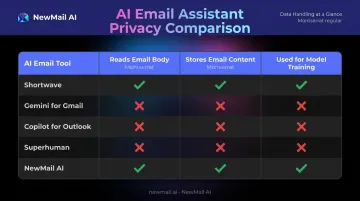
Writers and inbox-native agents must read your email body content to function. That's unavoidable. What varies is what vendors do with that content after the fact.
"GDPR compliant" and "SOC 2 certified" have become marketing shorthand that can mask very different actual practices. SOC 2 documents controls; it doesn't specify whether your email bodies are stored or used for model training. The EDPB's Opinion 28/2024 confirms that AI models trained on personal data cannot automatically be considered anonymous — a direct concern for professionals in legal, finance, or healthcare.
The questions that actually matter:
- Does the vendor store your email content after processing?
- How long is that data retained?
- Is it used to train or improve their models?
The 7 Best AI Email Assistants in 2026
Tools were selected across five criteria: AI capability depth, inbox compatibility, data privacy posture, pricing transparency, and ease of setup. These seven represent the strongest options across distinct use cases — not just the most-marketed names.
NewMail AI
NewMail AI is a Swiss-built, inbox-native AI assistant that works inside Gmail, Outlook, and Apple Mail without replacing them. Built by founders from AI and cybersecurity laboratory backgrounds, it was designed privacy-first from the architecture up — not as a compliance checkbox added later.
Setup takes under 3 minutes: connect your inbox (30 seconds), let the AI learn your voice from sent email history (60 seconds), and your inbox is sorted with drafts ready (60 seconds). The AI assistant, Nova, learns your communication style, tone, business context, and priorities. Drafts reflect your voice — not generic AI output.
Standout differentiators:
- Zero Data Retention by default — email content is processed ephemerally; nothing is written to disk
- ZDR agreements with Anthropic and Mistral — these providers discard all inputs immediately after processing
- Google Security Certified at the highest tier — the result of an independent cybersecurity audit of NewMail's data security practices, not just a marketplace listing
- Swiss jurisdiction — headquartered in Switzerland under some of the world's strictest data protection laws
- Approval-first drafting — Nova drafts, you approve; nothing sends without explicit sign-off
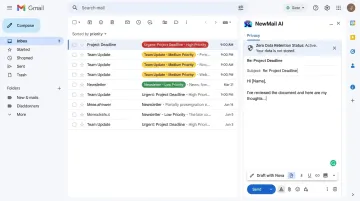
For Enterprise teams (20–200+ users), the plan adds SSO, a KPI dashboard, team context with shared organizational knowledge, a dedicated account manager, and a full Data Processing Agreement (DPA).
| Key Features | AI drafting in your voice, priority inbox with custom categories, task extraction, meeting recaps, works natively in Gmail/Outlook/Apple Mail |
| Pricing | Free Trial: 14 days, no credit card, full access. Professional: $12/month (or ~$9.60/month annually). Enterprise: volume pricing via sales@newmail.ai |
| Best For | Executives, sales teams, and professionals in legal, finance, or healthcare who need AI productivity without data retention risk |
Superhuman
Superhuman is a standalone email client built around one obsession: speed. Every interaction responds in under 100 milliseconds. It has a loyal following among founders and executives who treat inbox velocity as a competitive differentiator.
In late 2025, Grammarly acquired Superhuman and subsequently rebranded the combined company as Superhuman — integrating AI writing capabilities alongside the speed-focused client.
Standout differentiators:
- Keyboard-driven interface with split inbox and AI triage
- Auto-drafted follow-ups for unanswered threads
- Read receipts built in
- Important caveat: AI features (Ask AI, Instant Reply, Auto Summarize) are Business plan-only — not included on the Pro tier, which creates pricing confusion
- Requires switching away from Gmail/Outlook's native UI — a real switching cost that not everyone accounts for upfront
| Key Features | Keyboard-driven inbox, AI triage, split inbox, auto follow-up drafting, read receipts, AI thread summaries |
| Pricing | Free: $0. Pro: $12/month (annual) or $30/month. Business: $33/month (annual) or $40/month. AI features require Business tier. |
| Best For | Executives, founders, and sales professionals who want maximum inbox speed and are willing to switch their email client |
SaneBox
SaneBox has been filtering inboxes longer than "AI email" was a marketing category. It works with any IMAP or Exchange client without replacing the interface, learning which senders matter based on behavior and routing everything else to a SaneLater folder.
Standout differentiators:
- Header-only processing — SaneBox makes filtering decisions from sender, subject, timestamps, and interaction history, without reading message body text. For HIPAA- or FINRA-sensitive roles, this metadata-only approach is a meaningful distinction from generative AI tools
- No drafting capability at any tier — pairs well alongside a separate drafting tool rather than replacing one
- 14-day free trial, no credit card required
| Key Features | SaneLater folder filtering, SaneBlackHole for permanent unsubscribes, header-only processing, trains on user behavior |
| Pricing | Snack: $4.99/month (1 account). Lunch: $7.99/month (2 accounts). Dinner: $24.99/month (4 accounts). 14-day free trial. |
| Best For | Anyone who wants aggressive inbox filtering without an AI reading their actual email content |
MailMaestro
MailMaestro (formerly Flowrite, now under Maestro Labs) is a drafting plugin for Gmail and Outlook that handles bullet-to-email drafting, thread summarization, tone adjustment, and attachment summarization — with particularly strong Microsoft 365 and Outlook desktop integration.
Standout differentiators:
- PII anonymization on Enterprise plans strips personally identifiable information before any text reaches an AI model — a meaningfully lower risk profile for teams drafting emails touching contracts, NDAs, or client financials
- Uses a blend of GPT-4, Claude, and Google models under the hood
- Produces professional output but does not learn your personal writing voice the way newer tools do — drafts are clean, not distinctly "you"
- SOC 2 Type II, GDPR, HIPAA, and CASA Tier 2 certifications
| Key Features | Email drafting from bullet points, thread and attachment summarization, tone adjustment, PII anonymization before AI processing, Outlook desktop integration |
| Pricing | Freemium: 3 email credits/week. Full-feature 14-day free trial available. Premium pricing available via Microsoft Marketplace. |
| Best For | Outlook-heavy teams and anyone in legal, finance, or healthcare who needs PII protection baked into the drafting workflow |
Shortwave
Shortwave is a Gmail-replacement client built by former Google engineers. It layers AI natively into the inbox experience with thread bundling, automatic conversation summaries, and — its most distinctive feature — semantic inbox search.
Rather than keyword matching, you can ask "what did the client say about the Q3 budget?" and Shortwave retrieves and summarizes the answer from across your email history. For anyone managing complex client relationships or long project threads, that saves significant time.
Standout differentiators:
- Semantic natural-language search across email and attachments
- Free tier is genuinely functional — not a stripped demo
- Hard limit: Gmail only. No Outlook, no Apple Mail
- AI drafting adapts to your writing style over time
| Key Features | Thread bundling, AI summaries, semantic inbox search, AI drafting with voice adaptation, Gmail-native interface |
| Pricing | Free tier available. Business: $24/seat/month (annual) or $30/month. Premier: $36/seat/month (annual). 14-day free trial. |
| Best For | Gmail-only users who want AI-native search and summarization without paying for a full premium client upfront |
Microsoft Copilot for Outlook
Microsoft Copilot brings enterprise AI directly into Outlook for Microsoft 365 organizations. It handles drafting, thread summarization, tone adjustment, and notably, can read lengthy attached documents and generate contextually relevant replies. A 40-page PDF attachment is fair game for generating a contextual reply.
Standout differentiators:
- Cross-Microsoft 365 context: Copilot understands content across Word, Excel, and Teams
- Compliance and vendor consolidation — for enterprises where adding a new AI vendor triggers security reviews and legal agreements, staying inside the existing M365 tenant removes that friction entirely
- Microsoft states that Azure/OpenAI prompts and completions are not used to train or retrain base models
| Key Features | Outlook-native drafting and summarization, attachment-based reply generation, cross-M365 context (Word, Excel, Teams), enterprise security |
| Pricing | Microsoft 365 Copilot Business: $21/user/month (annual). Enterprise: $30/user/month (annual). Requires qualifying M365 base subscription. |
| Best For | Enterprise teams already standardized on Microsoft 365 who need AI without adding a new vendor relationship |
Google Gemini in Gmail
Google has integrated Gemini directly into Gmail for Workspace subscribers. "Help me write" handles drafting, thread summary cards appear before you open a conversation, and the mobile experience matches desktop. No installation, no OAuth permissions beyond what Google already holds.
Standout differentiators:
- Zero friction for existing Workspace users — no new tool to learn
- Google states that Workspace customer data, including prompts, is not used to train generative AI models outside the domain without permission
- Licensing nuance: Basic Gemini access is included from Business Starter (~$6/user/month annually), but full AI feature depth requires Business Standard. Verify your current tier before assuming you need a separate tool.
| Key Features | Native Gmail drafting ("Help me write"), automatic thread summary cards, mobile-consistent experience, cross-Workspace context |
| Pricing | Included from Business Starter (~$6/user/month annually). Business Standard: $12/user/month (annual). Full features require Standard tier or above. |
| Best For | Google Workspace users who want AI drafting and summarization at no extra software cost with no new tool to learn |
How We Evaluated These Tools
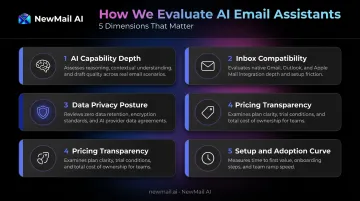
Every tool was assessed across five dimensions:
- AI capability depth — drafting quality, voice learning, triage accuracy
- Inbox compatibility — Gmail/Outlook/Apple Mail support, native vs. client replacement
- Data privacy posture — what data is stored, for how long, and whether it's used for model training
- Pricing transparency — what's actually included at each tier (not just the headline price)
- Setup and adoption curve — realistic time from sign-up to first value
Why Privacy Is the Most Underweighted Factor
IBM's 2025 Cost of a Data Breach Report puts the global average breach cost at $4.44 million. 97% of organizations that experienced an AI-related security incident lacked proper AI access controls — a direct risk for any sales team or law firm whose entire client relationship history lives in their inbox.
"SOC 2 compliant" tells you a vendor has documented controls. It doesn't tell you whether your email bodies are stored at rest, for how long, or whether they're used to train models. Those are separate questions — and the answers only come from explicit vendor commitments:
- Zero Data Retention (ZDR) agreement — confirms no email content is stored on vendor systems
- Data Processing Agreement (DPA) — defines exactly how your data is handled under GDPR or equivalent
- No-training policy — explicit statement that your emails don't feed model improvement
Once you've confirmed a vendor's data commitments, platform compatibility becomes the next filter — and it cuts the list fast. A Gmail-only tool fails immediately in a mixed environment. A tool that requires replacing Outlook with a new client carries a switching cost most teams underestimate. Confirm platform support before evaluating any AI feature.
Conclusion
There is no single best AI email assistant in 2026 because the market has genuinely segmented. The right choice depends on which problem you're actually solving:
- Inbox volume and noise? SaneBox or Shortwave
- Drafting speed? MailMaestro or Google Gemini
- Maximum inbox velocity? Superhuman
- Enterprise consolidation? Microsoft Copilot
- Privacy-first AI that works in your voice without storing email content? NewMail AI
For professionals in sensitive industries, the data architecture behind your chosen tool is a genuine business decision. When you're handling client communications, NDAs, or protected health information, the gap between ephemeral processing and retained email data has real consequences.
If data privacy is a hard requirement, NewMail AI was built around Zero Data Retention from day one — not bolted on later. Try it free for 14 days: no credit card, no client switching, and setup completes in under 3 minutes.
Frequently Asked Questions
What is the best AI email assistant for privacy-conscious professionals?
Tools with ephemeral processing and Zero Data Retention agreements — like NewMail AI — are purpose-built for this need. Check whether email content is stored after processing and whether it's used for model training. GDPR compliance alone doesn't answer either question — those require explicit vendor statements, not just a compliance badge.
Can AI email assistants work inside Gmail and Outlook without replacing them?
Yes — inbox-native tools like NewMail AI, SaneBox, and MailMaestro operate as add-ons within your existing client. Standalone clients like Superhuman and Shortwave replace your native Gmail or Outlook interface entirely. That's a meaningful switching cost to evaluate before migrating.
Is it safe to give an AI assistant access to my inbox?
Safety depends entirely on what the tool does with that access. Look for SOC 2 certification, an explicit no-training-on-user-data policy, and clarity on whether email content is stored at rest. Organizations in regulated industries should specifically seek Zero Data Retention agreements with AI providers — not just with the vendor itself.
Do AI email assistants learn my personal writing voice?
It varies by tool. NewMail AI and Shortwave adapt to individual writing style through analysis of sent email history. MailMaestro and Microsoft Copilot produce professional output but not distinctly personalized drafts.
Which AI email assistant is best for enterprise teams in regulated industries?
NewMail AI (Zero Data Retention, Swiss jurisdiction, Google Security Certified) and MailMaestro (PII anonymization before AI processing) are the two tools in this guide purpose-built for compliance-sensitive environments. Microsoft Copilot is the lowest-friction option for organizations already fully standardized on Microsoft 365.
What is the difference between an AI email writer, organizer, and inbox-native assistant?
Writers compose messages in the compose window only; organizers filter and sort incoming mail without touching drafting. Inbox-native assistants combine both: drafting in your voice, prioritizing your inbox, and extracting tasks, all within your existing email client with no UI switch required.