Introduction
Statista estimates 376 billion emails are sent and received daily in 2025, and according to Microsoft's 2024 Work Trend Index, knowledge workers spend 60% of their Microsoft 365 app time on communication tasks like email and chat. Without the right tools, Gmail becomes a time sink rather than a communication tool.
Not all AI email assistants solve the same problem — some focus on writing speed, others on inbox organization or enterprise-grade data privacy. For Gmail users specifically, integration quality and security posture matter as much as the AI features themselves.
Given those stakes, this guide covers the best AI email assistants built for Gmail in 2026: how they work, who they're best for, and what to evaluate before granting inbox access.
TL;DR: Best AI Email Assistants for Gmail in 2026
- NewMail AI — Best for privacy-first AI with Zero Data Retention — Google Security Certified
- Shortwave — Best for AI-powered email search and inbox clarity
- Gemini for Gmail — Best native Gmail AI for Google Workspace users
- Superhuman — Best for speed-focused professionals managing high email volumes
- SaneBox — Best for automated inbox filtering that works inside your existing email client
What Is an AI Email Assistant for Gmail?
An AI email assistant for Gmail uses machine learning and natural language processing to automate or enhance inbox tasks — drafting replies, summarizing threads, prioritizing messages, and organizing your inbox — all within or connected to Gmail.
The shift from rule-based filters to context-aware AI is significant. Modern tools understand thread history, sender relationships, and intent rather than just keywords. Where Gmail's built-in filters flag messages by keyword, AI assistants act on meaning — flagging a terse reply from a key client differently than the same words from a newsletter.
Gmail-specific tools come in three forms:
- Native integrations — built directly into Gmail (Gemini)
- Chrome extensions or Gmail add-ons — overlay AI features onto Gmail's interface (NewMail AI, Superhuman)
- Background add-ons — work via IMAP without changing how you access Gmail (SaneBox)
Which type fits you depends on how you work: drafting speed, triage accuracy, and data privacy requirements all point toward different categories.
Best AI Email Assistants for Gmail in 2026
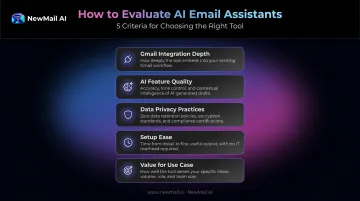
Tools were evaluated across five criteria:
- Gmail integration depth — how natively each tool works inside Gmail
- AI feature quality — capabilities beyond basic drafting
- Data privacy practices — what happens to your email data
- Setup ease — time to first useful output
- Value for use case — whether features match the target user's actual needs
NewMail AI
NewMail AI is a privacy-first AI email assistant built by founders from AI and cybersecurity backgrounds. It works natively inside Gmail (and Outlook and Apple Mail), processing emails without storing any email content by default.
What sets it apart is the security architecture. NewMail holds the highest level of Google Workspace data security certification, is headquartered in Switzerland under some of the world's strictest data protection laws, and has Zero Data Retention agreements with AI providers Anthropic and Mistral , meaning email data is discarded immediately after processing and never logged.
Setup takes under three minutes: 30 seconds to connect your inbox, 60 seconds for the AI to learn your voice, style, and priorities, and 60 seconds to sort your inbox and generate draft replies. NewMail's tagline captures the experience: "Chaos to clarity in under 3 minutes."
| Key Features | Priority inbox with custom categories, AI drafting in your voice, task extraction, meeting recaps, Zero Data Retention by default |
| Pricing | Free 14-day trial (no credit card); Professional from $12/month; Enterprise (volume pricing for teams of 20–200+) — verify current pricing at newmail.ai |
| Best For | Privacy-conscious professionals, executives, sales teams, and organizations in sensitive industries requiring verified Zero Data Retention |
Shortwave
Shortwave is a Gmail-only AI email client built by ex-Google and Firebase engineers, known for its AI-driven search and thread organization. TechCrunch reported a $9M Series A and described it as an attempt to bring back Google Inbox's best features with modern AI.
Its AI assistant lives in a persistent chat panel where you can ask natural language questions across your full inbox history, calendar, and connected apps like Notion and HubSpot. The agent can organize, schedule, write, and search based on plain-language prompts. TechCrunch confirmed it can draft meeting invites with proposed times pulled from calendar context.
Note: The feature name "Ghostwriter" referenced in some reviews was not confirmed on Shortwave's official product pages — the AI writing capability is real, but the specific label is unverified.
| Key Features | AI inbox search, thread summarization, AI writing agent, smart bundles, calendar scheduling via natural language |
| Pricing | Free plan available; paid tiers from $30/seat/month — verify current pricing at shortwave.com |
| Best For | Gmail users who want AI-powered search, inbox clarity, and organized email-to-task workflows |
Gemini for Gmail
Gemini is Google's native AI assistant embedded directly within Gmail, available to Google Workspace subscribers. Because it lives inside Gmail without installation, it has full thread and account context with no setup required.
Google's Verge coverage from Google I/O 2025 confirmed that Gmail's smart replies now pull context from your inbox and Google Drive, including suggested meeting times from calendar data. Gemini can summarize unread threads, draft replies, and answer natural language questions about your inbox.
One important privacy note: Google confirms that Workspace customer data is not used to train its underlying generative AI models, and Gemini's Connected Apps do not train on Gmail, Drive, or Calendar data directly.
| Key Features | Thread summarization, AI reply drafting, Smart Compose personalization, calendar-aware scheduling, inbox context queries |
| Pricing | Included with Google Workspace plans (from $6/user/month); personal plans from $19.99/month for Google AI Pro — verify current pricing at workspace.google.com |
| Best For | Google Workspace users who want zero-friction native Gmail AI with no third-party tools |
Superhuman
Superhuman is a premium AI-powered email client for Gmail and Outlook, built around a keyboard-first interface and the 100ms UX rule — every interaction is engineered to feel instantaneous. That speed philosophy carries through every feature: a split inbox surfaces your most important messages first, and the snippet system blends AI-generated drafts with pre-built templates for one-touch replies.
Superhuman's own data claims users save 4 hours per week, with teams collectively saving 15M+ hours annually — though these are vendor-reported figures. TechCrunch covered Superhuman's AI-powered Instant Reply launch in 2024 as a notable step toward fully automated email triage.
| Key Features | Split inbox, AI triage, keyboard shortcuts, snippet templates, AI reply generation, thread summarization, Auto Archive, Auto Labels |
| Pricing | Free plan available; Pro from $12/member/month (billed annually); Business from $33/member/month — verify current pricing at superhuman.com |
| Best For | Executives, founders, and sales professionals handling high email volumes who want the fastest inbox experience available |
SaneBox
SaneBox is an AI-powered inbox management add-on that works on top of any email provider, including Gmail — no app switching required. It creates smart folders within Gmail and routes less important emails there automatically, learning from your behavior over time.
PCMag gave SaneBox a rare 5-star Editors' Choice rating, and SaneBox itself reports never storing full emails or attachments. The SaneBlackHole feature permanently blocks unwanted senders. A daily digest batches low-priority emails so they don't interrupt your main inbox.
| Key Features | AI-based email sorting, SaneLater folder, SaneBlackHole sender blocking, daily digest, Do Not Disturb mode, follow-up reminders |
| Pricing | From $4.99/month (Snack plan, billed biennially); 14-day free trial — verify current pricing at sanebox.com |
| Best For | Professionals drowning in newsletters and low-priority emails who want automatic organization without switching apps |
How to Choose the Right AI Email Assistant for Gmail
Start With Your Primary Pain Point
The most common mistake is choosing a tool before identifying what's actually broken. These are different categories:
- Inbox chaos and volume → SaneBox or Gemini
- Drafting speed and voice consistency → NewMail AI or Gemini
- AI-powered search and retrieval → Shortwave
- Raw speed and keyboard-first workflow → Superhuman
- Zero-friction setup with no new tools → Gemini for Gmail
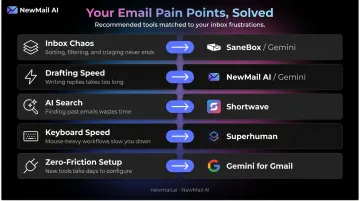
Each category solves a distinct problem — picking outside your actual need wastes both budget and onboarding time.
Evaluate Gmail Integration Depth
Look for tools that are native to Gmail, Google Security Certified, or built as proper Gmail add-ons. Avoid tools that require you to forward emails to third-party servers — this creates both a security risk and workflow friction.
Google classifies Gmail API scopes that read or modify message bodies as restricted, requiring formal OAuth verification. Check what scopes any tool requests before granting access.
Data Privacy and Certifications
For professionals in finance, legal, healthcare, or executive roles, this deserves serious scrutiny. Before connecting any tool to your inbox, ask:
- Does the tool store email content on its own servers?
- Which AI providers does it use for inference?
- Does it hold GDPR compliance and a formal Data Processing Agreement?
- Has it passed any third-party security audit?
NewMail AI sets a high bar on this front:
- Google Security Certified at the highest tier for Workspace apps
- Zero Data Retention agreements with Anthropic and Mistral (no model training on your emails)
- Swiss headquarters, subject to GDPR and among the strictest data laws globally
- Ephemeral processing — emails are analyzed in real time and never stored on NewMail's servers
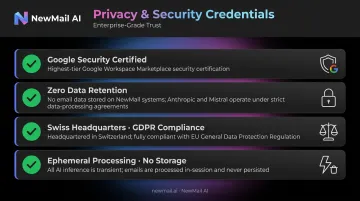
For anyone handling sensitive client communications, that combination is worth verifying against any alternative.
Setup Friction and Scalability
The best tool is the one your team will actually use. Prioritize tools that:
- Set up in minutes with a meaningful free trial
- Don't require learning a new email interface
- Scale to team use with SSO, DPA, and admin controls if you're evaluating for 20+ users
Conclusion
The best AI email assistant for Gmail in 2026 is the one that solves your specific bottleneck — not the one with the most features. Match the tool to the problem:
- Inbox chaos: SaneBox or Gemini handles triage without complexity
- Drafting speed: NewMail AI or Superhuman will move the needle fastest
- Email retrieval: Shortwave is purpose-built for search and context
Privacy should not be a secondary consideration. As AI tools process increasingly sensitive professional communications, the security architecture underneath matters: look for Zero Data Retention, GDPR compliance, and audited certifications before you connect any tool to your inbox.
For Gmail users who need AI that drafts in their voice, protects their data, and sets up in under three minutes, try NewMail AI free at newmail.ai.
Frequently Asked Questions
Does Gmail have AI to help write emails?
Yes. Gmail includes native AI via Gemini (for Workspace users) and Smart Compose, which offer autocomplete suggestions, reply drafts, and email summaries. Availability varies by plan and region — Workspace subscribers get the most complete feature set.
Is there an AI cleaner for Gmail?
Yes. Tools like SaneBox and Clean Email act as AI-powered inbox organizers for Gmail, automatically sorting, filtering, and archiving emails without switching email clients. SaneBox works entirely within your existing Gmail interface.
What is the best AI email assistant for Gmail in 2026?
The right pick depends on what you need most: Gemini for native Gmail integration with zero setup, Shortwave for AI search and inbox organization, Superhuman for speed, and NewMail AI for professionals who need privacy-first AI drafting with Zero Data Retention and Google Security Certification.
Are AI email assistants safe to use with Gmail?
Safety varies significantly by tool. Check whether the tool stores email content, which AI providers it uses, and whether it holds GDPR compliance or Google Security Certification before granting inbox access. Tools requiring email forwarding to third-party servers carry higher inherent risk.
How do AI email assistants integrate with Gmail?
Three main methods: native integration built into Gmail (Gemini), a Gmail add-on or OAuth-based web app that works inside your inbox (NewMail AI, Superhuman), or a background add-on that works via IMAP without changing the Gmail interface at all (SaneBox).
Can AI email assistants draft emails in my own writing style?
Several tools learn writing style over time. NewMail AI claims to replicate your voice in 60 seconds by analyzing your sent email history. Superhuman's snippet system blends AI drafts with pre-built templates.