AI email assistants have evolved well past spam filters. The best tools in 2026 draft replies in your voice, sort what actually needs attention, and handle sensitive data with verifiable security standards. But they're not interchangeable — some replace your inbox entirely, others layer on top, and a few focus purely on filtering noise.
This guide covers five of the best AI email assistants in 2026: what each one does, who it's built for, and where it falls short.
TL;DR
- NewMail AI — best for privacy-conscious professionals and sensitive-industry teams needing zero email data retention and Swiss-jurisdiction compliance
- Superhuman — best for high-volume inboxes needing fast triage and AI drafting in a keyboard-driven interface
- Google Gemini in Gmail — best for users already in Google Workspace who want AI built in with no additional tool
- Microsoft Copilot in Outlook — best for Microsoft 365 teams that want a native, no-migration AI assistant
- SaneBox — best for anyone who wants intelligent inbox filtering without switching their email client
What Is an AI Email Assistant?
An AI email assistant uses Natural Language Processing (NLP) and machine learning to automate the cognitive work of email. Unlike rule-based sorting, these tools understand context, intent, and tone — then act on that understanding to draft replies, prioritize messages, and flag what actually needs your attention.
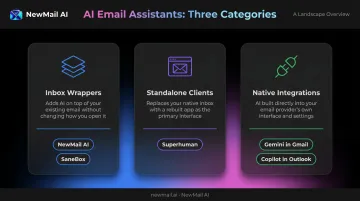
Three distinct types exist:
- Inbox wrappers — layer onto Gmail or Outlook without replacing them (NewMail AI, SaneBox)
- Standalone clients — replace your existing inbox entirely (Superhuman)
- Native integrations — baked directly into existing platforms (Gemini in Gmail, Copilot in Outlook)
The most common use cases professionals rely on these tools for:
- AI drafting in your own voice
- Inbox triage and priority sorting
- Thread summarization
- Follow-up reminders
- Meeting-to-email context linking
Adoption is accelerating fast. Gartner predicted that 40% of enterprise applications would include task-specific AI agents by 2026, up from under 5% in 2025 — and email is where that shift is most visible. Which type fits your workflow comes down to where you're losing the most time.
Best AI Email Assistants in 2026
Choosing the right AI email assistant depends on more than feature lists — it comes down to how well a tool fits your workflow, your privacy requirements, and the email client you already use. Each tool below was evaluated on AI capability, inbox compatibility, privacy and data handling, ease of setup, and fit for different professional use cases.
NewMail AI
NewMail AI is a privacy-first AI email assistant built by founders from AI and cybersecurity backgrounds. It works natively inside Gmail, Outlook, and Apple Mail with a setup time of approximately 2 minutes — no download, no credit card required for the free trial.
What makes it genuinely different is the architecture. NewMail holds Zero Data Retention agreements with its AI providers (including Anthropic and Mistral), meaning email content is processed ephemerally and never stored. It's headquartered in Switzerland, GDPR compliant, and holds Google's highest-level security certification for Workspace applications.
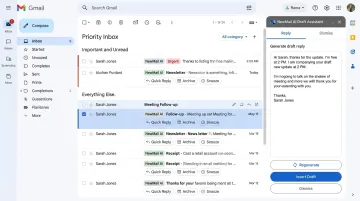
The AI learns your writing style in 60 seconds by analyzing your sent email history, then generates drafts that match your tone, vocabulary, and structure. User preferences and profile context are protected with AES encryption. Every draft requires your approval before sending — a deliberate human-in-the-loop design that matters for compliance-sensitive teams.
Key features:
- Priority inbox with custom categories
- AI drafting in user's voice (including FAQs and relevant links)
- Task extraction and scheduling
- Meeting recaps with action items
- Works inside Gmail, Outlook, and Apple Mail
| Attribute | Details |
|---|---|
| Best For | Privacy-sensitive industries, executives, sales and CS teams, enterprise teams of 20–200+ |
| Pricing | Free 14-day trial (no credit card, no download); Professional at $12/month or ~$9.60/month billed annually; Enterprise with volume pricing — contact sales@newmail.ai |
| Setup | ~2 minutes; self-serve at app.newmail.ai |
Superhuman
Superhuman is a speed-first email client built for professionals processing very high email volumes. It works on top of Gmail and Outlook. In June 2025, Grammarly acquired Superhuman and subsequently rebranded the entire company under the Superhuman name, uniting Grammarly, Coda, and Superhuman Mail into one suite.
The core experience is keyboard-driven. Triage, archive, snooze, reply, and search without touching a mouse. Its split inbox automatically identifies priority emails, and AI drafts replies in the user's writing style.
Superhuman is purpose-built for inbox speed. It does not handle outreach sequences or cross-app workflows — and it requires migrating away from your current email client entirely.
Key features:
- Split inbox AI triage
- AI reply drafting in user's voice
- Follow-up reminders
- Keyboard-driven interface
- Gmail and Outlook support (Google and Microsoft 365-hosted accounts only)
| Attribute | Details |
|---|---|
| Best For | Executives, founders, and sales professionals handling 100+ emails daily who prioritize speed above all |
| Pricing | Mail plans start at $30/month or $300/year (Starter); Business at $40/month or $396/year; Enterprise via contact. Verify current plans at superhuman.com/plans |
Google Gemini in Gmail
Gemini is Google's native AI assistant embedded directly into Gmail and the broader Google Workspace — Docs, Drive, Calendar, and Meet. For teams already using Google tools, adoption is straightforward — no new software, no separate login.
Because Gemini sees email, calendar, and Drive data together, it can draft replies with genuine context: referencing attached files, upcoming meetings, and past threads without any separate setup. No other tool on this list offers that level of native cross-app context without additional integration work.
The limitation is equally clear: Gemini is Google-ecosystem only. It cannot connect to Slack, Salesforce, or any non-Google tool. The most capable features also require a paid Workspace add-on — verify what your organization has licensed before assuming full access.
Key features:
- AI email drafting from prompts
- Thread summarization
- Gmail + Calendar + Drive context awareness
- Predictive replies
| Attribute | Details |
|---|---|
| Best For | Google Workspace users who want AI built into their existing tools with no new software |
| Pricing | Included in Google Workspace plans (Business Starter from $7/user/month billed annually). Google AI Pro at $19.99/month includes Gemini across Gmail, Docs, and more. Verify current plans at workspace.google.com/pricing |
Microsoft Copilot in Outlook
Copilot is Microsoft's native AI assistant integrated across all Microsoft 365 applications — Outlook, Word, Teams, and Calendar. No new tool adoption required for organizations already on Microsoft 365.
Within Outlook, Copilot can summarize entire email threads, draft replies from short prompts, adjust tone, check calendar availability, and convert emails into tasks. It's a strong fit for organizations fully committed to the Microsoft ecosystem.
Two limitations worth noting: Copilot only sees Microsoft 365 data, so anything happening in Slack, Zoom, or Google Workspace is invisible to it. Second, a BBC report from February 2026 confirmed that Microsoft acknowledged a bug that temporarily exposed confidential emails to Copilot Chat — a relevant reminder that even enterprise-grade tools deserve scrutiny on data handling. Copilot prompts and responses can also be stored in hidden mailbox folders and are searchable by eDiscovery tools under Microsoft Purview policies.
Key features:
- Thread summaries
- AI email drafting with tone control
- Calendar integration
- Task creation from emails
- Teams context
| Attribute | Details |
|---|---|
| Best For | Organizations fully committed to Microsoft 365 that want AI embedded into their existing workflow without migration |
| Pricing | Microsoft 365 Copilot at $30/user/month; requires an eligible Microsoft 365 base subscription. Not available on free Outlook.com accounts. Verify at microsoft.com/en-us/microsoft-365-copilot/pricing |
SaneBox
SaneBox is an inbox filtering tool that works on top of any existing email client — Gmail, Outlook, Apple Mail, or any IMAP, Exchange, or ActiveSync-based provider. Users don't switch tools or learn a new interface.
Its value is narrowly focused: reduce inbox noise. SaneBox analyzes behavioral patterns to move low-priority emails out of the main inbox automatically. SaneReminders tracks follow-ups. SaneBlackHole permanently removes unwanted senders with one drag-and-drop.
SaneBox doesn't draft emails or run outreach sequences. For professionals who need a lighter inbox without any workflow disruption, that narrow focus is exactly the point.
Key features:
- Automated inbox filtering
- SaneLater folder for low-priority email
- SaneBlackHole for permanently blocking senders
- SaneReminders for follow-up tracking
| Attribute | Details |
|---|---|
| Best For | Professionals overwhelmed by inbox volume who want a cleaner main inbox without switching email clients |
| Pricing | Snack from $4.99/month (1 account, 2 features); Lunch from $7.99/month (2 accounts, 6 features); Dinner tier also available. 14-day free trial. Verify current pricing at sanebox.com/pricing |
How We Chose the Best AI Email Assistants
The Evaluation Framework
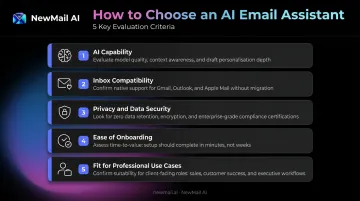
Five dimensions guided the selection:
- AI capability: How well the tool drafts, triages, and understands context across real inbox scenarios
- Inbox compatibility: Whether it works natively inside Gmail, Outlook, and Apple Mail — or relies on clunky workarounds
- Privacy and data security: What the tool actually does with your email content — retention policies, certifications, and encryption standards
- Ease of onboarding: How quickly a professional can get up and running without disrupting their existing workflow
- Fit for professional use cases: Whether it's built for solo users, teams, or compliance-sensitive environments — not just generic inbox management
Common Selection Mistakes
Professionals consistently make the same errors when choosing an AI email assistant:
- Choosing on features without checking data policies — results in security incidents or compliance failures when email content is stored or used for model training
- Picking the wrong ecosystem — selecting a Google-only tool when half your workflow lives in Microsoft 365 leads to low adoption and wasted spend
- Underestimating migration cost — switching to a standalone email client disrupts existing workflows for days or weeks, not hours
- Solving the wrong problem — investing in a drafting tool when the real bottleneck is inbox triage, or vice versa
What to Check on Privacy
For any tool connecting to your inbox, verify:
- Does the tool store email content on its servers?
- Is your email data used to train public AI models?
- What encryption standards apply to any retained data?
- What happens to your data after account cancellation?
If you work in legal, financial, healthcare, or enterprise environments, certifications matter beyond optics. GDPR compliance, SOC 2, and Zero Data Retention agreements with AI providers each carry specific legal obligations — they determine what a vendor is contractually permitted to do with your clients' data.
Conclusion
The right AI email assistant solves the specific problem costing you the most time. No single tool wins every use case.
- Inbox noise without migration: SaneBox
- Google Workspace teams: Gemini
- Microsoft 365 organizations: Copilot
- Speed-first, high-volume professionals: Superhuman
- Sensitive data handling with zero email storage: NewMail AI
When evaluating any tool for the long term, look beyond the feature list. Consider how the vendor approaches privacy, how well the AI adapts to your voice over time, and whether the tool scales from individual use to team deployment without requiring new infrastructure.
For professionals who need AI that works inside their existing inbox — without storing a single email — NewMail AI offers a 14-day free trial with full access from day one, a 2-minute setup, and no credit card required. Built in Switzerland under strict GDPR standards, security isn't a setting you configure — it's how the system was designed.
Frequently Asked Questions
What are the best AI email assistants in 2026?
The best options depend on your use case: NewMail AI for privacy-first inbox management, Superhuman for speed and high-volume triage, Gemini for Google Workspace users, Copilot for Microsoft 365 teams, and SaneBox for filtering without switching tools.
Is it safe to connect my inbox to an AI email assistant?
Safety depends on the tool's data handling. Check whether it stores email content, uses your data to train AI models, holds certifications like GDPR or SOC 2, and offers zero data retention — especially if you work in legal, financial, or other regulated industries where client confidentiality is non-negotiable.
Do AI email assistants work with Gmail and Outlook?
Most tools support one or both platforms, but integration depth varies significantly. Some require workarounds, some work as native add-ins, and some replace the inbox entirely. NewMail AI works directly inside Gmail, Outlook, and Apple Mail with no migration or new interface to learn.
Can an AI email assistant draft emails in my own writing style?
The best tools in 2026 learn from your sent history to match your tone, vocabulary, and structure — though quality varies. Some adapt in minutes; others need more onboarding time. NewMail AI learns your style in approximately 60 seconds.
What AI email assistant is best for privacy-sensitive industries?
Prioritize tools with zero data retention policies, recognized compliance certifications (GDPR, SOC 2), and a strict no-training-on-client-data policy. NewMail AI's Swiss-based architecture and Zero Data Retention agreements with AI providers make it purpose-built for legal, financial, and healthcare environments.
How quickly can I set up an AI email assistant?
Setup time varies by tool type. Add-ins and wrappers that work inside Gmail or Outlook typically take 2–5 minutes. Standalone clients that replace the inbox may require data migration and a learning curve of several days. NewMail AI is fully operational in under 2 minutes with no email data stored during setup.