Introduction
According to Microsoft WorkLab, the average worker receives 117 emails every weekday and spends up to 8.8 hours per week in email alone. With over 400 million Microsoft 365 paid seats worldwide, Outlook sits at the center of most professional inboxes—yet its built-in tools (rules, flags, folders) haven't meaningfully changed how people manage email overload.
That's shifting in 2026. AI email assistants now do far more than autocomplete sentences. The best ones, operating natively inside Outlook, now:
- Triage your inbox by context and urgency
- Draft replies that sound like you, not a template
- Extract tasks and deadlines from thread content
- Summarize long chains before you open them
The challenge is picking the right one. Five tools dominate this space, each solving a different problem. This guide covers all of them: what they do, what they cost, who they're built for, and how to choose based on your actual workflow bottleneck—not just brand recognition.
Key Takeaways
- Outlook users average nearly 9 hours per week in email; each tool reviewed here addresses a different bottleneck
- NewMail AI is the only option built with Zero Data Retention as core architecture, not a setting
- Microsoft Copilot requires no new vendor but is reactive, not proactive
- For speed, Superhuman leads; for writing simplicity, MailMaestro; for hands-off filtering, SaneBox
- All five tools integrate with Outlook—no workarounds needed
What Can an AI Email Assistant Do for Outlook?
An AI email assistant connects to your Outlook account via OAuth, add-in, or native integration and uses AI to handle inbox decisions that currently require your manual attention. The result is less time triaging and more time on work that actually moves things forward.
Core Capabilities in 2026
Mature tools in this category now handle:
- Priority inbox sorting — ranks messages by content and context, not just sender rules
- AI draft generation — produces replies that match your tone and reference thread history
- Thread summarization — condenses long chains into a 3-line briefing
- Task and follow-up extraction — pulls action items from email content automatically
- Calendar coordination — handles scheduling requests and generates meeting recaps
Three Integration Architectures
How a tool connects to Outlook determines its depth and IT compatibility:
- Native add-ins — installed via Microsoft AppSource, work inside the Outlook UI, straightforward for enterprise IT to approve
- Standalone clients — replace the Outlook interface entirely (Superhuman), requiring users to switch environments
- Account-level connections — authenticate via OAuth or IMAP, process email server-side without requiring a UI change (SaneBox, NewMail AI)
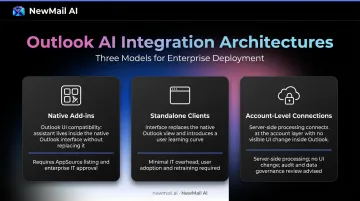
For enterprise teams with strict IT governance, native add-ins are usually the path of least resistance. Individual professionals and small teams often find account-level connections faster to set up and easier to manage without IT sign-off.
Best AI Email Assistants for Outlook in 2026
These five tools were selected based on Outlook integration depth, AI capability breadth, privacy standards, pricing value, and setup friction. Each solves a distinct problem.
NewMail AI
NewMail AI is a privacy-first AI email assistant built in Switzerland by a team with backgrounds in data-centric AI. It works natively inside Outlook, Gmail, and Apple Mail with no separate app or interface change required. The entire architecture is built around one principle: email content should never be stored.
The privacy architecture is independently verifiable, not marketing language:
- Google Security Certified at the highest tier for Workspace applications — an independent cybersecurity audit, not a basic marketplace listing
- Zero Data Retention agreements with Anthropic and Mistral — inputs are discarded immediately after processing and cannot be used for model training
- Strict Data Processing Agreements with OpenAI and Google Gemini prohibit training use
- Military-grade AES encryption protects stored context (communication style, preferences, settings) — no raw email content is ever written to disk
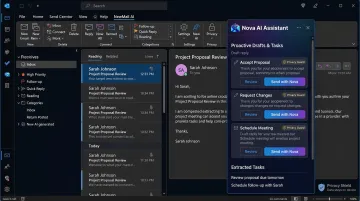
Functionally, NewMail's AI agent (Nova) learns your voice through a one-time analysis of sent emails, then generates proactive drafts automatically as new emails arrive. Inbox triage, task extraction, and daily briefings all run without manual prompting. Every draft requires explicit user approval before sending—human-in-the-loop is non-negotiable.
| Feature | Details |
|---|---|
| Key Features | Priority inbox with custom categories, AI drafts in user's voice, automatic task extraction, AI scheduling assistant, daily briefings, instant meeting recaps, proactive inbox triage—all inside Outlook |
| Pricing | Free 14-day trial (no credit card, full access). Professional: $12/month or ~$9.60/month billed annually. Enterprise: volume pricing for teams 20–200+, includes SSO, DPA, KPI dashboard (adoption, response time, ROI), team context, dedicated account manager |
| Best For | Executives, sales teams, and professionals in sensitive industries who need full AI productivity with provable Zero Data Retention; enterprise teams requiring SSO, DPA, and compliance documentation |
Microsoft Copilot
Copilot is Microsoft's native AI assistant embedded across the M365 suite—Outlook, Word, Excel, Teams, SharePoint, and OneDrive. For organizations already running Microsoft 365, it removes one variable entirely: no new vendor, no new IT approval process.
Copilot's genuine strength is cross-app context. It can reference a SharePoint document, summarize a Teams recording, and draft an Outlook reply in one workflow—without leaving Outlook. Thread summarization, tone coaching, and scheduling suggestions are solid.
Where it falls short: Copilot is reactive by design. It requires a prompt for each action and won't autonomously triage your inbox or extract tasks in the background. A few specific limitations worth knowing:
- "Prioritize my inbox" ignores encrypted messages and mail already sorted by rules
- Requires an additional per-user fee on top of an existing M365 license
- No proactive drafting — every output starts with a manual prompt
| Feature | Details |
|---|---|
| Key Features | Thread summarization, AI reply drafting, tone coaching, natural language Outlook rules, scheduling suggestions, cross-app M365 context (Teams, SharePoint, OneDrive) |
| Pricing | Microsoft 365 Copilot Business: $21/user/month (annual) or $25.20/month (monthly commitment). Enterprise: $30/user/month (annual) or $31.50 monthly. Requires qualifying M365 license. |
| Best For | Teams fully embedded in Microsoft 365 who want AI assistance without adding a third-party vendor; enterprise IT environments with existing Microsoft compliance posture |
Superhuman
Superhuman is a premium email client rebuilt from scratch around speed. It supports both Gmail and Outlook and is designed for professionals who process high email volumes daily and need to move faster than any standard interface allows.
The core product is velocity. Keyboard shortcuts cover every action, Auto Drafts prepare AI-generated replies before you open an email, and Auto Labels triage by importance automatically. Superhuman's AI writing assistant adapts drafts to each recipient's communication style. It holds a G2 rating of 4.7/5 from 1,256 reviews.
One commitment worth knowing upfront: Superhuman replaces the standard Outlook interface entirely. There's a real keyboard-shortcut learning curve, and at $25–$33/user/month, the pricing only makes sense at volume. Users processing fewer than 100 emails a day will likely not recoup the cost.
| Feature | Details |
|---|---|
| Key Features | Keyboard-first navigation, Auto Drafts (AI replies pre-generated per email), Auto Labels (AI triage), Auto Summarize, Voice and Tone Match, Ask AI, SOC 2 Type II |
| Pricing | Starter: $25/user/month. Business: $33/user/month. Enterprise: contact sales. |
| Best For | High-volume power users (200+ emails/day) willing to learn a new interface; sales professionals and executives who need maximum email velocity |
MailMaestro
MailMaestro is a focused AI writing add-in that installs directly into Outlook via Microsoft AppSource. It's the lightest option on this list: no new client, no workflow changes, just AI-powered drafting inside your existing Outlook interface.
MailMaestro is purpose-built for writing speed. One-click reply generation, tone selection (formal, friendly, assertive), multilingual drafting, and thread summarization cover most professional writing scenarios. Its enterprise data anonymization feature—PII obfuscation before email content reaches the underlying AI model—makes it deployable for teams handling contracts or financial data.
Scope is deliberately narrow. MailMaestro does not triage your inbox, extract tasks, integrate with calendars, or connect to other tools. It's a writing assistant, not a workflow assistant — and that's an intentional design choice, not a gap.
| Feature | Details |
|---|---|
| Key Features | One-click reply generation, tone selection, multilingual drafting, thread summarization, enterprise PII obfuscation before AI processing, native Outlook add-in (desktop, web, Mac) |
| Pricing | Free tier: 3 email credits/week. Premium: from $12/month with 14-day full trial, no credit card required. |
| Best For | Professionals who need faster, more professional writing without changing their existing Outlook workflow; enterprise teams requiring data anonymization before AI processing |
SaneBox
SaneBox is an inbox filtering service that layers on top of Outlook via IMAP, automatically sorting low-priority email into smart folders based on your behavior patterns—without reading full message content.
SaneBox solves pure inbox volume reduction better than any other tool on this list. Newsletters, notifications, and low-signal messages move to SaneLater, SaneNews, or SaneBlackHole automatically. SaneReminders tracks sent emails that haven't received a reply. It works with any Outlook client without interface changes, and it analyzes only headers (sender, subject, date) — email body content never reaches SaneBox servers.
One clear boundary: SaneBox doesn't draft emails, extract tasks, or generate AI content. It's a filter, and a good one. It pairs well with a drafting tool like NewMail AI or MailMaestro for users who need both triage and writing support.
| Feature | Details |
|---|---|
| Key Features | Smart folder sorting (SaneLater, SaneNews, SaneBlackHole), SaneReminders for follow-up tracking, IMAP-based (no interface change), behavior-based filtering without reading email body |
| Pricing | Snack: $4.99/month. Lunch: $7.99/month. Dinner: $24.99/month. 14-day free trial, no credit card. |
| Best For | Outlook users whose primary bottleneck is inbox noise, not drafting speed; budget-conscious professionals who want passive filtering without switching clients |
How We Chose the Best AI Email Assistants for Outlook
The Evaluation Framework
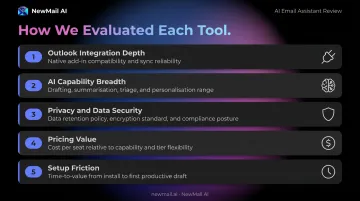
Each tool was assessed on five dimensions:
- Outlook integration depth — native add-in, OAuth, or client replacement; desktop, web, and mobile compatibility
- AI capability breadth — does it triage, draft, summarize, and extract tasks, or only one of these?
- Privacy and data security — what data is accessed, stored, and whether it's used for AI model training
- Pricing value — cost relative to the problem it solves
- Setup friction — time to first value and whether IT approval or ecosystem lock-in is required
The Most Common Mistake
Choosing based on brand recognition or feature count alone. A professional whose problem is drafting speed needs a fundamentally different tool than someone whose problem is inbox volume, missed follow-ups, or data privacy compliance.
Before evaluating any tool, identify your primary bottleneck:
- Inbox noise and volume → SaneBox
- Writing speed and quality → MailMaestro
- Raw email velocity → Superhuman
- Microsoft ecosystem integration → Copilot
- Comprehensive AI productivity with data privacy → NewMail AI
That bottleneck mapping also shapes how heavily each criterion was weighted — and privacy earned a category of its own.
Why Privacy Weighs More Than Features in 2026
According to a Deloitte survey summarized by Cybersecurity Dive, 72% of professionals ranked data privacy as a top-three ethical concern for generative AI — up from 25% who cited it as their primary concern in 2023 to 40% in 2024.
For email, that concern is especially acute. Your inbox contains contracts, financial details, personnel information, and confidential strategy — the kind of data that creates real liability if mishandled.
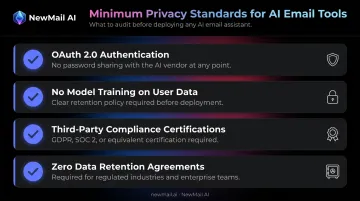
Any tool that handles email content should meet these standards at minimum:
- OAuth 2.0 authentication (no password sharing with the vendor)
- Clear data retention policies with no model training on user email content
- Third-party compliance certifications (GDPR, SOC 2, or equivalent)
- For regulated industries: Zero Data Retention agreements with all AI processing partners
Conclusion
The best AI email assistant for Outlook in 2026 depends entirely on where your time is actually being lost:
- Inbox noise → SaneBox filters it passively without touching your workflow
- Writing speed → MailMaestro drafts inside Outlook with one click
- Email velocity → Superhuman rebuilds the experience around speed
- M365 integration → Copilot adds AI without a new vendor relationship
- Full AI productivity with zero data storage → NewMail AI handles triage, drafting, task extraction, and scheduling while keeping email content ephemeral by design
Before committing to any subscription, verify three things: does it scale with your email volume growth, does it fit your existing tech stack, and does it meet your organization's data security requirements?
For professionals who want full AI email productivity without a single line of email content stored, NewMail AI's 14-day free trial requires no credit card and completes setup in under three minutes. Built in Switzerland, it operates under Zero Data Retention agreements with its AI providers, processes email content ephemerally without storing it on NewMail's servers, and applies AES-256 encryption to all stored user preferences — security decisions made at the architecture level, not configured after the fact.
Frequently Asked Questions
Which AI is best for Outlook email?
It depends on your primary need. NewMail AI suits privacy-conscious professionals and sensitive industries; Microsoft Copilot works best for M365-embedded teams; Superhuman is built for high-volume speed users; MailMaestro covers writing assistance only; SaneBox handles passive inbox filtering. Identify your core bottleneck before choosing.
Does Outlook have an AI email assistant?
Yes—Microsoft Copilot is Outlook's built-in AI assistant, available as a paid add-on to Microsoft 365 subscriptions starting at $21/user/month. It handles drafting, thread summarization, tone adjustment, and scheduling, but is reactive (requires prompting) and does not autonomously triage your inbox or extract tasks.
Is it safe to connect a third-party AI tool to my Outlook account?
Reputable tools use OAuth 2.0 authentication, meaning they never see your password. Before connecting any tool, verify whether it stores email content, trains AI models on your data, and what compliance certifications it holds. NewMail AI, for example, uses Zero Data Retention and processes email ephemerally with no content stored on its servers.
What is the difference between Microsoft Copilot and a standalone AI email assistant?
Copilot spans the full M365 suite (Word, Excel, Teams, Outlook) but is shallower on email-specific management — it won't autonomously triage, extract tasks, or act without a prompt. Standalone tools are purpose-built for email workflow depth, offering more granular inbox management, privacy controls, and voice-matching capabilities.
Do AI email assistants for Outlook work on desktop and web versions?
Most tools on this list (NewMail AI, Copilot, MailMaestro, SaneBox) work across Outlook desktop, web, and mobile because they connect at the account level rather than via a browser extension. Tools that replace the Outlook client entirely, like Superhuman, work through their own app interface regardless of device.
Can an AI email assistant send emails automatically without my approval?
Most generate drafts for user review before sending—autonomous send is technically possible but rarely appropriate for professional use. The standard best practice in 2026 is human-in-the-loop: AI drafts, human reviews, human sends. NewMail AI explicitly never sends without user approval; follow-up automation is governed by timing rules the user configures in advance.