Introduction
The average worker now receives 117 emails per day, according to Microsoft's Work Trend Index — and Microsoft 365 users are interrupted by email, meetings, or notifications every 2 minutes. McKinsey puts the total cost at 28% of the workweek spent just managing messages.
That share of the workweek hasn't budged. What has changed is the category of tools built to reclaim it.
The best AI email assistants in 2026 handle full inbox triage, draft replies in your specific voice, extract tasks from threads, and meet enterprise data privacy requirements — without a new interface to learn.
This guide reviews the top AI email assistant tools available in 2026, breaks down what separates them, and explains exactly what to evaluate before connecting one to your inbox.
Key Takeaways
- AI email assistants now manage triage, prioritization, contextual drafts, and task extraction — not just autocomplete.
- Privacy standards (zero data retention, GDPR, encryption) should be evaluated before AI feature depth.
- Don't confuse an AI email client with an AI email assistant — they solve fundamentally different problems.
- NewMail AI leads for privacy-first professionals: zero email storage, Swiss-based architecture, Google Security Certified, setup in under 2 minutes.
- The best tools activate in minutes inside your existing inbox — setup speed and integration quality are non-negotiable.
What Is an AI Email Assistant and Why Does It Matter in 2026?
AI email assistants use natural language processing and machine learning to read incoming messages, understand context, and take action — whether that's categorizing threads, drafting replies, or flagging tasks. The category has evolved well beyond Gmail's Smart Reply (2017) and Smart Compose (2018), which offered pre-written suggestions and sentence completions. Those were helpful shortcuts. Today's tools are closer to what Forrester describes as "digital coworkers" — systems that analyze, interpret, and act on data across business processes.
The Four Capabilities That Define the Category
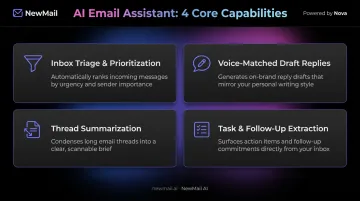
Modern AI email assistants deliver four distinct functions. Each solves a different piece of the inbox problem:
- Inbox triage and prioritization: Surfaces high-priority threads based on sender intent, urgency, and required action — no more manually scanning everything.
- Voice-matched draft replies: Learns from your sent email history to generate responses that sound like you, not generic AI output.
- Thread summarization: Condenses long email chains into a brief, scannable recap so you can catch up in seconds.
- Task and follow-up extraction: Spots action items buried in emails and routes them to a to-do list or follow-up queue.
These capabilities are driving rapid adoption across knowledge-work roles. 75% of global knowledge workers now use generative AI at work, and 83% of B2B automation decision-makers plan to accelerate AI agent investment within 12 months.
Best AI Email Assistant Tools for 2026
Each tool was evaluated on five dimensions:
- Inbox management depth
- AI draft quality
- Privacy standards
- Platform compatibility
- Setup speed
Different tools are built for different use cases. The right choice depends on whether you need the AI to work for you or just help you work faster.
NewMail AI
NewMail AI is a Switzerland-based, privacy-first AI email assistant built by founders from AI and cybersecurity backgrounds. Its architecture was designed from day one with zero email storage: emails are processed ephemerally, in-memory, and discarded immediately after analysis.
Nova, its AI agent, works natively inside Gmail, Outlook, and Apple Mail without requiring a separate application or interface.
What sets it apart:
- Google Security Certified at the highest tier available for Google Workspace applications — achieved through an independent cybersecurity audit, not self-attestation
- Zero Data Retention agreements with AI providers Anthropic and Mistral — inputs are discarded immediately after processing
- Military-grade encryption (AES) for all stored user preferences and context
- GDPR compliant under Swiss law, with Switzerland holding EU adequacy status for data transfers
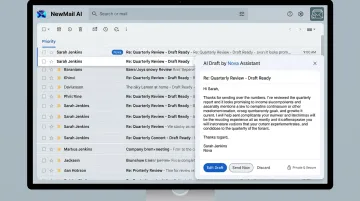
- Nova learns your writing voice in 60 seconds by analyzing a selection of your sent emails — no manual style configuration needed
- Setup takes under 2 minutes: 30 seconds to connect your inbox, 60 seconds for Nova to learn your context, 60 seconds for inbox sorting and draft generation
Every draft requires your approval before sending — a deliberate human-in-the-loop design that matters for compliance-sensitive environments.
| Category | Details |
|---|---|
| Key Features | Priority inbox with custom categories, AI drafts in your voice (including FAQs and relevant links), task extraction, instant meeting recaps with action items, works inside Gmail/Outlook/Apple Mail |
| Pricing | Free Trial: 14 days, no credit card, no download. Professional: $12/month (or ~$9.60/month billed annually). Enterprise: volume pricing for teams of 20–200+, contact sales@newmail.ai |
| Best For | Privacy-sensitive professionals, executives, sales and customer success teams, and enterprise teams requiring zero data retention and formal DPAs |
Superhuman
Superhuman (now part of the Superhuman Suite following Grammarly's acquisition in July 2025) is a speed-first email client built for Gmail and Outlook. It's optimized for doing email faster, not for delegating it.
What sets it apart:
- Sub-100ms load times (self-reported)
- Split Inbox for automatic triage by email type
- AI Write, Instant Reply, and Auto Drafts for rapid response generation
- Keyboard-driven navigation with shortcuts for every action
- Thread summarization and Grammarly writing assistance bundled in paid tiers
Superhuman is an email client, not an email assistant — you're still doing the work, just more efficiently.
| Category | Details |
|---|---|
| Key Features | Split Inbox, keyboard shortcuts, AI Write/Instant Reply/Auto Drafts, thread summarization, Grammarly assistance, read status tracking |
| Pricing | Free: $0. Pro: $12/member/month (annual) or $30/month. Business: $33/member/month (annual) or $40/month. Enterprise: custom |
| Best For | Speed-focused power users who want to process email faster with AI on demand |
Shortwave
Shortwave is a Gmail client built by ex-Google engineers, with AI woven into its core workflows rather than bolted on. It offers one of the deepest feature sets in the category, particularly around natural language search and writing personalization.
Where it excels:
- Natural language inbox search — ask questions across your entire email history in plain English
- Ghostwriter learns your writing style from past sent emails and drafts in your voice
- Tasklet automations connect email actions to Slack, Notion, Asana, and 3,000+ other apps using plain English instructions
- Smart email bundling to reduce inbox fragmentation
One significant limitation: Shortwave requires a Gmail or Google Workspace account. Outlook.com and Hotmail are supported only via email forwarding, and Microsoft 365/Exchange accounts are not supported at all.
SaneBox does not draft replies. It's a filtering tool, not an assistant. Pair it with a drafting tool if you need AI replies, not just triage.
| Category | Details |
|---|---|
| Key Features | SaneLater, SaneBlackHole, SaneNoReplies follow-up tracking, SaneDoNotDisturb, email digest, works with any email client |
| Pricing | Snack: $4.99/month (billed every 2 years). Lunch: $7.99/month. Dinner: $24.99/month |
| Best For | Professionals who want passive inbox filtering without switching their email client |
Microsoft Copilot for Outlook
Microsoft Copilot is the native AI assistant built into Outlook and the Microsoft 365 suite. Its cross-app context from Word, Excel, SharePoint, and Teams gives it an edge for organizations already running on Microsoft infrastructure.
What sets it apart:
- AI-drafted emails with tone and length controls
- Thread summarization with numbered superscripts that link back to source messages in the thread
- Coaching by Copilot provides tone and clarity feedback on drafts before you send
- Calendar-connected scheduling suggestions
- Deep integration with Word, Excel, and SharePoint data
One hard limitation: Copilot in Outlook only works on primary mailboxes hosted on Exchange Online. Archive, group, shared, and delegate mailboxes are not supported.
| Category | Details |
|---|---|
| Key Features | Draft with Copilot, thread summarization with source citations, Coaching by Copilot, calendar scheduling, cross-app context from Word/Excel/SharePoint |
| Pricing | Microsoft 365 Personal: $99.99/year (Copilot included). Business: from $18/user/month (annual, promotional). Enterprise: $30/user/month. Copilot Pro for individuals: $20/user/month |
| Best For | Microsoft 365 users and corporate teams embedded in the Outlook/Office ecosystem |
How to Choose the Right AI Email Assistant
The Evaluation Framework
Every tool in this list was assessed on five dimensions:
- Inbox management depth — triage, prioritization, and categorization quality
- AI draft quality and voice personalization — does it sound like you?
- Data privacy and security posture — what happens to your email data?
- Platform compatibility and integration — does it work inside your existing client?
- Value relative to pricing — does the cost justify the productivity gain?
The most common buyer mistake: selecting a tool based purely on AI drafting features while ignoring privacy standards and integration fit. A tool with impressive drafts that stores your email content in perpetuity is a significant liability for any business handling sensitive communications.
Why Privacy Deserves First-Class Consideration
That liability isn't hypothetical. Gartner found that 42% of IT leaders identify data privacy as their top generative AI concern, and the firm also predicts that by 2027, more than 40% of AI-related data breaches will stem from improper cross-border use of generative AI.
Before connecting any AI tool to your inbox, verify:
- Zero data retention or explicit deletion policies — does the tool store your email content?
- Encryption standards — TLS in transit, AES-256 at rest
- OAuth authentication — the tool should never require your email password directly
- Compliance certifications — GDPR and SOC 2 for most businesses; HIPAA for regulated industries
- AI provider agreements — does the vendor hold DPAs with the AI models processing your data?
AI Email Client vs. AI Email Assistant: The Core Distinction
This is the most common mismatch in the category:
- AI email clients (Superhuman, Shortwave) help you work faster — better keyboard shortcuts, smarter organization, AI drafting on demand. You're still doing the work.
- AI email assistants (NewMail AI) work for you — triage happens automatically, drafts are generated before you ask, tasks are extracted without manual intervention.
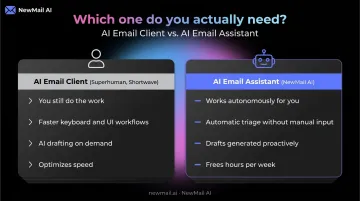
For professionals managing 100+ emails daily, that distinction matters in practice: an assistant that handles triage and drafting autonomously frees hours per week, while a client that accelerates manual work saves minutes. Picking the wrong category means paying for a solution to a problem you don't actually have.
Conclusion
The right AI email assistant matches your actual workflow, integrates with the email client you already use, and handles your data in a way you can trust. Feature count is rarely the deciding factor.
Before committing, evaluate these ongoing performance factors:
- How well the AI learns and maintains your voice over time
- Whether the tool scales cleanly for team use
- Whether the pricing stays cost-effective as your usage grows
For professionals and teams that need a privacy-first assistant inside their existing inbox, NewMail AI is built for that from the ground up:
- Zero email storage with ephemeral processing
- Military-grade encryption and Google Security Certified status
- Personalized AI agent (Nova) active in under 2 minutes
- No new interface, no credit card required to start
Start your free 14-day trial at app.newmail.ai
Frequently Asked Questions
What is an AI email assistant and how does it work?
AI email assistants use NLP and machine learning to read incoming messages, categorize them by urgency, draft replies in your voice, and extract action items. The best tools learn from your past email patterns — sent history, response habits, communication style — and improve accuracy continuously.
Which AI email assistant is best for privacy-sensitive industries?
Tools with verifiable zero data retention policies and strong encryption are the right fit for regulated or sensitive environments. NewMail AI's Swiss-based architecture, Zero Data Retention agreements with Anthropic and Mistral, and Google Security Certified status make it the strongest option for industries where email data cannot leave the organization or be retained by third parties.
Can AI email assistants work inside Gmail, Outlook, and Apple Mail?
Compatibility varies. Superhuman and Shortwave replace your email client entirely. NewMail AI and SaneBox work natively inside your existing email environment — Gmail, Outlook, and Apple Mail — without requiring a migration or new interface.
How do AI email assistants protect my email data?
Look for OAuth authentication (the tool never sees your password), encryption in transit and at rest, explicit zero data retention or deletion policies, and compliance certifications relevant to your industry. For regulated industries, prioritize tools with formal Data Processing Agreements and documented ZDR commitments over those offering only general privacy policies.
What features should I prioritize when choosing an AI email assistant?
Start with your primary pain point: inbox overload, draft quality, or team collaboration. Then evaluate on inbox triage depth, voice-matched writing quality, privacy standards, integration with your current email client, and setup speed.
How long does it take to set up an AI email assistant?
Setup time varies by tool. NewMail AI activates in under 2 minutes inside your existing email client — connecting via OAuth, learning your voice, and generating initial drafts all happen before you finish your coffee. More complex tools like Shortwave or Superhuman may require 15–30 minutes to configure automations and learn keyboard shortcuts.