That's the problem a true email AI agent solves. Not just a "compose with AI" button bolted onto your inbox, but an autonomous system that prioritizes your messages, drafts replies in your voice, extracts tasks, and manages your workflow — without requiring you to switch apps or compromise sensitive data.
2026 marks a clear maturation point for this category. The best tools now work natively inside Gmail, Outlook, and Apple Mail, learn your communication style in minutes, and come with real privacy architecture — not just a reassuring privacy page.
This guide covers the top five email AI agents, how they differ, the evaluation criteria that actually matter, and which tool fits your role or team size.
TL;DR
- An email AI agent triages, prioritizes, and manages your inbox autonomously — unlike basic AI writing add-ons that only assist with drafting.
- The best tools in 2026 work natively inside Gmail, Outlook, or Apple Mail — no new app to learn, no context-switching.
- Privacy is a critical differentiator: look for Zero Data Retention policies, GDPR compliance, and encryption standards before committing.
- Top privacy-first pick: NewMail AI stores zero email content, holds Google Security Certification, and takes under 2 minutes to set up.
- Criteria evaluated: integration depth, drafting capability, voice personalization, privacy architecture, and pricing transparency.
What Is an Email AI Agent?
Not all inbox AI tools are equal. The distinction matters for how much time you actually save.
An AI email assistant helps you work faster on tasks you still initiate yourself — it suggests a draft when you open the compose window, summarizes a thread when you ask, or flags a message you've already opened. You remain in control throughout.
An AI email agent operates autonomously. It scans your inbox, prioritizes messages without you asking, drafts replies in your voice before you open them, extracts tasks, schedules meetings, and runs your inbox workflow in the background — all within your existing email client.
Gartner predicted that 40% of enterprise applications would feature task-specific AI agents by 2026, up from less than 5% in 2025.
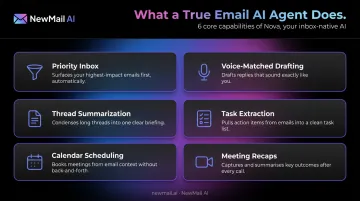
Core Capabilities of a True Email AI Agent in 2026
- Priority inbox with custom categories (urgent, FYI, newsletter, action required)
- Voice-matched reply drafting — sounds like you, not like a template
- Thread summarization — catch up on a 40-message chain in 10 seconds
- Task extraction — converts email requests into to-dos automatically
- Calendar scheduling — proposes and books meetings from email context
- Meeting recaps with action items and owners, distributed from your inbox
Why Privacy Architecture Matters Here
Those capabilities require deep access to your inbox — which raises a critical question: what happens to your data? Your inbox contains sensitive client communications, deal negotiations, HR discussions, and financial data. Yet many AI tools process that content on third-party servers with unclear retention policies.
The most defensible approach is ephemeral processing: email is analyzed in-memory, never written to disk, and discarded immediately after use. Paired with Zero Data Retention (ZDR) agreements with AI providers, this ensures your email content is never stored by either the tool or the underlying model.
According to Cisco's 2025 Data Privacy Benchmark Study, 99% of respondents consider external privacy certifications significant when selecting vendors — and 64% were concerned about GenAI tools leading to sensitive information leaks.
Best Email AI Agents in 2026: Top 5 Reviewed
Tools were evaluated on six dimensions: inbox integration depth, AI capabilities beyond drafting, voice learning, privacy architecture, ease of setup, and value across individual and team use cases.
NewMail AI
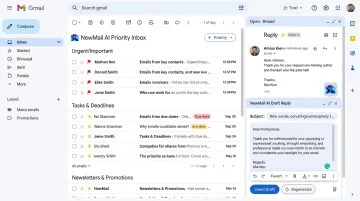
NewMail AI is a privacy-first email AI agent built in Switzerland by founders from AI and cybersecurity backgrounds. It works natively inside Gmail, Outlook, and Apple Mail — not as a replacement client, but as an integrated layer on top of your existing inbox.
What sets it apart is the combination of genuine inbox automation and a rigorous privacy architecture. Email content is processed ephemerally: analyzed in-memory, then discarded. No email is stored on NewMail's servers.
For AI processing, NewMail holds formal Zero Data Retention agreements with Anthropic and Mistral — contractual commitments that inputs are discarded immediately after inference, with no logging or persistent storage. Organizations with stricter requirements can operate exclusively through ZDR-enabled providers, ensuring zero data persistence across the entire pipeline.
| Details | |
|---|---|
| Key Features | Priority inbox with custom categories; voice-matched AI drafting (including FAQs and links); task extraction and calendar scheduling; instant meeting recaps with action items; works inside Gmail, Outlook, and Apple Mail; approval-first drafting on every message |
| Pricing | Free Trial: 14 days, no credit card required, full feature access. Professional: $12/month (or ~$9.60/month billed annually). Enterprise: volume pricing for teams of 20–200+, contact sales@newmail.ai |
| Best For | Professionals and enterprise teams in sensitive industries who need genuine inbox automation, zero email storage, and AES encryption — without switching email clients |
Superhuman
Superhuman is a premium email client with deep AI integration, built around keyboard-first design and inbox velocity. It supports both Gmail and Outlook and has developed a strong following among high-volume email users who prioritize getting to inbox zero fast.
Its AI capabilities include instant reply drafting with voice learning, thread auto-summarization, split inbox by category, follow-up reminders, and read receipts. The feature set is comprehensive, and the keyboard shortcut system is faster than any mouse-based workflow.
The key trade-off: Superhuman replaces your native email client entirely rather than integrating within it. If you're attached to Gmail or Outlook's interface — or your team uses a standardized setup — that's a meaningful friction point. It also doesn't offer the same privacy architecture as purpose-built privacy-first tools.
Note: Grammarly acquired Superhuman in July 2025, which may affect product direction over time.
| Details | |
|---|---|
| Key Features | AI draft replies with voice training; auto-summarize; split inbox; follow-up reminders; keyboard shortcuts for all actions; read receipts |
| Pricing | Starter: $25/user/month (annual) or $30/month. Business: $33/user/month (annual) or $40/month. Superhuman Suite Pro: $12/member/month (annual). Enterprise: custom. No meaningful free tier. Verify current pricing at superhuman.com/pricing |
| Best For | High-volume emailers who prioritize raw speed and don't mind leaving their native inbox behind |
Shortwave
Shortwave is an AI-powered email client built for Gmail power users, with its standout capability being natural-language AI search across your entire email history. Instead of keyword searching, you can ask "what did the team decide about the Q3 budget?" and get a direct answer from past threads.
Beyond search, Shortwave offers AI drafting and summarization, smart email bundling that reduces inbox noise, scheduled sends, and Google Calendar integration for scheduling from email context.
One important note on compatibility: Shortwave requires a Gmail or Google Workspace account for sign-in. Microsoft 365 and Exchange accounts are not natively supported — though Yahoo, iCloud, and some other providers can connect via a Gmail forwarding bridge.
| Details | |
|---|---|
| Key Features | Natural language email search across full history; AI drafting and summarization; smart email bundling; scheduled sends; Google Calendar integration |
| Pricing | 14-day free trial. Business: $24/seat/month (annual) or $30/month. Premier: $36/seat/month (annual). Max: $100/seat/month (annual). Verify at shortwave.com/pricing |
| Best For | Gmail-centric teams who frequently need to retrieve information from past threads and want clean inbox organization with AI-powered search |
Microsoft Copilot for Outlook
Microsoft Copilot is the native AI assistant embedded within Outlook and Microsoft 365. For existing Microsoft 365 subscribers, it requires no additional software — Copilot features appear directly inside Outlook for thread summarization, AI drafting with tone control, action item extraction, and communication coaching.
Its distinct advantage is cross-app context: Copilot can reference Teams messages, Word documents, and SharePoint files when drafting emails, making it uniquely powerful for organizations running deeply integrated Microsoft stacks. Enterprise compliance infrastructure is robust, inheriting Microsoft 365's existing security and compliance commitments.
Limitations worth noting: Copilot scenarios are not supported on mailboxes not hosted on Exchange Online, including archive, group, or shared mailboxes. Pricing requires an add-on to existing Microsoft 365 subscriptions.
| Details | |
|---|---|
| Key Features | Thread summarization with source links; AI drafting with tone and length adjustment; communication coaching; action item extraction; cross-app context from Microsoft 365 apps |
| Pricing | Requires Microsoft 365 subscription. Copilot Business add-on: $18/user/month (promotional, billed annually). Enterprise: $30/user/month (billed annually). Copilot Chat included at no additional cost for eligible M365 subscribers. Verify at microsoft.com/en-us/microsoft-365-copilot/pricing |
| Best For | Organizations already running Microsoft 365 who want native AI across email, calendar, and productivity apps without deploying a separate tool |
SaneBox
SaneBox is an inbox intelligence layer that runs behind the scenes across virtually any email client — Gmail, Outlook, Apple Mail, Yahoo, iCloud, and anything supporting IMAP. It uses AI to learn what matters to you and automatically sorts low-priority messages, newsletters, and noise into separate folders, without manual rules.
Its set-and-forget approach requires no interface change whatsoever. It works with your existing email app, improves accuracy over time, and essentially disappears into the background. It now also includes SaneDrafts, an AI feature that generates reply drafts in your tone for manual review.
SaneBox's limitation is scope: it's primarily an organizational layer, not a full inbox agent. It won't extract tasks, schedule meetings, or provide meeting recaps. It works best as a complementary tool alongside a more capable AI agent.
| Details | |
|---|---|
| Key Features | Automatic inbox sorting by importance; SaneLater folder for low-priority mail; SaneBlackHole for blocking senders; follow-up reminders; SaneDrafts AI reply generation; works with any IMAP-compatible email client |
| Pricing | Snack: $4.99/month. Lunch: $7.99/month. Dinner: $24.99/month. Verify at sanebox.com/pricing |
| Best For | Professionals who want passive inbox noise reduction without changing their email app — ideally as a complementary layer alongside a full AI email agent |
How We Chose the Best Email AI Agents
The Evaluation Framework
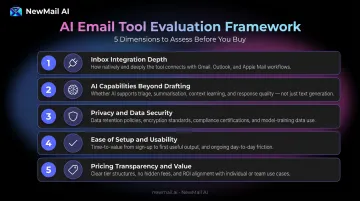
Tools were assessed on five dimensions:
- Inbox integration depth — native add-on vs. client replacement vs. background service
- AI capabilities beyond drafting — prioritization, voice learning, task extraction, meeting summaries
- Privacy and data security architecture — what data is stored, retention policies, compliance certifications
- Ease of setup and daily usability — how long to get running, how disruptive to existing workflow
- Pricing transparency and value — across individual users and teams of different sizes
The Privacy Mistake Most Buyers Make
Most buyers choose an email AI agent based on drafting quality or feature count — and overlook the data privacy policy entirely.
A 2025 enterprise AI security study found that 69% of organizations cite AI-powered data leaks as their top security concern, yet 47% have no AI-specific security controls in place. Your inbox holds sensitive client communications, financial discussions, and proprietary business information — which means Zero Data Retention and encryption standards aren't optional extras. They're prerequisites.
Questions every buyer should ask before committing:
- Does the tool store your email content, or process it ephemerally?
- Does it have formal ZDR agreements with its underlying AI providers?
- What compliance certifications does it hold — GDPR, SOC 2, Google Security Certification?
- What data access permissions does it request, and are those scoped appropriately?
Why Audience Diversity Matters in This Category
Once you know what to protect, you can focus on fit — and fit varies widely across this category.
Shortwave is excellent for Gmail-centric, research-heavy teams. Microsoft 365 shops will find Copilot the natural choice, given its deep native integration. Superhuman suits speed-driven individuals willing to switch email clients. SaneBox works as a passive triage layer for almost anyone. NewMail AI is the strongest fit for professionals and enterprise teams where data privacy is a hard requirement, not a preference.
Your email client, team size, and data governance requirements will determine the right answer. The sections below cover each tool in detail.
Conclusion
The right email AI agent comes down to three questions: How deeply does it integrate with your existing email client? How seriously does it treat your data? And does the AI actually learn your communication style, or does it generate generic text you'll need to rewrite anyway?
Match your tool to your primary pain point:
- Inbox chaos → prioritization-first tools (NewMail AI, SaneBox)
- Drafting speed → voice-learning agents (NewMail AI, Superhuman)
- Data security → privacy-first architecture (NewMail AI)
- Microsoft 365 integration → Copilot for Outlook
- Email history search → Shortwave
Whatever you shortlist, trial before committing — and read the data policy carefully. Specifically, look for whether the tool stores your email content, trains on it, or shares inference data with third parties. Those three questions will tell you more than any feature comparison chart.
If privacy is non-negotiable, NewMail AI is worth a close look. It's built on zero data retention — no email content stored on their servers — holds Google's highest-tier Workspace security certification, and is based in Switzerland under some of the strictest data laws in the world. Setup takes two minutes, and the 14-day free trial requires no credit card. Start at app.newmail.ai.
Frequently Asked Questions
What is the difference between an AI email agent and an AI email assistant?
An AI email assistant helps you speed up tasks you still initiate — opening a compose window triggers a draft, or you click to summarize a thread. An AI email agent works autonomously: it prioritizes your inbox, drafts in your voice, extracts tasks, and manages your workflow without requiring you to initiate each action.
Are AI email agents safe to use with sensitive business emails?
Safety varies significantly by tool. Look for Zero Data Retention policies, end-to-end encryption, GDPR compliance, and scoped OAuth permissions. NewMail AI processes emails ephemerally with no email storage by default and holds formal ZDR agreements with Anthropic and Mistral — setting a higher bar than most competitors.
Which AI email agents work with both Gmail and Outlook?
NewMail AI and SaneBox work natively across Gmail, Outlook, and Apple Mail. Shortwave requires a Gmail or Google Workspace account for sign-in and doesn't natively support Microsoft 365. Microsoft Copilot works within Outlook and Microsoft 365. Superhuman supports both Gmail and Outlook but replaces the native client entirely.
How much do AI email agents typically cost in 2026?
Pricing spans from free tiers and entry plans (SaneBox from $4.99/month, Shortwave's free tier) to professional plans in the $12–$30/user/month range, up to negotiated enterprise pricing. NewMail AI's Professional plan starts at $12/month, with a free 14-day trial at app.newmail.ai.
Can an AI email agent actually write in my personal voice?
The best agents learn from past sent emails and style preferences to match your tone, phrasing, and structure. NewMail AI's Nova learns your voice and business context in 60 seconds during onboarding, then generates drafts — including relevant FAQs and links — that sound like you, not a template.
What should enterprise teams look for in an email AI agent?
Prioritize Zero Data Retention agreements with AI providers, a formal DPA, GDPR compliance, admin controls, SSO, and a KPI dashboard for tracking adoption and ROI. NewMail AI's Enterprise plan covers all of these for teams of 20–200+, including dedicated onboarding and Swiss data law protection. Contact sales@newmail.ai for volume pricing.