Key Takeaways
- AI email agents are autonomous systems combining LLMs, memory, and tool integrations to read, classify, draft, and act on emails.
- Effective architecture is built on five core layers — input processing, LLM reasoning, memory management, tool integration, and output execution — each essential for real-world performance.
- Architecture patterns—reactive, deliberative, ReAct, multi-agent—directly determine an agent's capability in real-world workflows.
- Security and privacy must be designed into the architecture from day one — compliance cannot be bolted on after the fact.
- Inbox-native agents that process email ephemerally offer the best balance of capability and privacy.
What Is an AI Email Agent?
Microsoft research shows the average worker receives 117 emails daily, with most messages skimmed in under 60 seconds. AI email agents promise to change not just how fast you respond—but whether you need to respond at all.
Most people interact with AI email tools without understanding what's driving them. That distinction matters, because architecture determines everything: response quality, context retention, action scope, and data privacy.
This guide covers:
- What an AI email agent actually is
- The five core components that make one work
- Architecture patterns used in production
- How data flows through the system
- What security-conscious deployment looks like
From Automation to Agency
A rule-based email tool follows fixed logic: if an email contains "invoice," route it to accounts. Useful, but brittle.
True AI email agents use large language models to understand nuance, infer intent, and reason about context. They can:
- Read a three-week email thread and understand where the conversation stands
- Decide whether to draft a reply, escalate to a colleague, or extract an action item
- Adapt its response based on the sender's relationship history and the urgency of the request
The spectrum of "agentic-ness" runs from a simple draft suggester at one end to a fully autonomous agent that reads, classifies, replies, escalates, and follows up at the other. Most production systems—including NewMail AI's Nova—sit deliberately in between: autonomous on organizational and monitoring tasks, but approval-gated on anything sent externally.
What makes email uniquely challenging for AI agents:
- Asynchronous and multi-turn — conversations span days or weeks with long gaps
- Context-dense — prior commitments, attachments, and relationship history all matter
- Tone-sensitive — the same content requires different framing depending on recipient and urgency
- High stakes — a poorly timed or miscalibrated response has real business consequences
Core Components of AI Email Agent Architecture
Anthropic's agent guidance identifies the augmented LLM—enhanced with retrieval, tools, and memory—as the basic building block of any agentic system. For email agents specifically, this maps to five distinct layers.
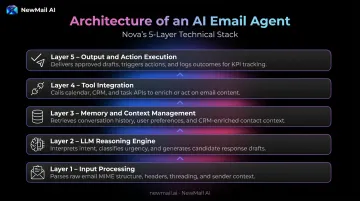
Layer 1: Input Processing
The agent ingests raw email in MIME format—headers, body text, thread relationships, attachment references—and normalizes it into structured data the LLM can reason about. This includes extracting sender metadata, identifying where a message sits within a thread, and flagging attachment types that may require different handling.
This stage is invisible to users but critical: garbage in, garbage out. An agent that misreads thread structure will produce drafts that contradict earlier exchanges.
Layer 2: LLM Reasoning Engine
This is the decision-making core. The language model receives a structured prompt containing the current email, a compressed thread summary, user preferences, and the set of allowed actions. It then decides: draft a reply, escalate, extract a task, flag as suspicious, or ask for clarification.
Prompt construction determines the quality of that reasoning. OpenAI's structured outputs achieved 100% schema-match reliability for routing labels and draft metadata in their evaluations, compared to under 40% with unstructured prompting. How you package state into the model matters as much as which model you use.
NewMail AI partners with multiple providers for this layer—Anthropic, Mistral, OpenAI, and Google Gemini—selecting the appropriate model based on task requirements and data handling constraints.
Layer 3: Memory and Context Management
Two types of memory keep an agent useful over time:
- Short-term (within-thread) — preserves conversation continuity across a multi-turn email chain, ensuring draft replies reflect the full arc of prior exchanges, not just the latest message
- Long-term — stores user preferences, communication style, recurring contacts, and past decisions so the agent improves with use
Losing context is one of the most common failure points in production email agents. Liu et al.'s "Lost in the Middle" research found that long-context models perform worst when relevant information sits in the middle of the input. Thread placement and summarization design matter as much as raw context window size.
Nova addresses this through structured thread summaries. Before generating any draft, it synthesizes what happened, what's being asked, and what needs to be addressed, rather than re-processing the entire raw thread.
Layer 4: Tool Integration
Tool integrations let the agent call external systems, moving it beyond text generation into real-world action:
- Calendar APIs for scheduling coordination
- CRM systems for contact and deal data
- Task managers for action item creation
- Knowledge bases for FAQ responses
- Anti-phishing services for threat assessment
Because these actions have real-world consequences, bounded permissions are essential at this layer.
Layer 5: Output and Action Execution
The agent delivers its decision: send a draft, flag for review, create a task, log a CRM update, or escalate. The critical design question at this layer is: what can the agent do autonomously versus what requires human approval?
Nova's answer is explicit. It acts autonomously on inbox organization, priority classification, follow-up scheduling (within pre-configured rules), and threat flagging. It requires human approval before any email is sent—no exceptions. This "approval-first" model is a structural constraint, not a setting users can accidentally turn off.
Key Architecture Patterns for AI Email Agents
Reactive Architecture
Reactive agents respond to immediate triggers using predefined rules and LLM generation. Detect an invoice → route to accounts. Detect "out of office" → draft an acknowledgment.
This is the most common pattern in entry-level AI email tools. It handles high-volume, predictable scenarios well. It struggles, however, when emails are ambiguous or require multiple steps — because it holds no internal model of conversation state beyond the current message.
Reactive architecture works best when:
- Emails follow consistent, recognizable patterns (invoices, booking confirmations, OOO replies)
- Routing rules are well-defined and rarely change
- Speed matters more than contextual nuance
Deliberative Architecture
Deliberative agents maintain an internal model of the conversation and broader goal, enabling multi-step planning. A customer complaint email, for instance, triggers a full sequence:
- Gather account data from connected systems
- Draft an empathetic, contextual response
- Schedule a follow-up call
- Log the interaction for audit or CRM sync
This pattern requires robust state management. It suits multi-stage workflows: customer support resolution, sales follow-up sequences, and intake processing in regulated industries.
ReAct and Reflective Patterns
The ReAct (Reason + Act) framework introduced by Yao et al. runs an iterative loop: observe the email → reason about what to do → take an action → observe the result → reason again. Their research found ReAct outperformed baseline methods by 34% on ALFWorld and 10% on WebShop using only one or two in-context examples.
A reflective layer adds a self-critique step: before sending, the model reviews its own draft against quality criteria. Both patterns improve output quality, but they add latency and cost. Production systems need to weigh thoroughness against response time.
Multi-Agent Architectures
High-volume or compliance-sensitive email workflows benefit from specialized agents working in sequence:
- Intake agent — classifies and routes incoming emails by intent and urgency
- Drafting agent — generates context-aware replies in the user's voice
- Compliance agent — checks content against policy before sending
- Escalation agent — flags exceptions for human review
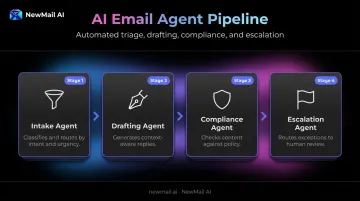
Anthropic's multi-agent research system outperformed a single-agent setup by 90.2% on their internal research evaluations—though it used approximately 15x more tokens. The trade-off is real: greater specialization and scalability come with orchestration complexity and cost.
NewMail AI's Enterprise tier takes a different approach: intent-based classification, personalized drafting, escalation documentation, and compliance controls are delivered within a single unified assistant rather than across separately orchestrated agents — reducing the token overhead and coordination complexity that pure multi-agent setups require.
Security, Privacy, and Data Governance
Security cannot be a feature bolted on after the fact. The architecture determines whether email content is stored, who can access it, how long it persists, and what happens when something goes wrong.
Email contains some of the most sensitive data an organization generates: financial correspondence, legal intake, customer PII, executive communications. OWASP identifies prompt injection as a top LLM application risk. Every inbound email is potential untrusted input that could attempt to manipulate agent behavior.
Architectural Security Principles
Production-grade AI email agents should be built around these controls:
- Analyze email content in memory and discard it after processing — never written to persistent storage
- Store user preferences and style profiles in encrypted form, not raw email content
- Secure Zero Data Retention (ZDR) agreements with underlying AI providers, guaranteeing inputs are discarded immediately and never used for model training
- Treat incoming email body and attachments as untrusted input, not executable instructions, to block prompt injection
- Define explicit permissions for what the agent can do autonomously versus what requires human approval
- Document lawful basis for processing under GDPR Article 6, processor agreements under Article 28, and storage limitation under Article 5
These principles apply across any AI email architecture. How they're implemented in practice varies significantly between vendors.
NewMail AI's Privacy-First Architecture in Practice
NewMail AI was built by founders from AI and cybersecurity backgrounds who embedded privacy into the architecture before any feature was written. Security is the structural foundation, not a layer added later.
Key architectural commitments:
| Control | Implementation |
|---|---|
| Email storage | Zero — emails are discarded from memory immediately after processing |
| AI provider agreements | ZDR with Anthropic and Mistral; DPA with OpenAI and Google Gemini |
| Model training | Your data is never used to train any AI model |
| Stored data | Encrypted context profile only (voice, style, priorities) — never raw email content |
| Jurisdiction | Switzerland — full GDPR compliance |
| Security certification | Google Security Certified at the highest tier |
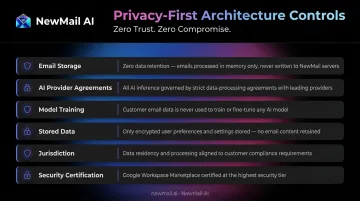
For Enterprise customers in regulated industries, ZDR mode routes all processing exclusively through providers like Anthropic and Mistral, ensuring fully in-memory processing with no logging at any stage.
Real-World Applications
Sales and Customer Success
An AI email agent shifts how sales teams handle communication—less time triaging, more time closing:
- Inbound classification — surfaces hot leads and urgent replies automatically, using intent signals rather than sender rules
- Thread-aware drafting — replies incorporate the full conversation arc, maintaining continuity across multi-touch deals
- Follow-up automation — sends polite reminders when prospects go quiet, based on timing rules the rep configures
- Escalation-ready handoffs — documents context cleanly so deal details survive the handoff to account executives or billing
Salesforce's 2024 data shows sales teams using AI are 1.3x more likely to see revenue increase, with reps reporting 70% of their time goes to non-selling tasks. AI email agents directly address that ratio.
Executive and High-Volume Professional Use
Executives face a different problem: not just volume, but the cognitive cost of context-switching between dozens of unrelated threads. Nova addresses this through:
- Priority classification with custom categories that surface what matters most
- Action item extraction with ownership and due date capture from thread content
- Instant meeting recaps structured around what happened, what was decided, and what's next
- Voice-matched drafting — learning communication style within approximately 60 seconds of initial setup, then improving with use
The voice learning capability works through an encrypted context profile that captures tone, phrasing, and business context (never raw emails). Every generated draft reflects the individual's style, not generic AI output.
Enterprise and Sensitive Industry Use Cases
Finance, legal, and healthcare organisations require more than capability—they require governance. The architecture patterns that support these deployments include:
- Explicit escalation logic with clean handoff documentation
- Bounded action spaces enforced through approval-first workflows
- SSO for centralised access control
- DPA governing all data processing relationships
- ZDR as a standard enterprise feature, not an add-on
NewMail AI's Enterprise tier (built for teams of 20–200+) pairs these controls with team-level context: a shared knowledge base, consistent brand voice, and KPI dashboards tracking adoption, response time, and ROI. It's built for deployments where compliance isn't optional and output still needs to be measurable.
Frequently Asked Questions
What is an AI email agent?
An AI email agent is an autonomous system that uses large language models and connected tools to read, understand, classify, draft, and act on emails. Unlike simple automation, it reasons about context and intent—handling nuanced, multi-step email scenarios without constant human instruction.
What are the main components of an AI email agent architecture?
Five core layers power a complete AI email agent: input processing, LLM reasoning, memory and context management, tool integration (calendars, CRMs, knowledge bases), and output/action execution with appropriate human oversight.
How does an AI email agent maintain context across a long email thread?
Through thread state objects and short-term memory that tracks conversation history. Well-designed agents summarize prior exchanges rather than re-processing the full raw thread, which keeps relevant context accessible without overwhelming the model's attention window.
What is the difference between rule-based email automation and an AI email agent?
Rule-based systems follow fixed if-then logic using keyword triggers and preset templates. AI email agents use LLMs to understand nuance, plan multi-step actions, and adapt responses based on full conversation history and inferred intent. This lets them handle situations that no fixed rule could anticipate.
How do AI email agents handle data privacy and security?
Privacy depends entirely on architectural choices: whether email content is stored, how long it's retained, and whether Zero Data Retention agreements exist with AI providers. Privacy-first agents like NewMail AI never store email content and process everything in-memory.
Can AI email agents work directly inside Gmail or Outlook?
Yes. Inbox-native agents integrate directly into existing email clients without requiring users to switch platforms or route email content to external dashboards. This model is both the most user-friendly deployment option and typically the most privacy-respecting, since it avoids storing email content in third-party systems.