AI Reply Drafts
Nova drafts accurate, context-aware Outlook replies in your own voice using the full thread history, your role, your priorities, and approved business knowledge.
NewMail AI brings personalized AI email replies directly into Outlook, Outlook.com, and Microsoft 365 workflows—without a new dashboard, download, or learning curve. Nova learns your voice, priorities, FAQs, products, and services, then drafts context-aware responses you review and approve, helping sales leaders, founders, executives, and client-facing teams respond faster while keeping sensitive email data private.
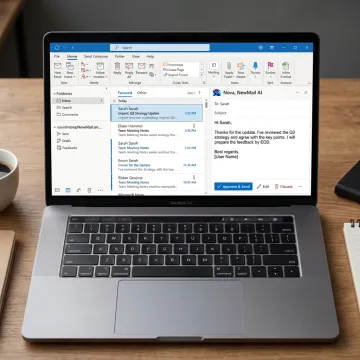
Personalized Outlook AI replies, inbox triage, follow-ups, tasks, scheduling, and privacy-first automation inside your existing email client.
Nova drafts accurate, context-aware Outlook replies in your own voice using the full thread history, your role, your priorities, and approved business knowledge.
Answer repetitive Outlook emails faster by letting Nova pull from your FAQs, links, documentation, product details, and approved messaging for personalized responses.
Surface stalled Outlook conversations and generate polite, context-aware follow-ups so prospects, customers, investors, and internal threads keep moving.
Prioritize Outlook messages by personalized relevance, urgency, key contacts, active projects, and required action instead of static inbox rules.
Extract action items, deadlines, commitments, and next steps from Outlook conversations so important work does not disappear inside long threads.
Coordinate meetings from email by checking availability, handling time zones, proposing meeting times, and keeping scheduling inside the Outlook workflow.

Connect Outlook or Outlook.com through secure OAuth in about 30 seconds. NewMail AI runs inside your existing inbox, so there is no new email app, dashboard, migration, or separate interface for your team to learn.
NewMail AI helps Outlook users move faster without sacrificing privacy, control, or personal tone.
Nova drafts Outlook replies in your voice using thread history, FAQs, and role-specific context.
Email content is not stored, with Zero Data Retention and strict AI provider agreements.
Works inside Outlook, Gmail, and Apple Mail without a new interface or workflow migration.
Start with a 2-week free trial, no credit card, no download, and setup in minutes.
Built by AI and cyber security specialists.
NewMail AI was built by founders from AI and cyber security labs who understood that real trust starts with architecture, not marketing language. From day one, the company designed Nova to process email context ephemerally, avoid storing email content, and preserve user control over every outbound message. Founder and leadership voice Yohann Abittan has discussed AI-powered executive assistants and productivity on The CTO Show, reflecting NewMail AI’s focus on practical, secure AI for busy professionals. Headquartered in Switzerland, the company aligns its privacy-first approach with strict data protection expectations while serving global Outlook, Gmail, and Apple Mail users.
Yes. NewMail AI’s Nova works inside Microsoft Outlook and Outlook.com to draft email replies in your voice. It reads the full thread context, applies your role, priorities, FAQs, products, and services, then prepares a response for you to review. The workflow is approval-first, so no AI-generated message is sent without your control.
Get clear answers about Outlook setup, security, plans, and team rollout.

Confirms strong privacy and data protection practices.
Highest-tier Google Workspace security certification achieved.
AI provider agreements prevent retention of customer data.
Tell us about your Outlook workflow, team size, and security needs. We’ll help you choose the right trial, Professional plan, or Enterprise rollout path.
You can also send us a quick email at dpo@newmail.ai.
You can also send us a quick email at dpo@newmail.ai.