Follow-Up Automation
Nova detects stalled conversations and drafts polite, context-aware reminders so deals, renewals, hiring threads, and client projects keep moving without manual inbox tracking.
Turn stalled conversations into timely, professional replies with NewMail AI. Nova learns your voice, understands each client thread, and drafts polite follow-up emails directly inside Gmail, Outlook, and Apple Mail. Keep deals, renewals, projects, and relationships moving without manually tracking every unanswered message or switching to another tool.
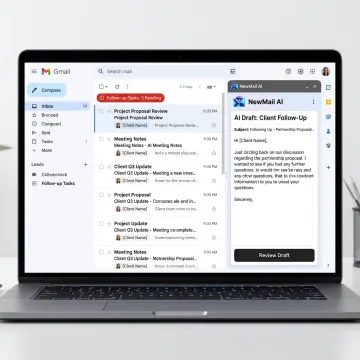
Everything you need to write, track, and send better client follow-up emails from your existing inbox.
Nova detects stalled conversations and drafts polite, context-aware reminders so deals, renewals, hiring threads, and client projects keep moving without manual inbox tracking.
Generate client follow-up replies that sound like you, using the full email thread, your role, FAQs, and approved knowledge instead of generic templates.
Keep active opportunities visible by prioritizing deal-relevant threads, prospect questions, customer requests, and pipeline conversations over low-value inbox noise.
Support account managers and customer success teams with timely nudges, renewal reminders, and relationship-driven replies across high-volume client portfolios.
Extract commitments, deadlines, and next steps from email conversations so promised follow-ups become visible tasks instead of forgotten thread details.
Coordinate meetings directly from email, propose times across calendars and time zones, and follow up when scheduling conversations go quiet.
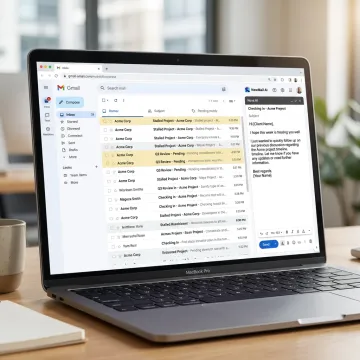
Connect Gmail, Outlook, or Apple Mail through secure OAuth in about 30 seconds. NewMail AI works inside your current inbox, so there is no separate interface, migration, dashboard, or new email workflow to manage.
NewMail AI helps client-facing professionals follow up faster while keeping control of every message.
Nova drafts follow-ups in your voice using thread context, FAQs, and approved knowledge.
Works directly inside Gmail, Outlook, and Apple Mail without dashboards or workflow disruption.
No email storage, GDPR compliance, encrypted settings, and Zero Data Retention agreements.
Connect your inbox, train Nova, and receive initial sorting and drafts in minutes.
Built by AI and cyber security experts.
NewMail AI was built by founders from AI and cyber security labs who saw a clear gap: professionals needed an email assistant smart enough to understand client context, but secure enough for sensitive business communication. From its base in Switzerland, NewMail AI was designed around privacy-first principles, strict data handling, and user control. The company evolved from a secure email productivity tool into a broader AI assistant platform for sales, customer success, executives, and teams of 20–200+. Its vision is practical: reduce inbox chaos, protect client data, and help professionals communicate faster without losing their personal voice.
A strong client follow-up email is brief, specific, and easy to respond to. Reference the previous conversation, restate the next step or question, and use a professional tone that fits the relationship. NewMail AI helps by reading the full thread, drafting in your voice, and suggesting a context-aware message you can review before sending.
Get answers about setup, privacy, pricing, or team rollout.

Built for privacy-conscious teams and professionals.
Highest Google Workspace data security certification.
AI providers process data without retention.
Start a free trial or contact the team to see how Nova can improve client follow-up workflows inside your existing inbox.
You can also send us a quick email at dpo@newmail.ai.
You can also send us a quick email at dpo@newmail.ai.