Outlook AI Assistant
Nova runs inside Microsoft Outlook and Outlook.com, bringing AI drafting, prioritization, task extraction, daily briefings, and scheduling into the inbox your team already uses.
Turn Outlook into a revenue-ready, support-friendly inbox with NewMail AI. Nova works inside your existing Outlook interface to prioritize important conversations, draft replies in your voice, extract tasks, schedule meetings, and surface follow-ups. Designed for sales and support teams, it helps you respond faster without switching tools, storing email content, or sacrificing control.
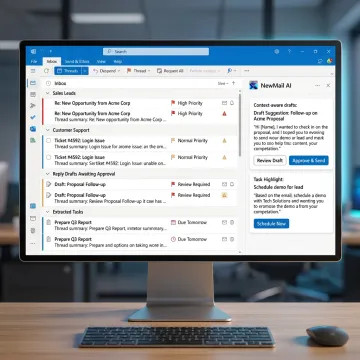
AI-powered Outlook workflows for sales, support, and client-facing teams that need faster, safer email execution.
Nova runs inside Microsoft Outlook and Outlook.com, bringing AI drafting, prioritization, task extraction, daily briefings, and scheduling into the inbox your team already uses.
Help reps qualify, convert, and close by surfacing deal-relevant threads, drafting personalized replies, scheduling meetings, and following up on stalled opportunities.
Support reps can answer customer questions faster with contextual drafts, FAQ-backed responses, urgent thread prioritization, and extracted commitments from customer conversations.
Generate high-quality replies in each user’s own voice, using full thread context, role-specific priorities, FAQs, links, and approval-first review before sending.
Rank Outlook email by personalized relevance, urgency, key contacts, active projects, and custom categories so important messages rise above routine inbox noise.
Nova identifies stalled threads, extracts action items, tracks commitments, and helps schedule meetings directly from email so nothing important falls through the cracks.

Connect Outlook through secure OAuth without downloading a new app or changing your inbox. NewMail AI starts from your existing Outlook workflow, so sales and support users can keep the interface they already know.
NewMail AI combines Outlook-native productivity with serious privacy and team controls.
Nova works inside Outlook, so teams avoid migrations, dashboards, and disruptive workflow changes.
No email storage, Zero Data Retention, encrypted settings, and GDPR-conscious architecture protect sensitive communication.
Nova learns each user’s voice, role, priorities, FAQs, and customer context in minutes.
Enterprise teams get SSO, DPA support, KPI dashboards, onboarding, and dedicated account management.
Built by AI and cyber security specialists.
NewMail AI was built by founders from AI and cyber security labs who believed email AI should earn trust through architecture, not slogans. From day one, the company designed its platform around privacy-first principles: ephemeral processing, no default email storage, encrypted preferences, and Zero Data Retention agreements with leading AI providers. Based in Switzerland, NewMail AI brings a strong privacy and data-protection mindset to modern productivity software. Its vision is to help sales, support, executive, and customer-facing teams move from inbox chaos to clarity in minutes while keeping humans in control of every outbound message.
An email management tool in Outlook helps organize, prioritize, draft, and track email so important conversations do not get buried. NewMail AI adds a personalized assistant named Nova inside Outlook, giving sales and support teams AI drafts, priority sorting, follow-up reminders, task extraction, scheduling, and daily briefings without forcing users into a separate dashboard or email client.
Get clear answers about Outlook setup, security, and team rollout.

Supports regulated, privacy-sensitive email workflows.
Validated through Google Workspace security review.
AI providers process data without retaining it.
Tell us about your Outlook workflow, team size, and security requirements. We’ll help you choose the right plan, trial path, or Enterprise rollout.
You can also send us a quick email at dpo@newmail.ai.
You can also send us a quick email at dpo@newmail.ai.