Introduction
Sales reps are supposed to sell. But according to the Microsoft Work Trend Index, the heaviest email users spend 8.8 hours per week on email alone — before accounting for meetings and chat. For sales teams managing high-volume inboxes, that translates directly to lost pipeline.
The problem compounds fast: missed follow-ups cost deals, slow response times hand opportunities to competitors — and an inbox that never quiets makes it nearly impossible to maintain a consistent, trustworthy tone with prospects. Chili Piper found that 78% of prospects buy from the first vendor to respond to a demo request — yet the average B2B response time is nearly five hours.
Speed and prioritization are two sides of the same problem. The right AI email assistant addresses both: it triages the inbox, surfaces what needs action, drafts replies in the rep's voice, and absorbs the cognitive load of managing hundreds of threads — freeing up hours each week for actual selling.
This guide reviews the best AI email assistants built specifically for sales teams in 2026, covering key features, verified pricing, security posture, and how to choose the right tool for your team.
Key Takeaways
- The best AI email assistants for sales teams prioritize inboxes, reply in each rep's voice, extract tasks, and keep sensitive prospect data protected
- Native integration inside Gmail, Outlook, or Apple Mail drives adoption; standalone apps usually don't
- Verify GDPR compliance, zero data retention policies, and security certifications before deploying any tool team-wide
- Top picks for 2026: NewMail AI, Lavender.ai, Superhuman, MailMaestro, and SaneBox — each reviewed in detail below
- Pilot any tool with a small group before rolling out team-wide
What Is an AI Email Assistant for Sales Teams?
An AI email assistant for sales is a tool that uses natural language processing and machine learning to draft, organize, prioritize, and respond to emails — mirroring the rep's voice and sales context. Unlike generic AI writing tools, it understands your deals, your prospects, and your conversation history.
Two Categories Worth Separating
The most common evaluation mistake is conflating outbound sales sequencers with inbox-native AI assistants — they solve different problems.
| Tool Type | What It Does |
|---|---|
| Outbound sequencers (Apollo, Salesloft, Outreach) | Automate cold email sequences to new prospects at volume |
| Inbox AI assistants (NewMail AI, SaneBox, Superhuman) | Manage the full inbox — replies, prioritization, follow-ups, and drafting for active conversations |
Sales teams typically need both, but they serve different functions. This guide focuses exclusively on inbox AI assistants — tools that manage what happens after the sequence fires.
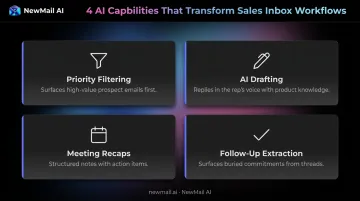
What Modern Inbox AI Does for Sales Teams
- Surfaces high-value prospect emails first, filtering out low-priority noise automatically
- Drafts replies that reflect the rep's voice and product knowledge, including FAQ context
- Generates structured meeting recap notes with action items after calls
- Extracts follow-ups and commitments buried in threads, so nothing slips through
Best AI Email Assistants for Sales Teams in 2026
Tools were evaluated on inbox-native experience, sales-relevant features, security posture, ease of use, and value for teams of 20–200+.
NewMail AI
NewMail AI is a privacy-first AI email assistant built by founders from AI and cybersecurity backgrounds, designed for sales teams and executives managing sensitive communications inside Gmail, Outlook, and Apple Mail. Its core architecture processes email data ephemerally — nothing is stored by default on NewMail's servers.
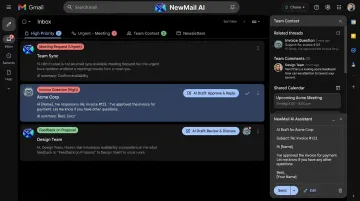
What sets it apart for sales teams: Nova (the AI agent) learns each rep's writing voice, role, and business context during a setup that takes under three minutes. From that point, it drafts replies in the rep's exact tone — including FAQs and relevant links — without sounding generic.
The priority inbox uses intent-based logic to surface hot prospect threads, not just by sender, but by what needs to happen next.
For enterprise sales teams, the platform goes further: a shared team context layer means reps benefit from consistent organizational knowledge while preserving their individual voice. The Enterprise plan includes a KPI dashboard tracking adoption, response times, and ROI — giving sales managers visibility without adding another reporting tool.
Security is built into the architecture from the ground up. NewMail holds Zero Data Retention agreements with Anthropic and Mistral, meaning those AI providers discard all email inputs immediately after processing — no logging, no model training. The platform also carries Google Workspace's highest-tier security certification, and is based in Switzerland under GDPR jurisdiction.
| Attribute | Details |
|---|---|
| Key Features | Priority inbox with intent-based categories, AI drafts in your voice (including FAQs), task extraction, meeting recaps, zero email storage, Gmail/Outlook/Apple Mail support, team context for enterprise |
| Best For | Sales teams and executives in sensitive industries who need fast, personalized email responses without compromising prospect or client data privacy |
| Pricing | Free 14-day trial (no credit card, no download); Professional at $12/month or ~$9.60/month billed annually; Enterprise custom pricing for teams of 20–200+ — contact sales@newmail.ai |
Lavender.ai
If your outbound reply rates need work, Lavender.ai is worth a close look. Built specifically for SDRs and sales reps, its primary function is real-time coaching: it scores each email before you send it, then surfaces specific suggestions on what to fix and how to improve.
The platform pulls prospect data from LinkedIn feeds, job postings, and podcast appearances to recommend prospect-specific opening lines. It also analyzes recipient personality and adjusts tone suggestions accordingly. Lavender integrates with HubSpot, Gong, and other sales tools, making it particularly useful for outbound-heavy teams who want to improve cold email quality without replacing their existing workflow.
According to G2, Lavender holds a 4.8/5 rating across 63 reviews, with users citing improved reply rates and more outbound meetings booked.
| Attribute | Details |
|---|---|
| Key Features | Real-time email scoring, personalization suggestions, LinkedIn and CRM integration (HubSpot, Gong), tone and recipient personality analysis |
| Best For | SDRs and outbound-focused reps who want AI coaching to improve cold email quality and reply rates |
| Pricing | Free plan available; paid plans — verify current pricing at lavender.ai (official pricing page was unavailable for verification at time of writing) |
Superhuman
Superhuman is a speed-first email client built around a 100ms interaction rule: every action — archiving, replying, triaging — feels nearly instant. It's keyboard-driven by design, and that approach makes working through a large inbox noticeably faster.
For sales, the Split Inbox automatically separates prospect emails from newsletters and internal threads. Read-status tracking shows when a prospect has opened your email. AI-powered snippets let reps respond to common scenarios in seconds. Superhuman claims users save 4 hours per week and process email twice as fast — those figures are vendor-reported, though G2's 4.7/5 across 1,256 reviews suggests the experience holds up.
It's best suited for solo executives or founders handling high daily email volume who prioritize raw speed over team-level features.
| Attribute | Details |
|---|---|
| Key Features | Split inbox triage, AI email drafts, keyboard shortcuts, read-status tracking, snippet templates |
| Best For | Solo sales executives and founders managing high email volume who need maximum inbox speed with AI-assisted drafting |
| Pricing | Pro at $12/member/month (annual) or $30/month; Business at $33/member/month (annual) or $40/month; Free and Enterprise plans also available |
MailMaestro
MailMaestro is an AI email assistant built natively for both Gmail and Outlook, with a strong emphasis on enterprise security and consistent brand voice. It generates up to three draft variations from a single prompt — useful when tone needs to vary by recipient type, like a prospect versus a procurement contact.
Smart labels and thread summaries help sales managers and AEs cut through long email chains quickly. On security, Maestro Labs has achieved SOC 2 Type II, GDPR, HIPAA compliance, Google Verified, and Microsoft Attested status — one of the more complete compliance portfolios in this category. The company states that customer data is never used to train AI models, and zero-day data retention is available for enterprise customers.
Note: MailMaestro acquired the Flowrite email writing platform and has integrated it into the product — it isn't a direct rebrand.
| Attribute | Details |
|---|---|
| Key Features | Multi-draft generation, tone and length control, thread summarization, smart labels, enterprise security (SOC 2, GDPR, HIPAA), Gmail and Outlook support |
| Best For | Sales managers and AEs at enterprise organizations on Microsoft 365 or Google Workspace who need secure, on-brand AI-assisted drafting |
| Pricing | Free plan available; Professional at $15/seat/month or $12/seat/month annually; Maestro Duo at $27/month or $25/month annually; Enterprise pricing on request |
SaneBox
SaneBox does one thing and does it well: it keeps your inbox from burying the emails that matter. A dedicated AI inbox organizer, it works across Gmail, Outlook, Apple Mail, Fastmail, and most IMAP-compatible clients — filtering and prioritizing silently in the background with no new interface to learn.
For sales reps drowning in email noise, SaneLater moves low-priority messages (newsletters, CCs, marketing) out of the primary inbox automatically. SaneReminders surface prospect threads that need follow-up. SaneBlackHole permanently blocks unwanted senders in one click. The Daily Digest summarizes what got filtered so nothing important slips through.
It won't draft emails for you, but if inbox noise is the primary problem, SaneBox solves it with minimal setup and no disruption.
| Attribute | Details |
|---|---|
| Key Features | AI inbox filtering, SaneLater folder, SaneBlackHole sender blocking, follow-up reminders, Daily Digest summaries, works with any email client |
| Best For | Sales reps and account managers overwhelmed by email volume who need passive inbox organization without switching tools |
| Pricing | Snack plan from $4.99/month (billed bi-yearly); Lunch at $7.99/month; Dinner at $24.99/month; 14-day free trial available |
Key Features Sales Teams Should Look For
Inbox-Native Experience
Tools that live inside Gmail, Outlook, or Apple Mail eliminate the switching cost that kills adoption. Standalone apps requiring data migration or a separate tab rarely survive a team rollout at scale.
Inbox-native tools work where reps already are. That's why they get used consistently — and standalone alternatives don't.
Voice and Tone Personalization
AI replies that sound generic damage rep credibility — especially with prospects who've already built a relationship. The best tools learn each rep's style so drafted replies feel authored, not templated.
Look for tools that personalize across:
- Writing style — tone, sentence length, vocabulary the rep actually uses
- Product knowledge — accurate references to features, pricing, and positioning
- Customer personas — language calibrated for the contact's role and industry
This matters most for follow-ups and nurture emails, where prospects notice immediately when something feels off.
Data Privacy and Security
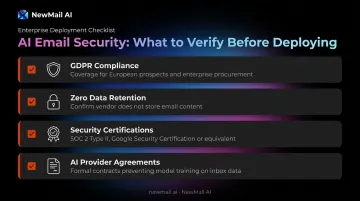
Personalization means the AI is reading real conversations — which makes the security architecture of your chosen tool critical. Sales teams handle confidential prospect and client data daily. Before rolling out an AI email tool, verify:
- GDPR compliance — especially for European prospects or enterprise procurement
- Zero data retention policies — does the vendor store your email content?
- Certifications — SOC 2 Type II, Google Security Certification, or equivalent
- AI provider agreements — does the vendor have formal contracts preventing AI partners (Anthropic, OpenAI, Mistral) from training on your inbox data?
IBM's 2024 AI adoption research found that 57% of organizations cite data privacy as a primary inhibitor to deploying generative AI. For sales teams in regulated industries, this isn't a secondary concern — it's the first question to answer.
How We Chose These AI Email Assistants
Evaluation criteria:
- Inbox-native integration — not standalone apps requiring separate logins or data export
- Sales-relevant features — priority sorting, voice personalization, follow-up assistance, meeting recaps, task extraction
- Security posture — GDPR compliance, certifications, data retention policies, and vendor agreements with AI providers
- Setup time — tools that take days to configure rarely get adopted across teams of 20+
- Pricing transparency — free trial availability and scalable pricing for growing sales teams
One more thing these criteria can't catch on their own: whether you're buying the right category of tool. The most common mistake sales teams make is choosing a cold outreach platform when they need an inbox management assistant. An outreach sequencer sends high-volume cold email to new prospects. An inbox AI assistant manages what comes back — replies, follow-ups, ongoing client communication. Both have a place, but they solve different problems. Make sure you know which one you're missing before you buy.
Conclusion
The best AI email assistant for a sales team is the one that fits into existing workflows, learns each rep's voice, and reduces inbox burden without adding new processes. A recognizable brand name doesn't guarantee the right fit. What actually matters is security posture, inbox-native integration, and whether reps actually use it.
Before rolling out team-wide, pilot with five to ten reps. Measure reply time, inbox clarity, and adoption rate over two weeks. What works for a solo founder may not work for a 50-person sales team that needs compliance documentation and shared team context.
If compliance and data privacy are non-negotiable, NewMail AI is built for exactly that environment. It offers zero data retention, Google's highest-tier security certification, and a two-minute setup. Start a free 14-day trial with no credit card and no download required.
Frequently Asked Questions
What is the best AI email assistant for sales teams?
The best choice depends on team needs. NewMail AI suits privacy-conscious teams needing full inbox management; Lavender.ai is built for SDRs focused on outbound quality; Superhuman fits high-volume executives; SaneBox is best for passive inbox filtering. All sales teams should prioritize tools that work inside their existing email client rather than requiring a separate interface.
How does an AI email assistant improve sales team productivity?
AI email assistants reduce time on repetitive drafting, auto-prioritize high-value prospect emails, extract action items from threads, and help reps respond faster. Microsoft's Copilot research found that 64% of users spent less time processing email, and writing and summarizing tasks were completed 29% faster with AI assistance.
Are AI email assistants safe to use with confidential sales data?
Safety depends entirely on the vendor's architecture. Before deploying, verify: GDPR compliance, zero data retention policies, SOC 2 or Google Security certifications, and formal agreements preventing AI providers from training on your inbox data. Never assume — always request documentation.
Can AI email assistants integrate with CRMs like Salesforce or HubSpot?
Integration depth varies significantly. Lavender.ai and MailMaestro offer direct CRM connections; inbox-management tools like NewMail AI and SaneBox operate at the email client level without native CRM integrations — though they complement CRM workflows by handling email context that lives outside the CRM itself. Confirm your integration requirements before selecting a tool, particularly if CRM logging is a workflow dependency.
What's the difference between an AI email assistant and an AI sales outreach tool?
Outreach tools (Apollo, Salesloft) automate cold email sequences to new prospects at volume. Inbox AI assistants manage the full inbox experience — replies, prioritization, follow-ups, and drafting for active conversations. Most sales teams need both, but they serve fundamentally different functions at different stages of the pipeline.
How long does it take to set up an AI email assistant for a sales team?
Lightweight tools like NewMail AI take around two minutes per user; SaneBox is similarly fast. Enterprise platforms requiring CRM integration, team context configuration, and voice training may take several days with IT involvement. For teams of 20 or more, fast onboarding with minimal IT dependency is a meaningful evaluation criterion — slow rollouts cut adoption before reps experience any value.