AI email assistants have evolved well past simple drafting plugins. Today's tools can prioritize your inbox, summarize threads, write in your voice, extract tasks, and surface follow-ups — all without switching apps. But not all tools are built the same, and choosing the wrong one based on brand recognition alone can leave you with a productivity tool that retains your most sensitive communications.
This guide covers six top-rated AI email assistants, evaluated across features, privacy, pricing, and best-fit use cases — so you can match the right tool to your actual workflow.
Key Takeaways
- The average professional receives 117 emails daily — AI assistants reduce inbox management from hours to minutes
- Over one-third of sensitive business information entered into AI apps is regulated personal data — privacy architecture matters
- The best tool depends on your primary need: speed, organization, drafting, privacy, or ecosystem fit
- Native platform fit (Gmail vs. Outlook vs. Apple Mail) matters as much as AI feature depth
- Few AI email tools are built around zero data retention from the ground up — most treat privacy as an add-on
What Is an AI Email Assistant?
An AI email assistant is a software layer that uses Natural Language Processing (NLP) and machine learning to handle the thinking work of email management. Unlike basic filters or rules, it reads context, intent, and sentiment — so you can act on what matters without reading every message in full.
The Three Main Categories
| Category | What It Does | Examples |
|---|---|---|
| Suite-native assistants | Embedded inside your existing platform (Gmail/Outlook) | Microsoft Copilot, Google Gemini |
| Standalone email clients | Replace your email interface entirely | Superhuman, Shortwave |
| Inbox-native assistants | Work inside your existing client without replacing it | NewMail AI, SaneBox |
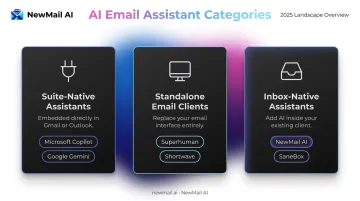
Each serves a different need. Standalone clients give you the most control but require switching apps entirely. Suite-native tools integrate without setup friction, though customization is limited. Inbox-native assistants add AI capabilities on top of your existing client without changing how you work.
Why Privacy Deserves More Attention
Most AI email tools send inbox content to third-party servers for processing. Netskope found that more than one-third of sensitive business information entered into AI apps is regulated personal data — and three-quarters of surveyed businesses block at least one AI app as a result.
When evaluating tools, look for:
- Zero data retention policies — email content is never stored after processing
- GDPR compliance with independently reviewed practices
- No model training on your email data
- SOC 2 or equivalent security certifications
Top-Rated AI Email Assistants
Tools below were selected based on real-world inbox utility, AI feature depth, integration flexibility, data security standards, and value for professionals managing high email volumes.
NewMail AI
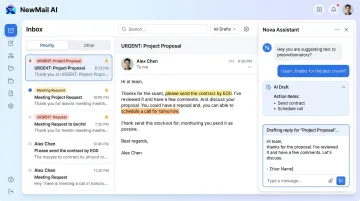
NewMail AI is a Swiss-made, privacy-first AI email assistant built by founders from AI and cybersecurity backgrounds. It works natively inside Gmail, Outlook, and Apple Mail — without storing email content by default and without requiring you to switch apps.
What sets it apart structurally is that privacy isn't a feature layered on top. The architecture was built around ephemeral data processing from day one: emails are processed in-memory and discarded immediately after analysis. NewMail holds Zero Data Retention agreements with AI providers including Anthropic and Mistral, carries Google's highest-tier Workspace security certification, and is GDPR compliant.
The assistant (Nova) learns your writing voice in roughly 60 seconds by analyzing your sent email history — tone, structure, vocabulary, and business context. From there it generates drafts that sound like you, not like a generic AI.
| Feature Area | Details |
|---|---|
| Key Features | Priority inbox with custom categories, AI drafts in your voice, task extraction with to-do linking, intelligent follow-up automation, instant meeting recaps with action items |
| Pricing | 14-day free trial (no credit card, full feature access); Professional plan available; Enterprise volume pricing for teams of 20–200+ — contact sales@newmail.ai |
| Best For | Executives, sales and customer success teams, professionals in regulated industries requiring zero data retention |
Superhuman
Superhuman is a premium, keyboard-driven email client engineered around a single priority: speed. Its "100ms rule" means every action responds in under 100 milliseconds — closer to a native desktop app than a web client.
Its AI triage splits your inbox so the most important messages surface first. From there, you can summarize threads, generate replies, and search historical conversations — all without leaving the keyboard. It works with Gmail and Outlook. Grammarly announced its acquisition of Superhuman in June 2025, which is expected to expand its writing capabilities. That said, Superhuman is built for individual inbox speed — team collaboration and outreach automation sit outside its scope.
| Feature Area | Details |
|---|---|
| Key Features | Split inbox with AI triage, AI reply generation, thread summarization, AI-powered search, keyboard-shortcut UX |
| Pricing | Free ($0); Pro at $12/user/month (billed annually) or $30/month; Business at $33/user/month (annually) or $40/month; Enterprise custom |
| Best For | Solo executives, founders, and high-volume individual users who prioritize inbox speed above everything else |
Shortwave
Shortwave is a Gmail-focused email client founded by ex-Google engineers that reimagines the inbox with a chat-like interface. Its strongest differentiator is AI-powered semantic search — you can find emails by concept rather than keyword, which makes it genuinely useful for anyone who struggles to retrieve older threads.
Its Ghostwriter feature learns your writing style from your sent folder to generate drafts that match your tone and structure. The AI can also extract tasks from threads, schedule calendar events in natural language, and group related emails into bundles.
Shortwave is built on Gmail. Microsoft 365 and Exchange are not natively supported, though mail forwarding works for non-Gmail accounts.
| Feature Area | Details |
|---|---|
| Key Features | AI-powered semantic inbox search, smart thread summaries, Ghostwriter style-mimicry drafting, calendar scheduling in natural language, email bundles |
| Pricing | Free plan available; Business at $24/seat/month (annually); Premier at $36/seat/month; Max at $100/seat/month; Enterprise via sales |
| Best For | Gmail users who want AI-powered organization, semantic search, and style-aware drafting |
Microsoft Copilot for Outlook
Microsoft Copilot is the native AI assistant embedded directly into Outlook and Microsoft 365. Its key advantage is cross-app context — it connects across Word, Excel, and Teams, so email summaries and drafts can reference documents and meeting transcripts from across your Microsoft environment.
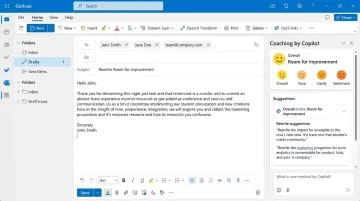
Its standout feature for email quality is Coaching by Copilot: before you send a draft, it analyzes your message for tone, clarity, and reader sentiment, then suggests specific improvements. Thread summaries include numbered references that jump to specific messages in long chains, and the add-on license runs $30/user/month on top of a qualifying Microsoft 365 plan.
| Feature Area | Details |
|---|---|
| Key Features | AI email drafting with tone control, thread summarization with in-line reference numbers, Coaching by Copilot, cross-app AI across Word, Excel, and Teams |
| Pricing | $30/user/month (annual commitment) on top of a qualifying Microsoft 365 plan |
| Best For | Corporate users and enterprise teams fully embedded in the Microsoft 365 ecosystem |
Google Gemini for Gmail
Google Gemini is integrated directly into Gmail and Google Workspace, giving it a contextual advantage no third-party tool can fully replicate: it can pull from your Calendar, Drive files, and email history simultaneously when generating a response.
Practical daily use includes morning catch-up summaries across unread threads, natural-language draft generation, and AI search that surfaces conversations by topic. Gmail conversations are not saved to Gemini Apps Activity. Gemini's AI features require a Google Workspace or Google One AI Premium subscription — they're not available on free Gmail accounts.
| Feature Area | Details |
|---|---|
| Key Features | Thread and inbox summarization, AI draft generation and tone refinement, natural-language email search, cross-Workspace context (Calendar, Drive) |
| Pricing | Workspace Business Standard from $12/user/month (annually); Business Plus at $18/user/month; Enterprise contact sales. Verify current Google One AI Premium pricing at one.google.com |
| Best For | Google Workspace users wanting native, no-setup-required AI inside Gmail |
SaneBox
SaneBox is not a drafting tool or a thread summarizer — it does one thing and does it well: it keeps your inbox clean. It works with any email client, including Gmail, Outlook, Apple Mail, Yahoo Mail, Fastmail, and any IMAP provider, without requiring you to switch apps.
SaneBox analyzes your email history and behavior to automatically move low-priority messages (newsletters, CCs, automated updates) into a SaneLater folder. The SaneBlackHole feature permanently blocks unwanted senders after a single drag — emails are held for 7 days, then trashed. After initial setup, it requires no ongoing management.
| Feature Area | Details |
|---|---|
| Key Features | AI-based inbox sorting and prioritization, SaneLater folder for low-priority emails, SaneBlackHole for permanent sender blocking, snooze and follow-up reminders |
| Pricing | Snack plan from $4.99/month (billed bi-yearly); Lunch at $7.99/month (billed bi-yearly); verify full tier pricing at sanebox.com/pricing |
| Best For | Individuals drowning in newsletters, notifications, and CC clutter who need hands-off inbox cleanup |
How We Chose These Tools
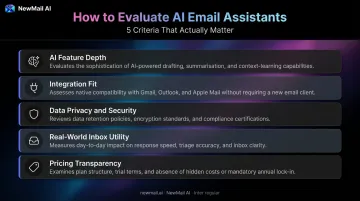
Every tool on this list was assessed across five criteria:
- AI feature depth — does it go beyond text generation to prioritize, summarize, learn your style, and extract tasks?
- Integration fit — does it work natively with Gmail, Outlook, and Apple Mail without disrupting existing workflows?
- Data privacy and security — retention policies, encryption, GDPR compliance, and whether your data trains third-party models
- Real-world inbox utility — does it solve actual professional pain points, or just demo well?
- Pricing transparency — is value clear relative to features, with no hidden licensing requirements?
Common Mistakes When Choosing an AI Email Assistant
- Choosing by brand name without checking where email data is sent and stored
- Picking a writing plugin when you actually need inbox management and prioritization
- Ignoring platform compatibility — a tool that doesn't work natively with your email client adds friction, not removes it
- Overlooking voice personalization — generic AI drafts that don't sound like you create more editing work, not less
No single tool wins across all categories. The right choice depends on your primary pain point — speed, privacy, organization, drafting, or ecosystem fit — and the email platform you're already using. The tools below are organized to help you match each option to your specific situation.
Frequently Asked Questions
Which AI model is best for email?
The answer depends on the use case. Tools like Superhuman use OpenAI's API for drafting and summarization; Shortwave names GPT-4o and Claude-family models in its official materials. Privacy-first tools like NewMail AI use models operating under Zero Data Retention agreements — meaning email content is never stored or used for model training, regardless of which provider processes the inference.
Can AI email assistants send emails automatically on my behalf?
Outreach-focused platforms can automate sending sequences, but personal inbox assistants like Superhuman, Shortwave, and NewMail AI draft and suggest replies while keeping you in control of what actually gets sent. This keeps accuracy and accountability intact — particularly important for professional and client-facing communication.
Are AI email assistants safe to use with confidential emails?
Safety depends entirely on the vendor's data practices. Look for zero-retention policies (email content is never stored after processing), GDPR compliance, and security certifications like SOC 2 or Google's highest-tier Workspace security certification. Tools without these protections may send email content to third-party servers and use it for model training.
Can AI email assistants work across Gmail, Outlook, and Apple Mail?
Compatibility varies significantly. NewMail AI works natively with Gmail, Outlook, and Apple Mail. Superhuman and SaneBox support Gmail and Outlook. Shortwave is built on Gmail (with forwarding options for other providers). Microsoft Copilot requires a Microsoft 365 license. Verify platform compatibility before committing to any tool.
How does an AI email assistant learn your writing style?
Most tools analyze your sent email history to identify patterns in tone, sentence structure, vocabulary, and typical phrasing. Shortwave's Ghostwriter and NewMail AI both use this approach to generate drafts that sound like you rather than generic AI output. NewMail AI completes this personalization in approximately 60 seconds during onboarding — with the structured context stored encrypted, never as raw email content.
AI email assistants in 2026 fall into clear categories: writing assistants, inbox organizers, native platform assistants, and privacy-first tools. The right fit depends on your workflow — not which brand has the most marketing spend.
Data privacy isn't optional. A fast tool that retains your emails is a liability for anyone handling sensitive client communications or working in a regulated industry.
For professionals who want an AI email assistant that works in their voice, integrates natively with Gmail, Outlook, or Apple Mail, and processes all data with zero retention — NewMail AI offers a 14-day free trial with no credit card required and setup in under two minutes.