AI agents for email replies go beyond simple drafting tools. They read full thread context, learn your writing voice, and in some configurations handle replies with minimal oversight — transforming inbox management from reactive to proactive.
This guide reviews the strongest AI agents for email replies in 2026, covering key features, pricing, privacy standards, and which use cases each tool actually suits.
TL;DR
- AI email agents draft, personalize, and sometimes send replies autonomously. Unlike basic AI writing helpers, they handle full reply workflows — not just faster composition.
- The best tools learn your writing voice, understand full thread context, and integrate natively with Gmail, Outlook, or Apple Mail
- What to evaluate: personalization depth, privacy and data handling, ease of setup, and native inbox integration
- Top picks for 2026:
- NewMail AI — privacy-first professionals
- Superhuman — speed-focused power users
- Shortwave — Gmail/Google Workspace teams
- Instantly AI Reply Agent — sales teams
- Microsoft Copilot for Outlook — Microsoft 365 organizations
What Is an AI Agent for Email Replies?
Not every AI email tool qualifies as an agent. Gartner draws a clear line: AI assistants depend on human input and don't operate independently, while AI agents perform complex end-to-end tasks with reduced oversight. Gartner even coined the term "agentwashing" — assistants mislabeled as agents to sound more capable.
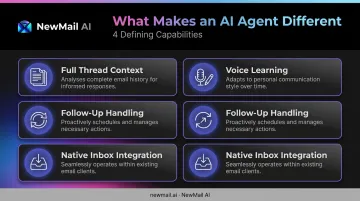
For email replies specifically, a true AI agent does four things an assistant doesn't:
- Reads full thread context before drafting, not just the last message
- Learns your writing voice from sent email history, not generic templates
- Handles follow-ups and objections without you initiating each action
- Integrates natively inside your existing inbox — no separate app, no copy-pasting between tabs
The tools reviewed below were selected because they meet this bar. Some lean toward draft-and-review workflows; others offer full autonomous reply handling. The sections ahead break down exactly where each tool fits — so you can match capability to workflow rather than guess.
Best AI Agents for Email Replies in 2026
These tools were evaluated on reply personalization quality, privacy and data handling, inbox integration depth, and real-world usability for professionals and teams.
NewMail AI
NewMail AI is a privacy-first AI email agent built for professionals and teams who need intelligent, personalized reply drafting without giving up data security. It works directly inside Gmail, Outlook, and Apple Mail — no separate dashboard, no new interface to learn.
The standout differentiator is NewMail's architecture. The platform's AI (called Nova) performs a one-time analysis of your sent email history during a 60-second onboarding step, building a structured context profile of your voice, role, and business priorities. From that point forward, every draft sounds like you.
Email content is never stored. It's processed in-memory and immediately discarded after each interaction.
On the privacy side, NewMail holds Google's highest-tier data security certification for Google Workspace applications, is fully GDPR compliant under Swiss law, and has Zero Data Retention agreements with AI providers Anthropic and Mistral, meaning those providers immediately discard all inputs after processing. No email content is used for model training, on any plan.
The human-in-the-loop policy is non-negotiable: NewMail never sends without explicit user approval. For compliance-sensitive teams in legal, finance, or regulated industries, that's a deliberate design choice, not a constraint.
| Feature | Details |
|---|---|
| Key Features | Context-aware reply drafts in your voice, priority inbox with intent-based categorization, task extraction, daily briefings, one-click reply building blocks, tone controls, works natively in Gmail/Outlook/Apple Mail |
| Pricing | 14-day free trial (no credit card, full access); Professional at $12/month or ~$9.60/month billed annually; Enterprise (20–200+ users) via custom quote |
| Privacy & Security | GDPR compliant, Google Security Certified (highest tier), Zero Data Retention with Anthropic and Mistral, military-grade AES encryption, Swiss-based data laws, never sends without user approval |
| Best For | Privacy-conscious professionals, regulated industries, and teams who want inbox-native AI that learns their voice without storing email content |
Superhuman
Superhuman is a premium AI-native email client built for high-volume professionals who prioritize reply speed above everything else. It has its own inbox interface — not a plugin on top of Gmail or Outlook — and its entire design is oriented around keyboard-driven efficiency.
The AI reply drafting feature learns the user's voice and tone after a short training period, generating contextual drafts that match individual communication style. Auto Summarize surfaces a one-line thread summary under the subject line, giving users full conversation context before they open an email. Split Inbox automatically sorts messages into focused sections so high-priority threads don't get buried.
For executives and professionals writing 20+ emails daily, Superhuman's combination of voice-matched drafts, follow-up reminders, and keyboard shortcuts for every action creates the fastest end-to-end reply experience of any tool in this list.
| Feature | Details |
|---|---|
| Key Features | AI draft replies with voice and tone matching, Auto Summarize, split inbox, follow-up reminders, keyboard shortcuts for every action |
| Pricing | Free: $0. Pro: $12/member/month (annual) or $30/month. Business: $33/member/month (annual) or $40/month. Enterprise: custom pricing |
| Best For | Executives and high-volume professionals who write 20+ emails daily and want the fastest possible reply workflow |

Shortwave
Shortwave is a Gmail-native AI email client that pairs AI reply generation with natural language search across your full email history. Where most tools draft from the last message in a thread, Shortwave's AI assistant processes the entire thread before writing, making it particularly useful for complex, context-heavy conversations.
The calendar integration is useful: users can check availability and send scheduling emails without leaving their inbox. Natural language search surfaces relevant context from past threads before you respond, which reduces back-and-forth and improves reply accuracy on complicated topics.
Shortwave requires a Gmail or Google Workspace account. Microsoft 365 and Exchange are not supported.
| Feature | Details |
|---|---|
| Key Features | Instant AI replies with full thread context, natural language email search, Google Calendar integration, email bundling, 14-day free trial |
| Pricing | Business: $24/seat/month (annual). Premier: $36/seat/month (annual). Max: $100/seat/month (annual). Enterprise: contact sales |
| Best For | Gmail and Google Workspace users who need AI-assisted replies backed by deep inbox context and calendar-aware scheduling |
Instantly AI Reply Agent
Instantly's AI Reply Agent is purpose-built for sales teams who need replies handled at volume — not faster drafting, but autonomous response management at scale. The agent reads incoming emails, handles objections, sends follow-ups, and books meetings via Calendly integration, all without requiring someone to monitor the inbox.
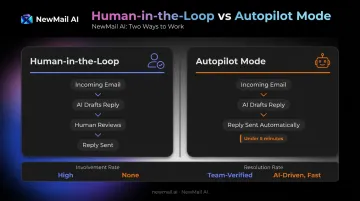
The platform operates in two modes: Human-in-the-Loop (you review before sending) and Autopilot (fully autonomous). In Autopilot mode, Instantly claims replies go out in under five minutes, 24/7. Performance is tracked through Involvement Rate (percentage of threads where AI drafted a reply) and Resolution Rate (percentage sent without edits).
Pricing is credit-based: each AI-generated reply costs 5 Instantly credits, with plans ranging from the Nano tier at $9/month for 150 credits up to Hyper Credits starting at $197/month for 10k–200k credits.
| Feature | Details |
|---|---|
| Key Features | Autopilot and Human-in-the-Loop reply modes, objection handling, follow-up automation, Calendly integration for autonomous meeting booking, Slack notifications, analytics dashboard |
| Pricing | Credit-based: 5 credits per AI reply. Outreach plans from $47/month; credit plans from $9/month |
| Best For | Sales teams and outbound professionals managing high reply volumes who need 24/7 autonomous email response and lead qualification |
Microsoft Copilot for Outlook
Microsoft Copilot is the AI layer built natively into Outlook, and for organizations already running Microsoft 365, it requires no additional setup. The drafting feature lets users prompt Copilot directly in the compose window; Coaching by Copilot analyzes draft replies for tone, clarity, and reader sentiment before they're sent — a feature no other tool on this list offers.
The cross-app context is the real differentiator. Because Copilot draws on Microsoft Graph, it can surface context from your emails, chats, documents, and meetings when drafting a reply. Thread summarization includes numbered citations linking back to specific emails, so you can verify exactly which message contributed to each point in the summary.
Microsoft 365 Copilot for Business is available as an add-on at $18/user/month (promotional annual pricing) on top of qualifying Microsoft 365 subscriptions.
| Feature | Details |
|---|---|
| Key Features | AI reply drafting with tone and length controls, thread summarization with citations, Coaching by Copilot, cross-app context from Teams/docs/meetings, pre-send accuracy reminder |
| Pricing | Requires Microsoft 365 subscription. Business Standard with Copilot: $23.50/user/month (annual). Business Premium with Copilot: $32/user/month (annual). Copilot add-on: $18/user/month (annual, promotional) |
| Best For | Outlook users and Microsoft 365 organizations who want AI reply drafting with built-in communication coaching |
How We Chose the Best AI Agents for Email Replies
The evaluation focused on three areas where most buyers go wrong:
1. Personalization depth vs. generic drafting A tool that generates grammatically correct replies is not the same as one that drafts in your actual voice. We focused on how well each tool learns individual communication patterns, not whether it can produce something that merely passes as an email.
2. Native inbox integration vs. standalone apps Tools that require you to switch to a separate application add friction that negates much of their time-saving value. Every tool in this guide works inside or directly connects to Gmail, Outlook, or Apple Mail, though the depth of that integration varies considerably.
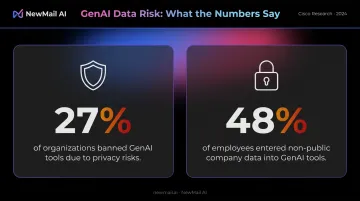
3. Privacy and data handling architecture Cisco's 2024 research found that 27% of organizations had banned generative AI tools at least temporarily due to privacy and data security risks, and 48% reported employees had entered non-public company information into GenAI tools. For professionals in regulated industries, understanding whether a tool stores email content, uses it for model training, or has Zero Data Retention agreements isn't optional. It's the first question to ask.
Additional factors evaluated:
- Setup time — can it be operational in under five minutes?
- Pricing transparency — are costs clear before you commit?
- Platform availability — does it support Gmail, Outlook, and Apple Mail?
- Team vs. individual use — does it scale beyond a single user?
The most common mistake buyers make: selecting a tool based on feature count without testing it on real emails. How well a tool handles your actual threads — your tone, your recurring objections, your specific context — tells you more than any feature list.
Conclusion
The right AI agent for email replies isn't the one with the most features or the most automation. It's the one that fits your privacy requirements, matches your writing style, and works inside the inbox you already use — without adding a new tool to manage.
Before committing to any tool, evaluate its data handling architecture: does it store email content? Does it use your emails to train its models? Do its certifications and contractual agreements hold up under scrutiny?
As enterprise teams face growing regulatory pressure over third-party AI access to email, these questions matter more than which tool has the longest feature list.
For professionals and teams who need an AI reply agent that satisfies all three — personalized drafting, inbox-native setup, and zero data retention — NewMail AI offers a 14-day free trial with full access. No credit card required, setup in under three minutes.
Frequently Asked Questions
What is the best AI agent for email replies?
It depends on your use case. NewMail AI is the strongest option for privacy-first professionals and regulated industries. Superhuman suits speed-focused power users who write 20+ emails daily. Instantly AI Reply Agent is built for sales teams needing 24/7 autonomous reply handling. Microsoft Copilot for Outlook fits organizations already running Microsoft 365.
Can AI agents respond to emails autonomously?
Yes, some can. Tools like Instantly AI Reply Agent operate in full Autopilot mode, drafting and sending replies without human review. Others, like NewMail AI, always require user approval before sending. The right mode depends on your risk tolerance and whether the use case involves regulated or sensitive content.
What is the difference between an AI email agent and an AI email assistant?
An AI email assistant helps you draft replies faster, but you control every step. An AI email agent reads thread context, learns your style, and acts with minimal supervision, handling follow-ups, objections, and scheduling autonomously. Gartner calls out "agentwashing" for tools that claim agent status while still requiring full human operation.
How do AI agents learn your writing voice and tone?
Most tools analyze your sent email history to build an initial voice profile. NewMail AI's Nova does this during a defined 60-second onboarding step, generating a structured context profile covering your tone, role, and business priorities. Accuracy improves with continued use as the system recognizes more of your communication patterns over time.
Are AI email agents safe to use with sensitive or confidential emails?
Safety varies by provider. The critical factors are whether the tool stores email content, uses your data for model training, and holds Zero Data Retention agreements with its AI providers. Tools built with privacy-first architecture, like NewMail AI (ZDR agreements with Anthropic and Mistral, Google Security Certified), are far better suited for sensitive industries than general-purpose AI tools.
How quickly can an AI agent start drafting email replies?
Most tools are operational within minutes of connecting a Gmail or Outlook account. NewMail AI's full setup, including inbox connection, voice learning, and first drafts, takes approximately three minutes with no credit card required. Instantly AI Reply Agent takes longer due to agent configuration and campaign assignment, but that setup enables its autonomous reply handling.