The real issue isn't just volume. It's complexity. Workers face interruptions every 2 minutes, context-switching constantly between threads that require triage, response, and follow-up — all without losing track of what actually matters.
AI email assistants have evolved well past spam filters. The best ones draft replies in your voice, surface what needs attention, extract tasks, and summarize threads — all while (ideally) keeping your data private. But not all tools are built the same, and the differences matter.
This guide explains what an AI email assistant actually is, breaks down the best options available today, and covers the selection criteria most comparison articles skip — including the privacy architecture questions you should be asking before you connect anything to your inbox.
TL;DR
- AI email assistants use NLP and machine learning to automate drafting, sorting, summarizing, and triaging your inbox — saving hours each week
- Top 2025 options span privacy-first assistants (NewMail AI), speed-focused clients (Superhuman), and inbox organizers (SaneBox)
- Key selection criteria: privacy architecture, platform compatibility, voice personalization, and workflow integration
- For professionals in sensitive industries, zero data retention and encryption are the baseline, not optional extras
What Is an AI Email Assistant?
An AI email assistant is a software layer powered by Natural Language Processing (NLP) and Machine Learning (ML) that reads, prioritizes, drafts, and acts on email. Unlike simple filter rules, these tools understand context, intent, and sentiment — meaning they can tell the difference between a cold pitch and a hot lead, or between an FYI and a task requiring a response.
Three Types of AI Email Assistants
| Type | What It Does | Examples |
|---|---|---|
| Integrated wrappers | Sits inside Gmail, Outlook, or Apple Mail — no new UI | NewMail AI, SaneBox |
| Standalone clients | Replaces your default inbox entirely | Superhuman, Shortwave |
| Drafters/plugins | Writing assistance only, no inbox management | ChatGPT plugins, Grammarly |
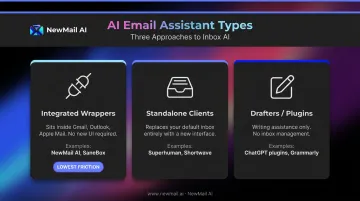
Integrated wrappers offer the lowest adoption friction for most professionals. There's no migration, no new interface to learn, and no change management to push through your team — you connect your existing inbox and start.
Best AI Email Assistants
Tools were evaluated on AI capability, platform compatibility, data privacy standards, setup friction, and real-world productivity impact for professionals and teams.
NewMail AI
NewMail AI is a privacy-first AI email assistant built by founders from AI and cybersecurity backgrounds. It works natively inside Gmail, Outlook, and Apple Mail with setup completing in under 3 minutes — no new inbox, no migration required.
The architecture is what sets it apart. Security was built in from day one, not layered on afterward:
- Google Security Certified — the highest tier of data security certification for Google Workspace apps, requiring a full Tier 3 CASA cybersecurity audit
- Zero Data Retention agreements with Anthropic and Mistral — email content is processed in-memory and discarded immediately after analysis
- Headquartered in Switzerland — under some of the world's strictest data protection laws, with full GDPR compliance
- Ephemeral processing — email content is never stored on NewMail's servers; only encrypted user context (tone, role, priorities) is retained, and users can view, edit, or delete it at any time
Nova, the AI agent, learns your writing voice in approximately 60 seconds by analyzing a selection of your sent emails. It generates drafts that sound like you — not like a generic AI.
| Category | Details |
|---|---|
| Key Features | Priority inbox with custom categories, AI drafts in your voice, task extraction, meeting recaps with action items, works inside Gmail/Outlook/Apple Mail |
| Pricing | Free 14-day trial with full feature access, no credit card required; Professional plan pricing at newmail.ai |
| Best For | Executives, sales teams, and professionals in regulated industries who need personalized AI with enterprise-grade privacy |
Superhuman
Superhuman is a premium standalone email client built around a single principle: every interaction must complete in under 100 milliseconds. It's engineered for power users who process massive email volume and treat speed as their primary productivity lever.
The keyboard-driven interface eliminates mouse interaction entirely. AI drafts learn your writing style over time. The split inbox auto-categorizes messages, and read-status tracking shows when and where emails were opened. In 2025, Superhuman added AI-powered auto-labeling to reduce marketing noise.
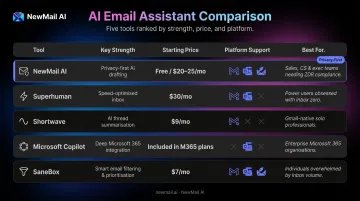
At $30/month, it's the most expensive option here. PCMag rated it 2.5/Fair in 2023, questioning whether the price is justified for users who can achieve similar results with Gmail keyboard shortcuts. It doesn't offer enterprise-grade data privacy controls or downstream task management.
| Category | Details |
|---|---|
| Key Features | AI draft replies with voice learning, split inbox, read receipts, thread summarization, keyboard-first shortcuts |
| Pricing | Starter from $30/month or $300/year; Business $40/month or $396/year; Enterprise by quote |
| Best For | Solo executives and founders who handle high email volume and want maximum speed above all else |
Shortwave
Shortwave, built by ex-Google engineers, reimagines Gmail with a chat-like interface. Its "Ghostwriter" AI analyzes your sent folder to match your writing style, and its semantic search lets you ask your inbox natural-language questions — "what did we agree on for the Q3 budget?" — without needing exact keyword matches.
AI bundles group related emails to reduce inbox noise, and Google Calendar integration keeps scheduling in context.
The main limitation: Shortwave's Outlook support is inconsistent across official documentation — its changelog indicates support was added, but its support docs state users must sign in with Gmail or Google Workspace and that Microsoft 365/Exchange is not directly supported. Treat cross-platform capability as unconfirmed until you verify it for your setup. Advanced AI usage is metered on lower tiers.
| Category | Details |
|---|---|
| Key Features | AI semantic inbox search, smart email bundles, thread summarization, Ghostwriter AI drafting, Google Calendar integration |
| Pricing | Business from $30/seat/month; Premier $45/seat/month; Max $120/seat/month |
| Best For | Gmail power users who need deep inbox search and AI drafting without cross-platform requirements |
Microsoft Copilot for Outlook
Copilot is embedded natively across Microsoft 365, including Outlook. It summarizes threads, drafts emails with adjustable tone, extracts action items, and — critically — understands context across Teams, Word, SharePoint, and Calendar simultaneously.
That cross-app context makes Copilot genuinely powerful for Microsoft-native organizations. A tool embedded across Teams, SharePoint, and Calendar can pull yesterday's meeting discussion directly into a follow-up email draft — something no standalone AI assistant can replicate.
The tradeoffs are real: no free tier, requires a qualifying Microsoft 365 subscription at $30/user/month, and personal Microsoft accounts using Gmail, Yahoo, or iCloud cannot access Copilot in Outlook. It's a poor fit for mixed-platform environments.
| Category | Details |
|---|---|
| Key Features | Native Outlook integration, thread summarization, tone-adjustable drafting, action item extraction, coaching feedback on email clarity |
| Pricing | $30/user/month; requires qualifying Microsoft 365 base license |
| Best For | Organizations already standardized on Microsoft 365 who want AI embedded natively in Outlook |
SaneBox
SaneBox doesn't draft emails. It doesn't learn your voice. What it does is keep low-priority email out of your way — consistently and without friction.
It works at the mailbox level via IMAP or Exchange, making it compatible with virtually any email client: Gmail, Outlook, Apple Mail, iCloud. Setup requires no UI switch and no new app. The AI analyzes your behavior patterns over 3–5 days, then automatically routes newsletters, notifications, and low-signal mail into a SaneLater folder. The SaneBlackHole feature permanently blocks unwanted senders with a single action.
PCMag awarded it 5.0/Exemplary and Editors' Choice. That score reflects real triage performance — but SaneBox handles sorting only, not drafting. For professionals who also need AI writing assistance, it pairs well with a drafting-focused tool.
| Category | Details |
|---|---|
| Key Features | Automatic low-priority sorting, SaneBlackHole sender blocking, SaneReminders for follow-ups, daily digest, works with any IMAP client |
| Pricing | Verify current pricing at sanebox.com — plans typically start under $10/month |
| Best For | Individuals drowning in newsletter clutter who want immediate inbox relief without switching their email client |
How We Chose the Best AI Email Assistants
Every tool on this list was assessed against five criteria:
- Active development and current AI capability — tools must reflect 2024–2025 AI capabilities, not legacy rule-based filtering
- Platform compatibility — evaluated across Gmail, Outlook, and Apple Mail
- Data privacy architecture — retention policies, compliance certifications, and whether email content is used to train models
- Real-world usability — setup friction, learning curve, and adoption realism for professional teams
- Measurable productivity impact — does it actually reduce email workload, or just shift the bottleneck from sending to prompting?
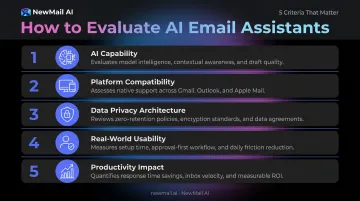
Those criteria separate tools that genuinely change how you work from tools that look impressive in a demo. They also expose where most buyers go wrong.
Three Mistakes Buyers Make
Most professionals shortlist tools based on feature count. That leads to three consistent missteps:
- Ignoring data policies — your inbox contains contracts, client data, financials, and strategy. More than 1 in 4 organizations have banned GenAI use specifically over privacy and data security risks — checking whether a vendor trains on your email content is basic due diligence.
- Choosing tools that replace your inbox UI — standalone clients create adoption friction, especially for teams. If your people don't switch, the tool delivers no ROI.
- Overlooking integration depth — a tool that doesn't connect to your calendar, CRM, or task manager creates new silos instead of eliminating them.
If any of those three errors apply to your current shortlist, the evaluation criteria above will help you reframe the decision. Enterprise and regulated-industry buyers should also verify: SOC 2 / GDPR compliance, zero-retention agreements with underlying AI providers, geography of data processing, and certifications like Google Security Certified status.
Conclusion
Choosing the right AI email assistant comes down to one question: does it fit how you actually work, or does it create new friction? The best tool integrates without disruption and handles your data the way your business requires.
Before committing, evaluate three dimensions:
- Productivity fit — does it reduce your email workload, or just make typing faster?
- Security architecture — is privacy built in from day one, or bolted on as a checkbox?
- Scalability — will it work for a team of 5 today and 50 next year?
If those three criteria matter to your team, NewMail AI is worth a direct look. It's inbox-native (Gmail, Outlook, and Apple Mail), drafts in your voice, and retains zero email data by default — a rare combination at any price point. Free 14-day trial, full feature access, set up in under 2 minutes, no credit card required. Start at newmail.ai.
Frequently Asked Questions
What is the best AI to help with emails?
It depends on your priority. For privacy-first professionals, NewMail AI leads with zero data retention and Google Security Certified status. For raw speed, Superhuman. For free Gmail users, Shortwave or Google's native Gemini are strong starting points. Match the tool to your actual constraint — privacy, speed, or cost.
What features should I look for in an AI email assistant?
Focus on AI drafting that matches your voice, priority inbox sorting, thread summarization, and task extraction. Verify platform compatibility with your email client. If your inbox contains sensitive business information, data privacy policies — specifically whether the vendor trains on your content — should be non-negotiable criteria, not afterthoughts.
Are AI email assistants safe to use?
Reputable tools are safe when they offer scoped permissions, clear data retention policies, and audit logs. The critical question is whether the vendor uses your email content to train AI models. Certifications like SOC 2, GDPR compliance, or Google Security Certified status — combined with a confirmed zero data retention policy — are the clearest signals of a trustworthy vendor.
What is the difference between an AI email assistant and an AI email agent?
An AI email assistant helps you draft, sort, and manage email faster — you approve every action before it happens. An AI email agent operates more autonomously, taking downstream actions like booking meetings or updating CRMs without requiring your input at each step — which is why most professionals benefit more from the assistant model and its human-in-the-loop accountability.
Can AI email assistants work with both Gmail and Outlook?
Platform compatibility varies significantly. NewMail AI and SaneBox work across Gmail, Outlook, and Apple Mail. Shortwave's Outlook support is inconsistent — verify before committing. Microsoft Copilot is Outlook/Microsoft 365 only. Always confirm compatibility with your specific email setup before choosing a tool.
How do AI email assistants protect my data?
The best tools process email data ephemerally — nothing stored after the session ends — and hold zero data retention agreements with underlying AI providers. Confirm that data is encrypted in transit and at rest, that your content isn't used for model training, and whether the vendor is headquartered in a privacy-strict jurisdiction like Switzerland, which adds a binding legal layer beyond standard certifications.