Introduction
Knowledge workers aren't just drowning in email — they're losing significant portions of their day to it. Microsoft's 2025 Work Trend Index found employees receive 117 emails per day on average and face interruptions from email, meetings, or notifications roughly 275 times daily — once every two minutes.
AI email assistants are the practical response to this problem. But choosing the right one isn't straightforward. The market now spans everything from simple drafting helpers to full inbox agents that classify, prioritize, and summarize autonomously.
That breadth creates its own challenge. Productivity gains must also be weighed against data privacy — especially for professionals in sales, legal, finance, or executive roles whose inboxes contain sensitive communications.
This article covers the best AI email assistant tools available today, what separates them, how to evaluate them, and how to match the right tool to your workflow.
Key Takeaways
- AI email assistants range from simple drafting aids to full inbox agents — solo vs. team use determines the right fit
- Privacy architecture matters as much as features — always verify whether a tool stores your email content and under what jurisdiction
- NewMail AI is the strongest option for professionals who need zero data retention with full AI capability inside Gmail, Outlook, and Apple Mail
- Superhuman leads on speed; Missive on team collaboration; Shortwave on Gmail-native AI search; SaneBox on silent filtering
- The best tools require no inbox migration and take under 5 minutes to set up
What Is an AI Email Assistant?
An AI email assistant is software that uses large language models (LLMs) and natural language processing to help read, sort, draft, and act on emails. This is meaningfully different from older rule-based filters, which used rigid if-then logic ("move newsletters to this folder") with no ability to understand context or intent.
Assistants vs. Agents
The distinction between an assistant and an agent matters when choosing a tool:
- AI assistant — reactive. You ask, it helps. It drafts replies, summarizes threads, and surfaces priorities, but you control every action. Nothing sends without your approval.
- AI agent — proactive. It reads, classifies, routes, and drafts in the background. You review before sending rather than initiating every task.
As Gartner describes, assistants simplify tasks but depend on human input, while task-specific agents add capacity for complex end-to-end work. Most tools on this list function as assistants, though several add selective agentic features for triage and routing.
Three Common Architectures
| Architecture | How It Works | Privacy Implication |
|---|---|---|
| Native email clients | Replaces your inbox interface (Superhuman, Shortwave) | Full mailbox access; evaluate data handling carefully |
| Inbox-native overlays | Layers AI inside Gmail/Outlook without replacing it (NewMail AI) | Works within your existing client; check storage policies |
| Server-side processors | Operates in the background on top of any client (SaneBox) | Review what data is accessed — content vs. metadata only |
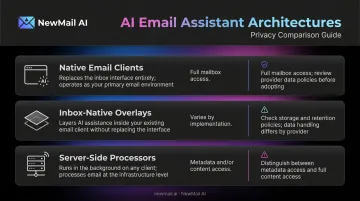
Architecture choice is most consequential for privacy-sensitive teams: an inbox-native overlay can deliver full AI functionality without routing email content through a separate system, while server-side processors often access more data than users realize.
The Best AI Email Assistant Tools
These tools were evaluated across five dimensions: AI capability, email client compatibility, privacy standards, setup friction, and real-world productivity value for both individuals and teams. Each entry covers what the tool does well, who it's built for, and where it falls short — so you can match the right tool to your actual workflow.
NewMail AI
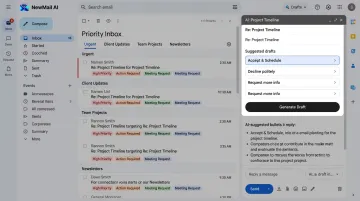
NewMail AI is a privacy-first inbox-native assistant built by founders from AI and cybersecurity backgrounds. It works directly inside Gmail, Outlook, and Apple Mail — no new inbox, no migration.
What sets it apart is its security architecture. Email content is processed ephemerally (in-memory only, never written to disk or a database), and NewMail holds Zero Data Retention agreements with AI providers including Anthropic and Mistral. The platform has achieved Google Security Certified status at the highest tier.
Headquartered in Switzerland with full GDPR compliance, privacy is built into the architecture — not bolted on afterward.
During a roughly 60-second onboarding analysis, Nova (the AI) learns your writing voice and communication style from a selection of sent emails. That raw content is then discarded — only the structured context profile is stored, with military-grade encryption. Setup from sign-up to a sorted inbox takes under three minutes.
| Attribute | Details |
|---|---|
| Key Features | Priority inbox with custom categories, AI drafts in your voice (including FAQs and links), task extraction and scheduling, instant meeting recaps with action items |
| Best For | Professionals and teams in sensitive industries — legal, finance, executive roles — who need AI productivity without compromising email privacy |
| Pricing | Free Trial: 14 days, no credit card required. Professional: $20–25/month (verify current pricing at app.newmail.ai). Enterprise: volume pricing for teams of 20–200+, contact sales@newmail.ai |
Superhuman
Superhuman is a premium keyboard-first email client built for power users processing high volumes of email daily. Its differentiator is raw speed — the engineering team targets sub-50ms UI interactions, and the AI features are built into that same performance envelope.
AI capabilities include Write with AI (drafts in your voice), Auto Summarize for thread condensation, Instant Reply, and Auto Drafts. The Split Inbox automatically triages incoming mail into categories like Important, Team, and News. Superhuman supports Gmail and Outlook.
The trade-off is cost. At $30/month for Starter, it's the most expensive option on this list — and it's optimized for solo productivity rather than team collaboration.
| Attribute | Details |
|---|---|
| Key Features | AI drafting in your voice, instant thread summarization, split inbox with auto-triage, keyboard shortcuts for every action, follow-up reminders |
| Best For | Solo executives, founders, and sales professionals managing 100+ emails daily who prioritize speed above everything else |
| Pricing | Starter: $30/month or $300/year. Business: $40/month or $33/member/month billed annually |
Missive
Missive is a team email and collaboration platform that weaves AI into shared inbox workflows. It supports Gmail, Outlook, IMAP, and messaging channels including WhatsApp and SMS — making it useful for teams managing customer communications across multiple surfaces.
The standout capability is AI Rules: the system reads incoming emails for sentiment, intent, and content — beyond simple keywords — then triggers automated actions like routing, labeling, drafting, or summarizing. MCP integrations connect Missive's AI to external tools like Notion, Stripe, Linear, and HubSpot, so the AI can pull live context before generating a draft. Shared AI prompts keep team responses consistent.
AI features require the Productive ($24/user/month) or Business ($36/user/month) plan. Teams on those tiers start with $5 in free AI credits and can connect their own AI provider keys.
| Attribute | Details |
|---|---|
| Key Features | AI Rules for automated inbox routing and drafting, MCP integrations (Notion, Stripe, Linear), shared canned responses with semantic search, multi-channel support |
| Best For | Operations, customer success, and support teams that need shared inbox management with AI embedded in collaborative workflows |
| Pricing | Starter: $14/user/month (annual) / $18/user/month (monthly). Productive: $24/$30. Business: $36/$45. AI requires Productive or Business |
Shortwave
Shortwave was built by former Google Inbox engineers who treated AI as the default inbox experience — not a feature bolted on afterward. The result is an email client where natural language search, thread summarization, smart bundling, and AI drafting are all first-class behaviors.
Its standout capability is conceptual search: ask something like "what did the design team say about the Q3 deadline?" and Shortwave retrieves results by meaning, not keyword matching. Smart bundling collapses related threads to reduce inbox noise. One important limitation: Shortwave is Gmail and Google Workspace only. Microsoft 365 and Exchange are not directly supported.
Current pricing tiers are Business ($30/seat/month), Premier ($45/seat/month), and Max ($120/seat/month). A 14-day free trial is available; lower-tier plans have daily AI usage caps.
| Attribute | Details |
|---|---|
| Key Features | Natural language email search across full history, AI thread summarization, smart email bundling, Google Calendar integration, AI drafting with style learning |
| Best For | Individual Gmail users and tech-forward professionals who rely heavily on searching past conversations and want a deeply AI-integrated inbox |
| Pricing | Business: $30/seat/month. Premier: $45/seat/month. Max: $120/seat/month. 14-day free trial available |
SaneBox
SaneBox does one thing and does it well: it filters lower-priority email before you see it. It's not a drafting assistant — it's a server-side filtering layer that works on top of any email client via IMAP, EWS-OWA, or ActiveSync. Gmail, Outlook, Apple Mail, and Fastmail are all supported.
The AI learns from your behavior over time. Emails it determines are non-urgent go to SaneLater. Senders you want to permanently block go to SaneBlackHole. SaneNoReplies tracks threads you've sent that haven't received a response. A daily digest summarizes what's been filtered. You never change your email client.
Notably, SaneBox analyzes metadata (sender, subject, date) — not full email content — which is a meaningful privacy distinction.
| Attribute | Details |
|---|---|
| Key Features | SaneLater folder for non-urgent mail, SaneBlackHole for permanent sender blocking, SaneNoReplies for tracking unanswered threads, daily digest, works with any email client |
| Best For | Professionals drowning in inbox volume — newsletters, CC chains, notifications — who want silent, set-and-forget filtering without switching email tools |
| Pricing | Snack: $4.99 (1 account, 2 features). Lunch: $7.99 (2 accounts, 6 features). Dinner: $24.99 (4 accounts, full features). Billed per email account, not per user |
How We Chose the Best AI Email Assistant
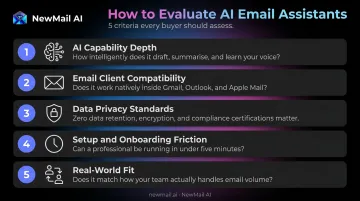
Tools on this list were assessed across five dimensions:
- AI capability depth: drafting quality, classification, automation, and search
- Email client compatibility — Gmail, Outlook, Apple Mail, and other protocols
- Data privacy standards: storage policies, certifications, jurisdiction, and ZDR availability
- Setup and onboarding friction — time to value without requiring inbox migration
- Real-world fit (tested against individual professional and team use cases)
The Most Overlooked Pitfall
Most buyers evaluate AI features first and privacy second — or not at all. This is a mistake that can disqualify an otherwise capable tool, particularly in regulated industries.
The questions to ask any vendor:
- Does the tool store my email content on its servers?
- Under what jurisdiction do those servers operate?
- Does the AI provider have Zero Data Retention agreements?
- Is a Data Processing Agreement available?
For professionals handling sensitive communications, a tool with weaker privacy architecture — regardless of how good its AI drafting is — may simply not be deployable.
"Best" Is Use-Case Dependent
Privacy requirements narrow the field before features even come into play. Once you've cleared that bar, the right choice depends on your actual workflow: a solo sales executive optimizing for reply speed has different needs than a compliance-sensitive team where every outbound message carries legal weight.
Start with your primary bottleneck — inbox volume, drafting consistency, or governance — and match the tool to that, not to the longest feature list.
Conclusion
The best AI email tools today go well beyond drafting. They classify, route, summarize, and surface priorities with minimal human input. But the right choice still comes down to two questions: are you working solo or on a team, and how seriously does your role demand data privacy?
For professionals in regulated industries, privacy architecture isn't a secondary concern — it's a baseline requirement. Tools built privacy-first from day one don't store your emails at all; tools that retrofit privacy policies onto existing products still do.
NewMail AI was built specifically for that second group. Key differentiators:
- Inbox-native: works inside Gmail, Outlook, and Apple Mail — no new client to learn
- Zero email storage by default: emails are processed ephemerally, never retained
- Swiss-based infrastructure: GDPR-compliant, with Zero Data Retention agreements with AI providers
- Voice personalization: Nova learns your writing style in under 60 seconds
Setup takes about 2 minutes, and a 14-day free trial is available with no credit card required.
If you're ready to test AI email management without risking your data, start your free trial at app.newmail.ai.
Frequently Asked Questions
What is an AI email assistant and how does it work?
AI email assistants use large language models and NLP to help read, sort, draft, and summarize emails. Reactive assistants respond when you prompt them (drafting, summarizing). Proactive agents work in the background — classifying and routing automatically — with the human reviewing before anything sends.
Are AI email assistants safe to use with sensitive business emails?
Safety depends entirely on the tool's data architecture. Look for zero email storage policies, GDPR compliance, and Zero Data Retention agreements with AI providers. Tools headquartered in Switzerland — subject to some of the world's strictest data laws — offer stronger baseline protections than most alternatives.
What's the difference between an AI email assistant and an AI email agent?
An assistant helps you process email faster — drafting and summarizing — while you control every action. An agent works proactively, reading, classifying, and drafting in the background, with you reviewing before send rather than initiating each task. Most tools operate as assistants with varying degrees of agentic behavior.
Do AI email assistants work with both Gmail and Outlook?
Most major tools support both, but coverage varies. Shortwave is Gmail-only. NewMail AI, Superhuman, Missive, and SaneBox all support both Gmail and Outlook, along with additional clients depending on the tool.
What features should I look for in an AI email assistant?
Five criteria matter most: AI drafting quality, inbox compatibility, privacy and data storage policy, integration with other tools (CRM, calendar), and setup friction. The single most important question to ask any vendor: do you store my email content, and under what terms?
Is there a free AI email assistant worth using?
Gemini in Gmail is included in eligible Google Workspace plans and handles summarization, drafting, and calendar-aware tasks. Shortwave, SaneBox, and NewMail AI each offer 14-day free trials — NewMail AI and SaneBox require no credit card to start. Free tiers typically cap AI usage and may involve data storage trade-offs that paid, privacy-first tools avoid.