This article compares five leading tools — SaneBox, Superhuman, Shortwave, Spark, and NewMail AI — across pricing, features, email client compatibility, and data privacy. Those last two factors matter more than most comparison guides acknowledge. Two tools at the same price point can differ dramatically in how they handle your email data, which has real consequences for executives, legal teams, and anyone working with sensitive communications.
Key Takeaways
- AI email summary tools automate inbox triage, extract action items, and draft replies — reducing time spent on manual email management
- Pricing ranges from free tiers to $100/seat/month, with enterprise plans custom-quoted for teams of 20+
- Core evaluation dimensions: summarization accuracy, email client support, AI draft quality, and data retention policy
- Privacy architecture is the sharpest differentiator: some tools store email content on third-party servers, while others process data ephemerally with zero storage
- The right tool depends on use case: individual speed vs. team collaboration, sensitive industries vs. general knowledge work
Email Summary Software: Quick Pricing Comparison
| Tool | Starting Price | Free Plan/Trial | Email Clients | AI Summarization | Data Retention | Best For |
|---|---|---|---|---|---|---|
| SaneBox | $4.99/month | Free trial | Gmail, Outlook, iCloud, Yahoo, IMAP, Exchange | No — filtering/sorting only | Headers only; optional body not stored; logs purged after 30 days | General inbox filtering |
| Superhuman | $25/user/month | Free month (promotional) | Gmail, Outlook | Yes — Auto Summarize | ZDR with LLM providers; SOC 2 Type II | Executives, high-performers |
| Shortwave | $24/seat/month | Free + 14-day trial | Gmail/Google Workspace only | Yes — instant AI summaries | Google Cloud; AES-256; customer data not used for LLM training | Gmail-native teams |
| Spark | Free ($0) | Free plan | Gmail, Outlook, multi-platform | Yes — thread summaries via AI Assistant | Third-party AI may retain inputs up to 30 days | Cross-device individuals and teams |
| NewMail AI | $20/month | 14-day trial (no credit card) | Gmail, Outlook, Apple Mail | Yes — email and thread summaries | Zero email storage; ephemeral processing; ZDR with Anthropic and Mistral | Privacy-conscious professionals and teams |
Pricing sourced from official vendor websites, verified July 2025. Enterprise plans are custom-quoted for teams of 20+ across most providers.
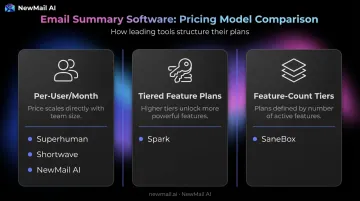
Three pricing models cover this category:
- Per-user/month subscriptions — used by Superhuman, Shortwave, and NewMail AI; scales predictably with team size
- Tiered feature plans — Spark's model, which gates AI features behind paid tiers while keeping the base app free
- Feature-count tiers — SaneBox's approach, with Snack, Lunch, and Dinner plans unlocking additional filtering rules
Two tools at the same price point can have very different answers to one question: where does your email data go after processing? The sections below break that down.
What Is Email Summary Software?
Email summary software connects to your existing inbox — Gmail, Outlook, Apple Mail — and uses AI to read, prioritize, and condense incoming messages. Instead of opening every email individually, users get summaries, priority rankings, extracted tasks, and in more advanced tools, ready-to-send draft replies.
How It Differs from Email Marketing Tools
This distinction gets confused frequently in search results. Email marketing platforms like Mailchimp or HubSpot handle the sending side — campaigns, sequences, and subscriber lists. Email summary software works on the receiving side — processing your incoming inbox so you can respond faster and miss less.
Who Benefits Most
- Executives managing 200+ emails daily who need signal extracted from noise
- Sales and customer success teams tracking active client conversations
- Account managers and founders needing structured follow-ups with action items
- Legal, financial, and healthcare professionals who need productivity without sacrificing data control
How the Technology Has Evolved
Early email tools were rule-based filters — keyword matching, folder routing, sender sorting. Modern tools use large language models to understand thread context, generate human-sounding drafts, and personalize output to individual writing styles.
Today, the sharpest divide between tools isn't AI capability — it's privacy architecture: what happens to your email content after the AI processes it.
Top Email Summary Software: Pricing & Features Breakdown
SaneBox
Pricing: Snack $4.99/month | Lunch $7.99/month | Dinner $24.99/month
SaneBox is an email filtering and prioritization tool, not an AI summarization tool in the traditional sense. It learns your inbox behavior and sorts email into folders (SaneLater for low-priority, SaneBlackHole for unwanted senders) without generating text summaries or reply drafts.
Strengths:
- Broad email client support (Gmail, Outlook, iCloud, Yahoo, Exchange, IMAP)
- Strong privacy posture — analyzes headers and patterns; does not store email body content; logs purged after 30 days
- Lowest entry price in this comparison
Limitations: SaneBox is a smart filter, not a summarization engine. It won't generate summaries, extract action items, or draft replies. Teams needing those capabilities should look elsewhere.
Superhuman
Pricing: Starter $25/user/month | Business $33/user/month | Enterprise: custom
Superhuman is a premium email client built for executives and high-performers who rely heavily on keyboard shortcuts. It replaces your email interface entirely rather than plugging into an existing client.
AI features include Auto Summarize (one-line summary above each conversation), Instant Reply, Auto Drafts, and AI writing calibrated to your voice.
Strengths:
- Strong AI draft quality with tone-matching
- ZDR agreements with LLM providers; customer content not used for model training; SOC 2 Type II certified
- Supports Gmail and Outlook
Limitations: Requires switching to Superhuman as your primary email app — a significant adoption barrier for teams accustomed to existing clients. Premium pricing with no permanent free plan.
Shortwave
Pricing: Business $24/seat/month | Premier $36/seat/month | Max $100/seat/month (all billed annually) | Enterprise: contact sales | Free tier available
Shortwave is a Gmail-native AI email app with instant thread summaries, AI-generated replies, and a bundled inbox view. PCMag rated it 4.0/5 "Excellent," highlighting its one-click thread summarization across multiple languages.
Strengths:
- Strong summarization — instant AI summaries with one-click operation
- 14-day free trial plus a free starting tier
- Data stored in Google Cloud with AES-256 encryption; customer data not used to train third-party LLMs
Limitations: Gmail and Google Workspace only. Microsoft 365 and Exchange are explicitly not supported — only available via email forwarding workarounds. A non-starter for Outlook-primary teams.
Spark
Pricing: Free | Plus $10/month | Pro $20/month | Enterprise: contact sales
Spark is a multi-platform email client (iOS, macOS, Android, Windows, Apple Watch) with AI summarization, smart inbox, and collaborative features including shared drafts, team comments, and shared inboxes. Its free tier makes it accessible for individual users testing AI email features.
Strengths:
- Best cross-device coverage of the five tools
- Free tier available; competitive paid pricing
- Collaborative features for small teams: shared inboxes, real-time drafts, assignments
Limitations: Third-party AI providers may retain prompt inputs for up to 30 days for abuse monitoring — a notable data handling caveat for sensitive use cases. AI features are gated behind paid tiers.
NewMail AI
Pricing: Professional $20/month | Enterprise: volume pricing for teams of 20–200+
NewMail AI is built by founders from AI and cybersecurity backgrounds, designed for professionals who need inbox intelligence without compromising data security. Unlike Superhuman or Shortwave, it works directly inside Gmail, Outlook, and Apple Mail — no new email client required.
Core features:
- AI-generated email and thread summaries
- Priority inbox with custom categories
- AI draft replies written in the user's voice (learned in ~60 seconds)
- Task extraction linked to a to-do list
- Meeting recaps with action items and ownership assignment
- Setup in approximately 2 minutes; 14-day free trial, no credit card
Privacy architecture — the key differentiator:
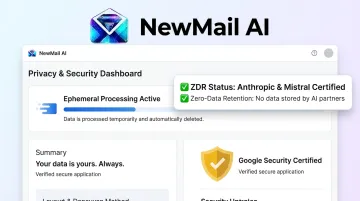
- Email content is never stored on NewMail's servers; processing is fully ephemeral (in-memory, discarded after inference)
- Zero Data Retention agreements with Anthropic and Mistral — no inputs retained after processing
- Google Security Certified at the highest Workspace Marketplace tier, including third-party pen testing and OWASP ASVS compliance
- Swiss-made and GDPR compliant; Data Processing Agreements available for Enterprise; DPO reachable at dpo@newmail.ai
- AES encryption covers all stored preferences and settings
Enterprise teams (20–200+) get additional capabilities: SSO, KPI dashboard tracking adoption, response time, and ROI, shared team context, dedicated account manager, and onboarding support.
Key Factors to Compare Before You Buy
Privacy and Data Retention
For anyone in legal, finance, healthcare, or executive roles, data handling is the first filter. Ask every vendor:
- Does my email content get stored on your servers after processing?
- Do your AI providers retain prompt inputs — and for how long?
- Do you have Zero Data Retention agreements with your LLM providers?
- Are you GDPR compliant, and is a Data Processing Agreement available?
- Have you passed an independent security certification from Google or equivalent?
Tools that store email content — or pass it to AI providers without retention controls — create compliance exposure for anyone in legal, financial, healthcare, or executive roles. The EDPB's Opinion 28/2024 explicitly requires organizations to assess lawfulness and data-subject rights when personal data flows through AI systems.
Once you've cleared the privacy bar, evaluate the actual output quality. Not all AI summaries are equal:
Summarization Quality and Context Awareness
- Does the tool summarize full threads, or just the most recent message?
- Can it extract specific action items, or does it only paraphrase?
- Do draft replies sound like you, or like generic AI output?
Run any free trial on your actual email types — long client threads behave differently from short internal messages.
Email Client Compatibility
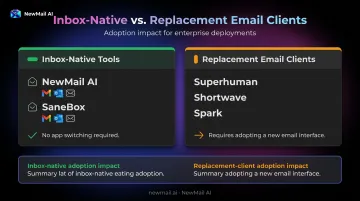
Email summary tools fall into two categories:
- Inbox-native tools (NewMail AI, SaneBox) plug into your existing Gmail, Outlook, or Apple Mail — no app-switching required
- Replacement clients (Superhuman, Shortwave, Spark) require adopting an entirely new email interface
Inbox-native tools lower setup effort and resistance to adoption. That matters especially in enterprise deployments, where change management carries a real cost.
Pricing Model and Scalability
Calculate total cost of ownership at your actual team size before committing. Key questions:
- Does per-seat pricing scale linearly, or are there volume discounts?
- Are features like meeting summaries or task extraction included, or add-ons?
- Does the enterprise plan include a dedicated security review and onboarding support?
Which Email Summary Tool Is Right for You?
| Situation | Recommended Focus |
|---|---|
| Individual seeking fast inbox triage | Strong summarization + AI drafts: Superhuman or NewMail AI |
| Gmail-only team wanting collaboration | Shortwave or Spark |
| Multi-platform team (Gmail + Outlook + Apple Mail) | NewMail AI |
| Regulated industry (legal, finance, healthcare) | Verified ZDR + compliance certs: NewMail AI |
| Budget-conscious individual, basic filtering | SaneBox or Spark Free |
| Enterprise team needing SSO, DPA, KPI tracking | NewMail AI Enterprise or Superhuman Enterprise |
Choosing on price alone is a mistake. A tool at $10/month that passes your email to AI providers without retention controls may carry compliance risk that a privacy-first tool — like NewMail AI, built on Zero Data Retention from day one — eliminates entirely. Match the tool's privacy architecture to your industry's actual risk profile.
NewMail AI offers a 2-week free trial with full feature access, no credit card required, and setup in under 2 minutes. Start at newmail.ai.
Conclusion
Email summary software tools share surface-level similarities — AI summaries, draft generation, priority filtering — but the real differences sit underneath: privacy architecture, platform compatibility, and pricing scalability. Those gaps only show up when you dig past the feature checklist.
Use this to narrow your shortlist:
- Sensitive or regulated communications: Zero Data Retention architecture and compliance certifications (GDPR, SOC 2) are non-negotiable — not nice-to-haves. NewMail AI's Swiss-based, ZDR-first design is built specifically for this use case.
- Individual professionals: Focus on summarization quality and whether the tool runs natively inside Gmail, Outlook, or Apple Mail — not as a separate app you have to switch to.
- Team deployments: Evaluate per-seat cost at scale, onboarding simplicity, and whether enterprise plans include the security controls (SSO, DPA, KPI dashboards) your organization actually requires.
Frequently Asked Questions
What is email summary software and how does it work?
Email summary software uses AI to read incoming emails and generate condensed summaries, extract action items, draft replies, and flag follow-ups — all within your existing email client. You get the key information from each message without reading every email individually.
How much does AI email summary software typically cost?
Pricing spans free tiers (Spark, Shortwave) up to $25–$100/seat/month for premium plans like Superhuman and Shortwave Max. NewMail AI Professional is $20/month with a full-feature free trial; enterprise plans are custom-quoted.
What is the difference between email summary software and email marketing software?
Email marketing software (Mailchimp, HubSpot) sends campaigns to contact lists — it's an outbound tool. Email summary software works on the receiving side, helping users process, prioritize, and respond to their incoming inbox more efficiently. One broadcasts; the other helps you keep up.
Is AI email summarization safe? What happens to my email data?
It depends on the vendor. Some store email content or pass it to AI providers without retention controls. NewMail AI uses ephemeral processing with Zero Data Retention agreements, so email content is never stored after inference — always review a vendor's data policy before purchasing.
Which email summary software works with Outlook and Apple Mail, not just Gmail?
Many tools are Gmail-only (Shortwave) or require switching to a new email app (Superhuman, Spark). NewMail AI works natively inside Gmail, Outlook, and Apple Mail without replacing your existing email client, which means no client migration for multi-platform professionals or mixed-device teams.
Can email summary software be used for teams, or is it only for individuals?
Most tools support both tiers, but enterprise capabilities vary significantly. Teams of 20+ should prioritize vendors that offer SSO, DPA availability, compliance certifications, and dedicated onboarding — not just a higher seat count.