Introduction
Most business professionals open their inbox expecting a manageable queue. What they find instead is a wall of unread threads, forwarded chains, and reply-all conversations that each require real mental effort before anything useful can happen.
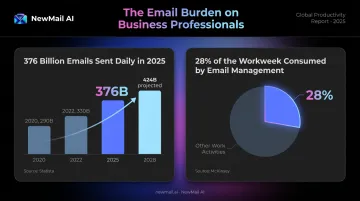
According to a 2019 Adobe study, workers spent roughly three or more hours per day on work email alone. McKinsey puts the broader figure at 28% of the workweek consumed by email management.
That's time not spent selling, building, or making decisions — and it compounds across every team, every day.
AI email summary tools address this directly. Rather than expecting you to read every message in full, they use large language models to extract what actually matters: decisions made, action items assigned, and threads that need a response now versus later.
This guide covers five tools built for business use, evaluated on summarization depth, inbox integration, data privacy, and team pricing.
Key Takeaways
- AI email summarizers surface decisions, tasks, and priorities from long threads without any manual scrolling
- The best tools work natively inside Gmail or Outlook — setup should take minutes, not a workflow overhaul
- Privacy policies vary significantly — Zero Data Retention and GDPR compliance matter for regulated industries
- Tools covered: NewMail AI, Superhuman, Shortwave, Microsoft Copilot for Outlook, SaneBox
- SaneBox filters and prioritizes email but does not generate summaries of individual threads
What Are AI Email Summary Tools and Why Do Businesses Need Them?
AI email summarizers use large language models to read email threads and extract key points, decisions, and next steps — without requiring the user to scroll through every message.
A single 40-message thread can take 15 minutes to fully read and parse. A well-generated summary surfaces the same information in 30 seconds — and that gap adds up fast across a full workday.
The scenarios where this matters most:
- Catching up before a client call — reading a 30-message thread three minutes before a meeting
- Returning from leave — getting back up to speed on live deals without reading hundreds of messages
- Handing off to a colleague — giving context on an active conversation without writing a summary yourself
- Reviewing a sales chain — finding current deal status buried in a weeks-long thread
- Multi-party project threads — tracking decisions made across different stakeholders without losing the thread
According to Statista, 376 billion emails were sent and received globally per day in 2025, projected to reach 424 billion by 2028. For individual business professionals, that global volume translates into real inbox pressure — and tools that reduce the reading burden have moved from optional to necessary.
Best AI Email Summary Tools for Business
Tools were evaluated on summarization quality, native inbox integration, business-tier privacy and security, email client compatibility, and value for teams.
NewMail AI
NewMail AI is a privacy-first AI email assistant built for business professionals managing high email volumes. It works natively inside Gmail, Outlook, and Apple Mail — no new interface required, no copy-paste workflow. The company is based in Switzerland, founded by specialists from AI and cybersecurity labs, with security embedded in the architecture itself from day one.
What sets it apart for business summarization:
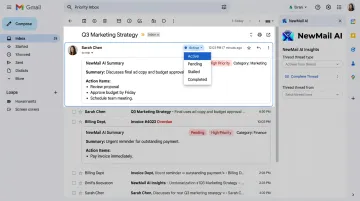
- Priority inbox with custom categories — context-aware categorization based on meaning and urgency, not sender rules; the AI groups emails into workflow stages (Pending, Active, Stalled, Completed) and adapts as threads evolve
- **Thread summary and action extraction** — analyzes full conversation history to surface what's been discussed, what's being asked, and what needs to happen next
- **Meeting recaps with action items** — generates structured summaries covering what was decided, assigned tasks with owners, and next steps; shareable directly from Gmail or Outlook
- AI drafts in the user's voice — Nova learns writing style, role, and business context in a 60-second onboarding analysis of sent emails, then generates draft replies that sound like the user, not generic AI output
- Human-in-the-loop by design — every draft requires explicit user approval before sending; no autonomous email sending
Privacy architecture: NewMail holds Zero Data Retention agreements with Anthropic and Mistral — email content is processed in-memory and immediately discarded, never written to persistent storage, never used for model training.
For OpenAI and Google Gemini processing, a Data Processing Agreement prohibits training use and mandates encryption. The platform carries Google Workspace's highest-tier security certification, backed by a full cybersecurity audit.
Setup takes approximately two minutes at app.newmail.ai — no credit card required for the free trial.
| Feature | Details |
|---|---|
| Key Summarization Features | Priority inbox with custom categories, thread summary and action extraction, meeting recaps with action items, AI drafts in user's voice |
| Pricing | Free trial (14 days, no credit card); Professional at $12/month or ~$9.60/month annually; Enterprise for teams of 20–200+ (contact sales@newmail.ai) |
| Best For / Compatibility | Executives, sales teams, and enterprise teams in regulated or sensitive industries requiring GDPR compliance and Zero Data Retention; Gmail, Outlook, and Apple Mail |
Superhuman
Superhuman replaces the Gmail or Outlook interface entirely with a speed-first design. Founders, executives, and sales professionals who process high email volumes are its core audience — and it shows in every interaction.
Core summarization features:
- One-line AI summaries visible at the top of each conversation — triage without opening
- Ask AI for natural language inbox search across full history
- Auto Drafts generate follow-up emails in the user's voice
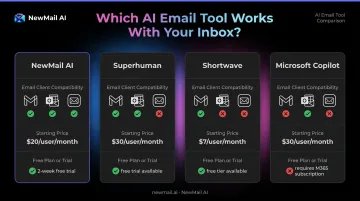
Key limitations to know: Auto Drafts and Ask AI are gated behind the Business tier. Custom auto-labels require Business or Enterprise. There is no free plan — the entry price is $25/user/month. Superhuman also only supports Gmail and Microsoft 365 hosted accounts; IMAP and Apple Mail are not supported.
It's a strong fit for individual professionals who prioritize speed above everything else and are willing to pay a premium. Teams needing flexible client compatibility or a lower entry price should compare alternatives before committing.
| Feature | Details |
|---|---|
| Key Summarization Features | One-line AI thread summaries, Ask AI natural language inbox search, AI-generated draft replies |
| Pricing | Starter from $25/user/month (annual); Business from $33/user/month (annual); no free plan |
| Best For / Compatibility | Speed-focused power users and executives; Gmail and Outlook (Microsoft 365 hosted) only |
Shortwave
Built by former Google engineers who worked on Firebase, Shortwave is a Gmail-native AI email client with one of the strongest free AI summarization tiers available. Threads are automatically bundled and every conversation surfaces an AI summary without requiring the user to open each email.
Differentiators:
- Automatic thread summaries visible directly in the inbox
- Ghostwriter AI drafting that learns personal writing voice
- Natural language search across full email history
- Smart bundling groups newsletters and notifications automatically
Current limitation: Shortwave requires a Gmail or Google Workspace account to sign in. Outlook.com and Hotmail are supported for forwarding only; Microsoft 365 and Exchange accounts are not currently supported. Yahoo, Fastmail, and iCloud can be connected via mail forwarding and SMTP setup.
The free plan works for individual Gmail users, though AI feature usage is capped. Given those Gmail-only constraints, it's worth confirming the pricing still fits before committing — the current page lists Business at $30/seat/month (verify at shortwave.com/pricing).
| Feature | Details |
|---|---|
| Key Summarization Features | Automatic thread summaries in inbox, Ghostwriter AI drafting, natural language search, smart bundling |
| Pricing | Free plan available; Business from $30/user/month (verify current pricing at shortwave.com/pricing) |
| Best For / Compatibility | Gmail-primary teams wanting AI summarization without switching tools; Gmail and Google Workspace (primary); limited Outlook support |
Microsoft Copilot for Outlook
For organizations already running on the Microsoft ecosystem, Copilot is the most natural fit — AI summarization, drafting, and analysis built directly into the tools teams already use, with no additional interfaces to learn.
Business-relevant features:
- Thread summaries include numbered citations that link directly to the source message — useful for auditing decisions or tracing context
- Coaching by Copilot analyzes tone, structure, and clarity before you send
- AI extends across Word, Excel, and Teams under one subscription
Key limitation: Copilot only works with primary mailboxes hosted on Exchange Online. Personal Gmail and non-Microsoft email are not supported. It also requires a qualifying Microsoft 365 plan plus a separate M365 Copilot add-on license at $30/user/month — making it one of the more expensive options on this list.
For Microsoft-native organizations, the integration depth justifies the cost. For teams using Gmail or mixed environments, it's effectively off the table.
| Feature | Details |
|---|---|
| Key Summarization Features | Thread summaries with clickable citations, AI draft generation, Coaching by Copilot tone analysis, cross-app AI (Word, Teams, Excel) |
| Pricing | Microsoft 365 subscription required; M365 Copilot add-on from $30/user/month; verify enterprise pricing with Microsoft |
| Best For / Compatibility | Microsoft 365 enterprise teams using Outlook; Exchange Online mailboxes only |
SaneBox
SaneBox is the most established tool on this list, operating since the early 2010s at the server level via IMAP. Unlike the AI clients above, it works alongside any existing email interface — no switching required, which matters for teams resistant to workflow disruption.
What it does well:
- Learns engagement patterns to route low-priority mail to SaneLater for batch review
- SaneNoReplies flags sent emails that haven't received a response — valuable for sales and client follow-up
- SaneBlackHole permanently removes unwanted senders
- Works with Gmail, Outlook, Yahoo, and most IMAP providers
Important distinction: SaneBox does not use generative AI. It does not summarize individual threads on demand or extract action items from email content. Its value is filtering and prioritization — reducing inbox noise so users spend less time triaging. If your team needs thread-level summarization or action item extraction, SaneBox won't deliver that.
Pricing starts at $7/month for individuals. Verify current plan details at sanebox.com/pricing.
| Feature | Details |
|---|---|
| Key Summarization Features | Daily digest of filtered low-priority email, smart inbox sorting, SaneNoReplies follow-up detection, SaneBlackHole for permanent sender blocking |
| Pricing | From $7/month; 14-day free trial; verify current pricing at sanebox.com/pricing |
| Best For / Compatibility | Teams wanting inbox noise reduction without changing their email client; Gmail, Outlook, Yahoo, and most IMAP providers |
How We Chose the Best AI Email Summary Tools for Business
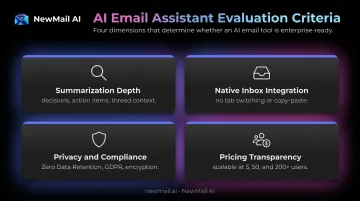
Tools were assessed on four primary criteria:
1. Summarization depth and accuracy The evaluation focused on whether summaries surface decisions, action items, and thread context — not just compressed subject lines. A useful summary lets a professional act without re-reading the original thread.
2. Native inbox integration A tool that requires copy-pasting email content into a separate window saves less time than it costs. The shortlist prioritized tools that surface summaries inside the inbox, without switching tabs or apps.
3. Business-grade privacy and compliance Free trials demonstrate summarization quality — they don't reveal what happens to your data afterward. Evaluation here covered email content retention periods, whether AI providers use customer data for model training, and GDPR compliance. For regulated or sensitive industries, these factors outweigh feature count.
4. Pricing transparency and team scalability The pricing model was checked at multiple team sizes — five users, fifty, and beyond. Core AI features (thread summaries, action extraction, draft generation) should be accessible without requiring the highest tier.
The common mistake: Evaluating a tool on free-trial summarization quality alone. Data retention policies, AI provider agreements, and native integration compatibility with your team's email client all matter — and none of them show up in a two-week trial.
Conclusion
The right tool depends on what your team actually needs. Each option reviewed here has a distinct focus:
- Superhuman — speed-optimized, but Gmail/Outlook-only with premium pricing
- Microsoft Copilot — strong ecosystem integration, requires Microsoft 365
- Shortwave — clean Gmail-native experience with a meaningful free tier
- SaneBox — inbox noise reduction without generative AI summarization
Before committing, verify three things:
- Does it integrate natively with the email client your team already uses?
- Does it offer enterprise-grade privacy controls — Zero Data Retention, GDPR compliance, certified security audits?
- Does the pricing model scale reasonably as your team grows?
If privacy and zero email storage rank high on that checklist, NewMail AI is worth a look. It runs natively inside Gmail, Outlook, and Apple Mail — no new interface required — and offers a free 14-day trial with no credit card and setup under two minutes.
Frequently Asked Questions
What is the best AI email management tool?
It depends on your use case. NewMail AI suits privacy-first business teams needing thread summaries, action extraction, and GDPR compliance. Superhuman fits speed-focused executives; Shortwave works for Gmail-primary teams on a tighter budget. The best choice integrates natively with your existing email client.
How do I get AI to summarize my emails?
Two approaches exist: use a native AI email tool that summarizes directly inside your inbox (NewMail AI, Superhuman, Shortwave, or Gemini for Gmail), or paste email content manually into a general tool like ChatGPT. Native tools save more time but require inbox access, so review each tool's privacy policy before connecting.
Are AI email summary tools safe for business use?
Safety varies by tool. Look for Zero Data Retention policies, GDPR compliance, end-to-end encryption, and independent security certifications. Tools that store email content long-term or use it for model training carry higher risk for businesses handling sensitive communications. Always verify data handling practices before connecting a business inbox.
Do AI email summarizers work with Outlook?
Several tools support Outlook natively, including NewMail AI, Superhuman, SaneBox, and Microsoft Copilot. Copilot offers the deepest Outlook integration but requires a Microsoft 365 license and is limited to Exchange Online mailboxes. NewMail AI and SaneBox offer more cross-client flexibility for mixed environments.
Can AI email tools summarize meeting recaps and extract action items?
Most tools focus on thread summarization. NewMail AI goes further: it generates structured meeting recaps with action items and ownership, and extracts tasks from email threads — including informal post-meeting follow-up chains — without requiring a formal calendar event.
What should I look for in an AI email summary tool for my team?
Evaluate five things: native inbox integration (no copy-paste), data privacy and retention policies, compatibility with your team's email client, summarization depth (thread-level vs. action item extraction), and pricing transparency as team size grows.