Introduction
Customer success teams rarely struggle with knowing what to say. The real problem is execution: emails go out late, land generic, or never get sent at all.
The consequences are measurable. SuperOffice tested 1,000 companies by sending a customer service email and found that 62% ignored it entirely, with an average response time of over 12 hours. Meanwhile, McKinsey reports that 51% of B2B buyers will seek alternatives if they can't reach the right person for help.
Email remains a core channel for CS outreach—and when it works, it works well. When it doesn't, customers disengage quietly before anyone notices.
This guide gives you 10 ready-to-use customer success email templates organised by lifecycle stage: onboarding and activation, engagement and feedback, and retention and revenue growth. Each template includes a subject line, full body copy, and a note on what makes it effective.
Key Takeaways
- CS emails fall into three stages: onboarding, engagement and feedback, and retention and revenue growth
- The best CS emails are short, specific, and triggered by customer behaviour—not arbitrary send schedules
- Every template below includes a subject line, body copy, and effectiveness breakdown
- AI drafting tools like NewMail AI help CS teams maintain a personalised voice at scale, without sacrificing response quality
What Makes a Customer Success Email Actually Work
The Three Non-Negotiables
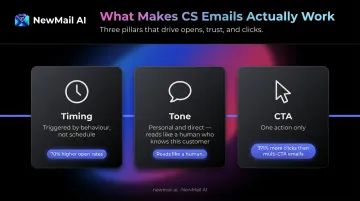
Before templates, there are principles. A CS email fails when it violates one of these three:
- Timing: Send based on customer behaviour or lifecycle stage—not a weekly digest. Triggered emails produce over 70% higher open rates and 152% higher click-through rates than batch sends
- Tone: Personal and direct, not promotional. The email should read like it came from a human who knows this customer
- CTA: One action per email. Campaign Monitor found emails with a single CTA receive 371% more clicks than those with multiple options—each additional ask dilutes focus
Subject Line Formulas That Work
Getting the principles right shapes every other decision—including how you write the subject line. CS emails perform best when subject lines are specific rather than clever. Four formulas worth using:
[First Name], here's how to get more from [Feature]Your [Product] subscription renews in 7 daysYou haven't logged in for 2 weeks—can we help?Quick question about your [Company] setup
Name, milestone, inactivity period, company name—any of these anchors a subject line to reality.
Personalisation at Scale
Personalisation breaks down at volume without a system behind it. The practical approach:
- Use merge tags for name, company, and product-specific data
- Segment sends by lifecycle stage or customer health score
- Keep language conversational even in high-volume sends
Tools like NewMail AI handle this through a personalised drafting engine. Nova learns each CSM's voice, phrasing preferences, and communication patterns in approximately 60 seconds, then generates drafts that match the rep's actual phrasing rather than a generic template.
It works natively inside Gmail and Outlook, so there's no workflow change required.
Customer Success Email Templates for Onboarding and Activation
Amplitude's research found that 91% of new users may drop off within 14 days if they don't reach meaningful product value. The first 30 days are the highest-risk window for churn. Onboarding emails should deliver value quickly—not walk through every feature.
Welcome and Introduction Email Template
Context: Sent immediately after sign-up or purchase. Goal: set expectations, introduce the CSM, and guide the customer to one clear first action.
Subject: Welcome to [Product], [First Name]—your next step is here
Hi [First Name],
Welcome aboard—I'm [CSM Name], and I'll be your point of contact at [Company].
Your account is live. Here's the one thing I'd recommend doing first:
[Complete your profile / Connect your first integration / Book your onboarding call]
→ [Link to first action]
It takes about 5 minutes and sets you up for everything else. I'll follow up in a few days to see how it's going, but feel free to reply here if anything comes up.
Looking forward to working with you.
[CSM Name] [Title] | [Company]
Why it works:
- Single CTA prevents decision paralysis
- Named CSM sign-off creates a real relationship from day one
- Links to one resource only—not a six-tab help center
Onboarding and Getting Started Email Template
Context: Sent 24–48 hours after the welcome email, while the customer is still in setup mode.
Subject: [First Name], three things worth doing this week
Hi [First Name],
You've got access—now let's make sure you get value from it quickly.
Here are three actions that typically move the needle fastest:
- [Action 1] — [One-line explanation of why it matters] → [Link]
- [Action 2] — [One-line explanation] → [Link]
- [Action 3] — [One-line explanation] → [Link]
Most customers who complete these three steps in the first week see [specific outcome] within [timeframe].
Any blockers? Just reply—happy to help.
[CSM Name]
Why it works:
- Numbered structure signals low friction—three discrete steps feel manageable
- Each action is framed around outcome, not feature
- Invites reply rather than pushing to a help doc
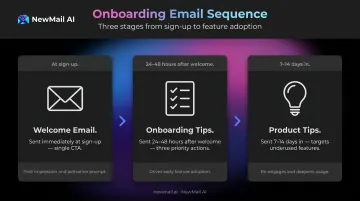
Product Tips and Best Practices Email Template
Context: Sent 7–14 days post-sign-up when the customer has initial exposure but may be underusing key features.
Subject: One thing most [Product] users miss in the first two weeks
Hi [First Name],
Based on your account activity, it looks like you've been using [Feature A].
One thing that customers at your stage often find useful: [Feature B].
Here's why it matters for [their use case]: [Two-sentence explanation].
→ [Link to short guide or 2-min video]
Questions about taking it further? I can walk you through it in 15 minutes—just reply.
[CSM Name]
Why it works:
- References actual usage data, making it feel attentive rather than automated
- Tip format is scannable—no walls of text
- Proactively prevents a support ticket before the customer hits the friction point
Customer Success Email Templates for Engagement and Feedback
Mid-lifecycle customers sit in a difficult spot—active enough to stay, disengaged enough to drift. These templates cover that territory: re-engaging customers who've gone quiet, gathering meaningful feedback, and resolving issues before they compound.
Customer Check-In Email Template
Context: Sent when usage data shows 2+ weeks of inactivity.
Subject: [First Name], we noticed you haven't been in lately
Hi [First Name],
I saw you haven't logged into [Product] recently, and wanted to check in.
Is there something specific that slowed things down? Sometimes it's a busy period, sometimes it's a friction point we should know about.
Either way, I'm here. If it would help to do a quick 20-minute call to refocus your setup, I can find a time that works.
→ [Book a call / Reply here]
No pressure either way—just want to make sure [Product] is actually useful for you.
[CSM Name]
Why it works:
- Acknowledges the specific behaviour rather than sending a generic "just checking in"
- Offers help without implying the customer did something wrong
- Low-commitment CTA (reply or book) removes friction from re-entry
New Feature and Product Update Email Template
Context: Sent when a new feature or significant improvement launches.
Subject: [First Name], this one's relevant to how you use [Product]
Hi [First Name],
We just released [Feature Name], and I think it addresses something you've been working around.
What it does: [One sentence on the benefit—not the feature name]
Why it's relevant to you: [Specific connection to their use case or pain point]
[Screenshot or GIF placeholder]
→ [Try it now / See how it works]
Let me know if you want a quick walkthrough—happy to show you how it fits into your current setup.
[CSM Name]
Why it works:
- Leads with benefit, not feature name
- Connects the announcement to a specific, known customer pain point
- Limits the update to one feature—not a product changelog dump
Customer Feedback and Survey Email Template
Context: Sent 30 days post-onboarding, after a key milestone, or following a support interaction.
Subject: Two minutes? Your feedback shapes what we build next
Hi [First Name],
Now that you've had [X weeks] with [Product], I'd love to hear how it's going—specifically around [area relevant to their use case].
We use this feedback directly to prioritise improvements, so it matters.
→ [Take the 2-minute survey]
And if there's anything you'd rather share directly with me, just reply here.
Thanks in advance.
[CSM Name]
Why it works:
- Positions the ask as a 2-minute commitment, not an "annual customer survey"
- Explains why the feedback matters, which increases response rates
- Personalised to their specific experience, not a generic satisfaction score
Escalation and Issue Response Email Template
Context: Sent when a customer has raised a complaint or experienced a product failure.
Subject: Re: [Issue Summary]—here's where things stand
Hi [First Name],
Thank you for flagging this. I've reviewed the situation and want to make sure you're not left waiting for answers.
What happened: [Brief, factual summary—no deflection]
What we've done: [Actions taken so far]
Next step: [Specific next action with a timeframe—e.g., "Our team will have a resolution by Thursday EOD"]
I'll follow up personally on [specific date] to confirm everything is resolved. If anything changes before then, I'll reach out immediately.
[Optional: goodwill gesture—e.g., "We'd also like to offer [X] as a way to make up for the disruption."]
[CSM Name]
Why it works:
- Avoids defensive language and acknowledges the issue without hedging
- Gives a concrete timeline so the customer isn't left waiting
- A goodwill gesture, where appropriate, signals accountability rather than damage control
Customer Success Email Templates for Retention and Revenue Growth
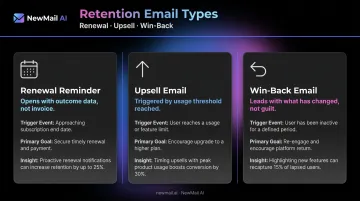
Renewal, upsell, and win-back emails routinely underperform because teams send them as billing notifications instead of demonstrating the value the customer has already received. Only 30% of organisations consider their SaaS renewal process effective, despite 85% having a formal process. The gap is usually in the email.
Renewal Reminder Email Template
Context: The 30-day renewal email is the primary version—it should recap value before mentioning billing.
Subject: [First Name], your [Product] renewal is coming up—here's what you've achieved
Hi [First Name],
Your [Product] subscription renews on [Date]—about 30 days from now.
Before we get into the logistics, here's what your team has accomplished this year:
- [Metric 1]: [Value achieved—e.g., "847 tickets resolved through automated workflows"]
- [Metric 2]: [Value achieved]
- [Metric 3]: [Value achieved]
Your renewal rate is [Amount], and everything continues automatically unless you'd like to make changes.
→ [Review your renewal / Manage your plan]
If you'd like to talk through next year's goals or adjust your plan before then, I'm happy to set up a call.
[CSM Name]
Why it works:
- Opens with outcome data, not invoice information
- Offers a CSM touchpoint for customers who want to discuss before auto-renewing
Once the renewal is secured, the next conversation shifts from protecting existing revenue to expanding it.
Upsell and Upgrade Email Template
Context: Sent when a customer hits a usage threshold or milestone that signals readiness for more.
Subject: [First Name], you've hit [Threshold]—here's what that means
Hi [First Name],
I noticed [Company] has [reached usage limit / achieved milestone]—which is a great sign for how the team is using [Product].
It also means you've hit the ceiling of your current plan. Customers at your usage level typically run into [specific limitation] around this point.
The [Next Tier] plan removes that limitation and also gives you [Specific Feature relevant to their use case]. Teams at a similar stage (like [Customer Name]) moved up and [achieved specific outcome].
→ [See what's included / Talk to me about upgrading]
Happy to walk through whether it makes sense for where you're headed.
[CSM Name]
Why it works:
- References specific usage data, so it doesn't read as a generic upsell pitch
- Frames the upgrade as removing a limitation the customer has already encountered
- Social proof from a comparable customer adds credibility without pressure
Re-engaging churned customers requires a different approach entirely—less urgency, more honesty about what's changed.
Win-Back and Re-Engagement Email Template
Context: Sent to customers who have cancelled or gone noticeably inactive.
Subject: [First Name], things have changed since you left
Hi [First Name],
A few things have changed since you last used [Product]—and some of them directly address [pain point or reason they left, if known].
Here's what's new:
- [Improvement 1]: [One line on the benefit]
- [Improvement 2]: [One line on the benefit]
If you'd like to take another look, I'd be happy to set you up with [a two-week trial extension / a focused demo of what's changed]—no commitment required.
→ [Restart your trial / Book a 20-minute update call]
Either way, no pressure. But I'd rather reach out than assume the timing was wrong forever.
[CSM Name]
Why it works:
- Leads with what's changed, not with guilt or "we miss you" language
- Ties improvements to the customer's known pain point where possible
- Low-commitment offer makes it easy to re-engage without feeling locked in
How to Scale Customer Success Emails Without Losing the Personal Touch
Building a Trigger-Based CS Email Playbook
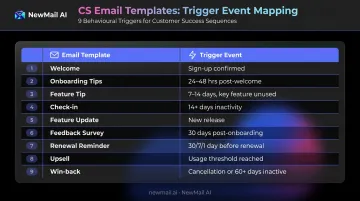
Scale breaks personalisation when teams rely on calendar-scheduled sends instead of behavioural triggers. The fix is mapping each template to a specific event:
| Template | Trigger Event |
|---|---|
| Welcome email | Sign-up or purchase confirmed |
| Onboarding tips | 24–48 hours post-welcome, setup incomplete |
| Feature tip | 7–14 days in, key feature unused |
| Check-in | 14+ days of login inactivity |
| Feature update | New release matching customer use case |
| Feedback survey | 30 days post-onboarding or post-support |
| Renewal reminder | 30, 7, and 1 day before renewal date |
| Upsell | Usage threshold reached |
| Win-back | Cancellation confirmed or 60+ days inactive |
AI-Assisted Drafting at CS Volume
Gainsight's 2024 State of AI in Customer Success report found that over 50% of CS organisations are already using AI, with 73% of respondents ranking increased CSM productivity as the top benefit.
The harder problem is making AI-drafted emails sound like the person sending them. NewMail AI's Nova assistant handles this by giving each CSM a personalised drafting engine that learns their individual voice, role context, and product knowledge — so a renewal email from one rep reads nothing like a check-in from another.
For CS teams at the Enterprise level (20–200+ users), NewMail's Enterprise plan adds team context — shared knowledge, brand voice consistency, and a KPI dashboard tracking adoption and response time — while Nova still drafts in each individual rep's voice. The approval-first model means no email goes out without the CSM reviewing it first, preserving accountability on high-stakes accounts without slowing down volume.
Metrics to Track Per Template Type
Don't measure all CS emails the same way. Match the metric to what the email is supposed to do:
- Re-engagement emails → Open rate (signals whether the subject line broke through after inactivity)
- Feature update emails → Click-through rate (did the customer engage with the feature?)
- Feedback emails → Response or survey completion rate
- Renewal sequences → Renewal conversion rate at each send interval
- Win-back emails → Re-activation rate within 30 days of send
A/B test subject lines and CTAs systematically, not randomly. Test one variable at a time, run it to statistical significance, then lock the winner into your playbook.
Frequently Asked Questions
What should a good customer success email always include?
A personalised greeting, a specific trigger or purpose that explains why you're writing now, one clear CTA, and a named sign-off from the CSM rather than a generic company alias. The CSM's name builds continuity across every touchpoint.
How often should a customer success manager email clients?
Frequency should follow lifecycle stage and health score, not a fixed calendar. New customers in onboarding may need weekly contact; stable, high-health accounts may only need a monthly check-in or event-triggered outreach.
What is the difference between a customer success email and a customer support email?
Support emails are reactive—they respond to a reported problem. Customer success emails are proactive—they anticipate needs, drive adoption, and address issues before customers raise them. Who sends the first message is the defining difference.
How do you personalise customer success emails at scale?
Segment by lifecycle stage, use merge tags to pull in behavioural data (usage, milestones, inactivity), and use AI drafting tools that learn each CSM's individual voice. NewMail AI's Nova assistant, for example, learns each rep's individual writing style so drafts stay consistent with how that person actually communicates rather than defaulting to a generic team tone.
What are the most important customer success emails to prioritise?
Start with three: the onboarding welcome (sets the relationship), the renewal reminder (protects revenue), and the win-back email (recovers lost accounts). These three have the most direct impact on retention and revenue before expanding to the full playbook.
How do you measure whether a customer success email is working?
Track open rate for subject line and timing effectiveness, reply rate for personalisation quality, and downstream metrics—feature adoption rate, renewal conversion, or re-activation rate—tied to the specific email sequence. Vanity metrics alone won't tell you if the email changed behaviour.